Load Injection (Load Scenarios)
Drive realistic API load from the same MockServer you already use for mocking — ramp virtual users or a fixed arrival rate, vary data per iteration, inject faults, and assert your SLOs over the generated traffic, all from one control plane with no second load tool. One instance injects tens of thousands of requests per second.
The standout advantage: MockServer exposes a rich, first-class metrics stream for the load it drives — active VUs, throughput, latency percentiles, error and status-code breakdowns, throttling, and data transfer — over both Prometheus and OpenTelemetry (OTLP). Point your existing observability stack at it and chart the injector's numbers side-by-side with your system under test on one dashboard, so a latency or error spike is instantly attributable to the right side. See the runnable Kubernetes + Grafana example for a one-command stack, and Observability & Metrics below for the full catalogue.
| Page | Question it answers |
|---|---|
| Scalability & Latency | How much traffic can one instance serve as a mock? |
| Load Injection | How do I drive load from MockServer? |
| Load Injection Performance | How much load can MockServer inject, and how does it scale? |
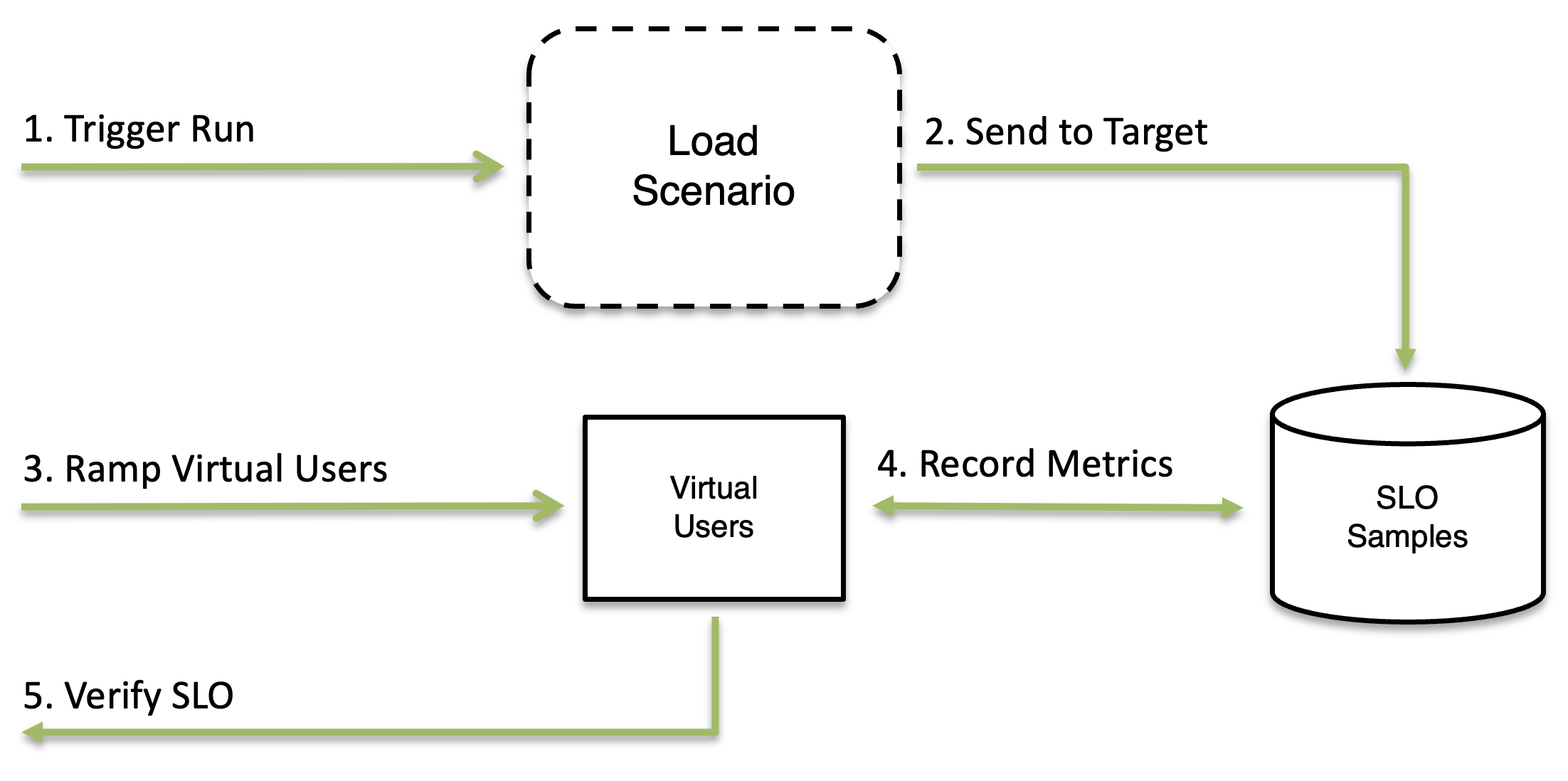
MockServer's built-in Load Scenarios are a declarative, bounded load generator. A load scenario is an ordered list of templated request steps driven through a sequence of stages (a load profile), with per-iteration variable data. Each stage either holds or ramps the number of concurrent virtual users (VU, closed model), holds or ramps an arrival rate in iterations per second (RATE, open model), or pauses. Results feed both the metrics histograms and the SLO sample store so a load run can be asserted with PUT /mockserver/verifySLO.
This makes MockServer useful for resilience verification: inject a chaos fault (see Chaos Testing), apply load, then assert that your SLOs held — all from a single control plane, with no external load tool required.
One instance injects tens of thousands of requests per second; to drive much more, run instances in parallel — see Load Injection Performance for how injection scales across many instances.
Registry model: load, then trigger. Scenarios are organised as a registry of named scenarios. You first load (register) a scenario by name with PUT /mockserver/loadScenario — this does not run it — then trigger one or many by name with PUT /mockserver/loadScenario/start to run them concurrently, each with its own optional start delay. Loading is always allowed; triggering a run is off by default: start returns 403 Forbidden until loadGenerationEnabled=true. Hard caps on concurrent scenarios, virtual users, in-flight requests, RPS, duration, and step count prevent the feature from self-DoS-ing the server. Scenarios can be preloaded at startup from a JSON file via mockserver.loadScenarioInitializationJsonPath.
When to use Load Scenarios vs k6 / Gatling / JMeter
The differentiating factor is a single control plane: MockServer mocks the upstreams, drives the load, injects faults, and asserts SLOs without a second tool. Reach for a dedicated load tool when you need its specific strengths.
| Need | MockServer Load Scenarios | k6 / Gatling / JMeter |
|---|---|---|
| Mock upstreams and drive load from one control plane | Yes — same server, no extra tool | No — requires a separate mock server alongside |
| Inject chaos faults (latency, errors, outages) alongside load | Yes — built-in chaos profiles | No — requires a separate fault injector |
| Assert SLO verdicts from the same server | Yes — thresholds + verifySLO built in |
Requires custom scripting or an external integration |
| Chart the injector's metrics next to your system under test | Yes — mock_server_load_* over Prometheus and OpenTelemetry, straight into Grafana/Datadog |
Yes, but a separate metrics pipeline to wire up and correlate |
| Dedicated distributed load tier | Yes — only using fan-out deployment pattern | Yes — clustered distributed load or fan-out deployment pattern |
How it works
On this page
Drive a load run from the REST control plane or the dashboard, model the scenario with stages and templated steps, then assert SLOs and read the metrics exposed over Prometheus and OpenTelemetry:
| Run a load test | Model the scenario | Verify & observe | Operate & tune |
|---|---|---|---|
Quickstart
The whole flow is just a few logical steps: register a 10-VU ramp-then-hold scenario (this does not run it), start it, read its live status, then stop it. Pick your language:
A closed-model ramp-then-hold scenario with default VELOCITY templating: ramp 1 → 10 virtual users over 30 seconds, then hold 10 VUs for a minute. A single step fetches a per-iteration order, pinned to an upstream by a Host header and an explicit socketAddress. The full lifecycle is exercised: register (does not run), start, list all / read one scenario's live status, then stop.
import org.mockserver.client.MockServerClient;
import org.mockserver.load.*;
import org.mockserver.model.SocketAddress;

import static org.mockserver.model.HttpRequest.request;

MockServerClient client = new MockServerClient("localhost", 1080);

LoadScenario scenario = LoadScenario.loadScenario("checkout-load")
    .withProfile(LoadProfile.of(
        LoadStage.rampVus(1, 10, 30000, RampCurve.LINEAR),
        LoadStage.constantVus(10, 60000)
    ))
    .withSteps(
        LoadStep.loadStep(request().withMethod("GET").withPath("/api/orders/$iteration.index")
            .withHeader("Host", "orders.svc:8080")
            .withSocketAddress("orders.svc", 8080, SocketAddress.Scheme.HTTP))
    );

client.loadScenario(scenario);                  // 1. register (does NOT start it yet)
client.startLoadScenarios("checkout-load");     // 2. start (requires loadGenerationEnabled=true)
String listing = client.loadScenarios();        // 3. list all registered scenarios
String status = client.getLoadScenario("checkout-load"); // live throughput / latency status
client.stopLoadScenarios("checkout-load"); // 4. stop (no args stops ALL running scenarios)var mockServerClient = require('mockserver-client').mockServerClient;
var client = mockServerClient("localhost", 1080);
// The per-step field is `request` (a full HttpRequest), not `httpRequest`.
var scenario = {
name: 'checkout-load',
profile: { stages: [
{ type: 'VU', startVus: 1, endVus: 10, durationMillis: 30000, curve: 'LINEAR' },
{ type: 'VU', vus: 10, durationMillis: 60000 }
] },
steps: [
{ request: { method: 'GET', path: '/api/orders/$iteration.index',
headers: { Host: ['orders.svc:8080'] },
socketAddress: { host: 'orders.svc', port: 8080, scheme: 'HTTP' } } }
]
};
(async function () {
await client.loadScenario(scenario); // 1. register (does NOT start it yet)
await client.startLoadScenarios('checkout-load'); // 2. start (requires loadGenerationEnabled=true)
var listing = await client.loadScenarios(); // 3. list all registered scenarios
var status = await client.getLoadScenario('checkout-load'); // live status
await client.stopLoadScenarios('checkout-load'); // 4. stop (no arg stops ALL running scenarios)
})();from mockserver import (HttpRequest, KeyToMultiValue, LoadProfile, LoadScenario,
LoadStage, LoadStep, MockServerClient, SocketAddress)
scenario = LoadScenario(
name="checkout-load",
profile=LoadProfile(stages=[
LoadStage.vu_stage(30000, start_vus=1, end_vus=10, curve="LINEAR"),
LoadStage.vu_stage(60000, vus=10),
]),
steps=[
LoadStep(request=HttpRequest(
method="GET", path="/api/orders/$iteration.index",
headers=[KeyToMultiValue(name="Host", values=["orders.svc:8080"])],
socket_address=SocketAddress(host="orders.svc", port=8080, scheme="HTTP"))),
],
)
with MockServerClient("localhost", 1080) as client:
client.load_scenario(scenario) # 1. register (does NOT start it yet)
client.start_load_scenarios("checkout-load") # 2. start (requires loadGenerationEnabled=true)
listing = client.load_scenarios() # 3. list all registered scenarios
status = client.get_load_scenario("checkout-load") # live status
client.stop_load_scenarios("checkout-load") # 4. stop (None stops ALL running scenarios)require 'mockserver-client'
include MockServer
client = Client.new('localhost', 1080)
scenario = LoadScenario.new(
name: 'checkout-load',
profile: LoadProfile.new(stages: [
LoadStage.vu(30_000, start_vus: 1, end_vus: 10, curve: 'LINEAR'),
LoadStage.vu(60_000, vus: 10)
]),
steps: [
LoadStep.new(request: HttpRequest.new(method: 'GET', path: '/api/orders/$iteration.index',
socket_address: SocketAddress.new(host: 'orders.svc', port: 8080, scheme: 'HTTP'))
.with_header('Host', 'orders.svc:8080'))
]
)
client.load_scenario(scenario) # 1. register (does NOT start it yet)
client.start_load_scenarios('checkout-load') # 2. start (requires loadGenerationEnabled=true)
client.load_scenarios # 3. list all registered scenarios
client.get_load_scenario('checkout-load') # live status
client.stop_load_scenarios('checkout-load') # 4. stop (nil stops ALL running scenarios)
client.closepackage main
import (
mockserver "github.com/mock-server/mockserver-monorepo/mockserver-client-go/v7"
)
func main() {
client := mockserver.New("localhost", 1080)
order := mockserver.Request().Method("GET").Path("/api/orders/$iteration.index").
Header("Host", "orders.svc:8080").Build()
order.SocketAddress = &mockserver.SocketAddress{Host: "orders.svc", Port: 8080, Scheme: "HTTP"}
scenario := mockserver.LoadScenario{
Name: "checkout-load",
Profile: &mockserver.LoadProfile{
Stages: []mockserver.LoadStage{
mockserver.RampVusStage(1, 10, 30000, mockserver.RampLinear),
mockserver.ConstantVusStage(10, 60000),
},
},
Steps: []mockserver.LoadStep{
{Request: &order},
},
}
client.LoadScenario(scenario) // 1. register (does NOT start it yet)
client.StartLoadScenarios("checkout-load") // 2. start (requires loadGenerationEnabled=true)
client.LoadScenarios() // 3. list all registered scenarios
client.GetLoadScenario("checkout-load") // live status
client.StopLoadScenarios("checkout-load") // 4. stop (no args stops ALL running scenarios)
}using MockServer.Client;
using MockServer.Client.Models;
using var client = new MockServerClient("localhost", 1080);
var ordersRequest = HttpRequest.Request()
.WithMethod("GET").WithPath("/api/orders/$iteration.index")
.WithHeader("Host", "orders.svc:8080")
.Build();
ordersRequest.SocketAddress = new SocketAddress { Host = "orders.svc", Port = 8080, Scheme = SocketScheme.HTTP };
var scenario = new LoadScenario
{
Name = "checkout-load",
Profile = new LoadProfile
{
Stages = new List<LoadStage>
{
LoadStage.RampVus(1, 10, 30000, RampCurve.LINEAR),
LoadStage.ConstantVus(10, 60000)
}
},
Steps = new List<LoadStep>
{
new() { Request = ordersRequest }
}
};
await client.LoadScenarioAsync(scenario); // 1. register (does NOT start it yet)
await client.StartLoadScenariosAsync("checkout-load"); // 2. start (requires loadGenerationEnabled=true)
var listing = await client.LoadScenariosAsync(); // 3. list all registered scenarios
var status = await client.GetLoadScenarioAsync("checkout-load"); // live status
await client.StopLoadScenariosAsync("checkout-load"); // 4. stop (no args stops ALL running scenarios)use mockserver_client::{
ClientBuilder, HttpRequest, LoadProfile, LoadScenario, LoadStage, LoadStep, RampCurve, SocketAddress,
};
let client = ClientBuilder::new("localhost", 1080).build().unwrap();
let profile = LoadProfile::of(vec![
LoadStage::vu_ramp(1, 10, 30_000, RampCurve::Linear),
LoadStage::vu_hold(10, 60_000),
]);
let steps = vec![
LoadStep::new(HttpRequest::new().method("GET").path("/api/orders/$iteration.index")
.header("Host", "orders.svc:8080")
.socket_address(SocketAddress::new("orders.svc", 8080).scheme("HTTP"))),
];
let scenario = LoadScenario::new("checkout-load", profile, steps);
client.load_scenario(&scenario).unwrap(); // 1. register (does NOT start it yet)
client.start_load_scenarios(&["checkout-load"]).unwrap(); // 2. start (requires loadGenerationEnabled=true)
client.load_scenarios().unwrap(); // 3. list all registered scenarios
client.get_load_scenario("checkout-load").unwrap(); // live status
client.stop_load_scenarios(&["checkout-load"]).unwrap(); // 4. stop (&[] stops ALL running scenarios)require_once 'vendor/autoload.php';
use MockServer\HttpRequest;
use MockServer\LoadProfile;
use MockServer\LoadScenario;
use MockServer\LoadStage;
use MockServer\MockServerClient;
$client = new MockServerClient('localhost', 1080);
$scenario = LoadScenario::scenario('checkout-load')
->profile(LoadProfile::of(
LoadStage::vuRamp(1, 10, 30000, 'LINEAR'),
LoadStage::vuHold(10, 60000),
))
->addStep(
HttpRequest::request()->method('GET')->path('/api/orders/$iteration.index')
->header('Host', 'orders.svc:8080')
->socketAddress('orders.svc', 8080, 'HTTP'),
);
$client->loadScenario($scenario); // 1. register (does NOT start it yet)
$client->startLoadScenarios('checkout-load'); // 2. start (requires loadGenerationEnabled=true)
$client->loadScenarios(); // 3. list all registered scenarios
$client->getLoadScenario('checkout-load'); // live status
$client->stopLoadScenarios('checkout-load'); // 4. stop (null stops ALL running scenarios)# 1. Enable load generation (set once at startup or via the config endpoint)
docker run -e MOCKSERVER_LOAD_GENERATION_ENABLED=true mockserver/mockserver
# 2. LOAD (register) a scenario — this does NOT run it
curl -s -X PUT http://localhost:1080/mockserver/loadScenario \
-H "Content-Type: application/json" \
-d '{
"name": "checkout-load",
"startDelayMillis": 0,
"profile": {
"stages": [
{ "type": "VU", "startVus": 1, "endVus": 10, "durationMillis": 30000, "curve": "LINEAR" },
{ "type": "VU", "vus": 10, "durationMillis": 60000 }
]
},
"steps": [
{
"request": {
"method": "GET",
"path": "/api/orders/$iteration.index",
"headers": { "Host": ["orders.svc:8080"] },
"socketAddress": { "host": "orders.svc", "port": 8080, "scheme": "HTTP" }
}
}
]
}'
# 3. TRIGGER it to run (one or many names at once)
curl -s -X PUT http://localhost:1080/mockserver/loadScenario/start \
-H "Content-Type: application/json" \
-d '{ "name": "checkout-load" }'
# 4. Poll progress (one scenario, or list all)
curl -s http://localhost:1080/mockserver/loadScenario/checkout-load
curl -s http://localhost:1080/mockserver/loadScenario
# 5. Stop it (stays registered, STOPPED — can be re-triggered)
curl -s -X PUT http://localhost:1080/mockserver/loadScenario/stop \
-d '{ "name": "checkout-load" }'Control-Plane API
All endpoints are control-plane endpoints — they respect control-plane authentication (mTLS / JWT) when configured. The flow is load (register) → trigger (run) by name.
| Verb | Path | Behaviour |
|---|---|---|
PUT |
/mockserver/loadScenario |
Load (register) a scenario by name — it is staged in the LOADED state but does not run. Allowed even when loadGenerationEnabled=false (no traffic). 400 with a JSON error when invalid or a cap is exceeded; 200 {status:"loaded", name, state:"LOADED"} otherwise. Loading the same name replaces the prior definition. |
GET |
/mockserver/loadScenario |
List all registered scenarios: { scenarios: [ { name, state, startDelayMillis, definition, …live status fields } ] }. state ∈ LOADED / PENDING / RUNNING / COMPLETED / STOPPED. Live fields (when active/run): stageIndex, stageType, currentTarget, currentVus, requestsSent, succeeded, failed, p50Millis, p95Millis, p99Millis, p999Millis, droppedIterations, verdict, abortedByThreshold, thresholdResults, checkResults, runId, startedAt, endedAt. |
GET |
/mockserver/loadScenario/{name} |
Return one registered scenario (definition + state + status). 404 if not registered. |
GET |
/mockserver/loadScenario/{name}/report |
Summary report for the run (live snapshot when running; retained terminal snapshot after COMPLETED/STOPPED). 404 if the scenario never ran. JSON by default; ?format=junit returns a JUnit-XML <testsuite> for CI. See Summary Report. |
PUT |
/mockserver/loadScenario/generateFromOpenAPI |
Generate a scenario from an OpenAPI spec and register it in the LOADED state. Does not run; allowed even when loadGenerationEnabled=false. Body: { name, specUrlOrPayload, target?, profile? }. Returns the generated scenario for editing. See Generate from OpenAPI. |
PUT |
/mockserver/loadScenario/generateFromRecording |
Generate a scenario from recorded proxy traffic and register it in the LOADED state. Does not run. Body: { name, mode?, requestFilter?, maxSteps?, target?, profile? }. mode ∈ VERBATIM (default) / TEMPLATIZED (a weighted route mix — weight == hit count, stepSelection: WEIGHTED). Returns the generated scenario for editing. See Generate from Recording. |
PUT |
/mockserver/loadScenario/start |
Trigger one or more registered scenarios to run concurrently. Body {"names":["a","b"]} or {"name":"a"}. Each honours its own startDelayMillis. Requires loadGenerationEnabled=true (else 403); 404 if a name isn't registered; 400 if it would exceed loadGenerationMaxConcurrentScenarios. Returns the triggered names and resulting states (PENDING / RUNNING). |
PUT |
/mockserver/loadScenario/stop |
Stop running scenario(s). Body {"names":[…]}, {"all":true}, or empty (stop all). Stopped scenarios stay registered (STOPPED) and can be re-triggered. |
DELETE |
/mockserver/loadScenario/{name} |
Remove one scenario from the registry (stops it first if running). |
DELETE |
/mockserver/loadScenario |
Clear the whole registry (stops all running). Idempotent. |
Lifecycle operations at a glance
However you drive a load test — from a client library, the REST API, or the dashboard — it always follows the same handful of logical steps. The code examples on this page are labelled with these step names rather than HTTP verbs and paths. Each step below links to the detail of what you can configure at that point.
| Step | What it does | What you can specify |
|---|---|---|
| Register | Stage a named scenario in the registry without running it (state LOADED). Always allowed, even when load generation is disabled. Re-registering the same name replaces it. |
The whole scenario model — its steps and load profile (or a named shape), plus optional data feeder, template variables, cross-step capture, weighted selection, in-run thresholds, pacing, and custom labels. Or have one generated from an OpenAPI spec or a recording. |
| Start | Trigger one or many registered scenarios to run concurrently. This is the only step that needs loadGenerationEnabled=true. |
A single name or several at once; each honours its own startDelayMillis so triggered scenarios can begin at staggered offsets. Bounded by the safety caps. |
| Read status | Poll live progress while a scenario runs, or read its retained terminal snapshot afterwards. List every scenario, or read one by name. | Live counters, corrected-latency percentiles, the pass/fail verdict, and a full summary report (JSON or JUnit XML). |
| Stop | Stop one, several, or all running scenarios. Stopped scenarios stay registered (state STOPPED) and can be re-triggered. |
One name, several names, or none at all (stop everything running). |
| Clear | Remove a scenario from the registry, or clear the whole registry — stopping anything still running first. | One name, or the entire registry (idempotent). |
Trigger several at once — each begins at its own offset via startDelayMillis:
Trigger several already-registered scenarios in a single call so they run concurrently — here checkout-load and background-poller. Each honours its own start delay. Both must already be registered, and triggering a run requires loadGenerationEnabled=true.
client.startLoadScenarios("checkout-load", "background-poller");await client.startLoadScenarios(['checkout-load', 'background-poller']);client.start_load_scenarios(["checkout-load", "background-poller"])client.start_load_scenarios(['checkout-load', 'background-poller'])client.StartLoadScenarios("checkout-load", "background-poller")await client.StartLoadScenariosAsync("checkout-load", "background-poller");client.start_load_scenarios(&["checkout-load", "background-poller"]).unwrap();$client->startLoadScenarios(['checkout-load', 'background-poller']);curl -s -X PUT http://localhost:1080/mockserver/loadScenario/start \
-d '{ "names": ["checkout-load", "background-poller"] }'Dashboard UI — Run & Edit Load Tests
Everything the REST API does is also available from the Performance view in the MockServer dashboard — build, run, and monitor load scenarios without writing any JSON. Open the dashboard at http://localhost:1080/mockserver/dashboard and click Performance in the navigation bar. (Load generation must be enabled first — loadGenerationEnabled=true — or the view shows the configuration flag needed to unlock it.)
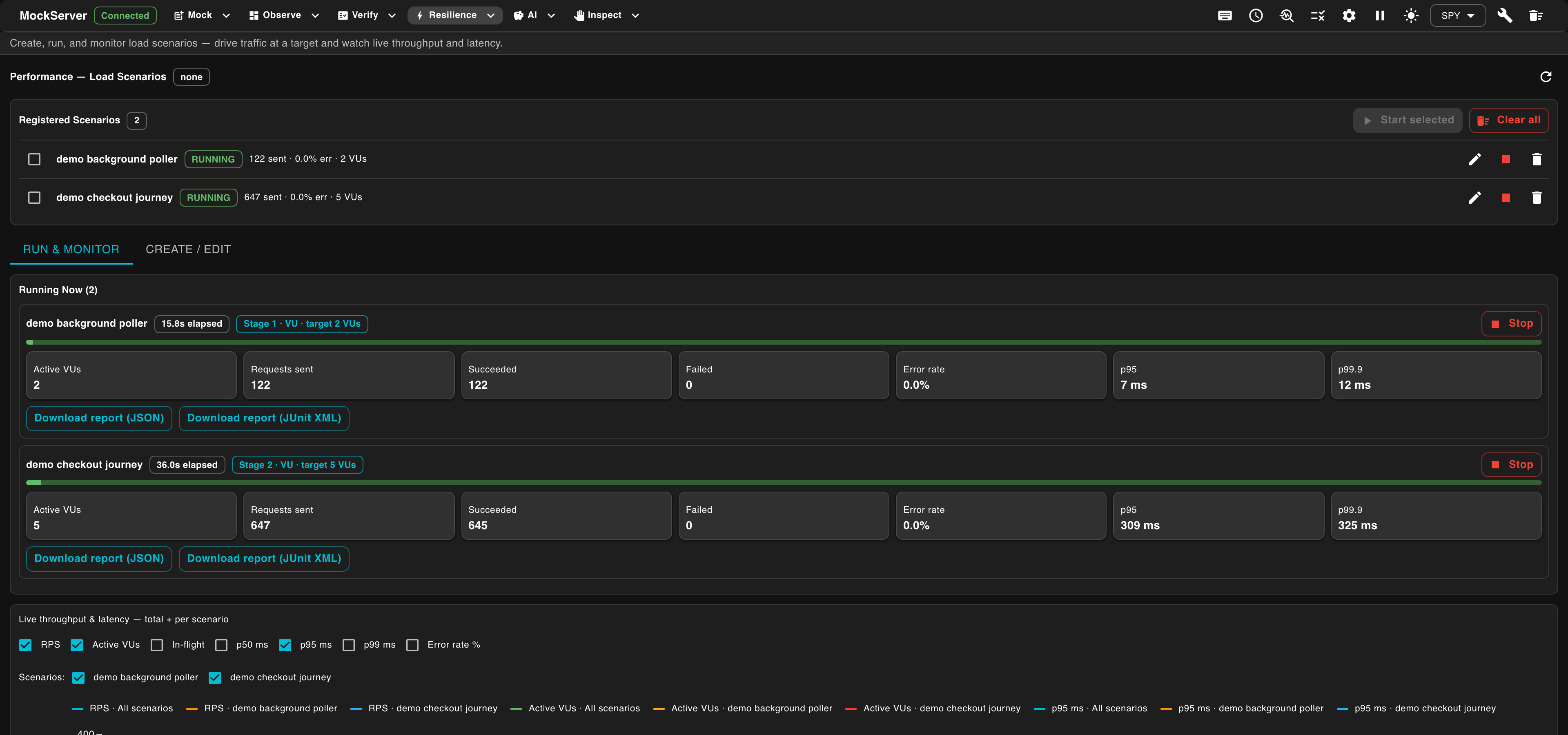
The view has two tabs over a shared registry of scenarios:
- RUN & MONITOR — the running view. Each registered scenario is a row with its live state (
RUNNING/LOADED/STOPPED), requests sent, error rate, and active VUs, plus per-scenario Start / Stop / edit / remove controls. Below it, Running now shows each active scenario's current stage, elapsed time, and hero tiles for Active VUs, Requests sent, Succeeded / Failed, Error rate, and p95 latency. A combined Live throughput & latency chart plots RPS, active VUs, in-flight, and p50/p95/p99 over the lifetime of the run — total and per scenario — drawn from themock_server_load_*metrics (requiresmetricsEnabled=true). - CREATE / EDIT — the editing view. A form-based builder assembles a scenario: choose the template type, add custom labels and an optional max requests cap, append an ordered list of stages (
VU/RATE/PAUSE, each with hold-or-ramp values, a ramp curve, and a duration), and define one or more steps (method, path, target host/port/scheme, optional templated body and headers, and a think-time delay). Load registers the scenario without running it; Load & Run registers and starts it immediately. Selecting a registered scenario's edit icon loads its definition back into this form for tweaking and re-running.
See the dashboard Performance reference for a field-by-field walkthrough.
Load Scenario Model
A load scenario is a JSON object with the following top-level fields:
| Field | Type | Required | Description |
|---|---|---|---|
name |
string | Yes | The scenario name — the unique registry key. Loading the same name replaces the prior definition. Appears in status, metric labels, and logs. |
startDelayMillis |
integer | No | Delay in milliseconds, applied after the scenario is triggered, before its iterations begin (default 0). A positive value means the scenario is PENDING until the delay elapses, then RUNNING. Lets several triggered scenarios begin at staggered offsets. |
steps |
array | Yes | Ordered list of request steps (see Steps below). Maximum 50 steps. |
profile |
object | Yes | The load profile — an ordered list of stages run in sequence (see Load Profile below). |
templateType |
string | No | Scenario-wide template engine used to re-render every step's templated fields — request path, body and header values — once per iteration, so each virtual-user request can carry varying data (feeder columns, captured values, the iteration index). It applies to all steps in the scenario; it is not set per step, because every step shares the same per-iteration context (the same feeder row and captured variables), so one engine keeps the placeholder syntax uniform across the whole journey. Optional — omit it to use the default VELOCITY (e.g. $iteration.index); set MUSTACHE to use {{iteration.index}} syntax instead. JAVASCRIPT is not supported for load steps and is rejected with a 400. Fields that contain no template placeholder are sent unchanged. |
maxRequests |
integer | No | Stop the scenario once this many requests have been dispatched, even if the duration has not elapsed. Useful for budget-bounded runs. |
labels |
object | No | Scenario-level custom metric labels (string key/value pairs). Keys must be listed in mockserver.loadGenerationMetricLabels to appear in Prometheus; all keys appear in OpenTelemetry automatically. See Observability & Metrics. |
thresholds |
array | No | In-run pass/fail thresholds. Each entry specifies a metric, comparator, and threshold value. The run carries a PASS verdict when all hold; FAIL when any breach. See In-Run Thresholds. |
abortOnFail |
boolean | No | When true, a FAIL verdict aborts the run early (terminal STOPPED state, abortedByThreshold set). Default false — the run always finishes its stages and carries a final verdict. |
abortGraceMillis |
integer | No | Suppress the abort action for the first N milliseconds of the run so noisy startup samples cannot trigger a premature abort. Thresholds are still evaluated and a verdict still reported during the grace window — only the abort is deferred. |
pacing |
object | No | Adaptive pacing for the closed-model VU loop — a target per-VU iteration cycle time. mode ∈ NONE (default, immediate reschedule) / CONSTANT_PACING (value = cycle in ms) / CONSTANT_THROUGHPUT (value = iterations/second per VU). See Adaptive Pacing. |
feeder |
object | No | Parameterized test data: one row selected per iteration, exposed as $iteration.data.<column> (Velocity) / {{iteration.data.<column>}} (Mustache). Supply inline rows or data+format (CSV/JSON). strategy ∈ CIRCULAR (default) / RANDOM / SEQUENTIAL. See Data Feeders. |
stepSelection |
string | No | How each iteration selects which steps to run: SEQUENTIAL (default) fires all steps in declared order; WEIGHTED fires exactly one step per iteration chosen at random proportional to each step's weight. See Weighted Step Selection. |
Steps
Each step defines a request to fire and an optional pause after it:
| Field | Type | Description |
|---|---|---|
request |
HttpRequest | The request to fire. Reuses the same HttpRequest model as expectations. Template expressions live in the path and body fields. Set socketAddress to point at the target service. |
thinkTime |
Delay | Optional pause between this step and the next (a { "timeUnit": "MILLISECONDS", "value": 100 } object). Implemented with a non-blocking scheduler — no thread is blocked during think time. |
name |
string | Optional step name. When set, it is used as the route metric label for this step instead of the auto-templatized request path. Use this to group requests to multiple paths under one label, or to give a step a human-readable name in metric charts. |
labels |
object | Optional step-level custom metric labels (string key/value pairs). Override the scenario-level labels for this step. Same Prometheus allowlist requirement applies. |
captures |
array | Optional list of capture rules that extract a value from this step's response and bind it to a named variable for use in later steps' templates. Each entry has a name, a source (BODY_JSONPATH / HEADER / BODY_REGEX), an expression, and an optional defaultValue. See Cross-Step Capture. |
checks |
array | Optional list of per-step response assertions (like a k6 check). Each entry has a source (STATUS / HEADER with headerName / BODY_JSONPATH with jsonPath), a comparator (EQUALS, NOT_EQUALS, CONTAINS, MATCHES, GT, LT, GTE, LTE), and an expected value. See Per-Step Response Checks. |
weight |
number | Relative selection weight used only when the scenario's stepSelection is WEIGHTED. Absent = 1.0; must be > 0 when WEIGHTED. Ignored under SEQUENTIAL (default). See Weighted Step Selection. |
Load Profile
The profile is an ordered list of stages (maximum 20 by default; raise via loadGenerationMaxStages) run one after another. The total run length is the sum of the stage durations. Each stage is one of three types:
VU(closed model) — hold or ramp the number of concurrent virtual users. Each VU loops the steps back-to-back; throughput is whatever the target can sustain. Answers "how does my service behave with N concurrent clients?"RATE(open model) — hold or ramp an arrival rate in iterations per second. MockServer starts new iterations on schedule (auto-scaling the virtual-user pool to run them) regardless of how fast the target responds. Answers "how does my service behave at R requests/second?" — this is the model that exposes queue build-up and tail latency.PAUSE— drive no load for the duration (virtual users drain). Use it to separate stages, e.g. let the target recover between a spike and a soak.
A stage holds a value (set vus / rate) or ramps between two values (set startVus+endVus / startRate+endRate). A ramp follows a curve:
LINEAR(default) — straight line.QUADRATIC— ease-in: slow at first, then accelerating.EXPONENTIAL— a steeper ease-in (handles ramps starting from zero correctly).
| Field | Type | Description |
|---|---|---|
type |
string | VU, RATE or PAUSE. |
durationMillis |
integer | How long this stage runs (milliseconds, > 0). The total across all stages must not exceed 3 600 000 ms (1 hour) by default; raise via loadGenerationMaxDurationMillis. |
curve |
string | Ramp shape for a ramping stage: LINEAR (default), QUADRATIC or EXPONENTIAL. Ignored for holds and pauses. |
vus |
integer | VU hold — number of concurrent virtual users to hold. Maximum 50. |
startVus / endVus |
integer | VU ramp — virtual users at the start and end of the ramp. Maximum 50. |
rate |
number | RATE hold — arrival rate in iterations per second to hold. Maximum 5000. |
startRate / endRate |
number | RATE ramp — arrival rate (iterations/second) at the start and end of the ramp. Maximum 5000. |
maxVus |
integer | RATE only — optional cap on the auto-scaling virtual-user pool used to run the started iterations (defaults to the global virtual-user cap of 50). If the rate cannot be met within this cap, the shortfall is recorded as a rate_limit throttle. |
Named Load Shapes
Instead of spelling out every stage, you can describe a common traffic pattern with a single declarative shape under profile.shape. A shape expands into ordinary stages so all caps and the orchestrator run unchanged. Use either a stages list or a shape — if both are present the explicit stages win.
Shape type |
What it models | Key parameters |
|---|---|---|
SPIKE |
Ramp up to a peak, hold it, ramp back down — with an optional recovery hold at baseline. Good for testing your service's response to a sudden burst. | baseline, peak, rampUpMillis, holdMillis, rampDownMillis, optional recoveryHoldMillis, optional curve |
STAIRS |
A flight of discrete hold steps, each one step higher than the previous. Good for finding the point where your service starts to degrade. |
start, step, steps, stepDurationMillis |
RAMP_HOLD |
Ramp from 0 to a target then hold it. The simplest ramp-and-soak pattern. | target, rampMillis, holdMillis, optional curve |
The metric field controls what the shape drives: VU (concurrent virtual users, closed model) or RATE (arrival rate in iterations/second, open model).
Drive a named SPIKE shape instead of writing the five explicit stages by hand: ramp the arrival RATE from a baseline of 10 up to a peak of 200 iterations/second over 15 seconds, hold the peak for 30 seconds, ramp back down over 15 seconds, then hold the baseline for a 30 second recovery. A single step drives each iteration against the target service. Each tab builds the scenario, then registers it and starts it (starting requires loadGenerationEnabled=true).
import org.mockserver.client.MockServerClient;
import org.mockserver.load.*;
import org.mockserver.model.SocketAddress;

import static org.mockserver.model.HttpRequest.request;

MockServerClient client = new MockServerClient("localhost", 1080);

LoadScenario scenario = LoadScenario.loadScenario("spike-test")
    .withProfile(LoadProfile.shaped(
        LoadShape.spike(LoadShape.Metric.RATE, 10, 200, 15000, 30000, 15000)
            .withRecoveryHoldMillis(30000L)))
    .withSteps(
        LoadStep.loadStep(request().withMethod("GET").withPath("/api/health")
            .withSocketAddress("target.svc", 8080, SocketAddress.Scheme.HTTP))
    );

client.loadScenario(scenario);            // register the SPIKE-shaped scenario
client.startLoadScenarios("spike-test"); // start (requires loadGenerationEnabled=true)var mockServerClient = require('mockserver-client').mockServerClient;
var client = mockServerClient("localhost", 1080);
// A named SPIKE shape expands into ramp-up / hold / ramp-down / recovery stages.
var scenario = {
name: 'spike-test',
profile: {
shape: {
type: 'SPIKE', metric: 'RATE',
baseline: 10, peak: 200,
rampUpMillis: 15000, holdMillis: 30000,
rampDownMillis: 15000, recoveryHoldMillis: 30000
}
},
steps: [
{ request: { method: 'GET', path: '/api/health',
socketAddress: { host: 'target.svc', port: 8080, scheme: 'HTTP' } } }
]
};
(async function () {
await client.loadScenario(scenario); // register the SPIKE-shaped scenario
await client.startLoadScenarios('spike-test'); // start (requires loadGenerationEnabled=true)
})();from mockserver import (HttpRequest, LoadProfile, LoadScenario, LoadShape,
LoadStep, MockServerClient, SocketAddress)
scenario = LoadScenario(
name="spike-test",
profile=LoadProfile(shape=LoadShape(
type="SPIKE", metric="RATE",
baseline=10, peak=200,
ramp_up_millis=15000, hold_millis=30000,
ramp_down_millis=15000, recovery_hold_millis=30000,
)),
steps=[
LoadStep(request=HttpRequest(method="GET", path="/api/health",
socket_address=SocketAddress(host="target.svc", port=8080, scheme="HTTP"))),
],
)
with MockServerClient("localhost", 1080) as client:
client.load_scenario(scenario) # register the SPIKE-shaped scenario
client.start_load_scenarios("spike-test") # start (requires loadGenerationEnabled=true)require 'mockserver-client'
include MockServer
client = Client.new('localhost', 1080)
scenario = LoadScenario.new(
name: 'spike-test',
profile: LoadProfile.new(shape: LoadShape.new(
type: 'SPIKE', metric: 'RATE',
baseline: 10, peak: 200,
ramp_up_millis: 15_000, hold_millis: 30_000,
ramp_down_millis: 15_000, recovery_hold_millis: 30_000
)),
steps: [
LoadStep.new(request: HttpRequest.new(method: 'GET', path: '/api/health',
socket_address: SocketAddress.new(host: 'target.svc', port: 8080, scheme: 'HTTP')))
]
)
client.load_scenario(scenario) # register the SPIKE-shaped scenario
client.start_load_scenarios('spike-test') # start (requires loadGenerationEnabled=true)
client.closepackage main
import (
mockserver "github.com/mock-server/mockserver-monorepo/mockserver-client-go/v7"
)
func main() {
client := mockserver.New("localhost", 1080)
health := mockserver.Request().Method("GET").Path("/api/health").Build()
health.SocketAddress = &mockserver.SocketAddress{Host: "target.svc", Port: 8080, Scheme: "HTTP"}
// A named SPIKE shape expands into ramp-up / hold / ramp-down / recovery stages.
baseline := 10.0
peak := 200.0
scenario := mockserver.LoadScenario{
Name: "spike-test",
Profile: &mockserver.LoadProfile{
Shape: &mockserver.LoadShape{
Type: mockserver.LoadShapeSpike, Metric: mockserver.LoadShapeMetricRate,
Baseline: &baseline, Peak: &peak,
RampUpMillis: 15000, HoldMillis: 30000,
RampDownMillis: 15000, RecoveryHoldMillis: 30000,
},
},
Steps: []mockserver.LoadStep{ {Request: &health} },
}
client.LoadScenario(scenario) // register the SPIKE-shaped scenario
client.StartLoadScenarios("spike-test") // start (requires loadGenerationEnabled=true)
}using MockServer.Client;
using MockServer.Client.Models;
using var client = new MockServerClient("localhost", 1080);
var health = HttpRequest.Request().WithMethod("GET").WithPath("/api/health").Build();
health.SocketAddress = new SocketAddress { Host = "target.svc", Port = 8080, Scheme = SocketScheme.HTTP };
var scenario = new LoadScenario
{
Name = "spike-test",
Profile = new LoadProfile
{
Shape = new LoadShape
{
Type = LoadShapeType.SPIKE, Metric = LoadShapeMetric.RATE,
Baseline = 10, Peak = 200,
RampUpMillis = 15000, HoldMillis = 30000,
RampDownMillis = 15000, RecoveryHoldMillis = 30000
}
},
Steps = new List<LoadStep>
{
new() { Request = health }
}
};
await client.LoadScenarioAsync(scenario); // register the SPIKE-shaped scenario
await client.StartLoadScenariosAsync("spike-test"); // start (requires loadGenerationEnabled=true)use mockserver_client::{
ClientBuilder, HttpRequest, LoadProfile, LoadScenario, LoadShape, LoadShapeMetric, LoadStep,
SocketAddress,
};
let client = ClientBuilder::new("localhost", 1080).build().unwrap();
let profile = LoadProfile::shaped(
LoadShape::spike(10.0, 200.0, 15_000, 30_000, 15_000)
.recovery_hold_millis(30_000)
.metric(LoadShapeMetric::Rate),
);
let steps = vec![
LoadStep::new(HttpRequest::new().method("GET").path("/api/health")
.socket_address(SocketAddress::new("target.svc", 8080))),
];
let scenario = LoadScenario::new("spike-test", profile, steps);
client.load_scenario(&scenario).unwrap(); // register the SPIKE-shaped scenario
client.start_load_scenarios(&["spike-test"]).unwrap(); // start (requires loadGenerationEnabled=true)require_once 'vendor/autoload.php';
use MockServer\HttpRequest;
use MockServer\LoadProfile;
use MockServer\LoadScenario;
use MockServer\LoadShape;
use MockServer\MockServerClient;
$client = new MockServerClient('localhost', 1080);
$scenario = LoadScenario::scenario('spike-test')
->profile(LoadProfile::fromShape(
LoadShape::spike('RATE', 10, 200, 15000, 30000, 15000)->recoveryHoldMillis(30000)
))
->addStep(
HttpRequest::request()->method('GET')->path('/api/health')
->socketAddress('target.svc', 8080, 'HTTP'),
);
$client->loadScenario($scenario); // register the SPIKE-shaped scenario
$client->startLoadScenarios('spike-test'); // start (requires loadGenerationEnabled=true)# A SPIKE shape — no need to write five explicit stages
curl -s -X PUT http://localhost:1080/mockserver/loadScenario \
-H "Content-Type: application/json" \
-d '{
"name": "spike-test",
"profile": {
"shape": {
"type": "SPIKE",
"metric": "RATE",
"baseline": 10,
"peak": 200,
"rampUpMillis": 15000,
"holdMillis": 30000,
"rampDownMillis": 15000,
"recoveryHoldMillis": 30000
}
},
"steps": [
{
"request": { "method": "GET", "path": "/api/health",
"socketAddress": { "host": "target.svc", "port": 8080, "scheme": "HTTP" } }
}
]
}'
# ...then start it (requires loadGenerationEnabled=true)
curl -s -X PUT http://localhost:1080/mockserver/loadScenario/start -d '{ "name": "spike-test" }'Adaptive Pacing
By default, a closed-model VU starts its next iteration immediately after finishing the previous one. Adaptive pacing introduces a target cycle time so a fast service does not spin faster than you intend. Set it via the scenario-level pacing object.
This is the load-test equivalent of Locust's constant_pacing / constant_throughput task and Gatling's pace.
mode |
value means |
When to use |
|---|---|---|
NONE (default) |
— | No pacing — the next iteration starts immediately. |
CONSTANT_PACING |
Target cycle in milliseconds | You want each VU to loop at most once every N ms, regardless of response time. |
CONSTANT_THROUGHPUT |
Target iterations/second per VU | You want each VU to complete N iterations per second. The cycle is derived as 1000/N ms. |
Pacing measures the full iteration elapsed time (including any per-step thinkTime waits) and delays only the start of the next iteration. On overrun (the iteration took longer than the cycle) the next iteration starts immediately — pacing never makes a slow VU go faster. Pacing applies only to the closed-model VU loop; open-model RATE iterations ignore it.
Cap each virtual user's iteration rate with scenario-level adaptive pacing: CONSTANT_PACING with a 500 ms target cycle means every VU loops at most twice per second, no matter how fast the target responds. A flat hold of 10 VUs runs for a minute, each iteration driving one step against the target service. Each tab builds the scenario, then registers it and starts it (starting requires loadGenerationEnabled=true).
import org.mockserver.client.MockServerClient;
import org.mockserver.load.*;
import org.mockserver.model.SocketAddress;

import static org.mockserver.model.HttpRequest.request;

MockServerClient client = new MockServerClient("localhost", 1080);

LoadScenario scenario = LoadScenario.loadScenario("paced-load")
    .withPacing(LoadPacing.constantPacing(500))
    .withProfile(LoadProfile.of(
        LoadStage.constantVus(10, 60000)
    ))
    .withSteps(
        LoadStep.loadStep(request().withMethod("GET").withPath("/api/products")
            .withSocketAddress("target.svc", 8080, SocketAddress.Scheme.HTTP))
    );

client.loadScenario(scenario);            // register the paced scenario
client.startLoadScenarios("paced-load"); // start (requires loadGenerationEnabled=true)var mockServerClient = require('mockserver-client').mockServerClient;
var client = mockServerClient("localhost", 1080);
// CONSTANT_PACING caps each VU at one iteration per 500 ms (2 iterations/second/VU).
var scenario = {
name: 'paced-load',
pacing: { mode: 'CONSTANT_PACING', value: 500 },
profile: { stages: [ { type: 'VU', vus: 10, durationMillis: 60000 } ] },
steps: [
{ request: { method: 'GET', path: '/api/products',
socketAddress: { host: 'target.svc', port: 8080, scheme: 'HTTP' } } }
]
};
(async function () {
await client.loadScenario(scenario); // register the paced scenario
await client.startLoadScenarios('paced-load'); // start (requires loadGenerationEnabled=true)
})();from mockserver import (HttpRequest, LoadPacing, LoadProfile, LoadScenario,
LoadStage, LoadStep, MockServerClient, SocketAddress)
scenario = LoadScenario(
name="paced-load",
pacing=LoadPacing(mode="CONSTANT_PACING", value=500),
profile=LoadProfile(stages=[
LoadStage.vu_stage(60000, vus=10),
]),
steps=[
LoadStep(request=HttpRequest(method="GET", path="/api/products",
socket_address=SocketAddress(host="target.svc", port=8080, scheme="HTTP"))),
],
)
with MockServerClient("localhost", 1080) as client:
client.load_scenario(scenario) # register the paced scenario
client.start_load_scenarios("paced-load") # start (requires loadGenerationEnabled=true)require 'mockserver-client'
include MockServer
client = Client.new('localhost', 1080)
scenario = LoadScenario.new(
name: 'paced-load',
pacing: LoadPacing.new(mode: 'CONSTANT_PACING', value: 500),
profile: LoadProfile.new(stages: [
LoadStage.vu(60_000, vus: 10)
]),
steps: [
LoadStep.new(request: HttpRequest.new(method: 'GET', path: '/api/products',
socket_address: SocketAddress.new(host: 'target.svc', port: 8080, scheme: 'HTTP')))
]
)
client.load_scenario(scenario) # register the paced scenario
client.start_load_scenarios('paced-load') # start (requires loadGenerationEnabled=true)
client.closepackage main
import (
mockserver "github.com/mock-server/mockserver-monorepo/mockserver-client-go/v7"
)
func main() {
client := mockserver.New("localhost", 1080)
products := mockserver.Request().Method("GET").Path("/api/products").Build()
products.SocketAddress = &mockserver.SocketAddress{Host: "target.svc", Port: 8080, Scheme: "HTTP"}
scenario := mockserver.LoadScenario{
Name: "paced-load",
Pacing: &mockserver.LoadPacing{Mode: mockserver.LoadPacingConstantPacing, Value: 500},
Profile: &mockserver.LoadProfile{
Stages: []mockserver.LoadStage{
mockserver.ConstantVusStage(10, 60000),
},
},
Steps: []mockserver.LoadStep{ {Request: &products} },
}
client.LoadScenario(scenario) // register the paced scenario
client.StartLoadScenarios("paced-load") // start (requires loadGenerationEnabled=true)
}using MockServer.Client;
using MockServer.Client.Models;
using var client = new MockServerClient("localhost", 1080);
var products = HttpRequest.Request().WithMethod("GET").WithPath("/api/products").Build();
products.SocketAddress = new SocketAddress { Host = "target.svc", Port = 8080, Scheme = SocketScheme.HTTP };
var scenario = new LoadScenario
{
Name = "paced-load",
Pacing = new LoadPacing { Mode = LoadPacingMode.CONSTANT_PACING, Value = 500 },
Profile = new LoadProfile
{
Stages = new List<LoadStage>
{
LoadStage.ConstantVus(10, 60000)
}
},
Steps = new List<LoadStep>
{
new() { Request = products }
}
};
await client.LoadScenarioAsync(scenario); // register the paced scenario
await client.StartLoadScenariosAsync("paced-load"); // start (requires loadGenerationEnabled=true)use mockserver_client::{
ClientBuilder, HttpRequest, LoadPacing, LoadProfile, LoadScenario, LoadStage, LoadStep,
SocketAddress,
};
let client = ClientBuilder::new("localhost", 1080).build().unwrap();
let profile = LoadProfile::of(vec![
LoadStage::vu_hold(10, 60_000),
]);
let steps = vec![
LoadStep::new(HttpRequest::new().method("GET").path("/api/products")
.socket_address(SocketAddress::new("target.svc", 8080))),
];
let scenario = LoadScenario::new("paced-load", profile, steps)
.pacing(LoadPacing::constant_pacing(500.0));
client.load_scenario(&scenario).unwrap(); // register the paced scenario
client.start_load_scenarios(&["paced-load"]).unwrap(); // start (requires loadGenerationEnabled=true)require_once 'vendor/autoload.php';
use MockServer\HttpRequest;
use MockServer\LoadPacing;
use MockServer\LoadProfile;
use MockServer\LoadScenario;
use MockServer\LoadStage;
use MockServer\MockServerClient;
$client = new MockServerClient('localhost', 1080);
$scenario = LoadScenario::scenario('paced-load')
->pacing(LoadPacing::constantPacing(500))
->profile(LoadProfile::of(
LoadStage::vuHold(10, 60000),
))
->addStep(
HttpRequest::request()->method('GET')->path('/api/products')
->socketAddress('target.svc', 8080, 'HTTP'),
);
$client->loadScenario($scenario); // register the paced scenario
$client->startLoadScenarios('paced-load'); // start (requires loadGenerationEnabled=true)# Each VU loops at most once per 500 ms (2 iterations/second/VU max)
curl -s -X PUT http://localhost:1080/mockserver/loadScenario \
-H "Content-Type: application/json" \
-d '{
"name": "paced-load",
"pacing": { "mode": "CONSTANT_PACING", "value": 500 },
"profile": { "stages": [ { "type": "VU", "vus": 10, "durationMillis": 60000 } ] },
"steps": [
{
"request": { "method": "GET", "path": "/api/products",
"socketAddress": { "host": "target.svc", "port": 8080, "scheme": "HTTP" } }
}
]
}'
# ...then start it (requires loadGenerationEnabled=true)
curl -s -X PUT http://localhost:1080/mockserver/loadScenario/start -d '{ "name": "paced-load" }'Per-Iteration Template Variables
Each iteration gets a fresh iteration context injected alongside the standard request variable. Use it to vary data across iterations and virtual users without external data files:
| Variable | Meaning | Velocity | Mustache |
|---|---|---|---|
index |
Global iteration index across all VUs (0-based) | $iteration.index |
{{iteration.index}} |
vuId |
ID of the virtual user running this iteration (0-based) | $iteration.vuId |
{{iteration.vuId}} |
vuIteration |
Iteration count within this specific VU (0-based) | $iteration.vuIteration |
{{iteration.vuIteration}} |
elapsedMillis |
Milliseconds since the scenario started | $iteration.elapsedMillis |
{{iteration.elapsedMillis}} |
count |
Total requests dispatched so far (across all VUs) | $iteration.count |
{{iteration.count}} |
data |
The data-feeder row for this iteration (a map of column → value; empty when no feeder is set) | $iteration.data.column |
{{iteration.data.column}} |
captured |
Variables captured from earlier steps in the same iteration (a map of name → value; see Cross-Step Capture) | $iteration.captured.token |
{{iteration.captured.token}} |
What fields are rendered. The request path, body, and header values are rendered through the template engine. Use these to vary the URL path, request payload, or headers across iterations.
Data Feeders
A scenario can drive its templates from a parameterized dataset: one row is selected per iteration and exposed as $iteration.data.<column> (Velocity) or {{iteration.data.<column>}} (Mustache). This is the load-test equivalent of Gatling feeders, k6 SharedArray, and JMeter CSV Data Set Config.
Set the feeder via the scenario-level feeder object. The dataset is always inline — supply either:
rows— a JSON array of column-to-value objects (the primary form)data+format— a raw string (CSVorJSON) parsed server-side at scenario load time
When both are given, rows wins. The strategy controls how rows are selected per iteration:
strategy |
Row chosen per iteration | Exhaustion behaviour |
|---|---|---|
CIRCULAR (default) |
Round-robin by global iteration index | Never exhausts — cycles the dataset indefinitely under sustained load |
RANDOM |
A uniformly random row each iteration | Never exhausts |
SEQUENTIAL |
Each row exactly once, in order | The run completes once the last row is consumed — a data-driven "replay exactly this dataset" mode, no maxRequests needed |
Drive each iteration from an inline round-robin dataset. A scenario-level feeder supplies three rows (user + account); with the CIRCULAR strategy each iteration picks the next row, so requests cycle alice → bob → carol → alice. The Mustache-templated path and X-User header read the current row's columns, and a fixed Host header plus socketAddress route the call to the target. Hold 5 virtual users for a minute, then register.
import org.mockserver.client.MockServerClient;
import org.mockserver.load.*;
import org.mockserver.model.HttpTemplate;
import org.mockserver.model.SocketAddress;
import java.util.List;
import java.util.Map;

import static org.mockserver.load.LoadFeeder.loadFeeder;
import static org.mockserver.model.HttpRequest.request;

MockServerClient client = new MockServerClient("localhost", 1080);

LoadScenario scenario = LoadScenario.loadScenario("user-browse")
    .withTemplateType(HttpTemplate.TemplateType.MUSTACHE)
    .withFeeder(loadFeeder()
        .withRows(List.of(
            Map.of("userId", "alice", "accountId", "A1"),
            Map.of("userId", "bob", "accountId", "A2"),
            Map.of("userId", "carol", "accountId", "A3")))
        .withStrategy(LoadFeeder.Strategy.CIRCULAR))
    .withProfile(LoadProfile.of(
        LoadStage.constantVus(5, 60000)
    ))
    .withSteps(
        LoadStep.loadStep(request().withMethod("GET")
                .withPath("/accounts/{{iteration.data.accountId}}")
                .withHeader("X-User", "{{iteration.data.userId}}")
                .withHeader("Host", "api.svc:8080")
                .withSocketAddress("api.svc", 8080, SocketAddress.Scheme.HTTP))
    );

client.loadScenario(scenario); // register (does NOT start it yet)var mockServerClient = require('mockserver-client').mockServerClient;
var client = mockServerClient("localhost", 1080);
var scenario = {
name: 'user-browse',
templateType: 'MUSTACHE',
feeder: {
strategy: 'CIRCULAR',
rows: [
{ userId: 'alice', accountId: 'A1' },
{ userId: 'bob', accountId: 'A2' },
{ userId: 'carol', accountId: 'A3' }
]
},
profile: { stages: [ { type: 'VU', vus: 5, durationMillis: 60000 } ] },
steps: [
{ request: { method: 'GET', path: '/accounts/{{iteration.data.accountId}}',
headers: { 'X-User': ['{{iteration.data.userId}}'], 'Host': ['api.svc:8080'] },
socketAddress: { host: 'api.svc', port: 8080, scheme: 'HTTP' } } }
]
};
(async function () {
await client.loadScenario(scenario); // register (does NOT start it yet)
})();from mockserver import (HttpRequest, KeyToMultiValue, LoadFeeder, LoadProfile,
LoadScenario, LoadStage, LoadStep, MockServerClient, SocketAddress)
scenario = LoadScenario(
name="user-browse",
template_type="MUSTACHE",
feeder=LoadFeeder(
rows=[
{"userId": "alice", "accountId": "A1"},
{"userId": "bob", "accountId": "A2"},
{"userId": "carol", "accountId": "A3"},
],
strategy="CIRCULAR",
),
profile=LoadProfile(stages=[
LoadStage.vu_stage(60000, vus=5),
]),
steps=[
LoadStep(request=HttpRequest(
method="GET",
path="/accounts/{{iteration.data.accountId}}",
headers=[
KeyToMultiValue(name="X-User", values=["{{iteration.data.userId}}"]),
KeyToMultiValue(name="Host", values=["api.svc:8080"]),
],
socket_address=SocketAddress(host="api.svc", port=8080, scheme="HTTP"))),
],
)
with MockServerClient("localhost", 1080) as client:
client.load_scenario(scenario) # register (does NOT start it yet)require 'mockserver-client'
include MockServer
client = Client.new('localhost', 1080)
scenario = LoadScenario.new(
name: 'user-browse',
template_type: 'MUSTACHE',
feeder: LoadFeeder.new(
strategy: 'CIRCULAR',
rows: [
{ 'userId' => 'alice', 'accountId' => 'A1' },
{ 'userId' => 'bob', 'accountId' => 'A2' },
{ 'userId' => 'carol', 'accountId' => 'A3' }
]
),
profile: LoadProfile.new(stages: [
LoadStage.vu(60_000, vus: 5)
]),
steps: [
LoadStep.new(request: HttpRequest.new(
method: 'GET',
path: '/accounts/{{iteration.data.accountId}}',
headers: [
KeyToMultiValue.new(name: 'X-User', values: ['{{iteration.data.userId}}']),
KeyToMultiValue.new(name: 'Host', values: ['api.svc:8080'])
],
socket_address: SocketAddress.new(host: 'api.svc', port: 8080, scheme: 'HTTP')))
]
)
client.load_scenario(scenario) # register (does NOT start it yet)
client.closepackage main
import (
mockserver "github.com/mock-server/mockserver-monorepo/mockserver-client-go/v7"
)
func main() {
client := mockserver.New("localhost", 1080)
browse := mockserver.Request().Method("GET").Path("/accounts/{{iteration.data.accountId}}").
Header("X-User", "{{iteration.data.userId}}").
Header("Host", "api.svc:8080").Build()
browse.SocketAddress = &mockserver.SocketAddress{Host: "api.svc", Port: 8080, Scheme: "HTTP"}
scenario := mockserver.LoadScenario{
Name: "user-browse",
TemplateType: "MUSTACHE",
Feeder: &mockserver.LoadFeeder{
Strategy: mockserver.LoadFeederCircular,
Rows: []map[string]string{
{"userId": "alice", "accountId": "A1"},
{"userId": "bob", "accountId": "A2"},
{"userId": "carol", "accountId": "A3"},
},
},
Profile: &mockserver.LoadProfile{
Stages: []mockserver.LoadStage{
mockserver.ConstantVusStage(5, 60000),
},
},
Steps: []mockserver.LoadStep{
{Request: &browse},
},
}
client.LoadScenario(scenario) // register (does NOT start it yet)
}using MockServer.Client;
using MockServer.Client.Models;
using var client = new MockServerClient("localhost", 1080);
var browse = HttpRequest.Request().WithMethod("GET").WithPath("/accounts/{{iteration.data.accountId}}")
.WithHeader("X-User", "{{iteration.data.userId}}")
.WithHeader("Host", "api.svc:8080")
.Build();
browse.SocketAddress = new SocketAddress { Host = "api.svc", Port = 8080, Scheme = SocketScheme.HTTP };
var scenario = new LoadScenario
{
Name = "user-browse",
TemplateType = LoadTemplateType.MUSTACHE,
Feeder = new LoadFeeder
{
Strategy = LoadFeederStrategy.CIRCULAR,
Rows = new List<Dictionary<string, string>>
{
new() { ["userId"] = "alice", ["accountId"] = "A1" },
new() { ["userId"] = "bob", ["accountId"] = "A2" },
new() { ["userId"] = "carol", ["accountId"] = "A3" }
}
},
Profile = new LoadProfile
{
Stages = new List<LoadStage> { LoadStage.ConstantVus(5, 60000) }
},
Steps = new List<LoadStep>
{
new() { Request = browse }
}
};
await client.LoadScenarioAsync(scenario); // register (does NOT start it yet)use mockserver_client::{
ClientBuilder, HttpRequest, LoadFeeder, LoadFeederStrategy, LoadProfile, LoadScenario,
LoadStage, LoadStep, SocketAddress,
};
use std::collections::HashMap;
let client = ClientBuilder::new("localhost", 1080).build().unwrap();
let feeder = LoadFeeder::rows(vec![
HashMap::from([("userId".to_string(), "alice".to_string()), ("accountId".to_string(), "A1".to_string())]),
HashMap::from([("userId".to_string(), "bob".to_string()), ("accountId".to_string(), "A2".to_string())]),
HashMap::from([("userId".to_string(), "carol".to_string()), ("accountId".to_string(), "A3".to_string())]),
])
.strategy(LoadFeederStrategy::Circular);
let profile = LoadProfile::of(vec![
LoadStage::vu_hold(5, 60_000),
]);
let steps = vec![
LoadStep::new(HttpRequest::new().method("GET").path("/accounts/{{iteration.data.accountId}}")
.header("X-User", "{{iteration.data.userId}}")
.header("Host", "api.svc:8080")
.socket_address(SocketAddress::new("api.svc", 8080))),
];
let scenario = LoadScenario::new("user-browse", profile, steps)
.template_type("MUSTACHE")
.feeder(feeder);
client.load_scenario(&scenario).unwrap(); // register (does NOT start it yet)require_once 'vendor/autoload.php';
use MockServer\HttpRequest;
use MockServer\LoadFeeder;
use MockServer\LoadProfile;
use MockServer\LoadScenario;
use MockServer\LoadStage;
use MockServer\MockServerClient;
$client = new MockServerClient('localhost', 1080);
$scenario = LoadScenario::scenario('user-browse')
->templateType('MUSTACHE')
->feeder(LoadFeeder::rows([
['userId' => 'alice', 'accountId' => 'A1'],
['userId' => 'bob', 'accountId' => 'A2'],
['userId' => 'carol', 'accountId' => 'A3'],
])->strategy('CIRCULAR'))
->profile(LoadProfile::of(
LoadStage::vuHold(5, 60000),
))
->addStep(
HttpRequest::request()->method('GET')->path('/accounts/{{iteration.data.accountId}}')
->header('X-User', '{{iteration.data.userId}}')
->header('Host', 'api.svc:8080')
->socketAddress('api.svc', 8080, 'HTTP'),
);
$client->loadScenario($scenario); // register (does NOT start it yet)# Inline rows — CIRCULAR: each iteration picks the next user in round-robin
curl -s -X PUT http://localhost:1080/mockserver/loadScenario \
-H "Content-Type: application/json" \
-d '{
"name": "user-browse",
"templateType": "MUSTACHE",
"feeder": {
"strategy": "CIRCULAR",
"rows": [
{ "userId": "alice", "accountId": "A1" },
{ "userId": "bob", "accountId": "A2" },
{ "userId": "carol", "accountId": "A3" }
]
},
"profile": { "stages": [ { "type": "VU", "vus": 5, "durationMillis": 60000 } ] },
"steps": [
{
"request": {
"method": "GET",
"path": "/accounts/{{iteration.data.accountId}}",
"headers": { "X-User": ["{{iteration.data.userId}}"],
"Host": ["api.svc:8080"] },
"socketAddress": { "host": "api.svc", "port": 8080, "scheme": "HTTP" }
}
}
]
}'The same round-robin dataset supplied as a raw CSV string instead of inline rows — MockServer parses it once at register time. Each iteration still picks the next row in CIRCULAR order and exposes its columns to the Mustache-templated path. Hold 5 virtual users for a minute, then register.
LoadScenario scenario = LoadScenario.loadScenario("user-browse-csv")
    .withTemplateType(HttpTemplate.TemplateType.MUSTACHE)
    .withFeeder(loadFeeder()
        .withData("userId,accountId\nalice,A1\nbob,A2\ncarol,A3")
        .withFormat(LoadFeeder.Format.CSV)
        .withStrategy(LoadFeeder.Strategy.CIRCULAR))
    .withProfile(LoadProfile.of(
        LoadStage.constantVus(5, 60000)
    ))
    .withSteps(
        LoadStep.loadStep(request().withMethod("GET")
                .withPath("/accounts/{{iteration.data.accountId}}")
                .withHeader("Host", "api.svc:8080")
                .withSocketAddress("api.svc", 8080, SocketAddress.Scheme.HTTP))
    );

client.loadScenario(scenario); // register (does NOT start it yet)var scenario = {
name: 'user-browse-csv',
templateType: 'MUSTACHE',
feeder: {
format: 'CSV',
strategy: 'CIRCULAR',
data: 'userId,accountId\nalice,A1\nbob,A2\ncarol,A3'
},
profile: { stages: [ { type: 'VU', vus: 5, durationMillis: 60000 } ] },
steps: [
{ request: { method: 'GET', path: '/accounts/{{iteration.data.accountId}}',
headers: { 'Host': ['api.svc:8080'] },
socketAddress: { host: 'api.svc', port: 8080, scheme: 'HTTP' } } }
]
};
(async function () {
await client.loadScenario(scenario); // register (does NOT start it yet)
})();scenario = LoadScenario(
name="user-browse-csv",
template_type="MUSTACHE",
feeder=LoadFeeder(
data="userId,accountId\nalice,A1\nbob,A2\ncarol,A3",
format="CSV",
strategy="CIRCULAR",
),
profile=LoadProfile(stages=[
LoadStage.vu_stage(60000, vus=5),
]),
steps=[
LoadStep(request=HttpRequest(
method="GET",
path="/accounts/{{iteration.data.accountId}}",
headers=[KeyToMultiValue(name="Host", values=["api.svc:8080"])],
socket_address=SocketAddress(host="api.svc", port=8080, scheme="HTTP"))),
],
)
with MockServerClient("localhost", 1080) as client:
client.load_scenario(scenario) # register (does NOT start it yet)scenario = LoadScenario.new(
name: 'user-browse-csv',
template_type: 'MUSTACHE',
feeder: LoadFeeder.new(
format: 'CSV',
strategy: 'CIRCULAR',
data: "userId,accountId\nalice,A1\nbob,A2\ncarol,A3"
),
profile: LoadProfile.new(stages: [
LoadStage.vu(60_000, vus: 5)
]),
steps: [
LoadStep.new(request: HttpRequest.new(
method: 'GET',
path: '/accounts/{{iteration.data.accountId}}',
headers: [KeyToMultiValue.new(name: 'Host', values: ['api.svc:8080'])],
socket_address: SocketAddress.new(host: 'api.svc', port: 8080, scheme: 'HTTP')))
]
)
client.load_scenario(scenario) # register (does NOT start it yet)
client.closebrowse := mockserver.Request().Method("GET").Path("/accounts/{{iteration.data.accountId}}").
Header("Host", "api.svc:8080").Build()
browse.SocketAddress = &mockserver.SocketAddress{Host: "api.svc", Port: 8080, Scheme: "HTTP"}
scenario := mockserver.LoadScenario{
Name: "user-browse-csv",
TemplateType: "MUSTACHE",
Feeder: &mockserver.LoadFeeder{
Data: "userId,accountId\nalice,A1\nbob,A2\ncarol,A3",
Format: "CSV",
Strategy: mockserver.LoadFeederCircular,
},
Profile: &mockserver.LoadProfile{
Stages: []mockserver.LoadStage{
mockserver.ConstantVusStage(5, 60000),
},
},
Steps: []mockserver.LoadStep{
{Request: &browse},
},
}
client.LoadScenario(scenario) // register (does NOT start it yet)var browse = HttpRequest.Request().WithMethod("GET").WithPath("/accounts/{{iteration.data.accountId}}")
.WithHeader("Host", "api.svc:8080")
.Build();
browse.SocketAddress = new SocketAddress { Host = "api.svc", Port = 8080, Scheme = SocketScheme.HTTP };
var scenario = new LoadScenario
{
Name = "user-browse-csv",
TemplateType = LoadTemplateType.MUSTACHE,
Feeder = new LoadFeeder
{
Data = "userId,accountId\nalice,A1\nbob,A2\ncarol,A3",
Format = LoadFeederFormat.CSV,
Strategy = LoadFeederStrategy.CIRCULAR
},
Profile = new LoadProfile
{
Stages = new List<LoadStage> { LoadStage.ConstantVus(5, 60000) }
},
Steps = new List<LoadStep>
{
new() { Request = browse }
}
};
await client.LoadScenarioAsync(scenario); // register (does NOT start it yet)use mockserver_client::{LoadFeeder, LoadFeederFormat, LoadFeederStrategy};
let feeder = LoadFeeder::data("userId,accountId\nalice,A1\nbob,A2\ncarol,A3", LoadFeederFormat::Csv)
.strategy(LoadFeederStrategy::Circular);
let profile = LoadProfile::of(vec![
LoadStage::vu_hold(5, 60_000),
]);
let steps = vec![
LoadStep::new(HttpRequest::new().method("GET").path("/accounts/{{iteration.data.accountId}}")
.header("Host", "api.svc:8080")
.socket_address(SocketAddress::new("api.svc", 8080))),
];
let scenario = LoadScenario::new("user-browse-csv", profile, steps)
.template_type("MUSTACHE")
.feeder(feeder);
client.load_scenario(&scenario).unwrap(); // register (does NOT start it yet)$scenario = LoadScenario::scenario('user-browse-csv')
->templateType('MUSTACHE')
->feeder(LoadFeeder::raw("userId,accountId\nalice,A1\nbob,A2\ncarol,A3", 'CSV')->strategy('CIRCULAR'))
->profile(LoadProfile::of(
LoadStage::vuHold(5, 60000),
))
->addStep(
HttpRequest::request()->method('GET')->path('/accounts/{{iteration.data.accountId}}')
->header('Host', 'api.svc:8080')
->socketAddress('api.svc', 8080, 'HTTP'),
);
$client->loadScenario($scenario); // register (does NOT start it yet)# Equivalent with raw CSV — parse happens once at scenario load time
curl -s -X PUT http://localhost:1080/mockserver/loadScenario \
-H "Content-Type: application/json" \
-d '{
"name": "user-browse-csv",
"templateType": "MUSTACHE",
"feeder": {
"format": "CSV",
"strategy": "CIRCULAR",
"data": "userId,accountId\nalice,A1\nbob,A2\ncarol,A3"
},
"profile": { "stages": [ { "type": "VU", "vus": 5, "durationMillis": 60000 } ] },
"steps": [
{
"request": {
"method": "GET",
"path": "/accounts/{{iteration.data.accountId}}",
"headers": { "Host": ["api.svc:8080"] },
"socketAddress": { "host": "api.svc", "port": 8080, "scheme": "HTTP" }
}
}
]
}'Cross-Step Capture
A later step often needs a value extracted from an earlier step's response — the classic case is a login step that returns a token which subsequent steps must send as a bearer credential. Each LoadStep can declare captures: rules that extract a named value from that step's response and make it available to later steps in the same iteration via $iteration.captured.<name> (Velocity) or {{iteration.captured.<name>}} (Mustache).
Scope: captured variables are per-iteration and never shared across virtual users. Each simulated user gets its own isolated set of captured values for each pass through the steps. A value captured in step 1 is visible only to steps 2 through N of the same iteration.
Capture source |
expression is |
Extracts |
|---|---|---|
BODY_JSONPATH |
A JSONPath expression | The JSONPath result over the response body. Single-element lists are unwrapped to their scalar value. |
HEADER |
A header name | The first value of that response header. |
BODY_REGEX |
A regex | Capture group 1 of the first match over the response body string. |
Capture is best-effort and never fails the run: on no match (or any extraction error) the variable falls back to defaultValue when set, otherwise it is left unset.
Two Mustache-templated steps run in order each iteration: login posts credentials and captures the response body's $.accessToken into a variable named token; fetch-account — in the same iteration — replays it as an Authorization: Bearer header. Each step targets an upstream via socketAddress. With 5 virtual users held for a minute, every VU captures and reuses its own token independently.
LoadScenario scenario = LoadScenario.loadScenario("login-then-browse")
    .withTemplateType(HttpTemplate.TemplateType.MUSTACHE)
    .withProfile(LoadProfile.of(
        LoadStage.constantVus(5, 60000)
    ))
    .withSteps(
        LoadStep.loadStep(request().withMethod("POST").withPath("/auth/login")
                .withHeader("Host", "api.svc:8080")
                .withHeader("Content-Type", "application/json")
                .withBody("{\"username\":\"user{{iteration.vuId}}\",\"password\":\"secret\"}")
                .withSocketAddress("api.svc", 8080, SocketAddress.Scheme.HTTP))
            .withName("login")
            .withCapture(LoadCapture.loadCapture("token", LoadCapture.Source.BODY_JSONPATH, "$.accessToken")),
        LoadStep.loadStep(request().withMethod("GET").withPath("/account")
                .withHeader("Host", "api.svc:8080")
                .withHeader("Authorization", "Bearer {{iteration.captured.token}}")
                .withSocketAddress("api.svc", 8080, SocketAddress.Scheme.HTTP))
            .withName("fetch-account")
    );

client.loadScenario(scenario); // register (does NOT start it yet)var scenario = {
name: 'login-then-browse',
templateType: 'MUSTACHE',
profile: { stages: [
{ type: 'VU', vus: 5, durationMillis: 60000 }
] },
steps: [
{ name: 'login',
request: { method: 'POST', path: '/auth/login',
headers: { 'Host': ['api.svc:8080'], 'Content-Type': ['application/json'] },
body: '{"username":"user{{iteration.vuId}}","password":"secret"}',
socketAddress: { host: 'api.svc', port: 8080, scheme: 'HTTP' } },
captures: [ { name: 'token', source: 'BODY_JSONPATH', expression: '$.accessToken' } ] },
{ name: 'fetch-account',
request: { method: 'GET', path: '/account',
headers: { 'Host': ['api.svc:8080'], 'Authorization': ['Bearer {{iteration.captured.token}}'] },
socketAddress: { host: 'api.svc', port: 8080, scheme: 'HTTP' } } }
]
};
await client.loadScenario(scenario); // register (does NOT start it yet)scenario = LoadScenario(
name="login-then-browse",
template_type="MUSTACHE",
profile=LoadProfile(stages=[
LoadStage.vu_stage(60000, vus=5),
]),
steps=[
LoadStep(name="login",
request=HttpRequest(method="POST", path="/auth/login",
headers=[KeyToMultiValue(name="Host", values=["api.svc:8080"]),
KeyToMultiValue(name="Content-Type", values=["application/json"])],
body='{"username":"user{{iteration.vuId}}","password":"secret"}',
socket_address=SocketAddress(host="api.svc", port=8080, scheme="HTTP")),
captures=[LoadCapture(name="token", source="BODY_JSONPATH", expression="$.accessToken")]),
LoadStep(name="fetch-account",
request=HttpRequest(method="GET", path="/account",
headers=[KeyToMultiValue(name="Host", values=["api.svc:8080"]),
KeyToMultiValue(name="Authorization", values=["Bearer {{iteration.captured.token}}"])],
socket_address=SocketAddress(host="api.svc", port=8080, scheme="HTTP"))),
],
)
client.load_scenario(scenario) # register (does NOT start it yet)scenario = LoadScenario.new(
name: 'login-then-browse',
template_type: 'MUSTACHE',
profile: LoadProfile.new(stages: [
LoadStage.vu(60_000, vus: 5)
]),
steps: [
LoadStep.new(name: 'login',
request: HttpRequest.new(method: 'POST', path: '/auth/login',
headers: { 'Host' => ['api.svc:8080'], 'Content-Type' => ['application/json'] },
body: '{"username":"user{{iteration.vuId}}","password":"secret"}',
socket_address: SocketAddress.new(host: 'api.svc', port: 8080, scheme: 'HTTP')),
captures: [LoadCapture.new(name: 'token', source: 'BODY_JSONPATH', expression: '$.accessToken')]),
LoadStep.new(name: 'fetch-account',
request: HttpRequest.new(method: 'GET', path: '/account',
headers: { 'Host' => ['api.svc:8080'], 'Authorization' => ['Bearer {{iteration.captured.token}}'] },
socket_address: SocketAddress.new(host: 'api.svc', port: 8080, scheme: 'HTTP')))
]
)
client.load_scenario(scenario) # register (does NOT start it yet)login := mockserver.Request().Method("POST").Path("/auth/login").
Header("Host", "api.svc:8080").
Header("Content-Type", "application/json").
Body(`{"username":"user{{iteration.vuId}}","password":"secret"}`).Build()
login.SocketAddress = &mockserver.SocketAddress{Host: "api.svc", Port: 8080, Scheme: "HTTP"}
account := mockserver.Request().Method("GET").Path("/account").
Header("Host", "api.svc:8080").
Header("Authorization", "Bearer {{iteration.captured.token}}").Build()
account.SocketAddress = &mockserver.SocketAddress{Host: "api.svc", Port: 8080, Scheme: "HTTP"}
scenario := mockserver.LoadScenario{
Name: "login-then-browse",
TemplateType: "MUSTACHE",
Profile: &mockserver.LoadProfile{
Stages: []mockserver.LoadStage{
mockserver.ConstantVusStage(5, 60000),
},
},
Steps: []mockserver.LoadStep{
{Name: "login", Request: &login,
Captures: []mockserver.LoadCapture{
{Name: "token", Source: mockserver.LoadCaptureBodyJSONPath, Expression: "$.accessToken"},
}},
{Name: "fetch-account", Request: &account},
},
}
client.LoadScenario(scenario) // register (does NOT start it yet)var login = HttpRequest.Request().WithMethod("POST").WithPath("/auth/login")
.WithHeader("Host", "api.svc:8080")
.WithHeader("Content-Type", "application/json")
.WithBody("{\"username\":\"user{{iteration.vuId}}\",\"password\":\"secret\"}").Build();
login.SocketAddress = new SocketAddress { Host = "api.svc", Port = 8080, Scheme = SocketScheme.HTTP };
var account = HttpRequest.Request().WithMethod("GET").WithPath("/account")
.WithHeader("Host", "api.svc:8080")
.WithHeader("Authorization", "Bearer {{iteration.captured.token}}").Build();
account.SocketAddress = new SocketAddress { Host = "api.svc", Port = 8080, Scheme = SocketScheme.HTTP };
var scenario = new LoadScenario
{
Name = "login-then-browse",
TemplateType = LoadTemplateType.MUSTACHE,
Profile = new LoadProfile
{
Stages = new List<LoadStage> { LoadStage.ConstantVus(5, 60000) }
},
Steps = new List<LoadStep>
{
new() { Name = "login", Request = login,
Captures = new() { new LoadCapture { Name = "token", Source = LoadCaptureSource.BODY_JSONPATH, Expression = "$.accessToken" } } },
new() { Name = "fetch-account", Request = account }
}
};
await client.LoadScenarioAsync(scenario); // register (does NOT start it yet)let login = HttpRequest::new().method("POST").path("/auth/login")
.header("Host", "api.svc:8080")
.header("Content-Type", "application/json")
.body(r#"{"username":"user{{iteration.vuId}}","password":"secret"}"#)
.socket_address(SocketAddress::new("api.svc", 8080));
let account = HttpRequest::new().method("GET").path("/account")
.header("Host", "api.svc:8080")
.header("Authorization", "Bearer {{iteration.captured.token}}")
.socket_address(SocketAddress::new("api.svc", 8080));
let profile = LoadProfile::of(vec![
LoadStage::vu_hold(5, 60_000),
]);
let steps = vec![
LoadStep::new(login)
.capture(LoadCapture::new("token", LoadCaptureSource::BodyJsonpath, "$.accessToken")),
LoadStep::new(account),
];
let scenario = LoadScenario::new("login-then-browse", profile, steps)
.template_type("MUSTACHE");
client.load_scenario(&scenario).unwrap(); // register (does NOT start it yet)$login = HttpRequest::request()->method('POST')->path('/auth/login')
->header('Host', 'api.svc:8080')
->header('Content-Type', 'application/json')
->body('{"username":"user{{iteration.vuId}}","password":"secret"}')
->socketAddress('api.svc', 8080, 'HTTP');
$account = HttpRequest::request()->method('GET')->path('/account')
->header('Host', 'api.svc:8080')
->header('Authorization', 'Bearer {{iteration.captured.token}}')
->socketAddress('api.svc', 8080, 'HTTP');
$scenario = LoadScenario::scenario('login-then-browse')
->templateType('MUSTACHE')
->profile(LoadProfile::of(
LoadStage::vuHold(5, 60000),
))
->addStep($login, name: 'login',
captures: [LoadCapture::of('token', 'BODY_JSONPATH', '$.accessToken')])
->addStep($account, name: 'fetch-account');
$client->loadScenario($scenario); // register (does NOT start it yet)# Login → capture token → use in subsequent step
curl -s -X PUT http://localhost:1080/mockserver/loadScenario \
-H "Content-Type: application/json" \
-d '{
"name": "login-then-browse",
"templateType": "MUSTACHE",
"profile": { "stages": [ { "type": "VU", "vus": 5, "durationMillis": 60000 } ] },
"steps": [
{
"name": "login",
"request": {
"method": "POST",
"path": "/auth/login",
"headers": {
"Host": ["api.svc:8080"],
"Content-Type": ["application/json"]
},
"body": { "username": "user{{iteration.vuId}}", "password": "secret" },
"socketAddress": { "host": "api.svc", "port": 8080, "scheme": "HTTP" }
},
"captures": [
{ "name": "token", "source": "BODY_JSONPATH", "expression": "$.accessToken" }
]
},
{
"name": "fetch-account",
"request": {
"method": "GET",
"path": "/account",
"headers": {
"Host": ["api.svc:8080"],
"Authorization": ["Bearer {{iteration.captured.token}}"]
},
"socketAddress": { "host": "api.svc", "port": 8080, "scheme": "HTTP" }
}
}
]
}'Step 1 logs in and captures the response body's $.accessToken into token. Step 2 — in the same iteration — sends it as Authorization: Bearer <token>. With 5 VUs, each VU's iterations each capture and replay their own token independently.
Per-Step Response Checks
A load test that only tracks latency and errors will happily report green while your service returns a 200 with the wrong body — a broken feature flag, an empty result set, a silently degraded response. Only 5xx and connection failures surface otherwise. Per-step checks (the load equivalent of a k6 check) close that gap: attach checks to a step and each one asserts something about that step's response.
Each check has a source (where to read the observed value), a comparator, and an expected value:
| Field | Values | Meaning |
|---|---|---|
source |
STATUS, HEADER, BODY_JSONPATH |
Where to read the observed value: the response status code; a response header (set headerName); or a JSONPath over the response body (set jsonPath). |
comparator |
EQUALS, NOT_EQUALS, CONTAINS, MATCHES, GT, LT, GTE, LTE |
How the observed value is compared to value. The string comparators work on the raw text (MATCHES is a full-match regex); the numeric comparators (GT/LT/GTE/LTE) parse both sides as numbers and fail the check if either side is not a number. |
value |
string | The expected value the observed value is compared against. |
Checks never fail an individual request — they are observational. Each evaluated check is counted as a pass or a fail: the counts feed the mock_server_load_checks metric (labelled outcome="pass"|"fail"), the per-check checkResults in the summary report and live status, and the CHECK_FAILURE_RATE threshold — so you can fail a CI run when too many checks break (and, with abortOnFail, stop it early). A check that can't be evaluated (a bad JSONPath, or no response at all on a connection error) simply counts as a fail. Omitting checks changes nothing — it is off by default.
import org.mockserver.client.MockServerClient;
import org.mockserver.load.*;
import org.mockserver.slo.SloObjective;

import java.util.List;

import static org.mockserver.model.HttpRequest.request;

MockServerClient client = new MockServerClient("localhost", 1080);

LoadScenario scenario = LoadScenario.loadScenario("checked-scenario")
    .withProfile(LoadProfile.of(
        LoadStage.constantVus(5, 60000)
    ))
    .withThresholds(
        LoadThreshold.loadThreshold()
            .withMetric(LoadThreshold.Metric.CHECK_FAILURE_RATE)
            .withComparator(SloObjective.Comparator.LESS_THAN)
            .withThreshold(0.01)
    )
    .withSteps(
        LoadStep.loadStep(request().withMethod("GET").withPath("/api/orders/123")
                .withSocketAddress("target", 8080))
            .withChecks(List.of(
                LoadCheck.loadCheck()
                    .withSource(LoadCheck.Source.STATUS)
                    .withComparator(LoadCheck.Comparator.EQUALS)
                    .withValue("200"),
                LoadCheck.loadCheck()
                    .withSource(LoadCheck.Source.HEADER)
                    .withHeaderName("Content-Type")
                    .withComparator(LoadCheck.Comparator.CONTAINS)
                    .withValue("application/json"),
                LoadCheck.loadCheck()
                    .withSource(LoadCheck.Source.BODY_JSONPATH)
                    .withJsonPath("$.status")
                    .withComparator(LoadCheck.Comparator.EQUALS)
                    .withValue("CONFIRMED")
            ))
    );

client.runLoadScenario(scenario);              // register + start (needs loadGenerationEnabled=true)
client.stopLoadScenarios("checked-scenario"); // stop when donevar mockServerClient = require('mockserver-client').mockServerClient;
var client = mockServerClient("localhost", 1080);
// The client submits raw JSON, so `checks` is expressed inline.
var scenario = {
name: 'checked-scenario',
profile: { stages: [ { type: 'VU', vus: 5, durationMillis: 60000 } ] },
thresholds: [
{ metric: 'CHECK_FAILURE_RATE', comparator: 'LESS_THAN', threshold: 0.01 }
],
steps: [
{
request: { method: 'GET', path: '/api/orders/123',
socketAddress: { host: 'target', port: 8080 } },
checks: [
{ source: 'STATUS', comparator: 'EQUALS', value: '200' },
{ source: 'HEADER', headerName: 'Content-Type', comparator: 'CONTAINS', value: 'application/json' },
{ source: 'BODY_JSONPATH', jsonPath: '$.status', comparator: 'EQUALS', value: 'CONFIRMED' }
]
}
]
};
(async function () {
await client.runLoadScenario(scenario); // register + start (needs loadGenerationEnabled=true)
await client.stopLoadScenarios('checked-scenario');
})();from mockserver import MockServerClient
# The typed LoadStep has no `checks` field yet, so submit the scenario as a raw dict.
scenario = {
"name": "checked-scenario",
"profile": {"stages": [{"type": "VU", "vus": 5, "durationMillis": 60000}]},
"thresholds": [
{"metric": "CHECK_FAILURE_RATE", "comparator": "LESS_THAN", "threshold": 0.01}
],
"steps": [
{
"request": {"method": "GET", "path": "/api/orders/123",
"socketAddress": {"host": "target", "port": 8080}},
"checks": [
{"source": "STATUS", "comparator": "EQUALS", "value": "200"},
{"source": "HEADER", "headerName": "Content-Type", "comparator": "CONTAINS", "value": "application/json"},
{"source": "BODY_JSONPATH", "jsonPath": "$.status", "comparator": "EQUALS", "value": "CONFIRMED"},
],
}
],
}
with MockServerClient("localhost", 1080) as client:
client.run_load_scenario(scenario) # register + start (needs loadGenerationEnabled=true)
client.stop_load_scenarios("checked-scenario")require 'mockserver-client'
include MockServer
client = Client.new('localhost', 1080)
# The typed LoadStep has no `checks` field yet, so submit the scenario as a raw Hash.
scenario = {
'name' => 'checked-scenario',
'profile' => { 'stages' => [ { 'type' => 'VU', 'vus' => 5, 'durationMillis' => 60_000 } ] },
'thresholds' => [
{ 'metric' => 'CHECK_FAILURE_RATE', 'comparator' => 'LESS_THAN', 'threshold' => 0.01 }
],
'steps' => [
{
'request' => { 'method' => 'GET', 'path' => '/api/orders/123',
'socketAddress' => { 'host' => 'target', 'port' => 8080 } },
'checks' => [
{ 'source' => 'STATUS', 'comparator' => 'EQUALS', 'value' => '200' },
{ 'source' => 'HEADER', 'headerName' => 'Content-Type', 'comparator' => 'CONTAINS', 'value' => 'application/json' },
{ 'source' => 'BODY_JSONPATH', 'jsonPath' => '$.status', 'comparator' => 'EQUALS', 'value' => 'CONFIRMED' }
]
}
]
}
client.run_load_scenario(scenario) # register + start (needs loadGenerationEnabled=true)
client.stop_load_scenarios('checked-scenario')
client.closepackage main
import (
"net/http"
"strings"
)
func main() {
// The typed LoadStep has no Checks field yet, so PUT the raw JSON directly.
scenario := `{
"name": "checked-scenario",
"profile": { "stages": [ { "type": "VU", "vus": 5, "durationMillis": 60000 } ] },
"thresholds": [
{ "metric": "CHECK_FAILURE_RATE", "comparator": "LESS_THAN", "threshold": 0.01 }
],
"steps": [
{
"request": { "method": "GET", "path": "/api/orders/123",
"socketAddress": { "host": "target", "port": 8080 } },
"checks": [
{ "source": "STATUS", "comparator": "EQUALS", "value": "200" },
{ "source": "HEADER", "headerName": "Content-Type", "comparator": "CONTAINS", "value": "application/json" },
{ "source": "BODY_JSONPATH", "jsonPath": "$.status", "comparator": "EQUALS", "value": "CONFIRMED" }
]
}
]
}`
base := "http://localhost:1080/mockserver"
reg, _ := http.NewRequest("PUT", base+"/loadScenario", strings.NewReader(scenario))
reg.Header.Set("Content-Type", "application/json")
http.DefaultClient.Do(reg) // 1. register (does NOT start it yet)
start, _ := http.NewRequest("PUT", base+"/loadScenario/start",
strings.NewReader(`{ "name": "checked-scenario" }`))
http.DefaultClient.Do(start) // 2. start (needs loadGenerationEnabled=true)
}using System.Net.Http;
using System.Text;
// The typed LoadStep has no Checks property yet, so PUT the raw JSON directly.
var scenario = """
{
"name": "checked-scenario",
"profile": { "stages": [ { "type": "VU", "vus": 5, "durationMillis": 60000 } ] },
"thresholds": [
{ "metric": "CHECK_FAILURE_RATE", "comparator": "LESS_THAN", "threshold": 0.01 }
],
"steps": [
{
"request": { "method": "GET", "path": "/api/orders/123",
"socketAddress": { "host": "target", "port": 8080 } },
"checks": [
{ "source": "STATUS", "comparator": "EQUALS", "value": "200" },
{ "source": "HEADER", "headerName": "Content-Type", "comparator": "CONTAINS", "value": "application/json" },
{ "source": "BODY_JSONPATH", "jsonPath": "$.status", "comparator": "EQUALS", "value": "CONFIRMED" }
]
}
]
}
""";
using var http = new HttpClient();
var body = new StringContent(scenario, Encoding.UTF8, "application/json");
await http.PutAsync("http://localhost:1080/mockserver/loadScenario", body); // register
await http.PutAsync("http://localhost:1080/mockserver/loadScenario/start", // start
new StringContent("{ \"name\": \"checked-scenario\" }", Encoding.UTF8, "application/json"));use reqwest::blocking::Client;
// The typed LoadStep has no `checks` field yet, so PUT the raw JSON directly.
let scenario = r#"{
"name": "checked-scenario",
"profile": { "stages": [ { "type": "VU", "vus": 5, "durationMillis": 60000 } ] },
"thresholds": [
{ "metric": "CHECK_FAILURE_RATE", "comparator": "LESS_THAN", "threshold": 0.01 }
],
"steps": [
{
"request": { "method": "GET", "path": "/api/orders/123",
"socketAddress": { "host": "target", "port": 8080 } },
"checks": [
{ "source": "STATUS", "comparator": "EQUALS", "value": "200" },
{ "source": "HEADER", "headerName": "Content-Type", "comparator": "CONTAINS", "value": "application/json" },
{ "source": "BODY_JSONPATH", "jsonPath": "$.status", "comparator": "EQUALS", "value": "CONFIRMED" }
]
}
]
}"#;
let http = Client::new();
http.put("http://localhost:1080/mockserver/loadScenario") // register
.header("Content-Type", "application/json").body(scenario).send().unwrap();
http.put("http://localhost:1080/mockserver/loadScenario/start") // start (needs loadGenerationEnabled=true)
.body(r#"{ "name": "checked-scenario" }"#).send().unwrap();require_once 'vendor/autoload.php';
use MockServer\MockServerClient;
$client = new MockServerClient('localhost', 1080);
// The typed LoadStep has no checks setter yet, so submit the scenario as a raw array.
$scenario = [
'name' => 'checked-scenario',
'profile' => ['stages' => [['type' => 'VU', 'vus' => 5, 'durationMillis' => 60000]]],
'thresholds' => [
['metric' => 'CHECK_FAILURE_RATE', 'comparator' => 'LESS_THAN', 'threshold' => 0.01],
],
'steps' => [
[
'request' => ['method' => 'GET', 'path' => '/api/orders/123',
'socketAddress' => ['host' => 'target', 'port' => 8080]],
'checks' => [
['source' => 'STATUS', 'comparator' => 'EQUALS', 'value' => '200'],
['source' => 'HEADER', 'headerName' => 'Content-Type', 'comparator' => 'CONTAINS', 'value' => 'application/json'],
['source' => 'BODY_JSONPATH', 'jsonPath' => '$.status', 'comparator' => 'EQUALS', 'value' => 'CONFIRMED'],
],
],
],
];
$client->runLoadScenario($scenario); // register + start (needs loadGenerationEnabled=true)
$client->stopLoadScenarios('checked-scenario');# Start the server with load generation enabled:
# docker run -e MOCKSERVER_LOAD_GENERATION_ENABLED=true mockserver/mockserver
# 1. REGISTER the scenario (does NOT run it) — PUT /mockserver/loadScenario
curl -s -X PUT http://localhost:1080/mockserver/loadScenario \
-H "Content-Type: application/json" \
-d '{
"name": "checked-scenario",
"profile": { "stages": [ { "type": "VU", "vus": 5, "durationMillis": 60000 } ] },
"thresholds": [
{ "metric": "CHECK_FAILURE_RATE", "comparator": "LESS_THAN", "threshold": 0.01 }
],
"steps": [
{
"request": { "method": "GET", "path": "/api/orders/123",
"socketAddress": { "host": "target", "port": 8080 } },
"checks": [
{ "source": "STATUS", "comparator": "EQUALS", "value": "200" },
{ "source": "HEADER", "headerName": "Content-Type", "comparator": "CONTAINS", "value": "application/json" },
{ "source": "BODY_JSONPATH", "jsonPath": "$.status", "comparator": "EQUALS", "value": "CONFIRMED" }
]
}
]
}'
# 2. START it (requires loadGenerationEnabled=true; else 403)
curl -s -X PUT http://localhost:1080/mockserver/loadScenario/start -d '{ "name": "checked-scenario" }'Every iteration fires the request and evaluates all three checks against the response. The status verdict flips to FAIL if more than 1% of checks fail, so a service that returns 200 but with $.status != "CONFIRMED" is caught even though no request errored.
Weighted Step Selection
By default every iteration runs all steps in declared order (stepSelection: SEQUENTIAL) — a multi-step user journey. With stepSelection: WEIGHTED, each iteration runs exactly one step, chosen at random with probability proportional to each step's weight. This models a mixed workload in a single scenario: 70% browse / 20% search / 10% checkout, for example.
stepSelection |
Steps run per iteration | Feeder & pacing |
|---|---|---|
SEQUENTIAL (default) |
All steps, in declared order | One feeder row per iteration; pacing targets the full iteration cycle. |
WEIGHTED |
Exactly one step, chosen by weight (absent = 1.0; must be > 0) | One feeder row per iteration; pacing targets the single-step iteration cycle. |
Note: cross-step capture is meaningful only under SEQUENTIAL — a WEIGHTED iteration runs a single step so there is no later step to consume a captured variable. Capture rules on a weighted step do no harm; they simply have nothing to feed into.
With stepSelection: WEIGHTED each iteration runs exactly one step, chosen at random in proportion to its weight. Here three steps — browse (weight 7), search (weight 2) and checkout (weight 1) — model a roughly 70% / 20% / 10% mix against one upstream, with 20 virtual users held for a minute.
LoadScenario scenario = LoadScenario.loadScenario("mixed-shop-workload")
    .withStepSelection(LoadScenario.StepSelection.WEIGHTED)
    .withProfile(LoadProfile.of(
        LoadStage.constantVus(20, 60000)
    ))
    .withSteps(
        LoadStep.loadStep(request().withMethod("GET").withPath("/products")
                .withSocketAddress("shop.svc", 8080, SocketAddress.Scheme.HTTP))
            .withName("browse")
            .withWeight(7.0),
        LoadStep.loadStep(request().withMethod("GET").withPath("/search?q=shoes")
                .withSocketAddress("shop.svc", 8080, SocketAddress.Scheme.HTTP))
            .withName("search")
            .withWeight(2.0),
        LoadStep.loadStep(request().withMethod("POST").withPath("/checkout")
                .withSocketAddress("shop.svc", 8080, SocketAddress.Scheme.HTTP))
            .withName("checkout")
            .withWeight(1.0)
    );

client.loadScenario(scenario); // register (does NOT start it yet)var scenario = {
name: 'mixed-shop-workload',
stepSelection: 'WEIGHTED',
profile: { stages: [
{ type: 'VU', vus: 20, durationMillis: 60000 }
] },
steps: [
{ name: 'browse', weight: 7,
request: { method: 'GET', path: '/products',
socketAddress: { host: 'shop.svc', port: 8080, scheme: 'HTTP' } } },
{ name: 'search', weight: 2,
request: { method: 'GET', path: '/search?q=shoes',
socketAddress: { host: 'shop.svc', port: 8080, scheme: 'HTTP' } } },
{ name: 'checkout', weight: 1,
request: { method: 'POST', path: '/checkout',
socketAddress: { host: 'shop.svc', port: 8080, scheme: 'HTTP' } } }
]
};
await client.loadScenario(scenario); // register (does NOT start it yet)scenario = LoadScenario(
name="mixed-shop-workload",
step_selection="WEIGHTED",
profile=LoadProfile(stages=[
LoadStage.vu_stage(60000, vus=20),
]),
steps=[
LoadStep(name="browse", weight=7.0,
request=HttpRequest(method="GET", path="/products",
socket_address=SocketAddress(host="shop.svc", port=8080, scheme="HTTP"))),
LoadStep(name="search", weight=2.0,
request=HttpRequest(method="GET", path="/search?q=shoes",
socket_address=SocketAddress(host="shop.svc", port=8080, scheme="HTTP"))),
LoadStep(name="checkout", weight=1.0,
request=HttpRequest(method="POST", path="/checkout",
socket_address=SocketAddress(host="shop.svc", port=8080, scheme="HTTP"))),
],
)
client.load_scenario(scenario) # register (does NOT start it yet)scenario = LoadScenario.new(
name: 'mixed-shop-workload',
step_selection: 'WEIGHTED',
profile: LoadProfile.new(stages: [
LoadStage.vu(60_000, vus: 20)
]),
steps: [
LoadStep.new(name: 'browse', weight: 7.0,
request: HttpRequest.new(method: 'GET', path: '/products',
socket_address: SocketAddress.new(host: 'shop.svc', port: 8080, scheme: 'HTTP'))),
LoadStep.new(name: 'search', weight: 2.0,
request: HttpRequest.new(method: 'GET', path: '/search?q=shoes',
socket_address: SocketAddress.new(host: 'shop.svc', port: 8080, scheme: 'HTTP'))),
LoadStep.new(name: 'checkout', weight: 1.0,
request: HttpRequest.new(method: 'POST', path: '/checkout',
socket_address: SocketAddress.new(host: 'shop.svc', port: 8080, scheme: 'HTTP')))
]
)
client.load_scenario(scenario) # register (does NOT start it yet)browseReq := mockserver.Request().Method("GET").Path("/products").Build()
browseReq.SocketAddress = &mockserver.SocketAddress{Host: "shop.svc", Port: 8080, Scheme: "HTTP"}
searchReq := mockserver.Request().Method("GET").Path("/search?q=shoes").Build()
searchReq.SocketAddress = &mockserver.SocketAddress{Host: "shop.svc", Port: 8080, Scheme: "HTTP"}
checkoutReq := mockserver.Request().Method("POST").Path("/checkout").Build()
checkoutReq.SocketAddress = &mockserver.SocketAddress{Host: "shop.svc", Port: 8080, Scheme: "HTTP"}
browseWeight, searchWeight, checkoutWeight := 7.0, 2.0, 1.0
scenario := mockserver.LoadScenario{
Name: "mixed-shop-workload",
StepSelection: mockserver.StepSelectionWeighted,
Profile: &mockserver.LoadProfile{
Stages: []mockserver.LoadStage{
mockserver.ConstantVusStage(20, 60000),
},
},
Steps: []mockserver.LoadStep{
{Name: "browse", Request: &browseReq, Weight: &browseWeight},
{Name: "search", Request: &searchReq, Weight: &searchWeight},
{Name: "checkout", Request: &checkoutReq, Weight: &checkoutWeight},
},
}
client.LoadScenario(scenario) // register (does NOT start it yet)var browse = HttpRequest.Request().WithMethod("GET").WithPath("/products").Build();
browse.SocketAddress = new SocketAddress { Host = "shop.svc", Port = 8080, Scheme = SocketScheme.HTTP };
var search = HttpRequest.Request().WithMethod("GET").WithPath("/search?q=shoes").Build();
search.SocketAddress = new SocketAddress { Host = "shop.svc", Port = 8080, Scheme = SocketScheme.HTTP };
var checkout = HttpRequest.Request().WithMethod("POST").WithPath("/checkout").Build();
checkout.SocketAddress = new SocketAddress { Host = "shop.svc", Port = 8080, Scheme = SocketScheme.HTTP };
var scenario = new LoadScenario
{
Name = "mixed-shop-workload",
StepSelection = LoadStepSelection.WEIGHTED,
Profile = new LoadProfile
{
Stages = new List<LoadStage> { LoadStage.ConstantVus(20, 60000) }
},
Steps = new List<LoadStep>
{
new() { Name = "browse", Request = browse, Weight = 7.0 },
new() { Name = "search", Request = search, Weight = 2.0 },
new() { Name = "checkout", Request = checkout, Weight = 1.0 }
}
};
await client.LoadScenarioAsync(scenario); // register (does NOT start it yet)let browse = HttpRequest::new().method("GET").path("/products")
.socket_address(SocketAddress::new("shop.svc", 8080));
let search = HttpRequest::new().method("GET").path("/search?q=shoes")
.socket_address(SocketAddress::new("shop.svc", 8080));
let checkout = HttpRequest::new().method("POST").path("/checkout")
.socket_address(SocketAddress::new("shop.svc", 8080));
let profile = LoadProfile::of(vec![
LoadStage::vu_hold(20, 60_000),
]);
let steps = vec![
LoadStep::new(browse).weight(7.0),
LoadStep::new(search).weight(2.0),
LoadStep::new(checkout).weight(1.0),
];
let scenario = LoadScenario::new("mixed-shop-workload", profile, steps)
.step_selection(LoadStepSelection::Weighted);
client.load_scenario(&scenario).unwrap(); // register (does NOT start it yet)$browse = HttpRequest::request()->method('GET')->path('/products')
->socketAddress('shop.svc', 8080, 'HTTP');
$search = HttpRequest::request()->method('GET')->path('/search?q=shoes')
->socketAddress('shop.svc', 8080, 'HTTP');
$checkout = HttpRequest::request()->method('POST')->path('/checkout')
->socketAddress('shop.svc', 8080, 'HTTP');
$scenario = LoadScenario::scenario('mixed-shop-workload')
->stepSelection('WEIGHTED')
->profile(LoadProfile::of(
LoadStage::vuHold(20, 60000),
))
->addStep($browse, name: 'browse', weight: 7.0)
->addStep($search, name: 'search', weight: 2.0)
->addStep($checkout, name: 'checkout', weight: 1.0);
$client->loadScenario($scenario); // register (does NOT start it yet)# Mixed workload: 70% browse, 20% search, 10% checkout
curl -s -X PUT http://localhost:1080/mockserver/loadScenario \
-H "Content-Type: application/json" \
-d '{
"name": "mixed-shop-workload",
"stepSelection": "WEIGHTED",
"profile": { "stages": [ { "type": "VU", "vus": 20, "durationMillis": 60000 } ] },
"steps": [
{
"name": "browse",
"weight": 7,
"request": { "method": "GET", "path": "/products",
"socketAddress": { "host": "shop.svc", "port": 8080, "scheme": "HTTP" } }
},
{
"name": "search",
"weight": 2,
"request": { "method": "GET", "path": "/search?q=shoes",
"socketAddress": { "host": "shop.svc", "port": 8080, "scheme": "HTTP" } }
},
{
"name": "checkout",
"weight": 1,
"request": { "method": "POST", "path": "/checkout",
"socketAddress": { "host": "shop.svc", "port": 8080, "scheme": "HTTP" } }
}
]
}'Examples
Each example below shows the same scenario across every MockServer client and the plain REST API. Expand a language to see how to build the load scenario, register it, start it, read its live status, and stop it.
The following examples drive load scenarios through MockServer using each client library and the plain REST API. They all follow the same registry workflow — register → start → read live status → stop. Load generation must be enabled (loadGenerationEnabled=true): registering is always allowed, but starting a run returns 403 when it is off.
A realistic multi-stage scenario: a linear RATE ramp (5 → 50 req/s, capped at 50 virtual users), then a 25-VU hold, then a PAUSE. Two Velocity-templated steps drive each iteration, startDelayMillis defers load briefly after start, and custom labels tag the metric series. The full lifecycle is exercised: register (does not run), start, list / read live status, stop, then clear the registry.
import org.mockserver.client.MockServerClient;
import org.mockserver.load.*;
import org.mockserver.model.Delay;
import org.mockserver.model.HttpTemplate;
import java.util.Map;
import java.util.concurrent.TimeUnit;

import static org.mockserver.model.HttpRequest.request;

MockServerClient client = new MockServerClient("localhost", 1080);

LoadScenario scenario = LoadScenario.loadScenario("checkout-load")
    .withTemplateType(HttpTemplate.TemplateType.VELOCITY)
    .withMaxRequests(100000)
    .withStartDelayMillis(500)
    .withLabels(Map.of("team", "payments", "env", "staging"))
    .withProfile(LoadProfile.of(
        LoadStage.rampRate(5, 50, 30000, RampCurve.LINEAR).withMaxVus(50),
        LoadStage.constantVus(25, 60000),
        LoadStage.pause(10000)
    ))
    .withSteps(
        LoadStep.loadStep(request().withMethod("GET").withPath("/products/$!iteration.index"))
            .withName("browse")
            .withThinkTime(new Delay(TimeUnit.MILLISECONDS, 500)),
        LoadStep.loadStep(request().withMethod("POST").withPath("/cart/checkout")
                .withBody("{\"item\":\"$!iteration.index\",\"qty\":1}"))
            .withName("checkout")
            .withLabels(Map.of("critical", "true"))
    );

client.loadScenario(scenario);                  // 1. register (does NOT start it yet)
client.startLoadScenarios("checkout-load");     // 2. start (requires loadGenerationEnabled=true)
String listing = client.loadScenarios();        // 3. list all registered scenarios
String status = client.getLoadScenario("checkout-load"); // live throughput / latency status
client.stopLoadScenarios("checkout-load");      // 4. stop (no args stops ALL running scenarios)
client.clearLoadScenarios(); // tidy up the registryvar mockServerClient = require('mockserver-client').mockServerClient;
var client = mockServerClient("localhost", 1080);
// The per-step field is `request` (a full HttpRequest), not `httpRequest`.
var scenario = {
name: 'checkout-load',
templateType: 'VELOCITY',
maxRequests: 100000,
startDelayMillis: 500,
labels: { team: 'payments', env: 'staging' },
profile: {
stages: [
{ type: 'RATE', startRate: 5, endRate: 50, durationMillis: 30000, curve: 'LINEAR', maxVus: 50 },
{ type: 'VU', vus: 25, durationMillis: 60000 },
{ type: 'PAUSE', durationMillis: 10000 }
]
},
steps: [
{ name: 'browse', request: { method: 'GET', path: '/products/$!iteration.index' },
thinkTime: { timeUnit: 'MILLISECONDS', value: 500 } },
{ name: 'checkout', labels: { critical: 'true' },
request: { method: 'POST', path: '/cart/checkout',
headers: { 'Content-Type': ['application/json'] },
body: '{"item":"$!iteration.index","qty":1}' } }
]
};
(async function () {
await client.loadScenario(scenario); // 1. register (does NOT start it yet)
await client.startLoadScenarios('checkout-load'); // 2. start (requires loadGenerationEnabled=true)
var listing = await client.loadScenarios(); // 3. list all registered scenarios
var status = await client.getLoadScenario('checkout-load'); // live status
await client.stopLoadScenarios('checkout-load'); // 4. stop (no arg stops ALL running scenarios)
await client.clearLoadScenarios(); // tidy up the registry
})();from mockserver import (Delay, HttpRequest, LoadProfile, LoadScenario,
LoadStage, LoadStep, MockServerClient)
scenario = LoadScenario(
name="checkout-load",
template_type="VELOCITY",
max_requests=100000,
start_delay_millis=500,
labels={"team": "payments", "env": "staging"},
profile=LoadProfile(stages=[
LoadStage.rate_stage(30000, start_rate=5, end_rate=50, max_vus=50, curve="LINEAR"),
LoadStage.vu_stage(60000, vus=25),
LoadStage.pause_stage(10000),
]),
steps=[
LoadStep(name="browse",
request=HttpRequest(method="GET", path="/products/$!iteration.index"),
think_time=Delay(time_unit="MILLISECONDS", value=500)),
LoadStep(name="checkout", labels={"critical": "true"},
request=HttpRequest(method="POST", path="/cart/checkout",
body='{"item":"$!iteration.index","qty":1}')),
],
)
with MockServerClient("localhost", 1080) as client:
client.load_scenario(scenario) # 1. register (does NOT start it yet)
client.start_load_scenarios("checkout-load") # 2. start (requires loadGenerationEnabled=true)
listing = client.load_scenarios() # 3. list all registered scenarios
status = client.get_load_scenario("checkout-load") # live status
client.stop_load_scenarios("checkout-load") # 4. stop (None stops ALL running scenarios)
client.clear_load_scenarios() # tidy up the registryrequire 'mockserver-client'
include MockServer
client = Client.new('localhost', 1080)
scenario = LoadScenario.new(
name: 'checkout-load',
template_type: 'VELOCITY',
max_requests: 100_000,
start_delay_millis: 500,
labels: { 'team' => 'payments', 'env' => 'staging' },
profile: LoadProfile.new(stages: [
LoadStage.rate(30_000, start_rate: 5, end_rate: 50, max_vus: 50, curve: 'LINEAR'),
LoadStage.vu(60_000, vus: 25),
LoadStage.pause(10_000)
]),
steps: [
LoadStep.new(name: 'browse',
request: HttpRequest.new(method: 'GET', path: '/products/$!iteration.index'),
think_time: Delay.new(time_unit: 'MILLISECONDS', value: 500)),
LoadStep.new(name: 'checkout', labels: { 'critical' => 'true' },
request: HttpRequest.new(method: 'POST', path: '/cart/checkout',
body: '{"item":"$!iteration.index","qty":1}'))
]
)
client.load_scenario(scenario) # 1. register (does NOT start it yet)
client.start_load_scenarios('checkout-load') # 2. start (requires loadGenerationEnabled=true)
client.load_scenarios # 3. list all registered scenarios
client.get_load_scenario('checkout-load') # live status
client.stop_load_scenarios('checkout-load') # 4. stop (nil stops ALL running scenarios)
client.clear_load_scenarios # tidy up the registry
client.closepackage main
import (
mockserver "github.com/mock-server/mockserver-monorepo/mockserver-client-go/v7"
)
func main() {
client := mockserver.New("localhost", 1080)
browse := mockserver.Request().Method("GET").Path("/products/$!iteration.index").Build()
checkout := mockserver.Request().Method("POST").Path("/cart/checkout").
Body(`{"item":"$!iteration.index","qty":1}`).Build()
// MaxVus is an optional *int field on a RATE stage.
rampStage := mockserver.RampRateStage(5, 50, 30000, mockserver.RampLinear)
maxVus := 50
rampStage.MaxVus = &maxVus
scenario := mockserver.LoadScenario{
Name: "checkout-load",
TemplateType: "VELOCITY",
MaxRequests: 100000,
StartDelayMillis: 500,
Labels: map[string]string{"team": "payments", "env": "staging"},
Profile: &mockserver.LoadProfile{
Stages: []mockserver.LoadStage{
rampStage,
mockserver.ConstantVusStage(25, 60000),
mockserver.PauseStage(10000),
},
},
Steps: []mockserver.LoadStep{
{Name: "browse", Request: &browse, ThinkTime: &mockserver.Delay{TimeUnit: "MILLISECONDS", Value: 500}},
{Name: "checkout", Request: &checkout, Labels: map[string]string{"critical": "true"}},
},
}
client.LoadScenario(scenario) // 1. register (does NOT start it yet)
client.StartLoadScenarios("checkout-load") // 2. start (requires loadGenerationEnabled=true)
client.LoadScenarios() // 3. list all registered scenarios
client.GetLoadScenario("checkout-load") // live status
client.StopLoadScenarios("checkout-load") // 4. stop (no args stops ALL running scenarios)
client.ClearLoadScenarios() // tidy up the registry
}using MockServer.Client;
using MockServer.Client.Models;
using var client = new MockServerClient("localhost", 1080);
var scenario = new LoadScenario
{
Name = "checkout-load",
TemplateType = LoadTemplateType.VELOCITY,
MaxRequests = 100000,
StartDelayMillis = 500,
Labels = new Dictionary<string, string> { ["team"] = "payments", ["env"] = "staging" },
Profile = new LoadProfile
{
Stages = new List<LoadStage>
{
new LoadStage { Type = LoadStageType.RATE, StartRate = 5, EndRate = 50,
DurationMillis = 30000, Curve = RampCurve.LINEAR, MaxVus = 50 },
LoadStage.ConstantVus(25, 60000),
LoadStage.Pause(10000)
}
},
Steps = new List<LoadStep>
{
new() { Name = "browse",
Request = HttpRequest.Request().WithMethod("GET").WithPath("/products/$!iteration.index"),
ThinkTime = new Delay { TimeUnit = TimeUnit.MILLISECONDS, Value = 500 } },
new() { Name = "checkout",
Request = HttpRequest.Request().WithMethod("POST").WithPath("/cart/checkout")
.WithBody("{\"item\":\"$!iteration.index\",\"qty\":1}"),
Labels = new Dictionary<string, string> { ["critical"] = "true" } }
}
};
await client.LoadScenarioAsync(scenario); // 1. register (does NOT start it yet)
await client.StartLoadScenariosAsync("checkout-load"); // 2. start (requires loadGenerationEnabled=true)
var listing = await client.LoadScenariosAsync(); // 3. list all registered scenarios
var status = await client.GetLoadScenarioAsync("checkout-load"); // live status
await client.StopLoadScenariosAsync("checkout-load"); // 4. stop (no args stops ALL running scenarios)
await client.ClearLoadScenariosAsync(); // tidy up the registryuse mockserver_client::{
ClientBuilder, Delay, HttpRequest, LoadProfile, LoadScenario, LoadStage, LoadStep, RampCurve,
};
let client = ClientBuilder::new("localhost", 1080).build().unwrap();
let profile = LoadProfile::of(vec![
LoadStage::rate_ramp(5.0, 50.0, 30_000, RampCurve::Linear).max_vus(50),
LoadStage::vu_hold(25, 60_000),
LoadStage::pause(10_000),
]);
let steps = vec![
LoadStep::new(HttpRequest::new().method("GET").path("/products/$!iteration.index"))
.think_time(Delay::milliseconds(500)),
LoadStep::new(HttpRequest::new().method("POST").path("/cart/checkout")
.body(r#"{"item":"$!iteration.index","qty":1}"#)),
];
let scenario = LoadScenario::new("checkout-load", profile, steps)
.template_type("VELOCITY")
.max_requests(100_000)
.start_delay_millis(500);
client.load_scenario(&scenario).unwrap(); // 1. register (does NOT start it yet)
client.start_load_scenarios(&["checkout-load"]).unwrap(); // 2. start (requires loadGenerationEnabled=true)
client.load_scenarios().unwrap(); // 3. list all registered scenarios
client.get_load_scenario("checkout-load").unwrap(); // live status
client.stop_load_scenarios(&["checkout-load"]).unwrap(); // 4. stop (&[] stops ALL running scenarios)
client.clear_load_scenarios().unwrap(); // tidy up the registryrequire_once 'vendor/autoload.php';
use MockServer\Delay;
use MockServer\HttpRequest;
use MockServer\LoadProfile;
use MockServer\LoadScenario;
use MockServer\LoadStage;
use MockServer\MockServerClient;
$client = new MockServerClient('localhost', 1080);
$scenario = LoadScenario::scenario('checkout-load')
->templateType('VELOCITY')
->maxRequests(100000)
->startDelayMillis(500)
->labels(['team' => 'payments', 'env' => 'staging'])
->profile(LoadProfile::of(
LoadStage::rateRamp(5, 50, 30000, 'LINEAR')->maxVus(50),
LoadStage::vuHold(25, 60000),
LoadStage::pause(10000),
))
->addStep(
HttpRequest::request()->method('GET')->path('/products/$!iteration.index'),
Delay::milliseconds(500),
'browse',
)
->addStep(
HttpRequest::request()->method('POST')->path('/cart/checkout')
->body('{"item":"$!iteration.index","qty":1}'),
null,
'checkout',
['critical' => 'true'],
);
$client->loadScenario($scenario); // 1. register (does NOT start it yet)
$client->startLoadScenarios('checkout-load'); // 2. start (requires loadGenerationEnabled=true)
$client->loadScenarios(); // 3. list all registered scenarios
$client->getLoadScenario('checkout-load'); // live status
$client->stopLoadScenarios('checkout-load'); // 4. stop (null stops ALL running scenarios)
$client->clearLoadScenarios(); // tidy up the registry# Start the server with load generation enabled:
# docker run -e MOCKSERVER_LOAD_GENERATION_ENABLED=true mockserver/mockserver
# 1. REGISTER (does NOT run it) — PUT /mockserver/loadScenario
curl -s -X PUT http://localhost:1080/mockserver/loadScenario \
-H "Content-Type: application/json" \
-d '{
"name": "checkout-load",
"templateType": "VELOCITY",
"maxRequests": 100000,
"startDelayMillis": 500,
"labels": { "team": "payments", "env": "staging" },
"profile": { "stages": [
{ "type": "RATE", "startRate": 5, "endRate": 50, "durationMillis": 30000, "curve": "LINEAR", "maxVus": 50 },
{ "type": "VU", "vus": 25, "durationMillis": 60000 },
{ "type": "PAUSE", "durationMillis": 10000 }
] },
"steps": [
{ "name": "browse", "request": { "method": "GET", "path": "/products/$!iteration.index" },
"thinkTime": { "timeUnit": "MILLISECONDS", "value": 500 } },
{ "name": "checkout", "labels": { "critical": "true" },
"request": { "method": "POST", "path": "/cart/checkout",
"body": "{\"item\":\"$!iteration.index\",\"qty\":1}" } }
]
}'
# 2. START it (requires loadGenerationEnabled=true; else 403)
curl -s -X PUT http://localhost:1080/mockserver/loadScenario/start \
-d '{ "name": "checkout-load" }'
# 3. LIST all registered scenarios, and read one scenario's live status
curl -s http://localhost:1080/mockserver/loadScenario
curl -s http://localhost:1080/mockserver/loadScenario/checkout-load
# 4. STOP it (stays registered, STOPPED — can be re-triggered)
curl -s -X PUT http://localhost:1080/mockserver/loadScenario/stop \
-d '{ "name": "checkout-load" }'Ramp from 1 to 10 concurrent virtual users over 30 seconds, then hold 10 VUs for a minute. Each iteration fetches a different order derived from the global iteration index. runLoadScenario registers and starts in a single call (so it still requires loadGenerationEnabled=true).
LoadScenario scenario = LoadScenario.loadScenario("orders-ramp")
    .withProfile(LoadProfile.of(
        LoadStage.rampVus(1, 10, 30000, RampCurve.LINEAR),
        LoadStage.constantVus(10, 60000)
    ))
    .withSteps(
        LoadStep.loadStep(request().withMethod("GET").withPath("/api/orders/$!iteration.index"))
            .withThinkTime(new Delay(TimeUnit.MILLISECONDS, 20))
    );

client.runLoadScenario(scenario);          // register + start in one call
client.stopLoadScenarios("orders-ramp"); // stop when donevar scenario = {
name: 'orders-ramp',
profile: { stages: [
{ type: 'VU', startVus: 1, endVus: 10, durationMillis: 30000, curve: 'LINEAR' },
{ type: 'VU', vus: 10, durationMillis: 60000 }
] },
steps: [
{ request: { method: 'GET', path: '/api/orders/$!iteration.index' },
thinkTime: { timeUnit: 'MILLISECONDS', value: 20 } }
]
};
await client.runLoadScenario(scenario); // register + start in one call
await client.stopLoadScenarios('orders-ramp');scenario = LoadScenario(
name="orders-ramp",
profile=LoadProfile(stages=[
LoadStage.vu_stage(30000, start_vus=1, end_vus=10, curve="LINEAR"),
LoadStage.vu_stage(60000, vus=10),
]),
steps=[
LoadStep(request=HttpRequest(method="GET", path="/api/orders/$!iteration.index"),
think_time=Delay(time_unit="MILLISECONDS", value=20)),
],
)
client.run_load_scenario(scenario) # register + start in one call
client.stop_load_scenarios("orders-ramp")scenario = LoadScenario.new(
name: 'orders-ramp',
profile: LoadProfile.new(stages: [
LoadStage.vu(30_000, start_vus: 1, end_vus: 10, curve: 'LINEAR'),
LoadStage.vu(60_000, vus: 10)
]),
steps: [
LoadStep.new(request: HttpRequest.new(method: 'GET', path: '/api/orders/$!iteration.index'),
think_time: Delay.new(time_unit: 'MILLISECONDS', value: 20))
]
)
client.run_load_scenario(scenario) # register + start in one call
client.stop_load_scenarios('orders-ramp')order := mockserver.Request().Method("GET").Path("/api/orders/$!iteration.index").Build()
scenario := mockserver.LoadScenario{
Name: "orders-ramp",
Profile: &mockserver.LoadProfile{
Stages: []mockserver.LoadStage{
mockserver.RampVusStage(1, 10, 30000, mockserver.RampLinear),
mockserver.ConstantVusStage(10, 60000),
},
},
Steps: []mockserver.LoadStep{
{Request: &order, ThinkTime: &mockserver.Delay{TimeUnit: "MILLISECONDS", Value: 20}},
},
}
client.RunLoadScenario(scenario) // register + start in one call
client.StopLoadScenarios("orders-ramp")var scenario = new LoadScenario
{
Name = "orders-ramp",
Profile = new LoadProfile
{
Stages = new List<LoadStage>
{
LoadStage.RampVus(1, 10, 30000, RampCurve.LINEAR),
LoadStage.ConstantVus(10, 60000)
}
},
Steps = new List<LoadStep>
{
new() { Request = HttpRequest.Request().WithMethod("GET").WithPath("/api/orders/$!iteration.index"),
ThinkTime = new Delay { TimeUnit = TimeUnit.MILLISECONDS, Value = 20 } }
}
};
await client.RunLoadScenarioAsync(scenario); // register + start in one call
await client.StopLoadScenariosAsync("orders-ramp");let profile = LoadProfile::of(vec![
LoadStage::vu_ramp(1, 10, 30_000, RampCurve::Linear),
LoadStage::vu_hold(10, 60_000),
]);
let steps = vec![
LoadStep::new(HttpRequest::new().method("GET").path("/api/orders/$!iteration.index"))
.think_time(Delay::milliseconds(20)),
];
let scenario = LoadScenario::new("orders-ramp", profile, steps);
client.run_load_scenario(&scenario).unwrap(); // register + start in one call
client.stop_load_scenarios(&["orders-ramp"]).unwrap();$scenario = LoadScenario::scenario('orders-ramp')
->profile(LoadProfile::of(
LoadStage::vuRamp(1, 10, 30000, 'LINEAR'),
LoadStage::vuHold(10, 60000),
))
->addStep(
HttpRequest::request()->method('GET')->path('/api/orders/$!iteration.index'),
Delay::milliseconds(20),
);
$client->runLoadScenario($scenario); // register + start in one call
$client->stopLoadScenarios('orders-ramp');# Register the scenario...
curl -s -X PUT http://localhost:1080/mockserver/loadScenario \
-H "Content-Type: application/json" \
-d '{
"name": "orders-ramp",
"profile": { "stages": [
{ "type": "VU", "startVus": 1, "endVus": 10, "durationMillis": 30000, "curve": "LINEAR" },
{ "type": "VU", "vus": 10, "durationMillis": 60000 }
] },
"steps": [
{ "request": { "method": "GET", "path": "/api/orders/$!iteration.index" },
"thinkTime": { "timeUnit": "MILLISECONDS", "value": 20 } }
]
}'
# ...then start it (requires loadGenerationEnabled=true)
curl -s -X PUT http://localhost:1080/mockserver/loadScenario/start -d '{ "name": "orders-ramp" }'Hold 2 VUs to warm the target up, PAUSE to let it settle, then ramp the arrival rate from 10 to 200 iterations/second and hold it. The open model starts iterations on schedule regardless of how fast the target responds — this is what exposes queue build-up and tail latency. maxVus caps the auto-scaling virtual-user pool used to meet the rate.
LoadScenario scenario = LoadScenario.loadScenario("rate-soak")
    .withProfile(LoadProfile.of(
        LoadStage.constantVus(2, 10000),
        LoadStage.pause(5000),
        LoadStage.rampRate(10, 200, 30000, RampCurve.EXPONENTIAL).withMaxVus(40),
        LoadStage.constantRate(200, 60000)
    ))
    .withSteps(
        LoadStep.loadStep(request().withMethod("GET").withPath("/health"))
    );

client.runLoadScenario(scenario);          // register + start in one call
client.stopLoadScenarios("rate-soak");var scenario = {
name: 'rate-soak',
profile: { stages: [
{ type: 'VU', vus: 2, durationMillis: 10000 },
{ type: 'PAUSE', durationMillis: 5000 },
{ type: 'RATE', startRate: 10, endRate: 200, durationMillis: 30000, curve: 'EXPONENTIAL', maxVus: 40 },
{ type: 'RATE', rate: 200, durationMillis: 60000 }
] },
steps: [ { request: { method: 'GET', path: '/health' } } ]
};
await client.runLoadScenario(scenario); // register + start in one call
await client.stopLoadScenarios('rate-soak');scenario = LoadScenario(
name="rate-soak",
profile=LoadProfile(stages=[
LoadStage.vu_stage(10000, vus=2),
LoadStage.pause_stage(5000),
LoadStage.rate_stage(30000, start_rate=10, end_rate=200, max_vus=40, curve="EXPONENTIAL"),
LoadStage.rate_stage(60000, rate=200),
]),
steps=[LoadStep(request=HttpRequest(method="GET", path="/health"))],
)
client.run_load_scenario(scenario) # register + start in one call
client.stop_load_scenarios("rate-soak")scenario = LoadScenario.new(
name: 'rate-soak',
profile: LoadProfile.new(stages: [
LoadStage.vu(10_000, vus: 2),
LoadStage.pause(5_000),
LoadStage.rate(30_000, start_rate: 10, end_rate: 200, max_vus: 40, curve: 'EXPONENTIAL'),
LoadStage.rate(60_000, rate: 200)
]),
steps: [LoadStep.new(request: HttpRequest.new(method: 'GET', path: '/health'))]
)
client.run_load_scenario(scenario) # register + start in one call
client.stop_load_scenarios('rate-soak')health := mockserver.Request().Method("GET").Path("/health").Build()
ramp := mockserver.RampRateStage(10, 200, 30000, mockserver.RampExponential)
maxVus := 40
ramp.MaxVus = &maxVus
scenario := mockserver.LoadScenario{
Name: "rate-soak",
Profile: &mockserver.LoadProfile{
Stages: []mockserver.LoadStage{
mockserver.ConstantVusStage(2, 10000),
mockserver.PauseStage(5000),
ramp,
mockserver.ConstantRateStage(200, 60000),
},
},
Steps: []mockserver.LoadStep{ {Request: &health} },
}
client.RunLoadScenario(scenario) // register + start in one call
client.StopLoadScenarios("rate-soak")var scenario = new LoadScenario
{
Name = "rate-soak",
Profile = new LoadProfile
{
Stages = new List<LoadStage>
{
LoadStage.ConstantVus(2, 10000),
LoadStage.Pause(5000),
new LoadStage { Type = LoadStageType.RATE, StartRate = 10, EndRate = 200,
DurationMillis = 30000, Curve = RampCurve.EXPONENTIAL, MaxVus = 40 },
LoadStage.ConstantRate(200, 60000)
}
},
Steps = new List<LoadStep>
{
new() { Request = HttpRequest.Request().WithMethod("GET").WithPath("/health") }
}
};
await client.RunLoadScenarioAsync(scenario); // register + start in one call
await client.StopLoadScenariosAsync("rate-soak");let profile = LoadProfile::of(vec![
LoadStage::vu_hold(2, 10_000),
LoadStage::pause(5_000),
LoadStage::rate_ramp(10.0, 200.0, 30_000, RampCurve::Exponential).max_vus(40),
LoadStage::rate_hold(200.0, 60_000),
]);
let steps = vec![
LoadStep::new(HttpRequest::new().method("GET").path("/health")),
];
let scenario = LoadScenario::new("rate-soak", profile, steps);
client.run_load_scenario(&scenario).unwrap(); // register + start in one call
client.stop_load_scenarios(&["rate-soak"]).unwrap();$scenario = LoadScenario::scenario('rate-soak')
->profile(LoadProfile::of(
LoadStage::vuHold(2, 10000),
LoadStage::pause(5000),
LoadStage::rateRamp(10, 200, 30000, 'EXPONENTIAL')->maxVus(40),
LoadStage::rateHold(200, 60000),
))
->addStep(HttpRequest::request()->method('GET')->path('/health'));
$client->runLoadScenario($scenario); // register + start in one call
$client->stopLoadScenarios('rate-soak');# Register the open-model soak...
curl -s -X PUT http://localhost:1080/mockserver/loadScenario \
-H "Content-Type: application/json" \
-d '{
"name": "rate-soak",
"profile": { "stages": [
{ "type": "VU", "vus": 2, "durationMillis": 10000 },
{ "type": "PAUSE", "durationMillis": 5000 },
{ "type": "RATE", "startRate": 10, "endRate": 200, "durationMillis": 30000, "curve": "EXPONENTIAL", "maxVus": 40 },
{ "type": "RATE", "rate": 200, "durationMillis": 60000 }
] },
"steps": [
{ "request": { "method": "GET", "path": "/health" } }
]
}'
# ...then start it (requires loadGenerationEnabled=true)
curl -s -X PUT http://localhost:1080/mockserver/loadScenario/start -d '{ "name": "rate-soak" }'In-Run Thresholds & Verdicts
A scenario can carry thresholds that are evaluated while the run executes and yield a PASS/FAIL verdict — independent of, and complementary to, post-run verifySLO. Use them to fail a CI load test the moment a metric breaches its budget.
Each threshold is a { metric, comparator, threshold } triple:
| Field | Values | Description |
|---|---|---|
metric |
LATENCY_P50, LATENCY_P95, LATENCY_P99, LATENCY_P999, ERROR_RATE, THROUGHPUT_RPS, CHECK_FAILURE_RATE |
The metric to check. Latency percentiles are in milliseconds; ERROR_RATE is a 0–1 fraction; THROUGHPUT_RPS is requests/second; CHECK_FAILURE_RATE is the 0–1 fraction of failed per-step checks (0 when no checks ran). |
comparator |
LESS_THAN, LESS_THAN_OR_EQUAL, GREATER_THAN, GREATER_THAN_OR_EQUAL |
The comparison direction. |
threshold |
number | The value to compare against. |
Verdict logic: the run carries a PASS verdict when all thresholds hold; FAIL when any breach. The verdict starts null until at least one request has completed (no run is failed on zero samples). Thresholds are computed from this run's own HDR histogram and counters — not the global SLO sample store — so they reflect only this run's traffic.
Abort on fail: set abortOnFail: true to stop the run early on the first FAIL verdict. abortGraceMillis suppresses the abort for the first N milliseconds so noisy startup samples cannot trigger a premature abort (thresholds are still evaluated and a verdict still reported during the grace window).
CI integration: poll GET /mockserver/loadScenario/<name> until state is terminal, then check verdict: map FAIL to a non-zero exit code. Or fetch the JUnit report (?format=junit) and let your CI system parse it.
Attach in-run thresholds to a scenario, then register it, start it, and read its live status to inspect the verdict field. The run carries a PASS verdict while every threshold holds (here: p99 latency under 200 ms and error rate at or below 1%) and flips to FAIL on a breach. With abortOnFail set, a FAIL stops the run early — after a 5 second grace window so noisy startup samples cannot trigger a premature abort.
import org.mockserver.client.MockServerClient;
import org.mockserver.load.*;
import org.mockserver.model.SocketAddress;
import org.mockserver.slo.SloObjective;

import static org.mockserver.model.HttpRequest.request;

MockServerClient client = new MockServerClient("localhost", 1080);

LoadScenario scenario = LoadScenario.loadScenario("checkout-gated")
    .withThresholds(
        LoadThreshold.loadThreshold()
            .withMetric(LoadThreshold.Metric.LATENCY_P99)
            .withComparator(SloObjective.Comparator.LESS_THAN)
            .withThreshold(200),
        LoadThreshold.loadThreshold()
            .withMetric(LoadThreshold.Metric.ERROR_RATE)
            .withComparator(SloObjective.Comparator.LESS_THAN_OR_EQUAL)
            .withThreshold(0.01))
    .withAbortOnFail(true)
    .withAbortGraceMillis(5000)
    .withProfile(LoadProfile.of(
        LoadStage.constantVus(10, 60000)
    ))
    .withSteps(
        LoadStep.loadStep(request().withMethod("POST").withPath("/checkout")
            .withSocketAddress("shop.svc", 8080, SocketAddress.Scheme.HTTP))
    );

client.loadScenario(scenario);                // register
client.startLoadScenarios("checkout-gated");  // start (requires loadGenerationEnabled=true)
String status = client.getLoadScenario("checkout-gated");
// the status JSON carries a "verdict" field — "PASS" while all thresholds hold, "FAIL" on a breachvar mockServerClient = require('mockserver-client').mockServerClient;
var client = mockServerClient("localhost", 1080);
var scenario = {
name: 'checkout-gated',
thresholds: [
{ metric: 'LATENCY_P99', comparator: 'LESS_THAN', threshold: 200 },
{ metric: 'ERROR_RATE', comparator: 'LESS_THAN_OR_EQUAL', threshold: 0.01 }
],
abortOnFail: true,
abortGraceMillis: 5000,
profile: { stages: [ { type: 'VU', vus: 10, durationMillis: 60000 } ] },
steps: [
{ request: { method: 'POST', path: '/checkout',
socketAddress: { host: 'shop.svc', port: 8080, scheme: 'HTTP' } } }
]
};
(async function () {
await client.loadScenario(scenario); // register
await client.startLoadScenarios('checkout-gated'); // start (requires loadGenerationEnabled=true)
var status = await client.getLoadScenario('checkout-gated');
// status.verdict is 'PASS' while all thresholds hold, 'FAIL' on a breach
console.log('verdict:', status.verdict);
})();from mockserver import (HttpRequest, LoadProfile, LoadScenario, LoadStage,
LoadStep, LoadThreshold, MockServerClient, SocketAddress)
scenario = LoadScenario(
name="checkout-gated",
thresholds=[
LoadThreshold(metric="LATENCY_P99", comparator="LESS_THAN", threshold=200),
LoadThreshold(metric="ERROR_RATE", comparator="LESS_THAN_OR_EQUAL", threshold=0.01),
],
abort_on_fail=True,
abort_grace_millis=5000,
profile=LoadProfile(stages=[LoadStage.vu_stage(60000, vus=10)]),
steps=[
LoadStep(request=HttpRequest(method="POST", path="/checkout",
socket_address=SocketAddress(host="shop.svc", port=8080, scheme="HTTP"))),
],
)
with MockServerClient("localhost", 1080) as client:
client.load_scenario(scenario) # register
client.start_load_scenarios("checkout-gated") # start (requires loadGenerationEnabled=true)
status = client.get_load_scenario("checkout-gated")
# status["verdict"] is "PASS" while all thresholds hold, "FAIL" on a breach
print("verdict:", status.get("verdict"))require 'mockserver-client'
include MockServer
client = Client.new('localhost', 1080)
scenario = LoadScenario.new(
name: 'checkout-gated',
thresholds: [
LoadThreshold.new(metric: 'LATENCY_P99', comparator: 'LESS_THAN', threshold: 200),
LoadThreshold.new(metric: 'ERROR_RATE', comparator: 'LESS_THAN_OR_EQUAL', threshold: 0.01)
],
abort_on_fail: true,
abort_grace_millis: 5000,
profile: LoadProfile.new(stages: [LoadStage.vu(60_000, vus: 10)]),
steps: [
LoadStep.new(request: HttpRequest.new(method: 'POST', path: '/checkout',
socket_address: SocketAddress.new(host: 'shop.svc', port: 8080, scheme: 'HTTP')))
]
)
client.load_scenario(scenario) # register
client.start_load_scenarios('checkout-gated') # start (requires loadGenerationEnabled=true)
status = client.get_load_scenario('checkout-gated')
# status['verdict'] is 'PASS' while all thresholds hold, 'FAIL' on a breach
client.closepackage main
import (
"fmt"
mockserver "github.com/mock-server/mockserver-monorepo/mockserver-client-go/v7"
)
func main() {
client := mockserver.New("localhost", 1080)
checkout := mockserver.Request().Method("POST").Path("/checkout").Build()
checkout.SocketAddress = &mockserver.SocketAddress{Host: "shop.svc", Port: 8080, Scheme: "HTTP"}
scenario := mockserver.LoadScenario{
Name: "checkout-gated",
Thresholds: []mockserver.LoadThreshold{
{Metric: mockserver.LoadThresholdLatencyP99, Comparator: "LESS_THAN", Threshold: 200},
{Metric: mockserver.LoadThresholdErrorRate, Comparator: "LESS_THAN_OR_EQUAL", Threshold: 0.01},
},
AbortOnFail: true,
AbortGraceMillis: 5000,
Profile: &mockserver.LoadProfile{
Stages: []mockserver.LoadStage{
mockserver.ConstantVusStage(10, 60000),
},
},
Steps: []mockserver.LoadStep{ {Request: &checkout} },
}
client.LoadScenario(scenario) // register
client.StartLoadScenarios("checkout-gated") // start (requires loadGenerationEnabled=true)
status, _ := client.GetLoadScenario("checkout-gated")
// status.Verdict is "PASS" while all thresholds hold, "FAIL" on a breach
fmt.Println("verdict:", status.Verdict)
}using MockServer.Client;
using MockServer.Client.Models;
using var client = new MockServerClient("localhost", 1080);
var checkout = HttpRequest.Request().WithMethod("POST").WithPath("/checkout").Build();
checkout.SocketAddress = new SocketAddress { Host = "shop.svc", Port = 8080, Scheme = SocketScheme.HTTP };
var scenario = new LoadScenario
{
Name = "checkout-gated",
Thresholds = new()
{
new LoadThreshold { Metric = LoadThresholdMetric.LATENCY_P99,
Comparator = LoadThresholdComparator.LESS_THAN, Threshold = 200 },
new LoadThreshold { Metric = LoadThresholdMetric.ERROR_RATE,
Comparator = LoadThresholdComparator.LESS_THAN_OR_EQUAL, Threshold = 0.01 }
},
AbortOnFail = true,
AbortGraceMillis = 5000,
Profile = new LoadProfile
{
Stages = new List<LoadStage> { LoadStage.ConstantVus(10, 60000) }
},
Steps = new List<LoadStep>
{
new() { Request = checkout }
}
};
await client.LoadScenarioAsync(scenario); // register
await client.StartLoadScenariosAsync("checkout-gated"); // start (requires loadGenerationEnabled=true)
var status = await client.GetLoadScenarioAsync("checkout-gated");
// the status JSON carries a "verdict" field — "PASS" while all thresholds hold, "FAIL" on a breachuse mockserver_client::{
ClientBuilder, HttpRequest, LoadComparator, LoadProfile, LoadScenario, LoadStage, LoadStep,
LoadThreshold, LoadThresholdMetric, SocketAddress,
};
let client = ClientBuilder::new("localhost", 1080).build().unwrap();
let profile = LoadProfile::of(vec![
LoadStage::vu_hold(10, 60_000),
]);
let steps = vec![
LoadStep::new(HttpRequest::new().method("POST").path("/checkout")
.socket_address(SocketAddress::new("shop.svc", 8080))),
];
let scenario = LoadScenario::new("checkout-gated", profile, steps)
.threshold(LoadThreshold::new(LoadThresholdMetric::LatencyP99, LoadComparator::LessThan, 200.0))
.threshold(LoadThreshold::new(LoadThresholdMetric::ErrorRate, LoadComparator::LessThanOrEqual, 0.01))
.abort_on_fail(true)
.abort_grace_millis(5000);
client.load_scenario(&scenario).unwrap(); // register
client.start_load_scenarios(&["checkout-gated"]).unwrap(); // start (requires loadGenerationEnabled=true)
let status = client.get_load_scenario("checkout-gated").unwrap();
// the status JSON carries a "verdict" field — "PASS" while all thresholds hold, "FAIL" on a breachrequire_once 'vendor/autoload.php';
use MockServer\HttpRequest;
use MockServer\LoadProfile;
use MockServer\LoadScenario;
use MockServer\LoadStage;
use MockServer\LoadThreshold;
use MockServer\MockServerClient;
$client = new MockServerClient('localhost', 1080);
$scenario = LoadScenario::scenario('checkout-gated')
->addThreshold(LoadThreshold::of('LATENCY_P99', 'LESS_THAN', 200))
->addThreshold(LoadThreshold::of('ERROR_RATE', 'LESS_THAN_OR_EQUAL', 0.01))
->abortOnFail()
->abortGraceMillis(5000)
->profile(LoadProfile::of(
LoadStage::vuHold(10, 60000),
))
->addStep(
HttpRequest::request()->method('POST')->path('/checkout')
->socketAddress('shop.svc', 8080, 'HTTP'),
);
$client->loadScenario($scenario); // register
$client->startLoadScenarios('checkout-gated'); // start (requires loadGenerationEnabled=true)
$status = $client->getLoadScenario('checkout-gated');
// $status['verdict'] is 'PASS' while all thresholds hold, 'FAIL' on a breach# Scenario with thresholds — will FAIL the run if p99 exceeds 200ms or error rate exceeds 1%
curl -s -X PUT http://localhost:1080/mockserver/loadScenario \
-H "Content-Type: application/json" \
-d '{
"name": "checkout-gated",
"thresholds": [
{ "metric": "LATENCY_P99", "comparator": "LESS_THAN", "threshold": 200 },
{ "metric": "ERROR_RATE", "comparator": "LESS_THAN_OR_EQUAL", "threshold": 0.01 }
],
"abortOnFail": true,
"abortGraceMillis": 5000,
"profile": { "stages": [ { "type": "VU", "vus": 10, "durationMillis": 60000 } ] },
"steps": [
{
"request": { "method": "POST", "path": "/checkout",
"socketAddress": { "host": "shop.svc", "port": 8080, "scheme": "HTTP" } }
}
]
}'
curl -s -X PUT http://localhost:1080/mockserver/loadScenario/start \
-d '{ "name": "checkout-gated" }'
# Poll until terminal, then check the verdict
until [ "$(curl -s http://localhost:1080/mockserver/loadScenario/checkout-gated \
| python3 -c "import sys,json; s=json.load(sys.stdin); print(s.get('state',''))")" \
!= "RUNNING" ]; do sleep 2; done
VERDICT=$(curl -s http://localhost:1080/mockserver/loadScenario/checkout-gated \
| python3 -c "import sys,json; s=json.load(sys.stdin); print(s.get('verdict','PASS'))")
echo "Verdict: $VERDICT"
[ "$VERDICT" = "FAIL" ] && exit 1 || exit 0Summary Report
GET /mockserver/loadScenario/{name}/report returns an end-of-run summary derived from the run's status snapshot — the live snapshot while the run is active, or the retained terminal snapshot after COMPLETED/STOPPED (so you can fetch the report after the run finishes). Returns 404 if the scenario never ran.
Two formats of the same data:
- JSON (default,
application/json) — a structured object withscenario,runId,state,verdict, timing (startedAtEpochMillis,endedAtEpochMillis,durationMillis), counts (requestsSent,succeeded,failed,droppedIterations,errorRate), latency percentiles (p50,p95,p99,p999in milliseconds), and per-threshold results. - JUnit XML (
?format=junit,application/xml) — a<testsuite>with one<testcase>per threshold (a breach adds a<failure>), plus a<testcase name="run completed">that fails when the run was aborted by a threshold, carries aFAILverdict, or stopped with request failures. Percentiles are emitted as<properties>for CI tools that render them.
Drop the JUnit report into your CI pipeline as a test-report artifact so a breached threshold automatically fails the build:
For a scenario that has already run (checkout-load), fetch its end-of-run summary report in both formats: the structured JSON object (counts, error rate, latency percentiles, per-threshold results) and the JUnit XML document. Write the JUnit XML to a file so your CI system can ingest it as a test-report artifact and fail the build on a breached threshold.
import org.mockserver.client.MockServerClient;
import java.nio.file.Files;
import java.nio.file.Path;

MockServerClient client = new MockServerClient("localhost", 1080);

String jsonReport = client.getLoadScenarioReport("checkout-load");           // JSON summary
String junitReport = client.getLoadScenarioReport("checkout-load", "junit"); // JUnit XML
Files.writeString(Path.of("load-report.xml"), junitReport); // attach to CI as a test artifactvar mockServerClient = require('mockserver-client').mockServerClient;
var fs = require('fs');
var client = mockServerClient("localhost", 1080);
(async function () {
var jsonReport = await client.getLoadScenarioReport('checkout-load'); // parsed JSON
var junitReport = await client.getLoadScenarioReport('checkout-load', 'junit'); // JUnit XML string
fs.writeFileSync('load-report.xml', junitReport); // attach to CI
})();from mockserver import MockServerClient
with MockServerClient("localhost", 1080) as client:
json_report = client.get_load_scenario_report("checkout-load") # dict
junit_report = client.get_load_scenario_report("checkout-load", format="junit") # JUnit XML string
with open("load-report.xml", "w") as f: # attach to CI
f.write(junit_report)require 'mockserver-client'
include MockServer
client = Client.new('localhost', 1080)
json_report = client.get_load_scenario_report('checkout-load') # Hash
junit_report = client.get_load_scenario_report('checkout-load', 'junit') # JUnit XML string
File.write('load-report.xml', junit_report) # attach to CI
client.closepackage main
import (
"os"
mockserver "github.com/mock-server/mockserver-monorepo/mockserver-client-go/v7"
)
func main() {
client := mockserver.New("localhost", 1080)
jsonReport, _ := client.GetLoadScenarioReport("checkout-load", "") // JSON summary
junitReport, _ := client.GetLoadScenarioReport("checkout-load", "junit") // JUnit XML
_ = jsonReport
os.WriteFile("load-report.xml", []byte(junitReport), 0o644) // attach to CI
}using MockServer.Client;
using var client = new MockServerClient("localhost", 1080);
var jsonReport = client.GetLoadScenarioReport("checkout-load"); // JSON summary
var junitReport = client.GetLoadScenarioReport("checkout-load", "junit"); // JUnit XML
File.WriteAllText("load-report.xml", junitReport); // attach to CIuse mockserver_client::ClientBuilder;
let client = ClientBuilder::new("localhost", 1080).build().unwrap();
let json_report = client.get_load_scenario_report("checkout-load", None).unwrap(); // JSON summary
let junit_report = client.get_load_scenario_report("checkout-load", Some("junit")).unwrap(); // JUnit XML
std::fs::write("load-report.xml", junit_report).unwrap(); // attach to CIrequire_once 'vendor/autoload.php';
use MockServer\MockServerClient;
$client = new MockServerClient('localhost', 1080);
$jsonReport = $client->getLoadScenarioReport('checkout-load'); // array
$junitReport = $client->getLoadScenarioReport('checkout-load', 'junit'); // JUnit XML string
file_put_contents('load-report.xml', $junitReport); // attach to CI# JSON report
curl http://localhost:1080/mockserver/loadScenario/checkout-load/report
# JUnit XML — attach to CI as a test artifact
curl 'http://localhost:1080/mockserver/loadScenario/checkout-load/report?format=junit' \
-o load-report.xmlCorrected Latency & Percentiles
MockServer measures latency using coordinated-omission correction: the clock starts from the moment an iteration was scheduled to begin (its due time), not from when the request was actually dispatched. This means any time spent waiting for an in-flight permit or an RPS token is counted as latency — just as a real client waiting in a queue would experience it.
Why this matters: without correction, a load tool that queues slow iterations reports artificially low latency because it only measures the time from dispatch to response. Under an open-model RATE stage, this can hide queue build-up entirely. With coordinated-omission correction, tail latency numbers are trustworthy.
The scenario status (GET /mockserver/loadScenario/{name}) includes these percentiles from a per-run HDR histogram:
| Field | Description |
|---|---|
p50Millis |
Median latency in milliseconds (exact, from the HDR histogram) |
p95Millis |
95th-percentile latency |
p99Millis |
99th-percentile latency |
p999Millis |
99.9th-percentile latency |
droppedIterations |
Iterations that were due but never dispatched because a safety cap was hit (in-flight limit or RPS token bucket). A non-zero value means the scenario could not sustain the requested load. |
These percentiles are populated even when Prometheus metrics are disabled — the HDR histogram is always maintained per-run. Any additional percentile can be queried via PromQL against the coordinated-omission-corrected mock_server_load_request_duration_seconds histogram.
Generate a Scenario from an OpenAPI Spec
PUT /mockserver/loadScenario/generateFromOpenAPI turns an OpenAPI specification into an editable, immediately-runnable scenario and registers it in the LOADED state. It generates no traffic and is allowed even when loadGenerationEnabled=false. The generated scenario is returned so you can review and edit it before triggering a run.
One LoadStep is created per operation (method + path), with a representative request-body example and a Content-Type header for operations that declare a body. The same OpenAPI parser and example engine used by PUT /mockserver/openapi/expectation is reused, so the generated steps line up with your mocked expectations.
Request body
| Field | Required | Description |
|---|---|---|
name |
Yes | Registry name for the generated scenario. |
specUrlOrPayload |
Yes | Accepted identically to PUT /mockserver/openapi/expectation: an inline JSON/YAML payload, a URL, or a file/classpath reference. |
target |
No | Override the target host for every generated step ({ host, port, scheme }). When absent, the spec's servers[0] URL is used; if the spec has no servers either, the step is left path-only for you to fill in. |
profile |
No | A load profile. When absent a conservative default is applied (5 VUs for 30 s) so the scenario runs out of the box. Edit the returned profile before scaling up. |
Seed an editable load scenario from a public OpenAPI spec — one step per operation, routed at the given target — then run it. generate registers the scenario in the LOADED state and produces no traffic (allowed even when loadGenerationEnabled=false); start then runs it (requires loadGenerationEnabled=true).
import org.mockserver.client.MockServerClient;

MockServerClient client = new MockServerClient("localhost", 1080);

// generateLoadScenarioFromOpenAPI takes a raw JSON request document.
String request = """
    {
      "name": "petstore-load",
      "specUrlOrPayload": "https://raw.githubusercontent.com/OAI/OpenAPI-Specification/master/examples/v3.0/petstore.yaml",
      "target": { "host": "petstore.svc", "port": 8080, "scheme": "http" },
      "profile": { "stages": [ { "type": "VU", "vus": 10, "durationMillis": 60000 } ] }
    }""";

client.generateLoadScenarioFromOpenAPI(request);   // generate + register (LOADED), no traffic
client.startLoadScenarios("petstore-load"); // start (requires loadGenerationEnabled=true)var mockServerClient = require('mockserver-client').mockServerClient;
var client = mockServerClient("localhost", 1080);
(async function () {
await client.generateLoadScenarioFromOpenAPI({
name: 'petstore-load',
specUrlOrPayload: 'https://raw.githubusercontent.com/OAI/OpenAPI-Specification/master/examples/v3.0/petstore.yaml',
target: { host: 'petstore.svc', port: 8080, scheme: 'http' },
profile: { stages: [ { type: 'VU', vus: 10, durationMillis: 60000 } ] }
}); // generate + register (LOADED), no traffic
await client.startLoadScenarios('petstore-load'); // start (requires loadGenerationEnabled=true)
})();from mockserver import LoadProfile, LoadStage, MockServerClient
with MockServerClient("localhost", 1080) as client:
client.generate_load_scenario_from_openapi(
"petstore-load",
"https://raw.githubusercontent.com/OAI/OpenAPI-Specification/master/examples/v3.0/petstore.yaml",
target={"host": "petstore.svc", "port": 8080, "scheme": "http"},
profile=LoadProfile(stages=[LoadStage.vu_stage(60000, vus=10)]),
) # generate + register (LOADED), no traffic
client.start_load_scenarios("petstore-load") # start (requires loadGenerationEnabled=true)require 'mockserver-client'
include MockServer
client = Client.new('localhost', 1080)
client.generate_load_scenario_from_openapi(
'petstore-load',
'https://raw.githubusercontent.com/OAI/OpenAPI-Specification/master/examples/v3.0/petstore.yaml',
target: { 'host' => 'petstore.svc', 'port' => 8080, 'scheme' => 'http' },
profile: LoadProfile.new(stages: [LoadStage.vu(60_000, vus: 10)])
) # generate + register (LOADED), no traffic
client.start_load_scenarios('petstore-load') # start (requires loadGenerationEnabled=true)
client.closepackage main
import (
mockserver "github.com/mock-server/mockserver-monorepo/mockserver-client-go/v7"
)
func main() {
client := mockserver.New("localhost", 1080)
// GenerateLoadScenarioFromOpenAPI takes a raw request document.
client.GenerateLoadScenarioFromOpenAPI(map[string]any{
"name": "petstore-load",
"specUrlOrPayload": "https://raw.githubusercontent.com/OAI/OpenAPI-Specification/master/examples/v3.0/petstore.yaml",
"target": map[string]any{"host": "petstore.svc", "port": 8080, "scheme": "http"},
"profile": map[string]any{
"stages": []map[string]any{
{"type": "VU", "vus": 10, "durationMillis": 60000},
},
},
}) // generate + register (LOADED), no traffic
client.StartLoadScenarios("petstore-load") // start (requires loadGenerationEnabled=true)
}using MockServer.Client;
using MockServer.Client.Models;
using var client = new MockServerClient("localhost", 1080);
await client.GenerateLoadScenarioFromOpenAPIAsync(
"petstore-load",
"https://raw.githubusercontent.com/OAI/OpenAPI-Specification/master/examples/v3.0/petstore.yaml",
new LoadGenerateTarget { Host = "petstore.svc", Port = 8080, Scheme = LoadTargetScheme.http },
new LoadProfile { Stages = new List<LoadStage> { LoadStage.ConstantVus(10, 60000) } }); // generate + register (LOADED)
await client.StartLoadScenariosAsync("petstore-load"); // start (requires loadGenerationEnabled=true)use mockserver_client::ClientBuilder;
use serde_json::json;
let client = ClientBuilder::new("localhost", 1080).build().unwrap();
// generate_load_scenario_from_openapi takes a raw request document.
client.generate_load_scenario_from_openapi(&json!({
"name": "petstore-load",
"specUrlOrPayload": "https://raw.githubusercontent.com/OAI/OpenAPI-Specification/master/examples/v3.0/petstore.yaml",
"target": { "host": "petstore.svc", "port": 8080, "scheme": "http" },
"profile": { "stages": [ { "type": "VU", "vus": 10, "durationMillis": 60000 } ] }
})).unwrap(); // generate + register (LOADED), no traffic
client.start_load_scenarios(&["petstore-load"]).unwrap(); // start (requires loadGenerationEnabled=true)require_once 'vendor/autoload.php';
use MockServer\LoadProfile;
use MockServer\LoadStage;
use MockServer\MockServerClient;
$client = new MockServerClient('localhost', 1080);
$client->generateLoadScenarioFromOpenAPI(
'petstore-load',
'https://raw.githubusercontent.com/OAI/OpenAPI-Specification/master/examples/v3.0/petstore.yaml',
['host' => 'petstore.svc', 'port' => 8080, 'scheme' => 'http'],
LoadProfile::of(LoadStage::vuHold(10, 60000)),
); // generate + register (LOADED), no traffic
$client->startLoadScenarios('petstore-load'); // start (requires loadGenerationEnabled=true)# Generate a load scenario from a public OpenAPI spec
curl -s -X PUT http://localhost:1080/mockserver/loadScenario/generateFromOpenAPI \
-H "Content-Type: application/json" \
-d '{
"name": "petstore-load",
"specUrlOrPayload": "https://raw.githubusercontent.com/OAI/OpenAPI-Specification/master/examples/v3.0/petstore.yaml",
"target": { "host": "petstore.svc", "port": 8080, "scheme": "http" },
"profile": { "stages": [ { "type": "VU", "vus": 10, "durationMillis": 60000 } ] }
}'
# Then trigger it (requires loadGenerationEnabled=true)
curl -s -X PUT http://localhost:1080/mockserver/loadScenario/start \
-d '{ "name": "petstore-load" }'A missing name/specUrlOrPayload, an unparseable spec, a spec with no operations, or a generated scenario that fails validation returns 400 with a JSON error.
Generate a Scenario from Recorded Traffic
PUT /mockserver/loadScenario/generateFromRecording turns traffic previously recorded by MockServer in proxy/recording mode into an editable, immediately-runnable scenario and registers it in the LOADED state. This is the record-to-load flow: capture real traffic through the proxy, then replay its shape as a load test. Like the OpenAPI seeder, it generates no traffic and is allowed even when loadGenerationEnabled=false.
Modes
mode |
Steps produced | When to use |
|---|---|---|
VERBATIM (default) |
One step per recorded request, in recorded order, preserving concrete paths, bodies, and headers. Optional maxSteps keeps only the first N. |
Exact replay of a captured session — regression testing with real traffic. |
TEMPLATIZED |
Requests are deduplicated by (method, templatized-path) — /orders/123 collapses to /orders/{id} — keeping one representative per unique route, ordered by hit frequency (most-hit first). One step per unique route, each with its weight set to that route's observed hit count and the scenario marked stepSelection: WEIGHTED, so each iteration picks a route in proportion to its recorded frequency — reproducing the recorded traffic mix. |
Traffic-shape load test — model the mix of endpoints without replaying every individual request verbatim. |
Request body
| Field | Required | Description |
|---|---|---|
name |
Yes | Registry name for the generated scenario. |
mode |
No | VERBATIM (default) or TEMPLATIZED. |
requestFilter |
No | A standard HttpRequest matcher. When present, only recorded requests it matches are included. When absent, all recorded requests are used. |
maxSteps |
No | For VERBATIM mode: keep only the first N recorded requests. TEMPLATIZED is naturally bounded by the number of unique routes. |
target |
No | Override the target host for every generated step. When absent, each recorded request's own routing is left untouched. |
profile |
No | A load profile. When absent the same conservative default as the OpenAPI seeder is applied (5 VUs for 30 s). |
Seed an editable load scenario from traffic previously recorded through the MockServer proxy — TEMPLATIZED keeps one weighted step per unique route, filtered to /api/.* and capped at 50 steps, routed at the given target — then run it. generate registers the scenario in the LOADED state and produces no traffic; start then runs it (requires loadGenerationEnabled=true).
import org.mockserver.client.MockServerClient;

MockServerClient client = new MockServerClient("localhost", 1080);

// generateLoadScenarioFromRecording takes a raw JSON request document.
String request = """
    {
      "name": "replay-prod-traffic",
      "mode": "TEMPLATIZED",
      "requestFilter": { "path": "/api/.*" },
      "maxSteps": 50,
      "target": { "host": "staging.svc", "port": 8080, "scheme": "http" }
    }""";

client.generateLoadScenarioFromRecording(request);  // generate + register (LOADED), no traffic
client.startLoadScenarios("replay-prod-traffic"); // start (requires loadGenerationEnabled=true)var mockServerClient = require('mockserver-client').mockServerClient;
var client = mockServerClient("localhost", 1080);
(async function () {
await client.generateLoadScenarioFromRecording({
name: 'replay-prod-traffic',
mode: 'TEMPLATIZED',
requestFilter: { path: '/api/.*' },
maxSteps: 50,
target: { host: 'staging.svc', port: 8080, scheme: 'http' }
}); // generate + register (LOADED), no traffic
await client.startLoadScenarios('replay-prod-traffic'); // start (requires loadGenerationEnabled=true)
})();from mockserver import HttpRequest, MockServerClient
with MockServerClient("localhost", 1080) as client:
client.generate_load_scenario_from_recording(
"replay-prod-traffic",
mode="TEMPLATIZED",
request_filter=HttpRequest(path="/api/.*"),
max_steps=50,
target={"host": "staging.svc", "port": 8080, "scheme": "http"},
) # generate + register (LOADED), no traffic
client.start_load_scenarios("replay-prod-traffic") # start (requires loadGenerationEnabled=true)require 'mockserver-client'
include MockServer
client = Client.new('localhost', 1080)
client.generate_load_scenario_from_recording(
'replay-prod-traffic',
mode: 'TEMPLATIZED',
request_filter: HttpRequest.new(path: '/api/.*'),
max_steps: 50,
target: { 'host' => 'staging.svc', 'port' => 8080, 'scheme' => 'http' }
) # generate + register (LOADED), no traffic
client.start_load_scenarios('replay-prod-traffic') # start (requires loadGenerationEnabled=true)
client.closeclient := mockserver.New("localhost", 1080)
// GenerateLoadScenarioFromRecording takes a raw request document.
client.GenerateLoadScenarioFromRecording(map[string]any{
"name": "replay-prod-traffic",
"mode": "TEMPLATIZED",
"requestFilter": map[string]any{"path": "/api/.*"},
"maxSteps": 50,
"target": map[string]any{"host": "staging.svc", "port": 8080, "scheme": "http"},
}) // generate + register (LOADED), no traffic
client.StartLoadScenarios("replay-prod-traffic") // start (requires loadGenerationEnabled=true)using MockServer.Client;
using MockServer.Client.Models;
using var client = new MockServerClient("localhost", 1080);
// Parameter order is (name, mode, requestFilter, target, maxSteps).
await client.GenerateLoadScenarioFromRecordingAsync(
"replay-prod-traffic",
LoadRecordingMode.TEMPLATIZED,
HttpRequest.Request().WithPath("/api/.*"),
new LoadGenerateTarget { Host = "staging.svc", Port = 8080, Scheme = LoadTargetScheme.http },
maxSteps: 50); // generate + register (LOADED), no traffic
await client.StartLoadScenariosAsync("replay-prod-traffic"); // start (requires loadGenerationEnabled=true)use mockserver_client::ClientBuilder;
use serde_json::json;
let client = ClientBuilder::new("localhost", 1080).build().unwrap();
// generate_load_scenario_from_recording takes a raw request document.
client.generate_load_scenario_from_recording(&json!({
"name": "replay-prod-traffic",
"mode": "TEMPLATIZED",
"requestFilter": { "path": "/api/.*" },
"maxSteps": 50,
"target": { "host": "staging.svc", "port": 8080, "scheme": "http" }
})).unwrap(); // generate + register (LOADED), no traffic
client.start_load_scenarios(&["replay-prod-traffic"]).unwrap(); // start (requires loadGenerationEnabled=true)use MockServer\HttpRequest;
use MockServer\MockServerClient;
$client = new MockServerClient('localhost', 1080);
$client->generateLoadScenarioFromRecording(
'replay-prod-traffic',
mode: 'TEMPLATIZED',
requestFilter: HttpRequest::request()->path('/api/.*'),
target: ['host' => 'staging.svc', 'port' => 8080, 'scheme' => 'http'],
maxSteps: 50,
); // generate + register (LOADED), no traffic
$client->startLoadScenarios('replay-prod-traffic'); // start (requires loadGenerationEnabled=true)# First, record real traffic through the MockServer proxy...
# (see Proxy Configuration for setup)
# Then generate a load scenario from the recorded traffic
curl -s -X PUT http://localhost:1080/mockserver/loadScenario/generateFromRecording \
-H "Content-Type: application/json" \
-d '{
"name": "replay-prod-traffic",
"mode": "TEMPLATIZED",
"requestFilter": { "path": "/api/.*" },
"maxSteps": 50,
"target": { "host": "staging.svc", "port": 8080, "scheme": "http" }
}'
# Then trigger it
curl -s -X PUT http://localhost:1080/mockserver/loadScenario/start \
-d '{ "name": "replay-prod-traffic" }'A missing name, an invalid mode, or a generated scenario that fails validation returns 400. Having no recorded requests to convert (none recorded, or none matching the filter) returns 409 instead — the request is fine, there is simply nothing recorded yet, so record some traffic through the proxy first. The TEMPLATIZED seeder produces a weighted mix: each route's weight is its observed hit count and the scenario is marked stepSelection: WEIGHTED, so each iteration fires a route in proportion to its recorded frequency. Edit the weights (or switch to SEQUENTIAL) on the returned scenario for different behaviour.
Safety Caps
Load generation is bounded by configurable caps to prevent the feature from self-DoS-ing the server. Requests that exceed a cap are rejected with 400 Bad Request and a JSON error message. All caps can be raised via the corresponding configuration property.
| Control | Property | Default | Enforced at |
|---|---|---|---|
| Feature flag (triggering runs) | mockserver.loadGenerationEnabled |
false |
PUT /loadScenario/start returns 403 when off (loading is always allowed) |
| Maximum concurrent scenarios | mockserver.loadGenerationMaxConcurrentScenarios |
10 | Trigger validation — rejected at PUT /loadScenario/start when it would exceed the number of active (PENDING+RUNNING) scenarios |
| Maximum virtual users | mockserver.loadGenerationMaxVirtualUsers |
50 | Scenario validation (rejected at PUT) |
| Maximum arrival rate (iterations/second) | mockserver.loadGenerationMaxRate |
5000 | Scenario validation (rejected at PUT) — applies to RATE stages |
| Maximum stages per profile | mockserver.loadGenerationMaxStages |
20 | Scenario validation (rejected at PUT) |
| Maximum in-flight requests | mockserver.loadGenerationMaxInFlightRequests |
200 | Live in-flight semaphore at dispatch |
| Maximum requests per second | mockserver.loadGenerationMaxRequestsPerSecond |
500 | Live token bucket at dispatch |
| Maximum total duration | mockserver.loadGenerationMaxDurationMillis |
3 600 000 ms (1 hour) | Scenario validation — the sum of all stage durations (rejected at PUT) |
| Maximum steps per scenario | mockserver.loadGenerationMaxSteps |
50 | Scenario validation (rejected at PUT) |
Asserting SLOs over Load Results
Every completed load-scenario request is recorded into MockServer's SLO sample store (when sloTrackingEnabled=true), so you can drive load and then assert that latency and error-rate objectives held — all from the MockServer control plane.
Drive a closed-model load run (10 virtual users for 30 seconds) at the target, let the run complete, then assert the recorded latency and error-rate objectives held over the window with verifySLO. Starting the run needs loadGenerationEnabled=true; recording the SLI samples needs sloTrackingEnabled=true.
import org.mockserver.model.SocketAddress;
import org.mockserver.slo.SloCriteria;
import org.mockserver.slo.SloObjective;
import org.mockserver.slo.SloWindow;
import java.util.Set;

LoadScenario scenario = LoadScenario.loadScenario("slo-validation-run")
    .withProfile(LoadProfile.of(
        LoadStage.constantVus(10, 30000)
    ))
    .withSteps(
        LoadStep.loadStep(request().withMethod("GET").withPath("/api/health")
            .withSocketAddress("target.svc", 8080, SocketAddress.Scheme.HTTP))
    );

client.runLoadScenario(scenario);   // register + start (requires loadGenerationEnabled=true)

// ... let the run COMPLETE before asserting (poll getLoadScenario until state COMPLETED) ...

// assert latency + error-rate SLOs held over the run (requires sloTrackingEnabled=true)
client.verifySLO(SloCriteria.sloCriteria()
    .withName("checkout-slo")
    .withWindow(SloWindow.lookback(60000))
    .withMinimumSampleCount(50)
    .withUpstreamHosts(Set.of("target.svc"))
    .withObjectives(
        SloObjective.sloObjective()
            .withSli(SloObjective.Sli.LATENCY_P95)
            .withComparator(SloObjective.Comparator.LESS_THAN)
            .withThreshold(200.0),
        SloObjective.sloObjective()
            .withSli(SloObjective.Sli.ERROR_RATE)
            .withComparator(SloObjective.Comparator.LESS_THAN_OR_EQUAL)
            .withThreshold(0.01)
));var scenario = {
name: 'slo-validation-run',
profile: { stages: [ { type: 'VU', vus: 10, durationMillis: 30000 } ] },
steps: [
{ request: { method: 'GET', path: '/api/health',
socketAddress: { host: 'target.svc', port: 8080, scheme: 'HTTP' } } }
]
};
(async function () {
await client.runLoadScenario(scenario); // register + start (requires loadGenerationEnabled=true)
// ... let the run COMPLETE before asserting (poll getLoadScenario until state COMPLETED) ...
// assert latency + error-rate SLOs held over the run (requires sloTrackingEnabled=true)
await client.verifySLO({
name: 'checkout-slo',
window: { type: 'LOOKBACK', lookbackMillis: 60000 },
minimumSampleCount: 50,
upstreamHosts: ['target.svc'],
objectives: [
{ sli: 'LATENCY_P95', comparator: 'LESS_THAN', threshold: 200.0 },
{ sli: 'ERROR_RATE', comparator: 'LESS_THAN_OR_EQUAL', threshold: 0.01 }
]
});
})();scenario = LoadScenario(
name="slo-validation-run",
profile=LoadProfile(stages=[LoadStage.vu_stage(30000, vus=10)]),
steps=[
LoadStep(request=HttpRequest(method="GET", path="/api/health",
socket_address=SocketAddress(host="target.svc", port=8080, scheme="HTTP"))),
],
)
client.run_load_scenario(scenario) # register + start (requires loadGenerationEnabled=true)
# ... let the run COMPLETE before asserting (poll get_load_scenario until state COMPLETED) ...
# assert latency + error-rate SLOs held over the run (requires sloTrackingEnabled=true)
client.verify_slo({
"name": "checkout-slo",
"window": {"type": "LOOKBACK", "lookbackMillis": 60000},
"minimumSampleCount": 50,
"upstreamHosts": ["target.svc"],
"objectives": [
{"sli": "LATENCY_P95", "comparator": "LESS_THAN", "threshold": 200.0},
{"sli": "ERROR_RATE", "comparator": "LESS_THAN_OR_EQUAL", "threshold": 0.01},
],
})scenario = LoadScenario.new(
name: 'slo-validation-run',
profile: LoadProfile.new(stages: [LoadStage.vu(30_000, vus: 10)]),
steps: [
LoadStep.new(request: HttpRequest.new(method: 'GET', path: '/api/health',
socket_address: SocketAddress.new(host: 'target.svc', port: 8080, scheme: 'HTTP')))
]
)
client.run_load_scenario(scenario) # register + start (requires loadGenerationEnabled=true)
# ... let the run COMPLETE before asserting (poll get_load_scenario until state COMPLETED) ...
# assert latency + error-rate SLOs held over the run (requires sloTrackingEnabled=true)
client.verify_slo({
'name' => 'checkout-slo',
'window' => { 'type' => 'LOOKBACK', 'lookbackMillis' => 60_000 },
'minimumSampleCount' => 50,
'upstreamHosts' => ['target.svc'],
'objectives' => [
{ 'sli' => 'LATENCY_P95', 'comparator' => 'LESS_THAN', 'threshold' => 200.0 },
{ 'sli' => 'ERROR_RATE', 'comparator' => 'LESS_THAN_OR_EQUAL', 'threshold' => 0.01 }
]
})health := mockserver.Request().Method("GET").Path("/api/health").Build()
health.SocketAddress = &mockserver.SocketAddress{Host: "target.svc", Port: 8080, Scheme: "HTTP"}
scenario := mockserver.LoadScenario{
Name: "slo-validation-run",
Profile: &mockserver.LoadProfile{
Stages: []mockserver.LoadStage{
mockserver.ConstantVusStage(10, 30000),
},
},
Steps: []mockserver.LoadStep{ {Request: &health} },
}
client.RunLoadScenario(scenario) // register + start (requires loadGenerationEnabled=true)
// ... let the run COMPLETE before asserting (poll GetLoadScenario until state COMPLETED) ...
// assert latency + error-rate SLOs held over the run (requires sloTrackingEnabled=true)
client.VerifySLO(mockserver.SloCriteria{
Name: "checkout-slo",
Window: &mockserver.SloWindow{Type: "LOOKBACK", LookbackMillis: 60000},
MinimumSampleCount: 50,
UpstreamHosts: []string{"target.svc"},
Objectives: []mockserver.SloObjective{
{Sli: "LATENCY_P95", Comparator: "LESS_THAN", Threshold: 200.0},
{Sli: "ERROR_RATE", Comparator: "LESS_THAN_OR_EQUAL", Threshold: 0.01},
},
})var scenario = new LoadScenario
{
Name = "slo-validation-run",
Profile = new LoadProfile
{
Stages = new List<LoadStage> { LoadStage.ConstantVus(10, 30000) }
},
Steps = new List<LoadStep>
{
new() { Request = HttpRequest.Request().WithMethod("GET").WithPath("/api/health").Build() }
}
};
scenario.Steps[0].Request.SocketAddress =
new SocketAddress { Host = "target.svc", Port = 8080, Scheme = SocketScheme.HTTP };
await client.RunLoadScenarioAsync(scenario); // register + start (requires loadGenerationEnabled=true)
// ... let the run COMPLETE before asserting (poll GetLoadScenarioAsync until state COMPLETED) ...
// assert latency + error-rate SLOs held over the run (requires sloTrackingEnabled=true)
client.VerifySlo(new SloCriteria
{
Name = "checkout-slo",
Window = SloWindow.Lookback(60000),
MinimumSampleCount = 50,
UpstreamHosts = new List<string> { "target.svc" },
Objectives = new List<SloObjective>
{
new() { Sli = Sli.LATENCY_P95, Comparator = SloComparator.LESS_THAN, Threshold = 200.0 },
new() { Sli = Sli.ERROR_RATE, Comparator = SloComparator.LESS_THAN_OR_EQUAL, Threshold = 0.01 }
}
});use mockserver_client::{SloCriteria, SloObjective, SloWindow, SocketAddress};
let profile = LoadProfile::of(vec![LoadStage::vu_hold(10, 30_000)]);
let steps = vec![
LoadStep::new(HttpRequest::new().method("GET").path("/api/health")
.socket_address(SocketAddress::new("target.svc", 8080))),
];
let scenario = LoadScenario::new("slo-validation-run", profile, steps);
client.run_load_scenario(&scenario).unwrap(); // register + start (requires loadGenerationEnabled=true)
// ... let the run COMPLETE before asserting (poll get_load_scenario until state COMPLETED) ...
// assert latency + error-rate SLOs held over the run (requires sloTrackingEnabled=true)
let criteria = SloCriteria::new(vec![
SloObjective::new("LATENCY_P95", "LESS_THAN", 200.0),
SloObjective::new("ERROR_RATE", "LESS_THAN_OR_EQUAL", 0.01),
])
.name("checkout-slo")
.window(SloWindow::lookback(60_000))
.minimum_sample_count(50)
.upstream_hosts(vec!["target.svc".to_string()]);
client.verify_slo(&criteria).unwrap();$scenario = LoadScenario::scenario('slo-validation-run')
->profile(LoadProfile::of(
LoadStage::vuHold(10, 30000),
))
->addStep(
HttpRequest::request()->method('GET')->path('/api/health')
->socketAddress('target.svc', 8080, 'HTTP'),
);
$client->runLoadScenario($scenario); // register + start (requires loadGenerationEnabled=true)
// ... let the run COMPLETE before asserting (poll getLoadScenario until state COMPLETED) ...
// assert latency + error-rate SLOs held over the run (requires sloTrackingEnabled=true)
$client->verifySlo([
'name' => 'checkout-slo',
'window' => ['type' => 'LOOKBACK', 'lookbackMillis' => 60000],
'minimumSampleCount' => 50,
'upstreamHosts' => ['target.svc'],
'objectives' => [
['sli' => 'LATENCY_P95', 'comparator' => 'LESS_THAN', 'threshold' => 200.0],
['sli' => 'ERROR_RATE', 'comparator' => 'LESS_THAN_OR_EQUAL', 'threshold' => 0.01],
],
]);# Enable both features at startup:
# docker run \
# -e MOCKSERVER_LOAD_GENERATION_ENABLED=true \
# -e MOCKSERVER_SLO_TRACKING_ENABLED=true \
# mockserver/mockserver
# 1. Register, then start a load run (e.g. 10 VUs for 30 s)
curl -s -X PUT http://localhost:1080/mockserver/loadScenario \
-H "Content-Type: application/json" \
-d '{
"name": "slo-validation-run",
"profile": { "stages": [ { "type": "VU", "vus": 10, "durationMillis": 30000 } ] },
"steps": [
{
"request": {
"method": "GET",
"path": "/api/health",
"socketAddress": { "host": "target.svc", "port": 8080, "scheme": "HTTP" }
}
}
]
}'
curl -s -X PUT http://localhost:1080/mockserver/loadScenario/start \
-d '{ "name": "slo-validation-run" }'
# 2. Wait for the scenario to complete (poll GET /loadScenario/slo-validation-run until state = "COMPLETED")
# 3. Assert SLOs held during the run — returns 200 (PASS) or 406 (FAIL)
curl -s -w "\n%{http_code}" -X PUT http://localhost:1080/mockserver/verifySLO \
-H "Content-Type: application/json" \
-d '{
"name": "checkout-slo",
"window": { "type": "LOOKBACK", "lookbackMillis": 60000 },
"minimumSampleCount": 50,
"upstreamHosts": ["target.svc"],
"objectives": [
{ "sli": "LATENCY_P95", "comparator": "LESS_THAN", "threshold": 200.0 },
{ "sli": "ERROR_RATE", "comparator": "LESS_THAN_OR_EQUAL", "threshold": 0.01 }
]
}'See SLO Resilience Verdicts for the full verifySLO reference, including window types, all SLI options, and the response body schema.
Scope note: the SLO sample store records load-scenario traffic and real proxied traffic under the same FORWARD scope, keyed by target host. When asserting SLOs over a load run, use a narrow window that covers only the load period to avoid mixing in unrelated traffic.
Observability & Metrics
Every completed load-scenario dispatch is recorded into a dedicated mock_server_load_* metric family that MockServer exposes through both of its observability channels — a Prometheus scrape endpoint and OpenTelemetry (OTLP) push. The same metrics drive the dashboard's live throughput & latency chart. This lets you chart the injector's latency, throughput, and error rate alongside your system-under-test in Grafana, Datadog, or any OTEL-compatible backend — without a separate load tool.
examples/kubernetes/load-injection-observability stack spins up MockServer, Prometheus, an OpenTelemetry Collector and Grafana on a local k3s cluster (via k3d), triggers a load run, and opens a provisioned dashboard that renders VUs, throughput, latency percentiles, failures, status codes, data transfer, and JVM plus pod CPU/memory — with the same metrics arriving over both Prometheus and OTLP. It's the fastest way to see this section's metrics live.How the metrics are exposed
The mock_server_load_* family rides the same metrics pipeline as the rest of MockServer — there is no separate setup for load metrics. Turn on whichever channel(s) your backend consumes:
| Channel | How to enable | How to consume |
|---|---|---|
| Prometheus (pull / scrape) | Set metricsEnabled=true (MOCKSERVER_METRICS_ENABLED=true). |
Scrape GET /mockserver/metrics — Prometheus text exposition format on the serve port (e.g. http://localhost:1080/mockserver/metrics). Returns 404 when metrics are disabled. Point a Prometheus scrape_config at it, or curl it directly. |
| OpenTelemetry (push / OTLP) | Set otelEndpoint to your collector's base URL (e.g. http://collector:4318) and otelMetricsEnabled=true. Metrics are pushed every otelMetricsExportIntervalSeconds (default 60). |
Your OTLP-compatible backend (Grafana, Datadog, Honeycomb, an OpenTelemetry Collector, …) receives the same series as OTLP metrics. All custom labels are forwarded as OTEL attributes automatically. |
# Run with load generation AND both metrics channels enabled
docker run -p 1080:1080 \
  -e MOCKSERVER_LOAD_GENERATION_ENABLED=true \
  -e MOCKSERVER_METRICS_ENABLED=true \
  -e MOCKSERVER_OTEL_ENDPOINT=http://collector:4318 \
  -e MOCKSERVER_OTEL_METRICS_ENABLED=true \
  mockserver/mockserver

# Scrape the Prometheus endpoint and filter to the load family
curl -s http://localhost:1080/mockserver/metrics | grep '^mock_server_load_'
See Observability for the full Prometheus and OpenTelemetry configuration reference (the mock_server_load_* family feeds into the same pipeline).
All per-request metrics carry six fixed labels so you can slice and dice without extra queries:
| Label | Value |
|---|---|
scenario |
The scenario name |
run_id |
A UUID generated at scenario start — stable for one run, resets on each PUT. Use it to filter metrics to exactly one execution. |
step |
Step index (0-based) or the step name when set |
route |
Auto-templatized path (numeric and UUID segments become {id}, e.g. /api/orders/{id}) or the step name when set |
method |
HTTP method (GET, POST, …) |
status_class |
Response status class: 2xx, 3xx, 4xx, 5xx, or unknown |
The full metric catalogue:
| Metric | Type | Description |
|---|---|---|
mock_server_load_request_duration_seconds |
Histogram | Round-trip latency per dispatch. Query any percentile with histogram_quantile in Prometheus or the equivalent in your OTEL backend. |
mock_server_load_requests |
Counter | Completed dispatches |
mock_server_load_request_bytes |
Counter | Outbound request bytes |
mock_server_load_response_bytes |
Counter | Inbound response bytes |
mock_server_load_iterations |
Counter | Full VU iteration completions (labelled by scenario + run_id only) |
mock_server_load_throttled |
Counter | Dispatches skipped by the self-load guard. Label reason = inflight_cap or rate_limit. A rising value means the scenario could not reach its setpoint. |
mock_server_load_errors |
Counter | Failed dispatches. Label kind = render, connection, timeout, null_response, or http_5xx. |
mock_server_load_active_vus |
Gauge | Virtual users currently running |
mock_server_load_inflight_requests |
Gauge | Dispatches currently in flight |
Adding custom labels
Attach domain dimensions (environment, region, team) to metric series using the labels field on the scenario or step:
Tag a scenario's metric series with custom dimensions — scenario-level (env, region) and step-level (team) — then register it. Prometheus only exposes label keys named in the startup allowlist (loadGenerationMetricLabels); OpenTelemetry forwards every custom label automatically.
import org.mockserver.model.SocketAddress;
import java.util.Map;

LoadScenario scenario = LoadScenario.loadScenario("checkout-load")
    .withLabels(Map.of("env", "staging", "region", "eu-west-1"))
    .withProfile(LoadProfile.of(
        LoadStage.constantVus(10, 30000)
    ))
    .withSteps(
        LoadStep.loadStep(request().withMethod("GET").withPath("/api/orders/$iteration.index")
                .withSocketAddress("orders.svc", 8080, SocketAddress.Scheme.HTTP))
            .withName("get-order")
            .withLabels(Map.of("team", "orders"))
    );

client.loadScenario(scenario); // register (Prometheus needs the label keys allow-listed at startup)var scenario = {
name: 'checkout-load',
labels: { env: 'staging', region: 'eu-west-1' },
profile: { stages: [ { type: 'VU', vus: 10, durationMillis: 30000 } ] },
steps: [
{ name: 'get-order', labels: { team: 'orders' },
request: { method: 'GET', path: '/api/orders/$iteration.index',
socketAddress: { host: 'orders.svc', port: 8080, scheme: 'HTTP' } } }
]
};
await client.loadScenario(scenario); // register (Prometheus needs the label keys allow-listed at startup)scenario = LoadScenario(
name="checkout-load",
labels={"env": "staging", "region": "eu-west-1"},
profile=LoadProfile(stages=[LoadStage.vu_stage(30000, vus=10)]),
steps=[
LoadStep(name="get-order", labels={"team": "orders"},
request=HttpRequest(method="GET", path="/api/orders/$iteration.index",
socket_address=SocketAddress(host="orders.svc", port=8080, scheme="HTTP"))),
],
)
client.load_scenario(scenario) # register (Prometheus needs the label keys allow-listed at startup)scenario = LoadScenario.new(
name: 'checkout-load',
labels: { 'env' => 'staging', 'region' => 'eu-west-1' },
profile: LoadProfile.new(stages: [LoadStage.vu(30_000, vus: 10)]),
steps: [
LoadStep.new(name: 'get-order', labels: { 'team' => 'orders' },
request: HttpRequest.new(method: 'GET', path: '/api/orders/$iteration.index',
socket_address: SocketAddress.new(host: 'orders.svc', port: 8080, scheme: 'HTTP')))
]
)
client.load_scenario(scenario) # register (Prometheus needs the label keys allow-listed at startup)order := mockserver.Request().Method("GET").Path("/api/orders/$iteration.index").Build()
order.SocketAddress = &mockserver.SocketAddress{Host: "orders.svc", Port: 8080, Scheme: "HTTP"}
scenario := mockserver.LoadScenario{
Name: "checkout-load",
Labels: map[string]string{"env": "staging", "region": "eu-west-1"},
Profile: &mockserver.LoadProfile{
Stages: []mockserver.LoadStage{
mockserver.ConstantVusStage(10, 30000),
},
},
Steps: []mockserver.LoadStep{
{Name: "get-order", Request: &order, Labels: map[string]string{"team": "orders"}},
},
}
client.LoadScenario(scenario) // register (Prometheus needs the label keys allow-listed at startup)var scenario = new LoadScenario
{
Name = "checkout-load",
Labels = new Dictionary<string, string> { ["env"] = "staging", ["region"] = "eu-west-1" },
Profile = new LoadProfile
{
Stages = new List<LoadStage> { LoadStage.ConstantVus(10, 30000) }
},
Steps = new List<LoadStep>
{
new()
{
Name = "get-order",
Request = HttpRequest.Request().WithMethod("GET").WithPath("/api/orders/$iteration.index").Build(),
Labels = new Dictionary<string, string> { ["team"] = "orders" }
}
}
};
scenario.Steps[0].Request.SocketAddress =
new SocketAddress { Host = "orders.svc", Port = 8080, Scheme = SocketScheme.HTTP };
await client.LoadScenarioAsync(scenario); // register (Prometheus needs the label keys allow-listed at startup)use mockserver_client::SocketAddress;
// Rust client: custom labels / step names are not exposed
let profile = LoadProfile::of(vec![LoadStage::vu_hold(10, 30_000)]);
let steps = vec![
LoadStep::new(HttpRequest::new().method("GET").path("/api/orders/$iteration.index")
.socket_address(SocketAddress::new("orders.svc", 8080))),
];
let scenario = LoadScenario::new("checkout-load", profile, steps);
client.load_scenario(&scenario).unwrap(); // register$scenario = LoadScenario::scenario('checkout-load')
->labels(['env' => 'staging', 'region' => 'eu-west-1'])
->profile(LoadProfile::of(
LoadStage::vuHold(10, 30000),
))
->addStep(
HttpRequest::request()->method('GET')->path('/api/orders/$iteration.index')
->socketAddress('orders.svc', 8080, 'HTTP'),
name: 'get-order',
labels: ['team' => 'orders'],
);
$client->loadScenario($scenario); // register (Prometheus needs the label keys allow-listed at startup)# Enable load generation with a custom label allowlist (Prometheus requires this at startup):
# docker run \
# -e MOCKSERVER_LOAD_GENERATION_ENABLED=true \
# -e MOCKSERVER_LOAD_GENERATION_METRIC_LABELS=env,region \
# mockserver/mockserver
# Register a scenario with scenario-level and step-level custom labels
curl -s -X PUT http://localhost:1080/mockserver/loadScenario \
-H "Content-Type: application/json" \
-d '{
"name": "checkout-load",
"labels": { "env": "staging", "region": "eu-west-1" },
"profile": { "stages": [ { "type": "VU", "vus": 10, "durationMillis": 30000 } ] },
"steps": [
{
"name": "get-order",
"labels": { "team": "orders" },
"request": { "method": "GET", "path": "/api/orders/$iteration.index",
"socketAddress": { "host": "orders.svc", "port": 8080, "scheme": "HTTP" } }
}
]
}'Prometheus: Only label keys listed in mockserver.loadGenerationMetricLabels (set at startup) appear as Prometheus labels. This is a Prometheus requirement — the schema is fixed at registration time.
OpenTelemetry: All custom label keys are forwarded as OTEL attributes with no allowlist needed.
Exemplars / trace pivoting
When your system under test propagates W3C Trace Context, the load-scenario latency histogram (mock_server_load_request_duration_seconds) attaches the upstream trace_id from the response's traceparent header as a Prometheus exemplar. In Grafana, this lets you click a latency spike and jump directly to the trace that caused it.
Example PromQL
# p95 request latency for a specific run
histogram_quantile(0.95,
  sum by (le, scenario, run_id) (
    rate(mock_server_load_request_duration_seconds_bucket[1m])
  )
)

# Error rate by kind
sum by (kind) (rate(mock_server_load_errors_total[1m]))

# Is the scenario being throttled?
rate(mock_server_load_throttled_total[1m])
Note: Prometheus renders counters with a _total suffix, so the counters listed without the suffix in the metric catalogue above (e.g. mock_server_load_errors) are queried as mock_server_load_errors_total.
The Prometheus endpoint requires metricsEnabled=true; OTLP export additionally requires otelEndpoint and otelMetricsEnabled=true — see How the metrics are exposed above.
Configuration
| Property | Environment variable | Default | Description |
|---|---|---|---|
mockserver.loadGenerationEnabled |
MOCKSERVER_LOAD_GENERATION_ENABLED |
false |
Master switch. Must be true to TRIGGER a run (PUT /mockserver/loadScenario/start); loading/registering a scenario (PUT /mockserver/loadScenario) is always allowed. Set at startup to avoid a restart. |
mockserver.loadGenerationMaxVirtualUsers |
MOCKSERVER_LOAD_GENERATION_MAX_VIRTUAL_USERS |
50 | Maximum concurrent virtual users allowed in a scenario. Raise for higher-concurrency load runs. |
mockserver.loadGenerationMaxInFlightRequests |
MOCKSERVER_LOAD_GENERATION_MAX_IN_FLIGHT_REQUESTS |
200 | Maximum dispatches allowed in flight simultaneously. Acts as a semaphore — dispatches that would exceed this are counted in mock_server_load_throttled with reason inflight_cap. |
mockserver.loadGenerationMaxRequestsPerSecond |
MOCKSERVER_LOAD_GENERATION_MAX_REQUESTS_PER_SECOND |
500 | Maximum dispatches per second (token bucket). Dispatches that would exceed this are counted in mock_server_load_throttled with reason rate_limit. |
mockserver.loadGenerationMaxRate |
MOCKSERVER_LOAD_GENERATION_MAX_RATE |
5000 | Maximum arrival rate (iterations per second) a RATE stage may request. Stages asking for a higher rate are rejected at PUT. |
mockserver.loadGenerationMaxStages |
MOCKSERVER_LOAD_GENERATION_MAX_STAGES |
20 | Maximum number of stages a single load profile may define. Profiles with more stages are rejected at PUT. |
mockserver.loadGenerationMaxDurationMillis |
MOCKSERVER_LOAD_GENERATION_MAX_DURATION_MILLIS |
3 600 000 (1 hour) | Maximum scenario duration in milliseconds. Scenarios with a longer duration are rejected at PUT. |
mockserver.loadGenerationMaxSteps |
MOCKSERVER_LOAD_GENERATION_MAX_STEPS |
50 | Maximum number of steps per scenario. Scenarios with more steps are rejected at PUT. |
mockserver.loadGenerationMaxConcurrentScenarios |
MOCKSERVER_LOAD_GENERATION_MAX_CONCURRENT_SCENARIOS |
10 | Maximum number of scenarios allowed active (PENDING + RUNNING) at once. A trigger that would exceed this is rejected with 400. |
mockserver.loadGenerationMetricLabels |
MOCKSERVER_LOAD_GENERATION_METRIC_LABELS |
"" |
Comma-separated list of custom label keys to register in Prometheus (e.g. env,region,team). Must be set before the first scenario runs. OpenTelemetry always receives all custom labels regardless of this setting. |
mockserver.loadScenarioInitializationJsonPath |
MOCKSERVER_LOAD_SCENARIO_INITIALIZATION_JSON_PATH |
"" |
Path to a JSON file containing an array of LoadScenario definitions to preload into the registry in the LOADED state at startup (mirroring initializationJsonPath for expectations). Invalid definitions log a warning and are skipped. |
Related Pages
- Load Injection Performance — how injected throughput scales across many parallel instances, with measured figures
- Dashboard — Performance view — build, run, and monitor load scenarios from the UI (see Dashboard UI above)
- Chaos Testing & Fault Injection — inject faults alongside load to verify resilience under stress
- SLO Resilience Verdicts — assert that latency and error-rate objectives held during the load run (post-run, via
verifySLO) - In-Run Thresholds & Verdicts — fail the run the moment a metric breaches its budget (this page)
- Summary Report — JSON and JUnit-XML CI artifacts from a completed run (this page)
- Response Templates — the Velocity / Mustache template engines used for
path,body, and header rendering in steps - Record & Replay — configure MockServer as a proxy to record real traffic for use with generateFromRecording
- OpenAPI — import an OpenAPI spec; the same spec can seed a load scenario via generateFromOpenAPI
- Observability — Prometheus and OpenTelemetry configuration; the
mock_server_load_*family feeds into the same pipeline - Observability & Metrics — load-specific metrics, custom labels, exemplars, and PromQL examples (this page)