Reduce LLM Cost
(AI Agent Inference Optimisation)
After proxying your AI agent's LLM calls through MockServer, you can export a structured optimisation brief — a pre-framed Markdown document that you paste directly into any LLM to get concrete, costed advice on reducing inference spend. No extra context needed; the brief contains everything the downstream LLM requires to reason about your traffic.
MockServer analyses the captured traffic offline, computing nine deterministic optimisation signals (repeated system prompts, low cache-hit rates, oversized tool results, unused tool schema, and more) along with token counts and estimated USD costs from provider pricing tables. MockServer never calls an LLM itself — every number in the report is deterministic and computed locally. An in-product verdict (A–F grade and a "$X recoverable" headline) summarises the findings at a glance.
How It Works
- Start MockServer as a proxy and capture LLM traffic — including real traffic from a headless OpenCode run
- Export the optimisation brief — via the dashboard, MCP tool, or REST endpoint
- Read the verdict — instant A–F grade and "$X recoverable" headline, no LLM required
- Act on the detected opportunities — nine signal types, each mapped to a concrete lever
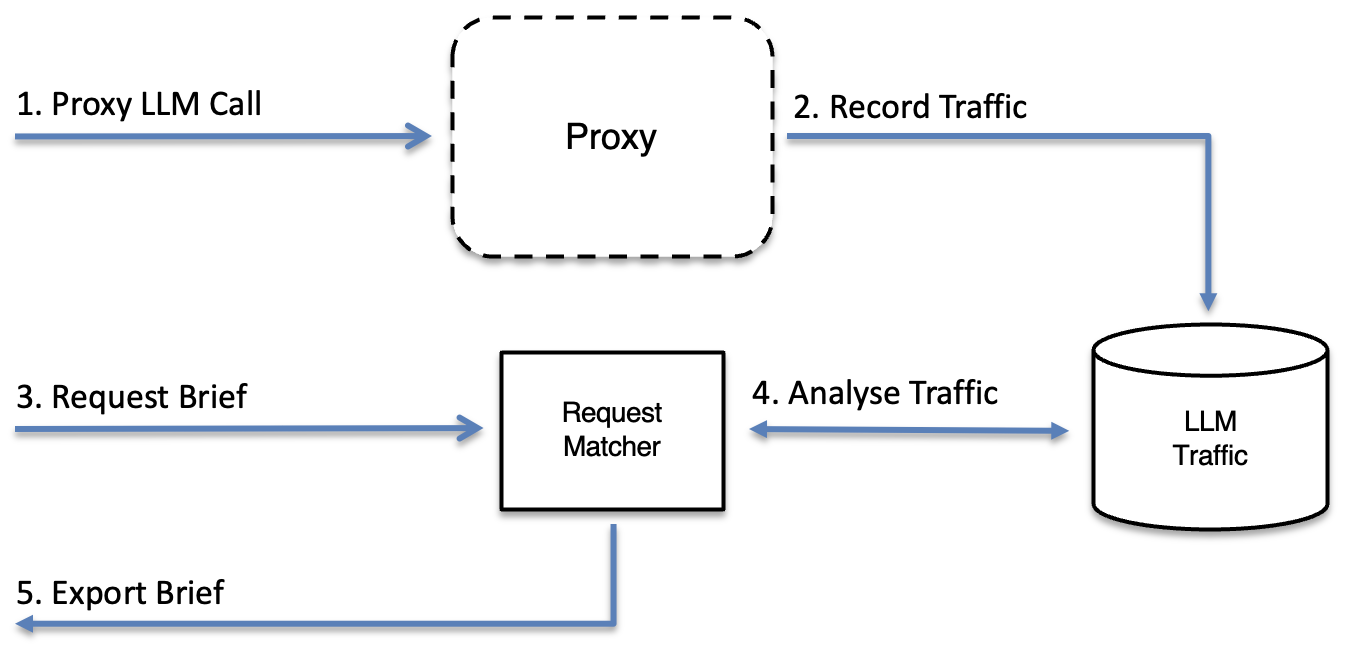
1. Start MockServer as a Proxy and Capture Traffic
Any MockServer instance can act as an HTTPS proxy — no special mode is needed. See AI Traffic Inspection for the full setup, including how to trust the MockServer CA certificate and configure standard environment variables for Node.js, Python, and other tools.
The quick-start for local use:
docker run -d --rm -p 1080:1080 mockserver/mockserver

export HTTPS_PROXY=http://localhost:1080
export NODE_EXTRA_CA_CERTS=/path/to/mockserver-ca.pem   # Node.js tools
export SSL_CERT_FILE=/path/to/mockserver-ca.pem          # Python tools

# Now run your agent — its LLM calls are captured automatically
claude   # or: opencode, python my_agent.py, etc.
MockServer captures every LLM request/response pair (including SSE-streamed completions)
in its event log, and these are the source the optimisation report is built from. Both
proxied/forwarded traffic (to a real provider) and mocked
LLM responses served by MockServer itself are analysed — so you can optimise against real
captured runs or against mocked conversations (for example, the data created by
npm run demo). LLM traffic is recognised by request shape
(the provider's API path), so it works regardless of the upstream host.
Generate real traffic with OpenCode
The offline npm run demo dataset includes a crafted,
deterministic agent run that fires every optimisation signal — great for a first look.
To analyse your own agent's real spend instead, proxy a headless
OpenCode run
through MockServer and pointed at a real provider.
Heads-up: this generates real, non-deterministic LLM
traffic — it needs network access and your own provider API key, and the
captured run varies each time. It is not wired into npm run demo,
which stays offline. Never commit or share API keys.
The repository ships a helper script,
mockserver-ui/scripts/demo-opencode-proxy.sh, that starts MockServer
as an HTTPS proxy with a machine-local CA, extracts that CA, and prints the exact environment
to run OpenCode through it:
# Start the proxy and print the run instructions
./mockserver-ui/scripts/demo-opencode-proxy.sh

# …or start the proxy AND run a one-shot OpenCode prompt through it
./mockserver-ui/scripts/demo-opencode-proxy.sh "summarise the README and suggest one improvement"
The equivalent done by hand, so you can run OpenCode in your own shell:
# 1. Start MockServer as an HTTPS proxy with a unique, machine-local CA
#    (the default CA private key is public — never trust it for real traffic).
docker run -d --rm --name mockserver-proxy -p 1080:1080 mockserver/mockserver \
  -serverPort 1080 \
  -Dmockserver.dynamicallyCreateCertificateAuthorityCertificate=true \
  -Dmockserver.directoryToSaveDynamicSSLCertificate=/dynamic-certs

# 2. Trigger CA generation, then copy the CA out of the container
curl -sk https://localhost:1080/ >/dev/null
docker exec mockserver-proxy cat /dynamic-certs/CertificateAuthorityCertificate.pem > mockserver-ca.pem

# 3. Route OpenCode through the proxy and trust the CA
export HTTPS_PROXY=http://localhost:1080
export NODE_EXTRA_CA_CERTS=$PWD/mockserver-ca.pem   # OpenCode is a Node.js tool
export SSL_CERT_FILE=$PWD/mockserver-ca.pem          # any Python helpers

# 4. Point OpenCode at a REAL provider with YOUR OWN API key, then run it headless
export OPENAI_API_KEY=sk-...            # or ANTHROPIC_API_KEY=sk-ant-...
opencode run "summarise the README and suggest one improvement"
OpenCode's LLM calls are now captured by MockServer. Open the dashboard LLM Optimise tab (immediately after Chaos in the navigation bar), or curl the report, to see signals computed from your real run:
curl -s "http://localhost:1080/mockserver/llm/optimisationReport?format=markdown"2. Export the Optimisation Brief
Three ways to export — choose whichever fits your workflow:
Dashboard — LLM Optimise Screen
Open the MockServer dashboard and click LLM Optimise in the navigation bar (it sits immediately after Chaos):
http://localhost:1080/mockserver/dashboard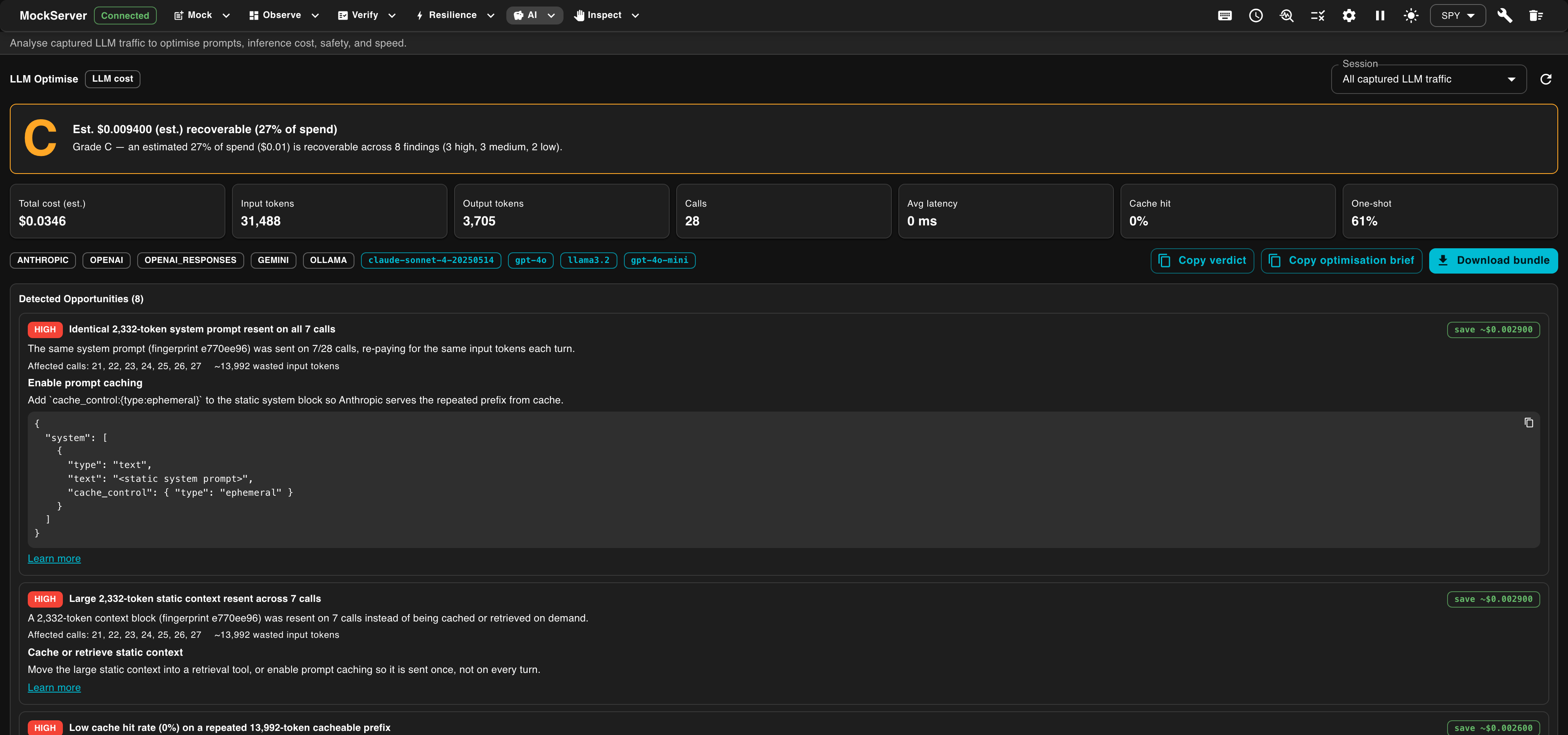
The LLM Optimise screen shows:
- A session picker — pick a single upstream host, or All captured LLM traffic (the default)
- A verdict banner — grade letter (A–F, colour-coded) with the "$X recoverable (Y% of spend)" headline and a one-line rationale
- Hero cards — total estimated cost, input/output tokens, call count, average latency, cache-hit rate, and one-shot rate
- A Detected Opportunities panel listing each signal with severity chip, estimated saving, and structured fix guidance
- A per-call table
- Copy verdict — copies a compact plain-text grade + fix summaries to the clipboard (built from the loaded JSON, no extra fetch)
- Copy optimisation brief — copies the full Markdown brief to the clipboard
- Download bundle — saves the structured JSON report
MCP Tool
If your AI agent is connected to MockServer's MCP control plane (see
MCP Setup), use the
export_optimisation_report tool:
{
  "method": "tools/call",
  "params": {
    "name": "export_optimisation_report",
    "arguments": {
      "format": "markdown"
    }
  }
}
Returns the full optimisation brief as Markdown text — paste it directly into any LLM.
{
  "method": "tools/call",
  "params": {
    "name": "export_optimisation_report",
    "arguments": {
      "format": "json",
      "host": "api.openai.com"
    }
  }
}
Returns the structured LlmOptimisationReport JSON bundle.
The optional host parameter filters to a single upstream host.
{
  "method": "tools/call",
  "params": {
    "name": "export_optimisation_report",
    "arguments": {
      "format": "csv"
    }
  }
}
Returns the spreadsheet-friendly CSV (per-call table plus totals/verdict summary) in the
csv field of the tool result.
REST Endpoint
Call GET /mockserver/llm/optimisationReport directly.
This is a MockServer control-plane endpoint; CORS is enabled so the dashboard UI can
call it even when the dashboard and control plane are on different hosts or ports.
curl -s "http://localhost:1080/mockserver/llm/optimisationReport?format=markdown"Returns text/markdown; charset=utf-8 — the full optimisation brief, ready to paste into any LLM.
curl -s "http://localhost:1080/mockserver/llm/optimisationReport?format=json" | python3 -m json.toolReturns application/json — the LlmOptimisationReport bundle including session metadata, per-call breakdown, detected signals, and redaction status.
curl -s "http://localhost:1080/mockserver/llm/optimisationReport?format=csv"Returns text/csv; charset=utf-8 — a spreadsheet-friendly export with two sections: a per-call table (provider, model, input/output/cached/reasoning tokens, estimated cost, latency, tool-call count, finish reason) and a totals/verdict summary. Open it in a spreadsheet or feed it to a data pipeline.
# OpenAI-evals JSONL (one {"input":[...],"ideal":"..."} sample per line)
curl -s "http://localhost:1080/mockserver/llm/optimisationReport?format=openai-evals"

# Chat fine-tune JSONL (one {"messages":[...]} conversation per line)
curl -s "http://localhost:1080/mockserver/llm/optimisationReport?format=fine-tune"

# promptfoo test suite (a single {"tests":[...]} JSON document)
curl -s "http://localhost:1080/mockserver/llm/optimisationReport?format=promptfoo"
Turn your captured LLM sessions into ready-to-use datasets for eval and fine-tune tooling. The prompt messages come from each captured request and the expected/ideal answer from the captured response. Redaction is on by default — every export runs through MockServer's redactor (Authorization / api-key headers, credential query parameters, and any configured body fields) and masks obvious secret shapes (e.g. sk-…, AWS keys, bearer tokens) in message text, so nothing sensitive leaks into a dataset. The JSONL formats are served as application/x-ndjson; promptfoo as application/json.
curl -s -X PUT "http://localhost:1080/mockserver/llm/diffRuns" \
  -H "Content-Type: application/json" \
  -d '{
        "before": {"session": "host:api.openai.com", "provider": "OPENAI"},
        "after":  {"session": "host:api.openai.com", "provider": "OPENAI"}
      }'
Compare two recorded runs at the prompt level. MockServer reconstructs each run's conversation, normalises the prompts (so whitespace, JSON key ordering, and volatile ids/timestamps don't show up as changes), and reports what changed: message edits/additions/removals, tool calls added or removed, and the token/cost delta. Deterministic and read-only — no LLM is called. Message text is masked for secret shapes. Select each run with the same session/host/provider filter used by the report.
# Only OpenAI traffic
curl -s "http://localhost:1080/mockserver/llm/optimisationReport?format=markdown&host=api.openai.com"

# Only Anthropic traffic, JSON
curl -s "http://localhost:1080/mockserver/llm/optimisationReport?format=json&provider=ANTHROPIC"

# A specific named session
curl -s "http://localhost:1080/mockserver/llm/optimisationReport?format=markdown&session=host%3Aapi.openai.com"
Query Parameters
| Parameter | Values | Default | Description |
|---|---|---|---|
format |
json | markdown | csv | openai-evals | fine-tune | promptfoo |
json |
Output format. markdown returns the pre-framed optimisation brief; json returns the structured LlmOptimisationReport bundle; csv returns a per-call table plus a totals/verdict summary as text/csv; openai-evals and fine-tune export the captured sessions as JSONL datasets; promptfoo exports a promptfoo test-suite JSON document. All dataset exports are redacted by default. |
session |
grouping key string | all captured LLM traffic |
Filter to one session. Sessions are grouped by isolation key (when LLM conversation expectations with session isolation are active) or by upstream Host header otherwise.
Example: host:api.openai.com.
|
host |
hostname string | all hosts | Filter to a single upstream host, e.g. api.openai.com. |
provider |
OPENAI | OPENAI_RESPONSES | ANTHROPIC | GEMINI | BEDROCK | AZURE_OPENAI | OLLAMA |
all providers | Filter to one LLM provider. Provider is auto-detected from request paths. |
If no LLM traffic has been captured yet, the endpoint returns HTTP 200 with an empty report (JSON) or a brief that says "no LLM traffic captured" (Markdown).
What the Markdown Brief Looks Like
The brief is structured in a fixed order so the downstream LLM can reason about it efficiently:
- Framing preamble — tells the LLM it is a cost-optimisation expert and what to do
- Verdict — A–F grade, rationale, estimated recoverable spend and token count, cache-hit rate, one-shot rate
- Run summary — provider(s), model(s), call count, token totals, estimated cost, latency, tool-call count, cache-hit rate, one-shot rate
- Per-call table — one row per call: model, input/output tokens, cost, latency, tools, finish reason. For proxied/forwarded traffic the per-call
latencyMsis the measured upstream round-trip time (full-stream duration for streaming responses). It is0only when the upstream time could not be captured for that call. - Detected opportunities — each detected signal as a section with title, detail, affected call indices, estimated saving, recommendation, and fix guidance (action, config snippet or example expectation, and a docs link where available)
- Conversations and tool definitions (appendix) — redacted messages and tool schemas so the LLM has the raw material to propose concrete edits
Once you have the brief, paste it into any LLM. No additional context is needed.
3. The Verdict
Every report includes a deterministic verdict — an A–F grade and a "$X recoverable" headline — computed from the detected signals without any LLM call. The grade is your quick answer to "how much is there to fix here?"
| Grade | Meaning |
|---|---|
| A | <10% of spend is recoverable — well optimised |
| B | 10–25% recoverable — or the grade would be A but at least one HIGH-severity finding exists (the floor is B even when the dollar saving is near zero) |
| C | 25–40% recoverable |
| D | 40–55% recoverable |
| F | >55% recoverable — significant inefficiency detected |
The "recoverable" figure is an estimate of how much spend could be saved by acting on the detected signals. It is calculated using per-call MAX attribution: each call's contribution is the maximum saving across all signals that affect it (not a sum), so the total can never exceed the actual session spend. Treat it as a directional estimate, not an invoice.
The rationale line explains the grade in plain English, for example: "Grade C — an estimated 18% of spend ($1.42) is recoverable across 3 findings (1 high, 2 medium)."
Session KPIs
Two new headline metrics appear in the hero cards and run summary:
-
Cache hit rate — the fraction of input tokens served from cache
(
cachedInputTokens / inputTokens). A rate below 50% on a session with repeated prompts suggests caching is not enabled. - One-shot rate — the fraction of calls that were not retries. A windowed retry detector (window of 3) identifies calls that duplicate a recent request; a low one-shot rate points to retry loops or duplicate request patterns worth de-duplicating.
4. The Nine Optimisation Signals
MockServer analyses the captured calls and emits up to nine deterministic signals, sorted by urgency (a combination of severity and how many calls are affected). Each signal names the problem, quantifies it in tokens and estimated USD, and provides structured fix guidance — including a copy-paste config snippet or example expectation where relevant.
| Signal | Severity | What it detects | How to fix it |
|---|---|---|---|
REPEATED_SYSTEM_PROMPT |
HIGH / MEDIUM | The same system prompt (identified by a fingerprint) is resent on two or more calls, re-paying for the same input tokens each turn. HIGH when the prompt is large (≥1,000 tokens) and repeated three or more times. | Enable provider prompt caching, or move the static context into a retrieval tool so it is only fetched when needed. For Anthropic, the fix includes a ready-to-paste cache_control snippet. |
LARGE_STATIC_CONTEXT_RESENT |
HIGH | A large context block (≥2,000 tokens) is resent across two or more calls instead of being cached or retrieved on demand. | Move the large static context into a retrieval tool or enable prompt caching so it is sent once, not every turn. |
DETERMINISTIC_TOOL_CALL |
MEDIUM | The same tool is called with the same arguments on two or more separate calls, making the LLM an unnecessary intermediary for a deterministic lookup. | Replace the LLM-mediated step with a direct HTTP or MCP endpoint call and feed the result back deterministically. An example MockServer expectation is included in the fix guidance. |
OVERSIZED_TOOL_RESULT |
MEDIUM | A tool returned ≥1,000 tokens, which are then re-sent as input on every subsequent turn, inflating cost. | Trim or summarise the tool output before returning it to the model so only the relevant fields are sent. |
OUTPUT_TOKEN_BLOAT |
LOW | One or more calls produced far more output than the median (either ≥1,500 tokens absolute, or ≥3× the median output for the session). | Constrain output with max_tokens or a stricter response_format / JSON schema so the model returns only what is needed. A ready-to-paste config snippet is included. |
DUPLICATE_CONSECUTIVE_CALL |
MEDIUM | Consecutive calls with a near-identical request shape (same path, model, message count, system prompt fingerprint, and input token count) suggest retries that re-pay for the same work. | De-duplicate or cache identical requests, and only retry on genuine transient errors with backoff. |
LOW_CACHE_HIT_RATE |
HIGH / MEDIUM | The session has a repeated cacheable prompt prefix (same system-prompt fingerprint on two or more calls) but the cache-hit rate is below 50%. Fires only when there are tokens not yet being cached. HIGH when the un-cached token count is ≥2,000 and the cache-hit rate is below 20%; MEDIUM otherwise. |
Enable prompt caching for the static prefix. For Anthropic, the fix provides a
ready-to-paste cache_control:{type:ephemeral} snippet for the
system block. For OpenAI and Gemini, automatic prefix caching applies — keep the
static prefix byte-identical and place it first; do not interleave volatile content before it.
|
MODEL_OVERSPEND |
LOW | Two or more calls produced short outputs (<256 tokens) with no tool calls and no reasoning tokens — "trivial" work — on a model whose blended rate is more than 30% above the provider's cheapest available model. |
Switch those calls to the cheaper model. The fix names the specific model and saving percentage,
for example: "these 5 calls on claude-opus-4-6 produced <256-token outputs
with no tools or reasoning — a smaller model such as claude-haiku-4 would likely
suffice at ~70% lower cost."
|
UNUSED_TOOL_SCHEMA |
MEDIUM / LOW |
Tool definitions are sent in the tools array on two or more calls
but never invoked anywhere in the session. The unused schema tokens are paid for as input on each
call. MEDIUM when the total wasted tokens across the session is ≥1,000; LOW otherwise.
|
Remove the unused tool definitions from tools. The fix lists up to
five unused tool names and the approximate token saving per call.
|
Redaction
The optimisation report always strips sensitive headers before including them in either the JSON bundle or the Markdown brief:
Authorization(Bearer tokens, Basic auth)x-api-key/api-keyCookie/Set-CookieProxy-Authorization
Body fields are redacted according to the mockserver.fixtureBodyRedactFields
configuration property — the same setting used by record_llm_fixtures.
The report includes a redaction object describing what was stripped,
so you know exactly what the downstream LLM will not see.
Body content is not automatically redacted beyond the configured field list. Review the
Markdown brief before pasting it into an external LLM if your prompts or tool results
contain sensitive data not covered by fixtureBodyRedactFields.
Configuration
| Property | Default | Description |
|---|---|---|
mockserver.llmOptimisationMaxCalls |
200 |
Maximum number of captured LLM calls included in a single report. When the captured session exceeds this limit, only the most recent calls are analysed. Increase this for long agent runs; reduce it to keep report size manageable when pasting into an LLM with a limited context window. |
mockserver.fixtureBodyRedactFields |
(empty) |
Comma-separated list of JSON body field names to redact in the brief (in addition to
the always-stripped sensitive headers). Reuses the same setting as
record_llm_fixtures. See
Configuration Properties.
|
Current Limitations
-
Cost estimates — costs are computed from MockServer's built-in provider
pricing tables (
LlmPricing), which may lag provider price changes. ThecostIsEstimatedfield in the JSON bundle istruewhen the provider did not return real usage tokens and MockServer estimated them from the decoded text; it isfalsewhen the provider returned real usage data. Treat all cost figures as directional estimates. - Non-LLM traffic — only traffic where MockServer can detect a supported LLM provider (OpenAI, Anthropic, Gemini, Bedrock, Azure OpenAI, Ollama), by API path shape, is included — whether mocked or proxied. Other traffic is ignored.
-
Session grouping — in v1, the optimisation report groups proxied LLM
traffic by upstream host, so the dashboard LLM Optimise session picker offers
host-based sessions (and "All captured LLM traffic"). The
sessionREST parameter accepts either the compositehost:<host>key or the bare host.
Related Pages
- AI Traffic Inspection — proxy setup, CA trust, and how traffic is captured
- MCP Setup — connect your AI agent to MockServer's MCP control plane to use the
export_optimisation_reporttool - MCP Tools Reference — full parameter documentation for
export_optimisation_reportand related tools - LLM Response Mocking — mock LLM API responses for deterministic, offline testing
- Configuration Properties —
mockserver.llmOptimisationMaxCallsandmockserver.fixtureBodyRedactFields
AI Integration — See Also
- MCP Setup — connect Claude Code, Cursor, Windsurf, Cline, or OpenCode to MockServer's built-in MCP endpoint
- MCP Tools Reference — full documentation of all MCP tools, parameters, and resources
- Debugging with AI — workflows for using AI assistants to debug HTTP traffic via MCP
- AI Traffic Inspection — inspect and record LLM/MCP traffic for debugging and deterministic replay
- OpenAPI Contract Verification — verify recorded traffic and run contract/resiliency tests against an OpenAPI spec
- OpenAPI for AI — use MockServer's OpenAPI spec as a fallback for AI tools without MCP support
- AI Protocol Mocking (MCP & A2A) — mock MCP servers and A2A agents your AI application depends on
- LLM Response Mocking — mock LLM API responses from OpenAI, Anthropic, Gemini, Bedrock, Azure OpenAI, and Ollama with provider-correct formatting, streaming, conversations, and chaos
- LLM Cost Optimisation — export a one-click optimisation brief (Markdown) or JSON bundle from captured LLM traffic to find ways to cut inference cost
- llms.txt — machine-readable index of MockServer documentation for AI assistants and LLMs