Getting Started Proxying

As an in-path HTTP(S) proxy, MockServer records every request and response that flows through it — including HTTPS, which it can decrypt transparently with an auto-generated certificate. That means you can capture how a system really behaves and replay it as deterministic mocks without changing a line of application code: point your clients at MockServer, run your scenarios, then analyse, verify, or record-and-replay the captured traffic.
To use MockServer to analyse an existing system:
- Start MockServer
- Configure Clients
- Run Scenarios
- Analyse Behaviour
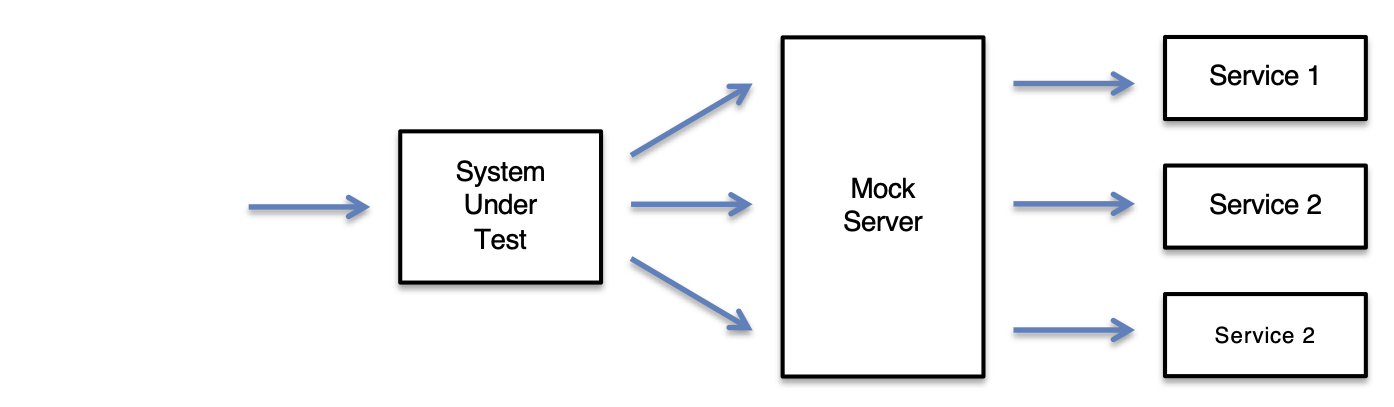
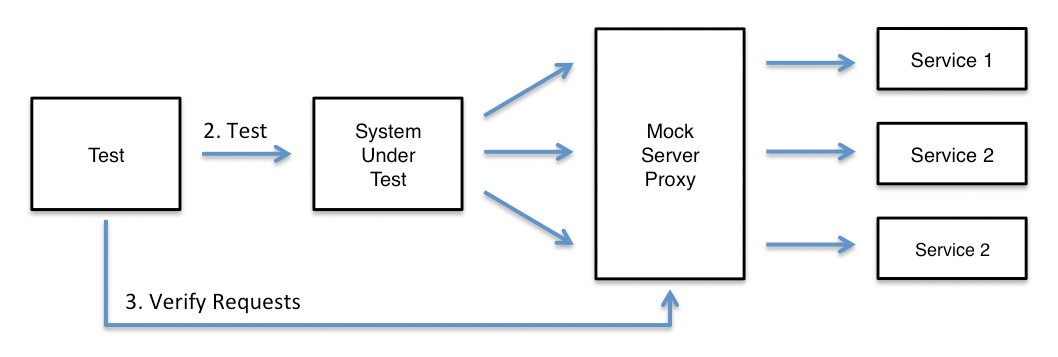
To use MockServer to verify requests:
- Start MockServer
- Configure Clients
- Run Your Test Scenarios
- Verify Requests
For example code see the code examples folder in the git repository.
Inspecting AI agent traffic? If you want to see the HTTPS calls that Claude Code, OpenCode, or Python AI libraries send to LLM APIs and MCP servers, see Inspect AI Agent Traffic. It covers proxy setup, CA trust, and per-tool configuration for AI tools.
Proxying WebSockets? MockServer also proxies WebSocket connections. When a client opens a WebSocket (an HTTP Upgrade: websocket request) through MockServer and no matching WebSocket expectation exists, MockServer connects to the real upstream WebSocket server (over ws or wss), relays the handshake, and then relays messages in both directions until either side closes. The relayed frames (text, binary, ping, pong, close) are recorded alongside the connection so you can inspect them with recorded requests and in the dashboard. The number of frames recorded per connection is capped by the webSocketProxyMaxRecordedFrames configuration property (default 1000; set to 0 to record only the handshake). This currently covers HTTP/1.1 WebSocket upgrades over plain and TLS upstreams.
0. Start MockServer
The fastest way to run MockServer is a single command — pick whichever fits your environment. Every option below starts a server that mocks and proxies HTTP and HTTPS on one port (default 1080):
# Docker — no Java required
docker run -p 1080:1080 mockserver/mockserver

# Node — no Java and no Docker (downloads a self-contained bundle)
npx -p mockserver-node mockserver run -p 1080

# Homebrew (macOS / Linux)
brew install mockserver && mockserver run -p 1080
Confirm it is up (the status endpoint returns 200 once MockServer is ready):
curl -i -X PUT http://localhost:1080/mockserver/statusMockServer is flexible and support numerous usage patterns.
MockServer can be run:
- programmatically via a Java API in an @Before or @After method
- using a JUnit 4 @Rule via a @Rule annotated field in a JUnit 4 test
- using a JUnit 5 Test Extension via a @ExtendWith annotated JUnit 5 class
- using a Spring Test Execution Listener via a @MockServerTest annotated test class
- as a Docker container in any Docker enabled environment
- via a Helm chart in any Kubernetes environment
- from the command line as a stand-alone process in a test environment
- via a Maven Plugin as part of a Maven build cycle
- as a Node.js (npm) module from any Node.js code
- as a Grunt plugin as part of a Grunt build cycle
- as a deployable WAR to an existing application server
- via a client library binary launcher (Node, Python, Ruby, Go, .NET, Rust) — downloads a cross-platform, JVM-less binary bundle automatically
- as a throwaway Testcontainers container started and stopped automatically by your test run
- as a shared, centralised deployment across multiple teams or CI pipelines — another good option when several projects share one running MockServer
To simplify configuration, all versions (except the deployable WAR) use a single port to support the control plane and data plane in HTTP, HTTPS or SOCKS.
Keeping tests fast: for the patterns that keep test suites quick — one container per suite with reset() between tests, container reuse, memory limits, and in-process alternatives for JVM tests — see Fast Tests: Startup Time, Memory and Reuse.
MockServer is available in the following formats:
- java dependency
- Docker container
- Helm chart for Kubernetes
- executable jar
- Homebrew package
- maven plugin
- npm plugin
- Grunt plugin
- deployable WAR that runs on JEE web servers
- client library binary bundle — a self-contained, cross-platform binary (no Java required) downloaded automatically by the Node, Python, Ruby, Go, .NET, and Rust clients
It is also possible to build and run MockServer directly from source code
1. Configure Clients
The page on configuring clients gives full details on how to configure clients to proxy requests via MockServer and includes code examples for the following clients:
- Java JDK HttpURLConnection
- Apache HttpClient
- Spring RestTemplate
- Google HTTP Client
- Jetty HttpClient
- Jersey Client
- Grizzly AsyncHttpClient
- Java Virtual Machine Network Stack
- Apple Mac HTTP & HTTPS (i.e. Chrome, Safari, Firefox, etc)
- Apple Mac Network Stack (i.e. SOCKS)
2. Analysing Behaviour
To analyse the requests that a system makes the proxy can be used to record all requests and their corresponding responses.
All requests and responses can be retrieved as expectations (called recorded expectations) in Java code or JSON. This allows an easy way to replay a recording from the proxy.
Unlike conventional record-replay approaches typically provided by other proxies, MockServer allows easy editing of the recorded requests because the recording is provided as Java code or JSON. This ensures that if minor changes are made to an API the recording can easily be modified and no re-recording required avoiding the need to update test assertions.
One-Command Record & Replay
The fastest way to record from a real upstream is a single retrieve call with the optional forwardUnmatchedTo parameter. It arms record-and-forward in one step — any request that does not match an existing expectation is forwarded to the upstream and recorded — so you no longer need to separately configure proxyRemoteHost / proxyRemotePort and attemptToProxyIfNoMatchingExpectation before you start:
# 1. point MockServer at the upstream (this call arms recording for the session)
curl -v -X PUT "http://localhost:1080/mockserver/retrieve?type=RECORDED_EXPECTATIONS&format=java&forwardUnmatchedTo=https://api.example.com"

# 2. run your application / tests against http://localhost:1080 so real traffic is recorded

# 3. retrieve the recording as ready-to-use code (or JSON) — in any supported format
curl -v -X PUT "http://localhost:1080/mockserver/retrieve?type=RECORDED_EXPECTATIONS&format=java"
The forwardUnmatchedTo value accepts a bare host (api.example.com), a host and port (api.example.com:9090), or a full URL (http://api.example.com:9090 / https://api.example.com, which default to port 80/443). The upstream host is validated against the same private-network / cloud-metadata SSRF protection as the normal forward and replay paths before any connection is made — a blocked upstream returns 403 and a malformed value returns 400, in both cases leaving the configuration untouched.
Recording is traffic-driven: the first call only arms recording, it does not generate any traffic itself. Combine with the deduplicateRecordedExpectations property to collapse structurally-identical calls (e.g. /users/1 and /users/2) into a single templatized /users/{id} expectation in the retrieved output.
By default only id-like path segments are templatized. Enable the templatizeRecordedValues property (in addition to deduplicateRecordedExpectations) to also generalize volatile-looking query parameter, header and JSON body values — UUIDs, long ids, ISO-8601 / epoch-millis timestamps, JWTs and long opaque tokens — into regex matchers, so the recorded expectation matches future requests instead of being pinned to one captured value. It is conservative: stable values (short strings, words, booleans, small numbers such as a page size or status code) are kept verbatim. Both properties are off by default, so recorded output is unchanged unless you opt in.
Consolidate a Recording Into Reusable Mocks
Without any options, a recording is a verbatim one-to-one dump: recording 50 hits to GET /users/123 gives you 50 identical single-use expectations. Add consolidate=true to the retrieve call to collapse a recording into a compact, reusable mock set in one step — without having to set any server property first:
curl -v -X PUT "http://localhost:1080/mockserver/retrieve?type=RECORDED_EXPECTATIONS&consolidate=true"With consolidate=true MockServer groups recorded calls by request shape and, for each shape, returns a single unlimited-use expectation (so it keeps matching instead of expiring after one call). Calls that differ only in an id path segment (/users/123, /users/456) collapse into one /users/{id} expectation; volatile request headers (Authorization, User-Agent, tracing headers, …) are dropped from the matcher; and when the same request returned different responses over time, those responses are attached as a sequence (the first call gets the first response, the next call the second, and so on). Add parameterize=true as well to also generalize volatile query-parameter, header and JSON-body values (UUIDs, timestamps, tokens) into matchers.
Recording with no query parameter is unchanged, so existing scripts keep working.
Promote a Recording to Active Mocks
To turn a recording directly into active mocks on the running server — consolidated, parameterized, secret-redacted and ready to serve — call the promote endpoint after recording:
# promote all recorded traffic to active mocks
curl -v -X PUT "http://localhost:1080/mockserver/recordings/promote"

# or promote only traffic matching a request filter (JSON body)
curl -v -X PUT "http://localhost:1080/mockserver/recordings/promote" \
  -d '{ "path": "/users/.*" }'
The promote endpoint retrieves the matching recorded traffic, redacts credentials (on by default), consolidates and parameterizes it (both on by default — add ?consolidate=false or ?parameterize=false to turn either off), then activates the resulting unlimited-use expectations and returns them as JSON with a 201 Created status. After that you can switch the real dependency off and serve the recording back with no further configuration.
Export Recorded Expectations as Client Code
Recorded (and active) expectations can be exported as ready-to-paste client code so you can drop a recording straight into a test. Use the retrieve API with type=RECORDED_EXPECTATIONS (or type=ACTIVE_EXPECTATIONS) and a code format:
- format=java — MockServer Java client builder DSL
- format=javascript — Node.js client calls (
mockServerClient(...).mockAnyResponse(…)) - format=python — Python client calls (
client.upsert(Expectation.from_dict(…))) - format=go — Go client calls (
client.Upsert(…)) - format=csharp — C# client calls (
client.Upsert(…)) - format=ruby — Ruby client calls (
client.upsert(…)) - format=rust — Rust client calls (
client.upsert(…)) - format=php — PHP client calls (
$client->upsertExpectation(…)) - format=json — round-trippable MockServer JSON
One client call is generated per expectation. For example, to export the recorded expectations as JavaScript:
curl -v -X PUT "http://localhost:1080/mockserver/retrieve?type=RECORDED_EXPECTATIONS&format=javascript"or as Python:
curl -v -X PUT "http://localhost:1080/mockserver/retrieve?type=RECORDED_EXPECTATIONS&format=python"or as Go, C#, Ruby, Rust or PHP — e.g. Go:
curl -v -X PUT "http://localhost:1080/mockserver/retrieve?type=RECORDED_EXPECTATIONS&format=go"Every language's output embeds the expectation's JSON inside a real client call, so it is correct for the published client packages (mockserver-client for Node.js, mockserver for Python, mockserver-client-go for Go, MockServer.Client for C#, the mockserver-client gem for Ruby, the mockserver-client crate for Rust, and mock-server/mockserver-client for PHP) and round-trips back into MockServer. In the dashboard, all of these formats are available under Library → Export, each with a Copy as code button; the same Export tab can also generate verification code from the recorded requests in Java, JavaScript, Python, Go, C#, Ruby and Rust.
HAR Export
Recorded requests and responses can be exported as a HAR (HTTP Archive) 1.2 file, which is a standard format supported by browser DevTools and other HTTP analysis tools.
To export as HAR, use the retrieve API with type=REQUEST_RESPONSES and format=HAR:
curl -v -X PUT "http://localhost:1080/mockserver/retrieve?type=REQUEST_RESPONSES&format=HAR"Automatic Persistence of Recorded Expectations
By default, recorded proxy traffic is only held in memory and lost when MockServer restarts. To automatically persist recorded expectations to a JSON file, configure the following properties:
- persistRecordedExpectations - set to true to enable automatic persistence of recorded expectations
- persistedRecordedExpectationsPath - file path for saving the recorded expectations (default: persistedRecordedExpectations.json)
The file is updated whenever a new request is forwarded through the proxy. The saved file can be loaded back into MockServer using the initializationJsonPath property to replay the recorded traffic.
Retrieving Recorded Expectations
All proxied requests including those proxied using a forward actions are recorded containing the request received and response returned.
It is possible to retrieve the recorded requests and responses as expectations so that they can be easily used as expectations to simulation a system.
Expectations are returned in the order they have been recorded. The expectations are returned can be filter using a request matcher.
Expectation[] recordedExpectations = new MockServerClient("localhost", 1080)
    .retrieveRecordedExpectations(
        request()
);var mockServerClient = require('mockserver-client').mockServerClient;
mockServerClient("localhost", 1080)
.retrieveRecordedExpectations({})
.then(
function (recordedExpectations) {
console.log(JSON.stringify(recordedExpectations));
},
function (error) {
console.log(error);
}
);See REST API for full JSON specification
from mockserver.client import MockServerClient

client = MockServerClient("localhost", 1080)
recorded_expectations = client.retrieve_recorded_expectations()require 'mockserver-client'
client = MockServer::Client.new('localhost', 1080)
recorded_expectations = client.retrieve_recorded_expectationsimport mockserver "github.com/mock-server/mockserver-monorepo/mockserver-client-go/v7"
client := mockserver.New("localhost", 1080)
recordedExpectations, err := client.RetrieveRecordedExpectations(nil)using MockServer.Client;
using var client = new MockServerClient("localhost", 1080);
var recordedExpectations = client.RetrieveRecordedExpectations();use mockserver_client::ClientBuilder;
let client = ClientBuilder::new("localhost", 1080).build().unwrap();
let recorded_expectations = client.retrieve_recorded_expectations(None).unwrap();use MockServer\MockServerClient;
$client = new MockServerClient('localhost', 1080);
$recordedExpectations = $client->retrieveRecordedExpectations();curl -v -X PUT "http://localhost:1080/mockserver/retrieve?type=RECORDED_EXPECTATIONS"See REST API for full JSON specification
Expectation[] recordedExpectations = new MockServerClient("localhost", 1080)
    .retrieveRecordedExpectations(
        request()
            .withPath("/some/path")
            .withMethod("POST")
);var mockServerClient = require('mockserver-client').mockServerClient;
mockServerClient("localhost", 1080).retrieveRecordedExpectations({
"path": "/some/path",
"method": "POST"
}).then(
function (recordedExpectations) {
console.log(JSON.stringify(recordedExpectations));
},
function (error) {
console.log(error);
}
);See REST API for full JSON specification
from mockserver.client import MockServerClient
from mockserver.models import HttpRequest

client = MockServerClient("localhost", 1080)
recorded_expectations = client.retrieve_recorded_expectations(
    HttpRequest(path="/some/path", method="POST")
)require 'mockserver-client'
client = MockServer::Client.new('localhost', 1080)
recorded_expectations = client.retrieve_recorded_expectations(
request: MockServer::HttpRequest.new(path: '/some/path', method: 'POST')
)import mockserver "github.com/mock-server/mockserver-monorepo/mockserver-client-go/v7"
client := mockserver.New("localhost", 1080)
recordedExpectations, err := client.RetrieveRecordedExpectations(
mockserver.Request().Path("/some/path").Method("POST"),
)using MockServer.Client;
using MockServer.Client.Models;
using var client = new MockServerClient("localhost", 1080);
var recordedExpectations = client.RetrieveRecordedExpectations(
HttpRequest.Request().WithPath("/some/path").WithMethod("POST")
);use mockserver_client::{ClientBuilder, HttpRequest};
let client = ClientBuilder::new("localhost", 1080).build().unwrap();
let filter = HttpRequest::new().path("/some/path").method("POST");
let recorded_expectations = client.retrieve_recorded_expectations(Some(&filter)).unwrap();use MockServer\MockServerClient;
use MockServer\HttpRequest;
$client = new MockServerClient('localhost', 1080);
$recordedExpectations = $client->retrieveRecordedExpectations(
HttpRequest::request()->path('/some/path')->method('POST')
);curl -v -X PUT "http://localhost:1080/mockserver/retrieve?type=RECORDED_EXPECTATIONS" -d '{
"path": "/some/path",
"method": "POST"
}'See REST API for full JSON specification
String recordedExpectations = new MockServerClient("localhost", 1080)
    .retrieveRecordedExpectations(
        request()
            .withPath("/some/path")
            .withMethod("POST"),
        Format.JAVA
);curl -v -X PUT "http://localhost:1080/mockserver/retrieve?type=RECORDED_EXPECTATIONS&format=JAVA" -d '{
"path": "/some/path"
}'See REST API for full JSON specification
String recordedExpectations = new MockServerClient("localhost", 1080)
    .retrieveRecordedExpectations(
        request()
            .withPath("/some/path")
            .withMethod("POST"),
        Format.JAVASCRIPT
);curl -v -X PUT "http://localhost:1080/mockserver/retrieve?type=RECORDED_EXPECTATIONS&format=JAVASCRIPT" -d '{
"path": "/some/path"
}'Returns copy-paste-ready code for the Node.js (mockserver-client) client, embedding each expectation's JSON in a mockAnyResponse(...) call. Also available for type=ACTIVE_EXPECTATIONS.
See REST API for full JSON specification
String recordedExpectations = new MockServerClient("localhost", 1080)
    .retrieveRecordedExpectations(
        request()
            .withPath("/some/path")
            .withMethod("POST"),
        Format.PYTHON
);curl -v -X PUT "http://localhost:1080/mockserver/retrieve?type=RECORDED_EXPECTATIONS&format=PYTHON" -d '{
"path": "/some/path"
}'Returns copy-paste-ready code for the Python (mockserver) client, embedding each expectation's JSON in a client.upsert(...) call. Also available for type=ACTIVE_EXPECTATIONS.
See REST API for full JSON specification
String recordedExpectations = new MockServerClient("localhost", 1080)
    .retrieveRecordedExpectations(
        request()
            .withPath("/some/path")
            .withMethod("POST"),
        Format.GO
);curl -v -X PUT "http://localhost:1080/mockserver/retrieve?type=RECORDED_EXPECTATIONS&format=GO" -d '{
"path": "/some/path"
}'Returns copy-paste-ready code for the Go (mockserver-client-go) client, embedding each expectation's JSON in a client.Upsert(...) call. Also available for type=ACTIVE_EXPECTATIONS.
See REST API for full JSON specification
String recordedExpectations = new MockServerClient("localhost", 1080)
    .retrieveRecordedExpectations(
        request()
            .withPath("/some/path")
            .withMethod("POST"),
        Format.CSHARP
);curl -v -X PUT "http://localhost:1080/mockserver/retrieve?type=RECORDED_EXPECTATIONS&format=CSHARP" -d '{
"path": "/some/path"
}'Returns copy-paste-ready code for the C# (MockServer.Client) client, embedding each expectation's JSON in a client.Upsert(...) call. Also available for type=ACTIVE_EXPECTATIONS.
See REST API for full JSON specification
String recordedExpectations = new MockServerClient("localhost", 1080)
    .retrieveRecordedExpectations(
        request()
            .withPath("/some/path")
            .withMethod("POST"),
        Format.RUBY
);curl -v -X PUT "http://localhost:1080/mockserver/retrieve?type=RECORDED_EXPECTATIONS&format=RUBY" -d '{
"path": "/some/path"
}'Returns copy-paste-ready code for the Ruby (mockserver-client) client, embedding each expectation's JSON in a client.upsert(...) call. Also available for type=ACTIVE_EXPECTATIONS.
See REST API for full JSON specification
String recordedExpectations = new MockServerClient("localhost", 1080)
    .retrieveRecordedExpectations(
        request()
            .withPath("/some/path")
            .withMethod("POST"),
        Format.RUST
);curl -v -X PUT "http://localhost:1080/mockserver/retrieve?type=RECORDED_EXPECTATIONS&format=RUST" -d '{
"path": "/some/path"
}'Returns copy-paste-ready code for the Rust (mockserver-client) crate, embedding each expectation's JSON in a client.upsert(...) call. Also available for type=ACTIVE_EXPECTATIONS.
See REST API for full JSON specification
String recordedExpectations = new MockServerClient("localhost", 1080)
    .retrieveRecordedExpectations(
        request()
            .withPath("/some/path")
            .withMethod("POST"),
        Format.PHP
);curl -v -X PUT "http://localhost:1080/mockserver/retrieve?type=RECORDED_EXPECTATIONS&format=PHP" -d '{
"path": "/some/path"
}'Returns copy-paste-ready code for the PHP (mock-server/mockserver-client) client, embedding each expectation's JSON in a $client->upsertExpectation(...) call. Also available for type=ACTIVE_EXPECTATIONS.
See REST API for full JSON specification
String recordedExpectations = new MockServerClient("localhost", 1080)
    .retrieveRecordedExpectations(
        request()
            .withPath("/some/path")
            .withMethod("POST"),
        Format.JSON
);var mockServerClient = require('mockserver-client').mockServerClient;
mockServerClient("localhost", 1080).retrieveRecordedExpectations({
"path": "/some/path",
"method": "POST"
}).then(
function (recordedExpectations) {
console.log(JSON.stringify(recordedExpectations));
},
function (error) {
console.log(error);
}
);See REST API for full JSON specification
from mockserver.client import MockServerClient
from mockserver.models import HttpRequest

client = MockServerClient("localhost", 1080)
# retrieve returns JSON by default
recorded_expectations = client.retrieve_recorded_expectations(
    HttpRequest(path="/some/path", method="POST")
)require 'mockserver-client'
client = MockServer::Client.new('localhost', 1080)
# retrieve returns JSON by default
recorded_expectations = client.retrieve_recorded_expectations(
request: MockServer::HttpRequest.new(path: '/some/path', method: 'POST')
)import mockserver "github.com/mock-server/mockserver-monorepo/mockserver-client-go/v7"
client := mockserver.New("localhost", 1080)
// RetrieveRecordedExpectations returns JSON-parsed expectations
recordedExpectations, err := client.RetrieveRecordedExpectations(
mockserver.Request().Path("/some/path").Method("POST"),
)using MockServer.Client;
using MockServer.Client.Models;
using var client = new MockServerClient("localhost", 1080);
// RetrieveRecordedExpectations returns JSON-parsed expectations
var recordedExpectations = client.RetrieveRecordedExpectations(
HttpRequest.Request().WithPath("/some/path").WithMethod("POST")
);use mockserver_client::{ClientBuilder, HttpRequest};
let client = ClientBuilder::new("localhost", 1080).build().unwrap();
let filter = HttpRequest::new().path("/some/path").method("POST");
// retrieve_recorded_expectations returns JSON-parsed expectations
let recorded_expectations = client.retrieve_recorded_expectations(Some(&filter)).unwrap();use MockServer\MockServerClient;
use MockServer\HttpRequest;
$client = new MockServerClient('localhost', 1080);
// retrieveRecordedExpectations returns JSON-parsed expectations
$recordedExpectations = $client->retrieveRecordedExpectations(
HttpRequest::request()->path('/some/path')->method('POST')
);curl -v -X PUT "http://localhost:1080/mockserver/retrieve?type=RECORDED_EXPECTATIONS&format=JSON" -d '{
"path": "/some/path"
}'See REST API for full JSON specification
Retrieving Recorded Requests
All requests the MockServer receives are recorded, including both proxied requests and requests that have matched an expectation.
It is possible to retrieve the recorded requests, as show below in the code examples.
Requests are returned in the order they have been recorded. Which requests are returned can be filter using a request matcher.
HttpRequest[] recordedRequests = new MockServerClient("localhost", 1080)
    .retrieveRecordedRequests(
        request()
);var mockServerClient = require('mockserver-client').mockServerClient;
mockServerClient("localhost", 1080)
.retrieveRecordedRequests({})
.then(
function (recordedRequests) {
console.log(JSON.stringify(recordedRequests));
},
function (error) {
console.log(error);
}
);See REST API for full JSON specification
from mockserver.client import MockServerClient

client = MockServerClient("localhost", 1080)
recorded_requests = client.retrieve_recorded_requests()require 'mockserver-client'
client = MockServer::Client.new('localhost', 1080)
recorded_requests = client.retrieve_recorded_requestsimport mockserver "github.com/mock-server/mockserver-monorepo/mockserver-client-go/v7"
client := mockserver.New("localhost", 1080)
recordedRequests, err := client.RetrieveRecordedRequests(nil)using MockServer.Client;
using var client = new MockServerClient("localhost", 1080);
var recordedRequests = client.RetrieveRecordedRequests();use mockserver_client::ClientBuilder;
let client = ClientBuilder::new("localhost", 1080).build().unwrap();
let recorded_requests = client.retrieve_recorded_requests(None).unwrap();use MockServer\MockServerClient;
$client = new MockServerClient('localhost', 1080);
$recordedRequests = $client->retrieveRecordedRequests();curl -v -X PUT "http://localhost:1080/mockserver/retrieve?type=REQUESTS"See REST API for full JSON specification
HttpRequest[] recordedRequests = new MockServerClient("localhost", 1080)
    .retrieveRecordedRequests(
        request()
            .withPath("/some/path")
            .withMethod("POST")
);var mockServerClient = require('mockserver-client').mockServerClient;
mockServerClient("localhost", 1080).retrieveRecordedRequests({
"path": "/some/path",
"method": "POST"
}).then(
function (recordedRequests) {
console.log(JSON.stringify(recordedRequests));
},
function (error) {
console.log(error);
}
);See REST API for full JSON specification
from mockserver.client import MockServerClient
from mockserver.models import HttpRequest

client = MockServerClient("localhost", 1080)
recorded_requests = client.retrieve_recorded_requests(
    HttpRequest(path="/some/path", method="POST")
)require 'mockserver-client'
client = MockServer::Client.new('localhost', 1080)
recorded_requests = client.retrieve_recorded_requests(
request: MockServer::HttpRequest.new(path: '/some/path', method: 'POST')
)import mockserver "github.com/mock-server/mockserver-monorepo/mockserver-client-go/v7"
client := mockserver.New("localhost", 1080)
recordedRequests, err := client.RetrieveRecordedRequests(
mockserver.Request().Path("/some/path").Method("POST"),
)using MockServer.Client;
using MockServer.Client.Models;
using var client = new MockServerClient("localhost", 1080);
var recordedRequests = client.RetrieveRecordedRequests(
HttpRequest.Request().WithPath("/some/path").WithMethod("POST")
);use mockserver_client::{ClientBuilder, HttpRequest};
let client = ClientBuilder::new("localhost", 1080).build().unwrap();
let filter = HttpRequest::new().path("/some/path").method("POST");
let recorded_requests = client.retrieve_recorded_requests(Some(&filter)).unwrap();use MockServer\MockServerClient;
use MockServer\HttpRequest;
$client = new MockServerClient('localhost', 1080);
$recordedRequests = $client->retrieveRecordedRequests(
HttpRequest::request()->path('/some/path')->method('POST')
);curl -v -X PUT "http://localhost:1080/mockserver/retrieve?type=REQUESTS" -d '{
"path": "/some/path",
"method": "POST"
}'See REST API for full JSON specification
String recordedRequests = new MockServerClient("localhost", 1080)
    .retrieveRecordedRequests(
        request()
            .withPath("/some/path")
            .withMethod("POST"),
        Format.JAVA
);curl -v -X PUT "http://localhost:1080/mockserver/retrieve?type=REQUESTS&format=JAVA" -d '{
"path": "/some/path"
}'See REST API for full JSON specification
String recordedRequests = new MockServerClient("localhost", 1080)
    .retrieveRecordedRequests(
        request()
            .withPath("/some/path")
            .withMethod("POST"),
        Format.JSON
);var mockServerClient = require('mockserver-client').mockServerClient;
mockServerClient("localhost", 1080).retrieveRecordedRequests({
"path": "/some/path",
"method": "POST"
}).then(
function (recordedRequests) {
console.log(JSON.stringify(recordedRequests));
},
function (error) {
console.log(error);
}
);See REST API for full JSON specification
from mockserver.client import MockServerClient
from mockserver.models import HttpRequest

client = MockServerClient("localhost", 1080)
# retrieve returns JSON by default
recorded_requests = client.retrieve_recorded_requests(
    HttpRequest(path="/some/path", method="POST")
)require 'mockserver-client'
client = MockServer::Client.new('localhost', 1080)
# retrieve returns JSON by default
recorded_requests = client.retrieve_recorded_requests(
request: MockServer::HttpRequest.new(path: '/some/path', method: 'POST')
)import mockserver "github.com/mock-server/mockserver-monorepo/mockserver-client-go/v7"
client := mockserver.New("localhost", 1080)
// RetrieveRecordedRequests returns JSON-parsed requests
recordedRequests, err := client.RetrieveRecordedRequests(
mockserver.Request().Path("/some/path").Method("POST"),
)using MockServer.Client;
using MockServer.Client.Models;
using var client = new MockServerClient("localhost", 1080);
// RetrieveRecordedRequests returns JSON-parsed requests
var recordedRequests = client.RetrieveRecordedRequests(
HttpRequest.Request().WithPath("/some/path").WithMethod("POST")
);use mockserver_client::{ClientBuilder, HttpRequest};
let client = ClientBuilder::new("localhost", 1080).build().unwrap();
let filter = HttpRequest::new().path("/some/path").method("POST");
// retrieve_recorded_requests returns JSON-parsed requests
let recorded_requests = client.retrieve_recorded_requests(Some(&filter)).unwrap();use MockServer\MockServerClient;
use MockServer\HttpRequest;
$client = new MockServerClient('localhost', 1080);
// retrieveRecordedRequests returns JSON-parsed requests
$recordedRequests = $client->retrieveRecordedRequests(
HttpRequest::request()->path('/some/path')->method('POST')
);curl -v -X PUT "http://localhost:1080/mockserver/retrieve?type=REQUESTS&format=JSON" -d '{
"path": "/some/path"
}'See REST API for full JSON specification
Retrieve Recorded Requests & Responses
All requests the MockServer receives are recorded, including both proxied requests and requests that have matched an expectation.
It is possible to retrieve the recorded requests and their responses, as show below in the code examples.
Requests and responses are returned in the order they have been recorded. Which requests are returned can be filter using a request matcher.
HttpRequestAndHttpResponse[] httpRequestAndHttpResponse = new MockServerClient("localhost", 1080)
    .retrieveRecordedRequestsAndResponses(
        request()
);var mockServerClient = require('mockserver-client').mockServerClient;
mockServerClient("localhost", 1080)
.retrieveRecordedRequestsAndResponses({})
.then(
function (recordedRequestsAndResponses) {
console.log(JSON.stringify(recordedRequestsAndResponses));
},
function (error) {
console.log(error);
}
);See REST API for full JSON specification
from mockserver.client import MockServerClient

client = MockServerClient("localhost", 1080)
recorded = client.retrieve_recorded_requests_and_responses()require 'mockserver-client'
client = MockServer::Client.new('localhost', 1080)
recorded = client.retrieve_recorded_requests_and_responsesimport mockserver "github.com/mock-server/mockserver-monorepo/mockserver-client-go/v7"
client := mockserver.New("localhost", 1080)
// use the raw Retrieve method for request/response pairs
data, err := client.Retrieve(nil, mockserver.RetrieveRequestResponses, mockserver.FormatJSON)using MockServer.Client;
using var client = new MockServerClient("localhost", 1080);
var recorded = client.RetrieveRecordedRequests();
// note: .NET client retrieves requests; for full request/response pairs use the REST APIuse mockserver_client::ClientBuilder;
let client = ClientBuilder::new("localhost", 1080).build().unwrap();
let recorded = client.retrieve_request_responses(None).unwrap();// no built-in request/response pair retrieve method; use curl
$ch = curl_init('http://localhost:1080/mockserver/retrieve?type=REQUEST_RESPONSES');
curl_setopt_array($ch, [
CURLOPT_CUSTOMREQUEST => 'PUT',
CURLOPT_RETURNTRANSFER => true,
CURLOPT_HTTPHEADER => ['Content-Type: application/json; charset=utf-8'],
]);
$recorded = json_decode(curl_exec($ch), true);
curl_close($ch);curl -v -X PUT "http://localhost:1080/mockserver/retrieve?type=REQUEST_RESPONSES"See REST API for full JSON specification
HttpRequestAndHttpResponse[] httpRequestAndHttpResponse = new MockServerClient("localhost", 1080)
    .retrieveRecordedRequestsAndResponses(
        request()
            .withPath("/some/path")
            .withMethod("POST")
);var mockServerClient = require('mockserver-client').mockServerClient;
mockServerClient("localhost", 1080).retrieveRecordedRequestsAndResponses({
"path": "/some/path",
"method": "POST"
}).then(
function (recordedRequestsAndResponses) {
console.log(JSON.stringify(recordedRequestsAndResponses));
},
function (error) {
console.log(error);
}
);See REST API for full JSON specification
from mockserver.client import MockServerClient
from mockserver.models import HttpRequest

client = MockServerClient("localhost", 1080)
recorded = client.retrieve_recorded_requests_and_responses(
    HttpRequest(path="/some/path", method="POST")
)require 'mockserver-client'
client = MockServer::Client.new('localhost', 1080)
recorded = client.retrieve_recorded_requests_and_responses(
request: MockServer::HttpRequest.new(path: '/some/path', method: 'POST')
)import mockserver "github.com/mock-server/mockserver-monorepo/mockserver-client-go/v7"
client := mockserver.New("localhost", 1080)
data, err := client.Retrieve(
mockserver.Request().Path("/some/path").Method("POST"),
mockserver.RetrieveRequestResponses,
mockserver.FormatJSON,
)using System.Net.Http;
using System.Text;
using var httpClient = new HttpClient();
var json = @"{
""path"": ""/some/path"",
""method"": ""POST""
}";
var response = await httpClient.PutAsync(
"http://localhost:1080/mockserver/retrieve?type=REQUEST_RESPONSES",
new StringContent(json, Encoding.UTF8, "application/json")
);
var recorded = await response.Content.ReadAsStringAsync();use mockserver_client::{ClientBuilder, HttpRequest};
let client = ClientBuilder::new("localhost", 1080).build().unwrap();
let filter = HttpRequest::new().path("/some/path").method("POST");
let recorded = client.retrieve_request_responses(Some(&filter)).unwrap();// no built-in request/response pair retrieve method; use curl
$ch = curl_init('http://localhost:1080/mockserver/retrieve?type=REQUEST_RESPONSES');
curl_setopt_array($ch, [
CURLOPT_CUSTOMREQUEST => 'PUT',
CURLOPT_POSTFIELDS => json_encode(['path' => '/some/path', 'method' => 'POST']),
CURLOPT_RETURNTRANSFER => true,
CURLOPT_HTTPHEADER => ['Content-Type: application/json; charset=utf-8'],
]);
$recorded = json_decode(curl_exec($ch), true);
curl_close($ch);curl -v -X PUT "http://localhost:1080/mockserver/retrieve?type=REQUEST_RESPONSES" -d '{
"path": "/some/path",
"method": "POST"
}'See REST API for full JSON specification
String har = new MockServerClient("localhost", 1080)
    .retrieveRecordedRequestsAndResponses(
        request(),
        Format.HAR
);var mockServerClient = require('mockserver-client').mockServerClient;
mockServerClient("localhost", 1080)
.retrieveRecordedRequestsAndResponsesAsHar({})
.then(
function (har) {
console.log(JSON.stringify(har));
},
function (error) {
console.log(error);
}
);See REST API for full JSON specification
import requests

# no built-in HAR retrieve method; use the REST API directly
response = requests.put(
    "http://localhost:1080/mockserver/retrieve",
    params={"type": "REQUEST_RESPONSES", "format": "HAR"}
)
har = response.json()require 'net/http'
require 'json'
# no built-in HAR retrieve method; use the REST API directly
uri = URI("http://localhost:1080/mockserver/retrieve?type=REQUEST_RESPONSES&format=HAR")
response = Net::HTTP.start(uri.host, uri.port) do |http|
http.put(uri, '')
end
har = JSON.parse(response.body)import mockserver "github.com/mock-server/mockserver-monorepo/mockserver-client-go/v7"
client := mockserver.New("localhost", 1080)
// use raw Retrieve with empty format to get HAR via query params
data, err := client.Retrieve(nil, "request_responses", "har")using System.Net.Http;
// no built-in HAR retrieve method; use the REST API directly
using var httpClient = new HttpClient();
var response = await httpClient.PutAsync(
"http://localhost:1080/mockserver/retrieve?type=REQUEST_RESPONSES&format=HAR",
new StringContent("", System.Text.Encoding.UTF8, "application/json")
);
var har = await response.Content.ReadAsStringAsync();use reqwest::blocking::Client;
// no built-in HAR retrieve method; use the REST API directly
let client = Client::new();
let response = client.put("http://localhost:1080/mockserver/retrieve?type=REQUEST_RESPONSES&format=HAR")
.header("Content-Type", "application/json")
.body("")
.send()
.unwrap();
let har = response.text().unwrap();// no built-in HAR retrieve method; use curl
$ch = curl_init('http://localhost:1080/mockserver/retrieve?type=REQUEST_RESPONSES&format=HAR');
curl_setopt_array($ch, [
CURLOPT_CUSTOMREQUEST => 'PUT',
CURLOPT_RETURNTRANSFER => true,
CURLOPT_HTTPHEADER => ['Content-Type: application/json; charset=utf-8'],
]);
$har = json_decode(curl_exec($ch), true);
curl_close($ch);curl -v -X PUT "http://localhost:1080/mockserver/retrieve?type=REQUEST_RESPONSES&format=HAR"See REST API for full JSON specification
String har = new MockServerClient("localhost", 1080)
    .retrieveRecordedRequestsAndResponses(
        request()
            .withPath("/some/path")
            .withMethod("POST"),
        Format.HAR
);var mockServerClient = require('mockserver-client').mockServerClient;
mockServerClient("localhost", 1080).retrieveRecordedRequestsAndResponsesAsHar({
"path": "/some/path",
"method": "POST"
}).then(
function (har) {
console.log(JSON.stringify(har));
},
function (error) {
console.log(error);
}
);See REST API for full JSON specification
import requests

# no built-in HAR retrieve method; use the REST API directly
response = requests.put(
    "http://localhost:1080/mockserver/retrieve",
    params={"type": "REQUEST_RESPONSES", "format": "HAR"},
    json={"path": "/some/path", "method": "POST"}
)
har = response.json()require 'net/http'
require 'json'
# no built-in HAR retrieve method; use the REST API directly
uri = URI("http://localhost:1080/mockserver/retrieve?type=REQUEST_RESPONSES&format=HAR")
response = Net::HTTP.start(uri.host, uri.port) do |http|
req = Net::HTTP::Put.new(uri)
req['Content-Type'] = 'application/json'
req.body = JSON.generate({ path: '/some/path', method: 'POST' })
http.request(req)
end
har = JSON.parse(response.body)import mockserver "github.com/mock-server/mockserver-monorepo/mockserver-client-go/v7"
client := mockserver.New("localhost", 1080)
data, err := client.Retrieve(
mockserver.Request().Path("/some/path").Method("POST"),
"request_responses",
"har",
)using System.Net.Http;
using System.Text;
// no built-in HAR retrieve method; use the REST API directly
using var httpClient = new HttpClient();
var json = @"{
""path"": ""/some/path"",
""method"": ""POST""
}";
var response = await httpClient.PutAsync(
"http://localhost:1080/mockserver/retrieve?type=REQUEST_RESPONSES&format=HAR",
new StringContent(json, Encoding.UTF8, "application/json")
);
var har = await response.Content.ReadAsStringAsync();use reqwest::blocking::Client;
// no built-in HAR retrieve method; use the REST API directly
let client = Client::new();
let response = client.put("http://localhost:1080/mockserver/retrieve?type=REQUEST_RESPONSES&format=HAR")
.header("Content-Type", "application/json")
.body(r#"{"path": "/some/path", "method": "POST"}"#.to_string())
.send()
.unwrap();
let har = response.text().unwrap();// no built-in HAR retrieve method; use curl
$ch = curl_init('http://localhost:1080/mockserver/retrieve?type=REQUEST_RESPONSES&format=HAR');
curl_setopt_array($ch, [
CURLOPT_CUSTOMREQUEST => 'PUT',
CURLOPT_POSTFIELDS => json_encode(['path' => '/some/path', 'method' => 'POST']),
CURLOPT_RETURNTRANSFER => true,
CURLOPT_HTTPHEADER => ['Content-Type: application/json; charset=utf-8'],
]);
$har = json_decode(curl_exec($ch), true);
curl_close($ch);curl -v -X PUT "http://localhost:1080/mockserver/retrieve?type=REQUEST_RESPONSES&format=HAR" -d '{
"path": "/some/path",
"method": "POST"
}'See REST API for full JSON specification
3. Verify Requests
MockServer supports verification of requests and responses it has received, including both proxied requests and requests that have matched an expectation.
What you can verify:
- Responses while proxying a system under test (SUT) — assert not just that the right requests were sent, but that the SUT returned the expected status codes, headers, and bodies (see Verifying Responses).
- Whether a request was forwarded or mocked —
withDisposition(Disposition.FORWARDED)counts only requests proxied upstream,withDisposition(Disposition.MOCKED)only requests served by an expectation. - Asynchronous requests, with a timeout (Java client) —
verify(request, times, Duration)polls until a request eventually arrives, andverifyNever(request, Duration)asserts none arrives within a window. - All failures at once —
verifyAll(...)evaluates every supplied verification and reports every mismatch together rather than failing on the first.
Verification can be specified as follows:
- a request matcher and a condition indicating the number of times the request should be matched
- a response matcher (optionally combined with a request matcher) and a condition indicating the number of times a matching response should have been recorded
- a sequence of request matchers that is matched in order
- a sequence of request and response matcher pairs that is matched in order
On this page:
- How Verification Works — including disposition,
verifyAll, timeout-aware verification, and parallel-testing notes - Verification Timing
- Verifying Responses — verify proxied/mocked responses by status, headers, and body
How Verification Works
MockServer records all received requests in an in-memory event log (separate from application logs). Verification checks this event log:
For request matcher count verification: MockServer filters the event log to find all RECEIVED_REQUEST entries matching your request matcher, counts them, and compares the count against your constraint (atLeast(n), exactly(n), etc.). Returns HTTP 202 if the count matches, or HTTP 406 with an error message if it does not.
Verifying by disposition (forwarded vs mocked): By default a request-count verification counts every matching received request regardless of how it was handled. Use withDisposition(Disposition.FORWARDED) to count only requests that MockServer forwarded/proxied to an upstream server, or withDisposition(Disposition.MOCKED) to count only requests that matched an expectation and received a mocked response. This is useful when MockServer is acting as a proxy for some paths and a mock for others, and you want to assert that a particular request was (or was not) sent upstream. When no disposition is set the original behaviour is unchanged. (Disposition applies to request-count verification only — it is ignored for response and expectation-id verifications.)
Collecting all failures with verifyAll(...): A normal verify(...) call throws on the first verification that fails. verifyAll(...) instead evaluates every supplied verification and, if any fail, throws a single AssertionError that lists all of the failures together — so a test reports every mismatch at once instead of one per run. If all verifications pass, no error is thrown.
Waiting for asynchronous requests (Java client): A normal verify(...) checks the event log once, as a single snapshot. When your system under test sends requests asynchronously (fire-and-forget, background workers), the request may not have reached MockServer at the instant you verify. The Java client provides two timeout-aware variants so you do not need an external retry helper:
- Eventual verification —
verify(request, VerificationTimes.once(), Duration.ofSeconds(5))(or theverify(Verification, Duration)overload) polls the event log with a small backoff and passes as soon as the condition is satisfied, throwing the last failure only if the timeout expires first. Use this to wait for a request that should eventually arrive. - Negative-within-timeout verification —
verifyNever(request, Duration.ofSeconds(2))(or theverifyNever(Verification, Duration)overload) asserts that no matching request arrives for the whole window. It fails the moment a matching request is observed and returns normally if the window elapses with no match — useful for asserting "no request was made within N seconds".
Both are implemented entirely in the Java client by polling the standard verify endpoint; no server-side wait is involved, and the existing single-snapshot verify(...) methods are unchanged.
For response verification: When a response matcher is included in the verification, MockServer retrieves all recorded request-response pairs (from EXPECTATION_RESPONSE and FORWARDED_REQUEST entries — MockServer's own auto-generated no-match responses are excluded) and filters them by the response matcher. If a request matcher is also supplied, both must match the same pair. The count of matching pairs is then checked against VerificationTimes. On failure, MockServer returns HTTP 406 with a "Response not found ..." error message listing the actual responses recorded. When detailedVerificationFailures is enabled, a field-level diff against the closest recorded response is appended to the error message.
For expectation ID verification: MockServer retrieves all events associated with the specified expectation ID (including EXPECTATION_RESPONSE and FORWARDED_REQUEST entries) and verifies the count.
For sequence verification: MockServer scans recorded requests in order, checking that each expected request appears after the previous match. This is not a simple count comparison—order matters. When httpResponses are included in a sequence verification, each step checks both the request and the response matcher against the same recorded exchange.
Important notes for parallel testing:
- The event log size is bounded by the
maxLogEntriesconfiguration property (default: minimum of free heap KB / 8 and 100,000 entries—see configuration). When this limit is reached, the oldest entries are evicted. If you run many parallel tests generating thousands of requests, consider increasing this value. Similarly, the number of expectations held in memory is bounded bymaxExpectations(default: minimum of free heap KB / 10 and 15,000 expectations). - Event recording uses an asynchronous ring buffer. However, verification operations are serialized through the same ring buffer in FIFO order, so a request that has reached MockServer and been recorded will be visible to subsequent verification calls. Intermittent failures are more commonly caused by:
- Your application under test sending requests asynchronously—ensure the application has completed sending before you verify
- Cross-test interference—one test's requests appearing in another test's verification
- Log eviction due to high request volume exceeding
maxLogEntries
- Best practices for parallel tests:
- Use separate MockServer instances (different ports or containers) per test for complete isolation
- If sharing an instance, use unique paths per test (e.g.,
/test/{testId}/...) or unique headers/query parameters in matchers - Avoid broad matchers like only
path("/api")in parallel tests - Be careful with
clear()orreset()—they affect all tests sharing the instance - If verification fails intermittently because your system under test is asynchronous, use retry-with-backoff to wait for requests to arrive (not to wait for MockServer to process already-received requests)
- To retrieve recorded requests for debugging, use
PUT /mockserver/retrieve?type=REQUESTSormockServerClient.retrieveRecordedRequests(null).
For more details on the internal architecture, see the Event System documentation.
Verification Timing
Note: MockServer processes log entries asynchronously using a ring buffer. When calling verify() immediately after sending requests, there may be a brief delay before log entries are available for verification. If verification fails unexpectedly right after requests are sent, add a small delay (e.g., 100ms) before retrying. This is most commonly needed in high-throughput scenarios or when the system under test sends requests asynchronously.
Verifying Repeating Requests
Verify that a request has been received by MockServer a specific number of times using a Verification
new MockServerClient("localhost", 1080)
    .verify(
        request()
            .withPath("/some/path"),
        VerificationTimes.atLeast(2)
);var mockServerClient = require('mockserver-client').mockServerClient;
mockServerClient("localhost", 1080)
.verify(
{
'path': '/some/path'
}, 2)
.then(
function () {
console.log("request found at least 2 times");
},
function (error) {
console.log(error);
}
);See REST API for full JSON specification
from mockserver.client import MockServerClient
from mockserver.models import HttpRequest, VerificationTimes

client = MockServerClient("localhost", 1080)
client.verify(
    HttpRequest(path="/some/path"),
    VerificationTimes.at_least(2)
)require 'mockserver-client'
client = MockServer::Client.new('localhost', 1080)
client.verify(
MockServer::HttpRequest.new(path: '/some/path'),
times: MockServer::VerificationTimes.at_least(2)
)import mockserver "github.com/mock-server/mockserver-monorepo/mockserver-client-go/v7"
client := mockserver.New("localhost", 1080)
err := client.Verify(
mockserver.Request().Path("/some/path"),
mockserver.AtLeast(2),
)using MockServer.Client;
using MockServer.Client.Models;
using var client = new MockServerClient("localhost", 1080);
client.Verify(
HttpRequest.Request().WithPath("/some/path"),
VerificationTimes.AtLeastTimes(2)
);use mockserver_client::{ClientBuilder, HttpRequest, VerificationTimes};
let client = ClientBuilder::new("localhost", 1080).build().unwrap();
client.verify(
HttpRequest::new().path("/some/path"),
VerificationTimes::at_least(2),
).unwrap();use MockServer\MockServerClient;
use MockServer\HttpRequest;
use MockServer\VerificationTimes;
$client = new MockServerClient('localhost', 1080);
$client->verify(
HttpRequest::request()->path('/some/path'),
VerificationTimes::atLeast(2)
);curl -v -X PUT "http://localhost:1080/mockserver/verify" -d '{
"httpRequest": {
"path": "/simple"
},
"times": {
"atLeast": 2
}
}'See REST API for full JSON specification
new MockServerClient("localhost", 1080)
.verify(
    request()
        .withPath("/some/path"),
    VerificationTimes.atMost(2)
);var mockServerClient = require('mockserver-client').mockServerClient;
mockServerClient("localhost", 1080)
.verify(
{
'path': '/some/path'
}, 0, 2)
.then(
function () {
console.log("request found at most 2 times");
},
function (error) {
console.log(error);
}
);See REST API for full JSON specification
from mockserver.client import MockServerClient
from mockserver.models import HttpRequest, VerificationTimes

client = MockServerClient("localhost", 1080)
client.verify(
    HttpRequest(path="/some/path"),
    VerificationTimes.at_most(2)
)require 'mockserver-client'
client = MockServer::Client.new('localhost', 1080)
client.verify(
MockServer::HttpRequest.new(path: '/some/path'),
times: MockServer::VerificationTimes.at_most(2)
)import mockserver "github.com/mock-server/mockserver-monorepo/mockserver-client-go/v7"
client := mockserver.New("localhost", 1080)
err := client.Verify(
mockserver.Request().Path("/some/path"),
mockserver.AtMost(2),
)using MockServer.Client;
using MockServer.Client.Models;
using var client = new MockServerClient("localhost", 1080);
client.Verify(
HttpRequest.Request().WithPath("/some/path"),
VerificationTimes.AtMostTimes(2)
);use mockserver_client::{ClientBuilder, HttpRequest, VerificationTimes};
let client = ClientBuilder::new("localhost", 1080).build().unwrap();
client.verify(
HttpRequest::new().path("/some/path"),
VerificationTimes::at_most(2),
).unwrap();use MockServer\MockServerClient;
use MockServer\HttpRequest;
use MockServer\VerificationTimes;
$client = new MockServerClient('localhost', 1080);
$client->verify(
HttpRequest::request()->path('/some/path'),
VerificationTimes::atMost(2)
);curl -v -X PUT "http://localhost:1080/mockserver/verify" -d '{
"httpRequest": {
"path": "/simple"
},
"times": {
"atMost": 2
}
}'See REST API for full JSON specification
new MockServerClient("localhost", 1080)
    .verify(
        request()
            .withPath("/some/path"),
        VerificationTimes.exactly(2)
);var mockServerClient = require('mockserver-client').mockServerClient;
mockServerClient("localhost", 1080)
.verify(
{
'path': '/some/path'
}, 2, 2)
.then(
function () {
console.log("request found exactly 2 times");
},
function (error) {
console.log(error);
}
);See REST API for full JSON specification
from mockserver.client import MockServerClient
from mockserver.models import HttpRequest, VerificationTimes

client = MockServerClient("localhost", 1080)
client.verify(
    HttpRequest(path="/some/path"),
    VerificationTimes.exactly(2)
)require 'mockserver-client'
client = MockServer::Client.new('localhost', 1080)
client.verify(
MockServer::HttpRequest.new(path: '/some/path'),
times: MockServer::VerificationTimes.exactly(2)
)import mockserver "github.com/mock-server/mockserver-monorepo/mockserver-client-go/v7"
client := mockserver.New("localhost", 1080)
err := client.Verify(
mockserver.Request().Path("/some/path"),
mockserver.ExactlyTimes(2),
)using MockServer.Client;
using MockServer.Client.Models;
using var client = new MockServerClient("localhost", 1080);
client.Verify(
HttpRequest.Request().WithPath("/some/path"),
VerificationTimes.ExactlyTimes(2)
);use mockserver_client::{ClientBuilder, HttpRequest, VerificationTimes};
let client = ClientBuilder::new("localhost", 1080).build().unwrap();
client.verify(
HttpRequest::new().path("/some/path"),
VerificationTimes::exactly(2),
).unwrap();use MockServer\MockServerClient;
use MockServer\HttpRequest;
use MockServer\VerificationTimes;
$client = new MockServerClient('localhost', 1080);
$client->verify(
HttpRequest::request()->path('/some/path'),
VerificationTimes::exactly(2)
);curl -v -X PUT "http://localhost:1080/mockserver/verify" -d '{
"httpRequest": {
"path": "/simple"
},
"times": {
"atLeast": 2,
"atMost": 2
}
}'See REST API for full JSON specification
new MockServerClient("localhost", 1080)
    .verify(
        openAPI(
            "https://raw.githubusercontent.com/mock-server/mockserver-monorepo/master/mockserver/mockserver-integration-testing/src/main/resources/org/mockserver/openapi/openapi_petstore_example.json"
        ),
        VerificationTimes.atLeast(2)
);var mockServerClient = require('mockserver-client').mockServerClient;
mockServerClient("localhost", 1080)
.verify(
{
'specUrlOrPayload': 'https://raw.githubusercontent.com/mock-server/mockserver-monorepo/master/mockserver/mockserver-integration-testing/src/main/resources/org/mockserver/openapi/openapi_petstore_example.json'
}, 2)
.then(
function () {
console.log("request found exactly 2 times");
},
function (error) {
console.log(error);
}
);See REST API for full JSON specification
import requests

# OpenAPI matchers are not supported in the Python client verify method;
# use the REST API directly
requests.put("http://localhost:1080/mockserver/verify", json={
    "httpRequest": {
        "specUrlOrPayload": "https://raw.githubusercontent.com/mock-server/mockserver-monorepo/master/mockserver/mockserver-integration-testing/src/main/resources/org/mockserver/openapi/openapi_petstore_example.json"
    },
    "times": {
        "atLeast": 2
    }
})require 'net/http'
require 'json'
# OpenAPI matchers are not supported in the Ruby client verify method;
# use the REST API directly
uri = URI("http://localhost:1080/mockserver/verify")
req = Net::HTTP::Put.new(uri, 'Content-Type' => 'application/json')
req.body = JSON.generate({
"httpRequest" => {
"specUrlOrPayload" => "https://raw.githubusercontent.com/mock-server/mockserver-monorepo/master/mockserver/mockserver-integration-testing/src/main/resources/org/mockserver/openapi/openapi_petstore_example.json"
},
"times" => { "atLeast" => 2 }
})
Net::HTTP.start(uri.host, uri.port) { |http| http.request(req) }package main
import (
"bytes"
"net/http"
)
func main() {
// OpenAPI matchers are not supported in the Go client;
// use the REST API directly
body := []byte(`{
"httpRequest": {
"specUrlOrPayload": "https://raw.githubusercontent.com/mock-server/mockserver-monorepo/master/mockserver/mockserver-integration-testing/src/main/resources/org/mockserver/openapi/openapi_petstore_example.json"
},
"times": {
"atLeast": 2
}
}`)
req, _ := http.NewRequest("PUT",
"http://localhost:1080/mockserver/verify",
bytes.NewReader(body))
req.Header.Set("Content-Type", "application/json")
http.DefaultClient.Do(req)
}using System.Net.Http;
using System.Text;
// OpenAPI matchers are not supported in the .NET client;
// use the REST API directly
using var httpClient = new HttpClient();
var json = @"{
""httpRequest"": {
""specUrlOrPayload"": ""https://raw.githubusercontent.com/mock-server/mockserver-monorepo/master/mockserver/mockserver-integration-testing/src/main/resources/org/mockserver/openapi/openapi_petstore_example.json""
},
""times"": {
""atLeast"": 2
}
}";
await httpClient.PutAsync(
"http://localhost:1080/mockserver/verify",
new StringContent(json, Encoding.UTF8, "application/json")
);use reqwest::blocking::Client;
// OpenAPI matchers are not supported in the Rust client;
// use the REST API directly
let client = Client::new();
let body = r#"{
"httpRequest": {
"specUrlOrPayload": "https://raw.githubusercontent.com/mock-server/mockserver-monorepo/master/mockserver/mockserver-integration-testing/src/main/resources/org/mockserver/openapi/openapi_petstore_example.json"
},
"times": {
"atLeast": 2
}
}"#;
client.put("http://localhost:1080/mockserver/verify")
.header("Content-Type", "application/json")
.body(body.to_string())
.send()
.unwrap();// OpenAPI matchers are not supported in the PHP client;
// use the REST API directly
$ch = curl_init('http://localhost:1080/mockserver/verify');
curl_setopt_array($ch, [
CURLOPT_CUSTOMREQUEST => 'PUT',
CURLOPT_POSTFIELDS => json_encode([
'httpRequest' => [
'specUrlOrPayload' => 'https://raw.githubusercontent.com/mock-server/mockserver-monorepo/master/mockserver/mockserver-integration-testing/src/main/resources/org/mockserver/openapi/openapi_petstore_example.json',
],
'times' => ['atLeast' => 2],
]),
CURLOPT_RETURNTRANSFER => true,
CURLOPT_HTTPHEADER => ['Content-Type: application/json; charset=utf-8'],
]);
curl_exec($ch);
curl_close($ch);curl -v -X PUT "http://localhost:1080/mockserver/verify" -d '{
"httpRequest": {
"specUrlOrPayload": "https://raw.githubusercontent.com/mock-server/mockserver-monorepo/master/mockserver/mockserver-integration-testing/src/main/resources/org/mockserver/openapi/openapi_petstore_example.json"
},
"times": {
"atLeast": 2
}
}'See REST API for full JSON specification
new MockServerClient("localhost", 1080)
    .verify(
        openAPI(
            "org/mockserver/openapi/openapi_petstore_example.json",
            "showPetById"
        ),
        VerificationTimes.once()
);var mockServerClient = require('mockserver-client').mockServerClient;
mockServerClient("localhost", 1080)
.verify(
{
'specUrlOrPayload': 'org/mockserver/openapi/openapi_petstore_example.json',
'operationId': 'showPetById'
}, 1, 1)
.then(
function () {
console.log("request found exactly 1 time");
},
function (error) {
console.log(error);
}
);See REST API for full JSON specification
import requests

# OpenAPI matchers are not supported in the Python client verify method;
# use the REST API directly
requests.put("http://localhost:1080/mockserver/verify", json={
    "httpRequest": {
        "specUrlOrPayload": "org/mockserver/openapi/openapi_petstore_example.json",
        "operationId": "showPetById"
    },
    "times": {
        "atLeast": 1,
        "atMost": 1
    }
})require 'net/http'
require 'json'
# OpenAPI matchers are not supported in the Ruby client verify method;
# use the REST API directly
uri = URI("http://localhost:1080/mockserver/verify")
req = Net::HTTP::Put.new(uri, 'Content-Type' => 'application/json')
req.body = JSON.generate({
"httpRequest" => {
"specUrlOrPayload" => "org/mockserver/openapi/openapi_petstore_example.json",
"operationId" => "showPetById"
},
"times" => { "atLeast" => 1, "atMost" => 1 }
})
Net::HTTP.start(uri.host, uri.port) { |http| http.request(req) }package main
import (
"bytes"
"net/http"
)
func main() {
// OpenAPI matchers are not supported in the Go client;
// use the REST API directly
body := []byte(`{
"httpRequest": {
"specUrlOrPayload": "org/mockserver/openapi/openapi_petstore_example.json",
"operationId": "showPetById"
},
"times": {
"atLeast": 1,
"atMost": 1
}
}`)
req, _ := http.NewRequest("PUT",
"http://localhost:1080/mockserver/verify",
bytes.NewReader(body))
req.Header.Set("Content-Type", "application/json")
http.DefaultClient.Do(req)
}using System.Net.Http;
using System.Text;
// OpenAPI matchers are not supported in the .NET client;
// use the REST API directly
using var httpClient = new HttpClient();
var json = @"{
""httpRequest"": {
""specUrlOrPayload"": ""org/mockserver/openapi/openapi_petstore_example.json"",
""operationId"": ""showPetById""
},
""times"": {
""atLeast"": 1,
""atMost"": 1
}
}";
await httpClient.PutAsync(
"http://localhost:1080/mockserver/verify",
new StringContent(json, Encoding.UTF8, "application/json")
);use reqwest::blocking::Client;
// OpenAPI matchers are not supported in the Rust client;
// use the REST API directly
let client = Client::new();
let body = r#"{
"httpRequest": {
"specUrlOrPayload": "org/mockserver/openapi/openapi_petstore_example.json",
"operationId": "showPetById"
},
"times": {
"atLeast": 1,
"atMost": 1
}
}"#;
client.put("http://localhost:1080/mockserver/verify")
.header("Content-Type", "application/json")
.body(body.to_string())
.send()
.unwrap();// OpenAPI matchers are not supported in the PHP client;
// use the REST API directly
$ch = curl_init('http://localhost:1080/mockserver/verify');
curl_setopt_array($ch, [
CURLOPT_CUSTOMREQUEST => 'PUT',
CURLOPT_POSTFIELDS => json_encode([
'httpRequest' => [
'specUrlOrPayload' => 'org/mockserver/openapi/openapi_petstore_example.json',
'operationId' => 'showPetById',
],
'times' => ['atLeast' => 1, 'atMost' => 1],
]),
CURLOPT_RETURNTRANSFER => true,
CURLOPT_HTTPHEADER => ['Content-Type: application/json; charset=utf-8'],
]);
curl_exec($ch);
curl_close($ch);curl -v -X PUT "http://localhost:1080/mockserver/verify" -d '{
"httpRequest": {
"specUrlOrPayload": "org/mockserver/openapi/openapi_petstore_example.json",
"operationId": "showPetById"
},
"times": {
"atLeast": 1,
"atMost": 1
}
}'See REST API for full JSON specification
new MockServerClient("localhost", 1080)
    .verify(
        "31e4ca35-66c6-4645-afeb-6e66c4ca0559",
        VerificationTimes.once()
);var mockServerClient = require('mockserver-client').mockServerClient;
mockServerClient("localhost", 1080)
.verifyById(
{
'id': '31e4ca35-66c6-4645-afeb-6e66c4ca0559'
}, 1, 1)
.then(
function () {
console.log("request found exactly 1 time");
},
function (error) {
console.log(error);
}
);See REST API for full JSON specification
import requests

# verify by expectation ID is not supported in the Python client;
# use the REST API directly
requests.put("http://localhost:1080/mockserver/verify", json={
    "expectationId": {
        "id": "31e4ca35-66c6-4645-afeb-6e66c4ca0559"
    }
})require 'net/http'
require 'json'
# verify by expectation ID is not supported in the Ruby client;
# use the REST API directly
uri = URI("http://localhost:1080/mockserver/verify")
req = Net::HTTP::Put.new(uri, 'Content-Type' => 'application/json')
req.body = JSON.generate({
"expectationId" => {
"id" => "31e4ca35-66c6-4645-afeb-6e66c4ca0559"
}
})
Net::HTTP.start(uri.host, uri.port) { |http| http.request(req) }package main
import (
"bytes"
"net/http"
)
func main() {
// verify by expectation ID is not supported in the Go client;
// use the REST API directly
body := []byte(`{"expectationId": {"id": "31e4ca35-66c6-4645-afeb-6e66c4ca0559"}}`)
req, _ := http.NewRequest("PUT",
"http://localhost:1080/mockserver/verify",
bytes.NewReader(body))
req.Header.Set("Content-Type", "application/json")
http.DefaultClient.Do(req)
}using System.Net.Http;
using System.Text;
// verify by expectation ID is not supported in the .NET client;
// use the REST API directly
using var httpClient = new HttpClient();
var json = @"{""expectationId"": {""id"": ""31e4ca35-66c6-4645-afeb-6e66c4ca0559""}}";
await httpClient.PutAsync(
"http://localhost:1080/mockserver/verify",
new StringContent(json, Encoding.UTF8, "application/json")
);use reqwest::blocking::Client;
// verify by expectation ID is not supported in the Rust client;
// use the REST API directly
let client = Client::new();
client.put("http://localhost:1080/mockserver/verify")
.header("Content-Type", "application/json")
.body(r#"{"expectationId": {"id": "31e4ca35-66c6-4645-afeb-6e66c4ca0559"}}"#.to_string())
.send()
.unwrap();// verify by expectation ID is not supported in the PHP client;
// use the REST API directly
$ch = curl_init('http://localhost:1080/mockserver/verify');
curl_setopt_array($ch, [
CURLOPT_CUSTOMREQUEST => 'PUT',
CURLOPT_POSTFIELDS => json_encode(['expectationId' => ['id' => '31e4ca35-66c6-4645-afeb-6e66c4ca0559']]),
CURLOPT_RETURNTRANSFER => true,
CURLOPT_HTTPHEADER => ['Content-Type: application/json; charset=utf-8'],
]);
curl_exec($ch);
curl_close($ch);curl -v -X PUT "http://localhost:1080/mockserver/verify" -d '{
"expectationId": {
"id": "31e4ca35-66c6-4645-afeb-6e66c4ca0559"
}
}'See REST API for full JSON specification
new MockServerClient("localhost", 1080)
    .verify(
        request()
            .withPath("/some/path"),
        VerificationTimes.exactly(0)
);var mockServerClient = require('mockserver-client').mockServerClient;
mockServerClient("localhost", 1080)
.verify(
{
'path': '/some/path'
}, 0, 0)
.then(
function () {
console.log("request found zero times");
},
function (error) {
console.log(error);
}
);See REST API for full JSON specification
from mockserver.client import MockServerClient
from mockserver.models import HttpRequest, VerificationTimes

client = MockServerClient("localhost", 1080)
client.verify(
    HttpRequest(path="/some/path"),
    VerificationTimes.exactly(0)
)require 'mockserver-client'
client = MockServer::Client.new('localhost', 1080)
client.verify(
MockServer::HttpRequest.new(path: '/some/path'),
times: MockServer::VerificationTimes.at_most(0)
)import mockserver "github.com/mock-server/mockserver-monorepo/mockserver-client-go/v7"
client := mockserver.New("localhost", 1080)
err := client.Verify(
mockserver.Request().Path("/some/path"),
mockserver.AtMost(0),
)using MockServer.Client;
using MockServer.Client.Models;
using var client = new MockServerClient("localhost", 1080);
client.Verify(
HttpRequest.Request().WithPath("/some/path"),
VerificationTimes.AtMostTimes(0)
);use mockserver_client::{ClientBuilder, HttpRequest, VerificationTimes};
let client = ClientBuilder::new("localhost", 1080).build().unwrap();
client.verify(
HttpRequest::new().path("/some/path"),
VerificationTimes::exactly(0),
).unwrap();use MockServer\MockServerClient;
use MockServer\HttpRequest;
use MockServer\VerificationTimes;
$client = new MockServerClient('localhost', 1080);
$client->verify(
HttpRequest::request()->path('/some/path'),
VerificationTimes::exactly(0)
);curl -v -X PUT "http://localhost:1080/mockserver/verify" -d '{
"httpRequest": {
"path": "/simple"
},
"times": {
"atMost": 0
}
}'See REST API for full JSON specification
Unlike verify requests never received above (which checks a specific request matcher was matched zero times), verifyZeroInteractions() verifies that no requests of any kind have been received by MockServer. It is equivalent to verifying a match-all request matcher with exactly(0).
new MockServerClient("localhost", 1080)
.verifyZeroInteractions();var mockServerClient = require('mockserver-client').mockServerClient;
mockServerClient("localhost", 1080)
.verifyZeroInteractions()
.then(
function () {
console.log("no requests received");
},
function (error) {
console.log(error);
}
);See REST API for full JSON specification
from mockserver.client import MockServerClient

client = MockServerClient("localhost", 1080)
client.verify_zero_interactions()require 'mockserver-client'
client = MockServer::Client.new('localhost', 1080)
client.verify_zero_interactionsimport mockserver "github.com/mock-server/mockserver-monorepo/mockserver-client-go/v7"
client := mockserver.New("localhost", 1080)
// verify that no requests were received
err := client.Verify(
mockserver.Request(),
mockserver.AtMost(0),
)using MockServer.Client;
using MockServer.Client.Models;
using var client = new MockServerClient("localhost", 1080);
// verify that no requests were received
client.Verify(
HttpRequest.Request(),
VerificationTimes.AtMostTimes(0)
);use mockserver_client::{ClientBuilder, HttpRequest, VerificationTimes};
let client = ClientBuilder::new("localhost", 1080).build().unwrap();
// verify that no requests were received
client.verify(
HttpRequest::new(),
VerificationTimes::at_most(0),
).unwrap();use MockServer\MockServerClient;
use MockServer\HttpRequest;
use MockServer\VerificationTimes;
$client = new MockServerClient('localhost', 1080);
// verify that no requests were received
$client->verify(
HttpRequest::request(),
VerificationTimes::exactly(0)
);curl -v -X PUT "http://localhost:1080/mockserver/verify" -d '{
"httpRequest": {},
"times": {
"atMost": 0
}
}'See REST API for full JSON specification
Verifying Responses
MockServer can verify the responses recorded from proxied/forwarded upstream systems, or from served expectations. This is especially useful when MockServer acts as a proxy in front of a system under test (SUT) — you can assert not only that the correct requests were sent, but that the SUT returned the expected responses.
When a response matcher is supplied in a verification, MockServer switches from counting received requests to counting recorded request-response pairs whose response matches. The response matcher can match by:
- Status code — exact match (e.g.,
200,404), or a status-code range / operator using thestatusCodeRangefield:- Class range:
"2XX"matches 200–299,"5xx"matches 500–599 (case-insensitive). - Numeric operator:
">= 400","> 200","< 300","<= 204","== 201". - When
statusCodeRangeis set it takes priority over an exactstatusCode.
- Class range:
- Reason phrase — string or regex match. When the
matchExactCaseconfiguration property is enabled, this comparison is case-sensitive (matching the request-side behaviour for path and method). - Headers — same header matching as request matchers (subset match, multi-value, notted values supported).
- Cookies — structured cookie matching (subset match, extra cookies allowed, notted values supported), the same as request cookie matching.
- Body — the same body matchers available for request bodies: JSON, JSON Schema, JSONPath, XML, XPath, regex, sub-string, binary, multipart, etc. An
optionalbody template matches a response with no body.
If both a request matcher and a response matcher are supplied, both must match the same recorded exchange. VerificationTimes (atLeast, atMost, exactly) applies to the count of matching pairs, exactly like request verification.
REST API: PUT /mockserver/verify with body { "httpRequest": {...}, "httpResponse": {...}, "times": {...} }. Returns HTTP 202 on pass, or HTTP 406 with a "Response not found ..." error message on failure. The request matcher is optional — omit it to match responses regardless of which request produced them.
new MockServerClient("localhost", 1080)
    .verify(
        request()
            .withPath("/some/path"),
        response()
            .withStatusCode(200)
            .withBody(json("{\"status\": \"ok\"}")),
        VerificationTimes.atLeast(1)
);var mockServerClient = require('mockserver-client').mockServerClient;
mockServerClient("localhost", 1080)
.verify(
{
'path': '/some/path'
},
{
'statusCode': 200,
'body': JSON.stringify({status: 'ok'})
}, 1)
.then(
function () {
console.log("matching request-response pair found at least once");
},
function (error) {
console.log(error);
}
);See REST API for full JSON specification
from mockserver.client import MockServerClient
from mockserver.models import HttpRequest, HttpResponse, VerificationTimes

client = MockServerClient("localhost", 1080)
client.verify(
    HttpRequest(path="/some/path"),
    HttpResponse(status_code=200, body='{"status": "ok"}'),
    VerificationTimes.at_least(1)
)require 'mockserver-client'
client = MockServer::Client.new('localhost', 1080)
client.verify(
MockServer::HttpRequest.new(path: '/some/path'),
MockServer::HttpResponse.new(status_code: 200, body: '{"status": "ok"}'),
times: MockServer::VerificationTimes.at_least(1)
)import mockserver "github.com/mock-server/mockserver-monorepo/mockserver-client-go/v7"
client := mockserver.New("localhost", 1080)
err := client.Verify(
mockserver.Request().Path("/some/path"),
mockserver.Response().StatusCode(200).Body(`{"status": "ok"}`),
mockserver.AtLeast(1),
)using MockServer.Client;
using MockServer.Client.Models;
using var client = new MockServerClient("localhost", 1080);
client.Verify(
HttpRequest.Request().WithPath("/some/path"),
HttpResponse.Response().WithStatusCode(200).WithBody("{\"status\": \"ok\"}"),
VerificationTimes.AtLeastTimes(1)
);use mockserver_client::{ClientBuilder, HttpRequest, HttpResponse, VerificationTimes};
let client = ClientBuilder::new("localhost", 1080).build().unwrap();
client.verify_with_response(
HttpRequest::new().path("/some/path"),
HttpResponse::new().status_code(200).body(r#"{"status": "ok"}"#),
VerificationTimes::at_least(1),
).unwrap();use MockServer\MockServerClient;
use MockServer\HttpRequest;
use MockServer\HttpResponse;
use MockServer\VerificationTimes;
$client = new MockServerClient('localhost', 1080);
$client->verify(
HttpRequest::request()->path('/some/path'),
HttpResponse::response()->statusCode(200)->body('{"status": "ok"}'),
VerificationTimes::atLeast(1)
);curl -v -X PUT "http://localhost:1080/mockserver/verify" -d '{
"httpRequest": {
"path": "/some/path"
},
"httpResponse": {
"statusCode": 200,
"body": "{\"status\": \"ok\"}"
},
"times": {
"atLeast": 1
}
}'See REST API for full JSON specification
When no request matcher is supplied, MockServer matches responses from all recorded request-response pairs. This is useful when you want to verify that a particular response was returned regardless of which request produced it.
new MockServerClient("localhost", 1080)
    .verify(
        response()
            .withStatusCode(200)
            .withHeaders(
                header("Content-Type", "application/json")
            ),
        VerificationTimes.atLeast(1)
);var mockServerClient = require('mockserver-client').mockServerClient;
mockServerClient("localhost", 1080)
.verify(
null,
{
'statusCode': 200,
'headers': {
'Content-Type': ['application/json']
}
}, 1)
.then(
function () {
console.log("matching response found at least once");
},
function (error) {
console.log(error);
}
);See REST API for full JSON specification
from mockserver.client import MockServerClient
from mockserver.models import HttpResponse, VerificationTimes

client = MockServerClient("localhost", 1080)
client.verify(
    HttpResponse(status_code=200, headers={"Content-Type": "application/json"}),
    VerificationTimes.at_least(1)
)require 'mockserver-client'
client = MockServer::Client.new('localhost', 1080)
client.verify(
MockServer::HttpResponse.new(
status_code: 200,
headers: { 'Content-Type' => 'application/json' }
),
times: MockServer::VerificationTimes.at_least(1)
)import mockserver "github.com/mock-server/mockserver-monorepo/mockserver-client-go/v7"
client := mockserver.New("localhost", 1080)
err := client.VerifyResponse(
mockserver.Response().StatusCode(200).
Header("Content-Type", "application/json"),
mockserver.AtLeast(1),
)using MockServer.Client;
using MockServer.Client.Models;
using var client = new MockServerClient("localhost", 1080);
client.Verify(
HttpResponse.Response().WithStatusCode(200)
.WithHeader("Content-Type", "application/json"),
VerificationTimes.AtLeastTimes(1)
);use mockserver_client::{ClientBuilder, HttpResponse, VerificationTimes};
let client = ClientBuilder::new("localhost", 1080).build().unwrap();
client.verify_response(
HttpResponse::new().status_code(200)
.header("Content-Type", "application/json"),
VerificationTimes::at_least(1),
).unwrap();use MockServer\MockServerClient;
use MockServer\HttpResponse;
use MockServer\VerificationTimes;
$client = new MockServerClient('localhost', 1080);
$client->verify(
HttpResponse::response()->statusCode(200)
->header('Content-Type', 'application/json'),
VerificationTimes::atLeast(1)
);curl -v -X PUT "http://localhost:1080/mockserver/verify" -d '{
"httpResponse": {
"statusCode": 200,
"headers": {
"Content-Type": ["application/json"]
}
},
"times": {
"atLeast": 1
}
}'See REST API for full JSON specification
Response body matchers support the same matching types as request body matchers, including JSON Schema. This example verifies that a response was recorded whose body conforms to a given JSON Schema.
new MockServerClient("localhost", 1080)
    .verify(
        request()
            .withPath("/api/users"),
        response()
            .withStatusCode(200)
            .withBody(jsonSchema("{" +
                "  \"type\": \"object\"," +
                "  \"required\": [\"id\", \"name\"]," +
                "  \"properties\": {" +
                "    \"id\": { \"type\": \"integer\" }," +
                "    \"name\": { \"type\": \"string\" }" +
                "  }" +
                "}")),
        VerificationTimes.atLeast(1)
);var mockServerClient = require('mockserver-client').mockServerClient;
mockServerClient("localhost", 1080)
.verifyRequestAndResponse(
{
'path': '/api/users'
},
{
'statusCode': 200,
'body': {
'type': 'JSON_SCHEMA',
'jsonSchema': JSON.stringify({
type: 'object',
required: ['id', 'name'],
properties: {
id: {type: 'integer'},
name: {type: 'string'}
}
})
}
}, 1)
.then(
function () {
console.log("matching request-response pair found at least once");
},
function (error) {
console.log(error);
}
);See REST API for full JSON specification
from mockserver.client import MockServerClient
from mockserver.models import HttpRequest, HttpResponse, VerificationTimes

client = MockServerClient("localhost", 1080)
client.verify(
    HttpRequest(path="/api/users"),
    VerificationTimes.at_least(1),
    response=HttpResponse(
        status_code=200,
        body={
            "type": "JSON_SCHEMA",
            "jsonSchema": "{\"type\":\"object\",\"required\":[\"id\",\"name\"],\"properties\":{\"id\":{\"type\":\"integer\"},\"name\":{\"type\":\"string\"}}}"
        }
    )
)require 'mockserver-client'
client = MockServer::Client.new('localhost', 1080)
client.verify(
MockServer::HttpRequest.new(path: '/api/users'),
times: MockServer::VerificationTimes.at_least(1),
response: MockServer::HttpResponse.new(
status_code: 200,
body: {
'type' => 'JSON_SCHEMA',
'jsonSchema' => '{"type":"object","required":["id","name"],"properties":{"id":{"type":"integer"},"name":{"type":"string"}}}'
}
)
)package main
import (
"bytes"
"net/http"
)
func main() {
// the Go ResponseBuilder body is a plain string, so a JSON_SCHEMA
// response-body matcher is sent via the REST API directly
body := []byte(`{
"httpRequest": {
"path": "/api/users"
},
"httpResponse": {
"statusCode": 200,
"body": {
"type": "JSON_SCHEMA",
"jsonSchema": "{\"type\":\"object\",\"required\":[\"id\",\"name\"],\"properties\":{\"id\":{\"type\":\"integer\"},\"name\":{\"type\":\"string\"}}}"
}
},
"times": {
"atLeast": 1
}
}`)
req, _ := http.NewRequest("PUT",
"http://localhost:1080/mockserver/verify",
bytes.NewReader(body))
req.Header.Set("Content-Type", "application/json")
http.DefaultClient.Do(req)
}using System.Collections.Generic;
using MockServer.Client;
using MockServer.Client.Models;
using var client = new MockServerClient("localhost", 1080);
client.Verify(
HttpRequest.Request().WithPath("/api/users"),
new HttpResponse
{
StatusCode = 200,
Body = new Dictionary<string, object>
{
["type"] = "JSON_SCHEMA",
["jsonSchema"] = "{\"type\":\"object\",\"required\":[\"id\",\"name\"],\"properties\":{\"id\":{\"type\":\"integer\"},\"name\":{\"type\":\"string\"}}}"
}
},
VerificationTimes.AtLeastTimes(1)
);use reqwest::blocking::Client;
// the Rust HttpResponse body is a plain string, so a JSON_SCHEMA
// response-body matcher is sent via the REST API directly
let client = Client::new();
let body = r#"{
"httpRequest": {
"path": "/api/users"
},
"httpResponse": {
"statusCode": 200,
"body": {
"type": "JSON_SCHEMA",
"jsonSchema": "{\"type\":\"object\",\"required\":[\"id\",\"name\"],\"properties\":{\"id\":{\"type\":\"integer\"},\"name\":{\"type\":\"string\"}}}"
}
},
"times": {
"atLeast": 1
}
}"#;
client.put("http://localhost:1080/mockserver/verify")
.header("Content-Type", "application/json")
.body(body.to_string())
.send()
.unwrap();// the PHP HttpResponse body() setter takes a string, so a JSON_SCHEMA
// response-body matcher is sent via the REST API directly
$json = json_encode([
'httpRequest' => ['path' => '/api/users'],
'httpResponse' => [
'statusCode' => 200,
'body' => [
'type' => 'JSON_SCHEMA',
'jsonSchema' => '{"type":"object","required":["id","name"],"properties":{"id":{"type":"integer"},"name":{"type":"string"}}}',
],
],
'times' => ['atLeast' => 1],
]);
$ch = curl_init('http://localhost:1080/mockserver/verify');
curl_setopt_array($ch, [
CURLOPT_CUSTOMREQUEST => 'PUT',
CURLOPT_POSTFIELDS => $json,
CURLOPT_HTTPHEADER => ['Content-Type: application/json; charset=utf-8'],
CURLOPT_RETURNTRANSFER => true,
]);
curl_exec($ch);
curl_close($ch);curl -v -X PUT "http://localhost:1080/mockserver/verify" -d '{
"httpRequest": {
"path": "/api/users"
},
"httpResponse": {
"statusCode": 200,
"body": {
"type": "JSON_SCHEMA",
"jsonSchema": "{\"type\":\"object\",\"required\":[\"id\",\"name\"],\"properties\":{\"id\":{\"type\":\"integer\"},\"name\":{\"type\":\"string\"}}}"
}
},
"times": {
"atLeast": 1
}
}'See REST API for full JSON specification
Verifying Request Sequences
Verify that a sequence of requests has been received by MockServer in the specified order using a VerificationSequence
The each request in the sequence will be verified to have been received at least once, in the exact order specified.
new MockServerClient("localhost", 1080)
.verify(
request()
.withPath("/some/path/one"),
request()
.withPath("/some/path/two"),
request()
.withPath("/some/path/three")
);var mockServerClient = require('mockserver-client').mockServerClient;
mockServerClient("localhost", 1080)
.verifySequence(
{
'path': '/some/path/one'
},
{
'path': '/some/path/two'
},
{
'path': '/some/path/three'
}
)
.then(
function () {
console.log("request sequence found in the order specified");
},
function (error) {
console.log(error);
}
);See REST API for full JSON specification
from mockserver.client import MockServerClient
from mockserver.models import HttpRequest
client = MockServerClient("localhost", 1080)
client.verify_sequence(
HttpRequest(path="/some/path/one"),
HttpRequest(path="/some/path/two"),
HttpRequest(path="/some/path/three"),
)require 'mockserver-client'
client = MockServer::Client.new('localhost', 1080)
client.verify_sequence(
MockServer::HttpRequest.new(path: '/some/path/one'),
MockServer::HttpRequest.new(path: '/some/path/two'),
MockServer::HttpRequest.new(path: '/some/path/three'),
)import mockserver "github.com/mock-server/mockserver-monorepo/mockserver-client-go/v7"
client := mockserver.New("localhost", 1080)
err := client.VerifySequence(
mockserver.Request().Path("/some/path/one"),
mockserver.Request().Path("/some/path/two"),
mockserver.Request().Path("/some/path/three"),
)using MockServer.Client;
using MockServer.Client.Models;
using var client = new MockServerClient("localhost", 1080);
client.VerifySequence(
HttpRequest.Request().WithPath("/some/path/one"),
HttpRequest.Request().WithPath("/some/path/two"),
HttpRequest.Request().WithPath("/some/path/three")
);use mockserver_client::{ClientBuilder, HttpRequest};
let client = ClientBuilder::new("localhost", 1080).build().unwrap();
client.verify_sequence(vec![
HttpRequest::new().path("/some/path/one"),
HttpRequest::new().path("/some/path/two"),
HttpRequest::new().path("/some/path/three"),
]).unwrap();use MockServer\MockServerClient;
use MockServer\HttpRequest;
$client = new MockServerClient('localhost', 1080);
$client->verifySequence(
HttpRequest::request()->path('/some/path/one'),
HttpRequest::request()->path('/some/path/two'),
HttpRequest::request()->path('/some/path/three')
);curl -v -X PUT "http://localhost:1080/mockserver/verifySequence" -d '{
"httpRequests":[
{
"path":"/some/path/one"
},
{
"path":"/some/path/two"
},
{
"path":"/some/path/three"
}
]
}'See REST API for full JSON specification
new MockServerClient("localhost", 1080)
.verify(
request()
.withPath("/status"),
openAPI(
"org/mockserver/openapi/openapi_petstore_example.json",
"listPets"
),
openAPI(
"org/mockserver/openapi/openapi_petstore_example.json",
"showPetById"
)
);var mockServerClient = require('mockserver-client').mockServerClient;
mockServerClient("localhost", 1080)
.verifySequence(
{
'path': '/status'
},
{
'specUrlOrPayload': 'org/mockserver/openapi/openapi_petstore_example.json',
'operationId': 'listPets'
},
{
'specUrlOrPayload': 'org/mockserver/openapi/openapi_petstore_example.json',
'operationId': 'showPetById'
}
)
.then(
function () {
console.log("request sequence found in the order specified");
},
function (error) {
console.log(error);
}
);See REST API for full JSON specification
import requests
# OpenAPI matchers in verification sequences are not supported in the
# Python client; use the REST API directly
requests.put("http://localhost:1080/mockserver/verifySequence", json={
"httpRequests": [
{"path": "/status"},
{
"specUrlOrPayload": "org/mockserver/openapi/openapi_petstore_example.json",
"operationId": "listPets"
},
{
"specUrlOrPayload": "org/mockserver/openapi/openapi_petstore_example.json",
"operationId": "showPetById"
}
]
})require 'net/http'
require 'json'
# OpenAPI matchers in verification sequences are not supported in the
# Ruby client; use the REST API directly
uri = URI("http://localhost:1080/mockserver/verifySequence")
req = Net::HTTP::Put.new(uri, 'Content-Type' => 'application/json')
req.body = JSON.generate({
"httpRequests" => [
{ "path" => "/status" },
{
"specUrlOrPayload" => "org/mockserver/openapi/openapi_petstore_example.json",
"operationId" => "listPets"
},
{
"specUrlOrPayload" => "org/mockserver/openapi/openapi_petstore_example.json",
"operationId" => "showPetById"
}
]
})
Net::HTTP.start(uri.host, uri.port) { |http| http.request(req) }package main
import (
"bytes"
"net/http"
)
func main() {
// OpenAPI matchers are not supported in the Go client;
// use the REST API directly
body := []byte(`{
"httpRequests":[
{"path": "/status"},
{
"specUrlOrPayload": "org/mockserver/openapi/openapi_petstore_example.json",
"operationId": "listPets"
},
{
"specUrlOrPayload": "org/mockserver/openapi/openapi_petstore_example.json",
"operationId": "showPetById"
}
]
}`)
req, _ := http.NewRequest("PUT",
"http://localhost:1080/mockserver/verifySequence",
bytes.NewReader(body))
req.Header.Set("Content-Type", "application/json")
http.DefaultClient.Do(req)
}using System.Net.Http;
using System.Text;
// OpenAPI matchers are not supported in the .NET client;
// use the REST API directly
using var httpClient = new HttpClient();
var json = @"{
""httpRequests"":[
{""path"": ""/status""},
{
""specUrlOrPayload"": ""org/mockserver/openapi/openapi_petstore_example.json"",
""operationId"": ""listPets""
},
{
""specUrlOrPayload"": ""org/mockserver/openapi/openapi_petstore_example.json"",
""operationId"": ""showPetById""
}
]
}";
await httpClient.PutAsync(
"http://localhost:1080/mockserver/verifySequence",
new StringContent(json, Encoding.UTF8, "application/json")
);use reqwest::blocking::Client;
// OpenAPI matchers are not supported in the Rust client;
// use the REST API directly
let client = Client::new();
let body = r#"{
"httpRequests":[
{"path": "/status"},
{
"specUrlOrPayload": "org/mockserver/openapi/openapi_petstore_example.json",
"operationId": "listPets"
},
{
"specUrlOrPayload": "org/mockserver/openapi/openapi_petstore_example.json",
"operationId": "showPetById"
}
]
}"#;
client.put("http://localhost:1080/mockserver/verifySequence")
.header("Content-Type", "application/json")
.body(body.to_string())
.send()
.unwrap();// OpenAPI matchers in verification sequences are not supported in the
// PHP client; use the REST API directly
$ch = curl_init('http://localhost:1080/mockserver/verifySequence');
curl_setopt_array($ch, [
CURLOPT_CUSTOMREQUEST => 'PUT',
CURLOPT_POSTFIELDS => json_encode([
'httpRequests' => [
['path' => '/status'],
[
'specUrlOrPayload' => 'org/mockserver/openapi/openapi_petstore_example.json',
'operationId' => 'listPets',
],
[
'specUrlOrPayload' => 'org/mockserver/openapi/openapi_petstore_example.json',
'operationId' => 'showPetById',
],
],
]),
CURLOPT_RETURNTRANSFER => true,
CURLOPT_HTTPHEADER => ['Content-Type: application/json; charset=utf-8'],
]);
curl_exec($ch);
curl_close($ch);curl -v -X PUT "http://localhost:1080/mockserver/verifySequence" -d '{
"httpRequests":[
{
"path": "/status"
},
{
"specUrlOrPayload": "org/mockserver/openapi/openapi_petstore_example.json",
"operationId": "listPets"
},
{
"specUrlOrPayload": "org/mockserver/openapi/openapi_petstore_example.json",
"operationId": "showPetById"
}
]
}'See REST API for full JSON specification
new MockServerClient("localhost", 1080)
.verify(
"31e4ca35-66c6-4645-afeb-6e66c4ca0559",
"66c6ca35-ca35-66f5-8feb-5e6ac7ca0559",
"ca3531e4-23c8-ff45-88f5-4ca0c7ca0559"
);var mockServerClient = require('mockserver-client').mockServerClient;
mockServerClient("localhost", 1080)
.verifySequenceById(
{
'id': '31e4ca35-66c6-4645-afeb-6e66c4ca0559'
},
{
'id': '66c6ca35-ca35-66f5-8feb-5e6ac7ca0559'
},
{
'id': 'ca3531e4-23c8-ff45-88f5-4ca0c7ca0559'
}
)
.then(
function () {
console.log("request sequence found in the order specified");
},
function (error) {
console.log(error);
}
);See REST API for full JSON specification
import requests
# verify sequence by expectation IDs is not supported in the Python
# client; use the REST API directly
requests.put("http://localhost:1080/mockserver/verifySequence", json={
"expectationIds": [
{"id": "31e4ca35-66c6-4645-afeb-6e66c4ca0559"},
{"id": "66c6ca35-ca35-66f5-8feb-5e6ac7ca0559"},
{"id": "ca3531e4-23c8-ff45-88f5-4ca0c7ca0559"}
]
})require 'net/http'
require 'json'
# verify sequence by expectation IDs is not supported in the Ruby
# client; use the REST API directly
uri = URI("http://localhost:1080/mockserver/verifySequence")
req = Net::HTTP::Put.new(uri, 'Content-Type' => 'application/json')
req.body = JSON.generate({
"expectationIds" => [
{ "id" => "31e4ca35-66c6-4645-afeb-6e66c4ca0559" },
{ "id" => "66c6ca35-ca35-66f5-8feb-5e6ac7ca0559" },
{ "id" => "ca3531e4-23c8-ff45-88f5-4ca0c7ca0559" }
]
})
Net::HTTP.start(uri.host, uri.port) { |http| http.request(req) }package main
import (
"bytes"
"net/http"
)
func main() {
// verify sequence by expectation IDs is not supported in the Go
// client; use the REST API directly
body := []byte(`{
"expectationIds": [
{"id": "31e4ca35-66c6-4645-afeb-6e66c4ca0559"},
{"id": "66c6ca35-ca35-66f5-8feb-5e6ac7ca0559"},
{"id": "ca3531e4-23c8-ff45-88f5-4ca0c7ca0559"}
]
}`)
req, _ := http.NewRequest("PUT",
"http://localhost:1080/mockserver/verifySequence",
bytes.NewReader(body))
req.Header.Set("Content-Type", "application/json")
http.DefaultClient.Do(req)
}using System.Net.Http;
using System.Text;
// verify sequence by expectation IDs is not supported in the .NET
// client; use the REST API directly
using var httpClient = new HttpClient();
var json = @"{
""expectationIds"": [
{""id"": ""31e4ca35-66c6-4645-afeb-6e66c4ca0559""},
{""id"": ""66c6ca35-ca35-66f5-8feb-5e6ac7ca0559""},
{""id"": ""ca3531e4-23c8-ff45-88f5-4ca0c7ca0559""}
]
}";
await httpClient.PutAsync(
"http://localhost:1080/mockserver/verifySequence",
new StringContent(json, Encoding.UTF8, "application/json")
);use reqwest::blocking::Client;
// verify sequence by expectation IDs is not supported in the Rust
// client; use the REST API directly
let client = Client::new();
let body = r#"{
"expectationIds": [
{"id": "31e4ca35-66c6-4645-afeb-6e66c4ca0559"},
{"id": "66c6ca35-ca35-66f5-8feb-5e6ac7ca0559"},
{"id": "ca3531e4-23c8-ff45-88f5-4ca0c7ca0559"}
]
}"#;
client.put("http://localhost:1080/mockserver/verifySequence")
.header("Content-Type", "application/json")
.body(body.to_string())
.send()
.unwrap();// verify sequence by expectation IDs is not supported in the PHP
// client; use the REST API directly
$ch = curl_init('http://localhost:1080/mockserver/verifySequence');
curl_setopt_array($ch, [
CURLOPT_CUSTOMREQUEST => 'PUT',
CURLOPT_POSTFIELDS => json_encode([
'expectationIds' => [
['id' => '31e4ca35-66c6-4645-afeb-6e66c4ca0559'],
['id' => '66c6ca35-ca35-66f5-8feb-5e6ac7ca0559'],
['id' => 'ca3531e4-23c8-ff45-88f5-4ca0c7ca0559'],
],
]),
CURLOPT_RETURNTRANSFER => true,
CURLOPT_HTTPHEADER => ['Content-Type: application/json; charset=utf-8'],
]);
curl_exec($ch);
curl_close($ch);curl -v -X PUT "http://localhost:1080/mockserver/verifySequence" -d '{
"expectationIds": [
{
"id": "31e4ca35-66c6-4645-afeb-6e66c4ca0559"
},
{
"id": "66c6ca35-ca35-66f5-8feb-5e6ac7ca0559"
},
{
"id": "ca3531e4-23c8-ff45-88f5-4ca0c7ca0559"
}
]
}'See REST API for full JSON specification
You can verify that a sequence of request-response pairs was recorded in order. Each step in the sequence can include a request matcher, a response matcher, or both. The httpRequests and httpResponses arrays are matched by index — httpRequests[0] is paired with httpResponses[0], and so on. Either array element can be omitted (or null) to act as a wildcard for that side of the pair.
new MockServerClient("localhost", 1080)
.verify(
verificationSequence()
.withRequests(
request().withPath("/api/login"),
request().withPath("/api/data")
)
.withResponses(
response().withStatusCode(200),
response().withStatusCode(200)
.withBody(json("{\"result\": \"success\"}"))
)
);var mockServerClient = require('mockserver-client').mockServerClient;
mockServerClient("localhost", 1080)
.verifySequence(
{
httpRequests: [
{ 'path': '/api/login' },
{ 'path': '/api/data' }
],
httpResponses: [
{ 'statusCode': 200 },
{ 'statusCode': 200, 'body': JSON.stringify({result: 'success'}) }
]
}
)
.then(
function () {
console.log("request-response sequence found in the order specified");
},
function (error) {
console.log(error);
}
);See REST API for full JSON specification
from mockserver.client import MockServerClient
from mockserver.models import HttpRequest, HttpResponse
client = MockServerClient("localhost", 1080)
client.verify_sequence(
requests=[
HttpRequest(path="/api/login"),
HttpRequest(path="/api/data"),
],
responses=[
HttpResponse(status_code=200),
HttpResponse(status_code=200, body='{"result": "success"}'),
]
)require 'mockserver-client'
client = MockServer::Client.new('localhost', 1080)
client.verify_sequence(
requests: [
MockServer::HttpRequest.new(path: '/api/login'),
MockServer::HttpRequest.new(path: '/api/data'),
],
responses: [
MockServer::HttpResponse.new(status_code: 200),
MockServer::HttpResponse.new(status_code: 200, body: '{"result": "success"}'),
]
)import mockserver "github.com/mock-server/mockserver-monorepo/mockserver-client-go/v7"
client := mockserver.New("localhost", 1080)
err := client.VerifySequenceWithResponses(
[]mockserver.RequestDefinition{
mockserver.Request().Path("/api/login"),
mockserver.Request().Path("/api/data"),
},
[]mockserver.HttpResponse{
mockserver.Response().StatusCode(200),
mockserver.Response().StatusCode(200).Body(`{"result": "success"}`),
},
)using MockServer.Client;
using MockServer.Client.Models;
using var client = new MockServerClient("localhost", 1080);
client.VerifySequence(
new[] {
HttpRequest.Request().WithPath("/api/login"),
HttpRequest.Request().WithPath("/api/data")
},
new[] {
HttpResponse.Response().WithStatusCode(200),
HttpResponse.Response().WithStatusCode(200).WithBody("{\"result\": \"success\"}")
}
);use mockserver_client::{ClientBuilder, HttpRequest, HttpResponse};
let client = ClientBuilder::new("localhost", 1080).build().unwrap();
client.verify_sequence_with_responses(
vec![
HttpRequest::new().path("/api/login"),
HttpRequest::new().path("/api/data"),
],
vec![
HttpResponse::new().status_code(200),
HttpResponse::new().status_code(200).body(r#"{"result": "success"}"#),
],
).unwrap();use MockServer\MockServerClient;
use MockServer\HttpRequest;
use MockServer\HttpResponse;
$client = new MockServerClient('localhost', 1080);
$client->verifySequence(
[
HttpRequest::request()->path('/api/login'),
HttpRequest::request()->path('/api/data'),
],
[
HttpResponse::response()->statusCode(200),
HttpResponse::response()->statusCode(200)->body('{"result": "success"}'),
]
);curl -v -X PUT "http://localhost:1080/mockserver/verifySequence" -d '{
"httpRequests": [
{
"path": "/api/login"
},
{
"path": "/api/data"
}
],
"httpResponses": [
{
"statusCode": 200
},
{
"statusCode": 200,
"body": "{\"result\": \"success\"}"
}
]
}'See REST API for full JSON specification
Next Steps & Related
- Record & Replay — turn captured traffic into reusable mock expectations for offline, deterministic testing.
- Debugging Proxied Traffic — inspect and export recorded requests and responses (JSON, HAR, cURL) in the dashboard or via the API.
- Network Latency Debugging — capture per-request timing breakdowns and latency percentiles to find where the time goes.
- Isolate a Single Service — use MockServer as a reverse proxy to route one service to a local debug instance while forwarding the rest to the real environment.