HTTPS & TLS
MockServer uses port unification to simplify the configuration so all protocols (i.e. HTTP, HTTPS / SSL, SOCKS, etc) are supported on the same port. This means when a request is sent over TLS (i.e. an HTTPS request) MockServer dynamically detects that the request is encrypted.
MockServer has support for TLS (i.e. HTTPS) in three areas:
- TLS for inbound connections to support HTTPS for mocking, proxying and control-plane interactions (creating expectations, retrieving logs, etc)
- mTLS for inbound connections (also called client authentication or two-way TLS) to authenticate any client sending HTTPS requests
- TLS for outbound connections (also called forward proxy TLS) to authenticate any client sending HTTPS requests
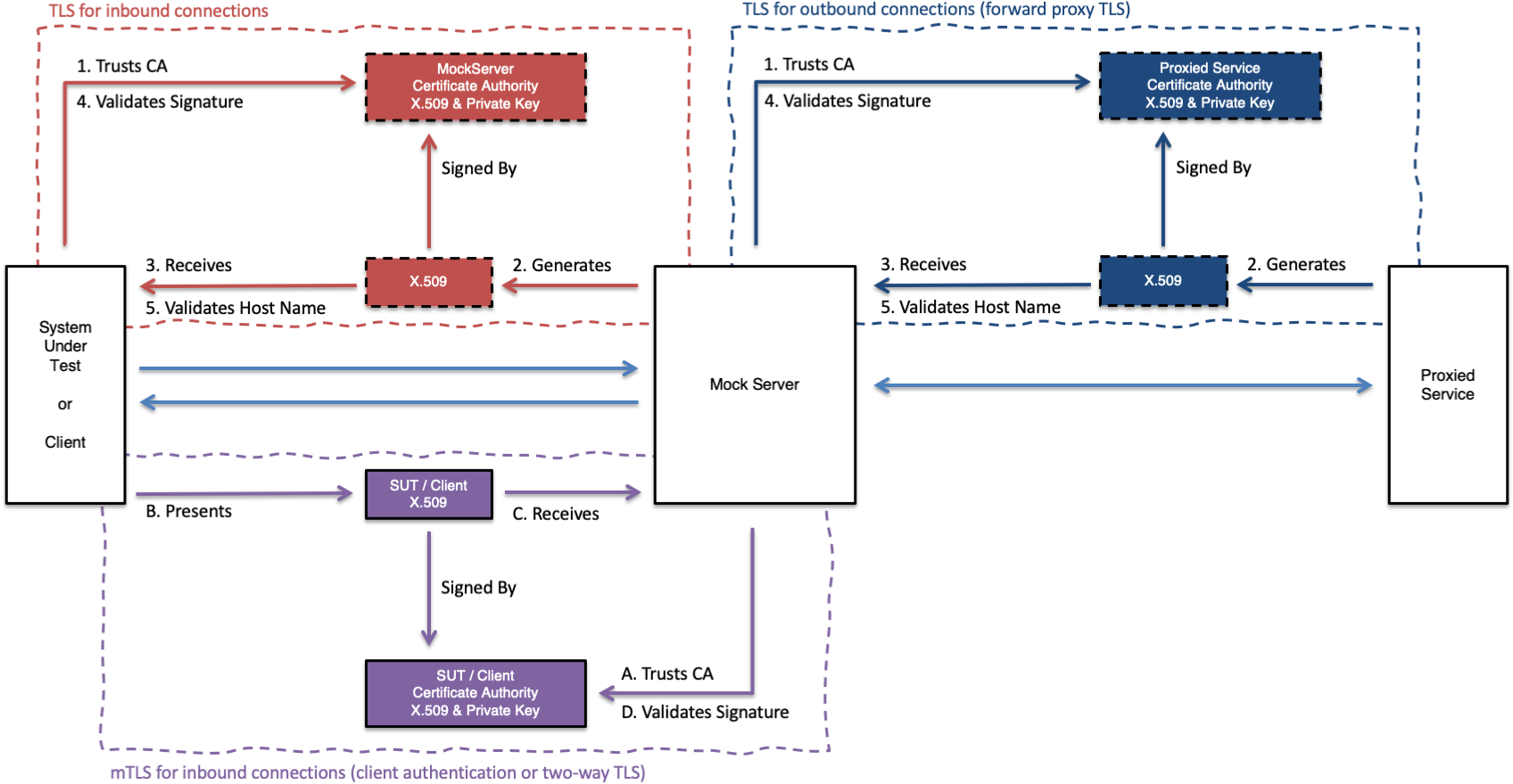
The majority of HTTP clients perform the following steps when making an HTTPS request:
- establish TCP connection to remote server
- perform TLS handshake with remote server and verify trust chain by receiving remote server X.509 Certificate and verifying it is signed by a known Certificate Authority
- perform hostname validation by comparing hostname (or IP address) of remote server with Subject Alternative Name (SAN) or Common Name (CN) on X.509
MockServer is able to mock the behaviour of multiple hostnames (i.e. servers) and present a valid X.509 Certificates for them. MockServer achieves this by dynamically generating its X.509 Certificate using an in-memory list of hostnames and ip addresses, this is described in more detail below.
It is important to ensure that any client calling MockServer over TLS trust MockServer as a Certificate Authority (CA) (i.e. trust the MockServer CA X.509) the different approaches to establishing this trust is described below.
MockServer provides multiple ways its TLS can be configured. The following things can be configured:
- How dynamic certificate are created including, hostname (i.e. CN & SAN) and ip address (i.e. SAN)
- The Certificate Authority X.509 Certificate and Private Key used to sign all generated X.509
- Dynamic creation of a unique (i.e. local) Certificate Authority X509 Certificate and Private Key instead of using the fixed Certificate Authority X509 Certificate and Private Key in the git repo.
- Require mTLS (also called client authentication or two-way TLS) for all TLS connections / HTTPS requests to MockServer
- Configure trust store and client X.509 used during forwarded and proxied requests to endpoints requiring mTLS
TLS Termination (No Passthrough)
Note: when proxying HTTPS traffic, MockServer performs man-in-the-middle (MITM) TLS termination. It decrypts incoming TLS connections, inspects the HTTP request content for expectation matching, and then re-encrypts traffic when forwarding to the upstream server. MockServer does not support TLS passthrough (where encrypted traffic is forwarded without decryption). This is by design — MockServer needs to inspect request content to match expectations, record requests for verification, and apply response actions.
Ensure MockServer Certificates Are Trusted
The MockServer CA X.509 must be considered a valid trust root to ensure MockServer's dynamically generate X.509 certificates are trusted by an HTTP Client. This means the CA X.509 needs to be added into the JVM, HTTP Client or operating system as appropriate.
Quick start: when run via the standalone JAR, Docker image, or mockserver CLI, MockServer writes the active CA certificate to ./mockserver-ca.pem at startup (absolute path logged) and prints a copy-paste proxy setup block containing the environment variables to set. Embedded usage stays silent; the file and block are produced on the first GET /mockserver/proxyConfiguration call instead. The endpoint is always available (plain text or JSON), regardless of how MockServer was started. See AI Traffic Inspection — Trust the MockServer CA Certificate for a step-by-step guide.
The MockServer CA X.509 can be found (in PEM format) in the MockServer github repo or can be loaded from the classpath location /org/mockserver/socket/CertificateAuthorityCertificate.pem
Operating System
It is possible to add the MockServer CA X.509 as a trusted root CA to your operating system, this will make most clients applications running on your OS (such as browsers) trust dynamically generated certificates from MockServer.
This is only an acceptable risk if it is done for a short period and the configuration setting dynamicallyCreateCertificateAuthorityCertificate is enabled to generate a local unique CA X.509 and Private Key that is saved to your local disk in the folder configured using directoryToSaveDynamicSSLCertificate.
If the configuration setting dynamicallyCreateCertificateAuthorityCertificate is not enabled, and your OS trusts the MockServer CA X.509, then this would leave your machine open to man-in-the-middle attacks because the corresponding Private Key is in the MockServer github repository. This would allow hackers to compromise all sensitive communicates such as to your bank or other sensitive sites.
Web Browsers
Browsers (such as Chrome, Firefox or IE) may not always trust dynamically generated certificates from MockServer because of Certificate Transparency and Public Key Pinning both of which make it hard to dynamically generate certificates that are trusted.
Some sites will work but others (such as google sites) won't work due to certificate pinning.
Browser that rely on Certificate Transparency will likely not trust dynamically generated certificates from MockServer
Java via Classpath
The following code shows how to load a file from the classpath or a relative filesystem location:
public void doSomething() {
    String mockServerCA = loadFileFromLocation("/org/mockserver/socket/CertificateAuthorityCertificate.pem");
}

public String loadFileFromLocation(String location) {
    location = location.trim().replaceAll("\\\\", "/");

    Path path;
    if (location.toLowerCase().startsWith("file:")) {
        path = Paths.get(URI.create(location));
    } else {
        path = Paths.get(location);
    }

    if (Files.exists(path)) {
        // org.apache.commons.io.FileUtils
        return FileUtils.readFileToString(path.toFile(), "UTF-8");
    } else {
        return loadFileFromClasspath(location);
    }
}

private String loadFileFromClasspath(String location) {
    try {
        InputStream inputStream = this.getClass().getResourceAsStream(location);
        try {
            if (inputStream == null) {
                inputStream = this.getClass().getClassLoader().getResourceAsStream(location);
            }

            if (inputStream == null) {
                inputStream = ClassLoader.getSystemResourceAsStream(location);
            }

            if (inputStream != null) {
                try {
                    // org.apache.commons.io.IOUtils
                    return IOUtils.toString(inputStream, Charsets.UTF_8);
                } catch (IOException e) {
                    throw new RuntimeException("Could not read " + location + " from the classpath", e);
                }
            }

            throw new RuntimeException("Could not find " + location + " on the classpath");
        } finally {
            if (inputStream != null) {
                inputStream.close();
            }
        }
    } catch (IOException ioe) {
        throw new RuntimeException("Exception closing input stream for " + location, ioe);
    }
}
Java DefaultSSLSocketFactory
Another mechanism to ensure the MockServer X.509 is trusted is to configure the DefaultSSLSocketFactory in the JVM using the following line:
HttpsURLConnection.setDefaultSSLSocketFactory(new KeyStoreFactory(new MockServerLogger()).sslContext().getSocketFactory());This can be used in a test case, as follows:
import org.junit.AfterClass;
import org.junit.BeforeClass;
import org.junit.Test;
import org.mockserver.integration.ClientAndServer;
import org.mockserver.logging.MockServerLogger;
import org.mockserver.socket.PortFactory;
import org.mockserver.socket.tls.KeyStoreFactory;

import javax.net.ssl.HttpsURLConnection;

public class ExampleTestClass {

    private static ClientAndServer mockServer;

    @BeforeClass
    public static void startMockServer() {
        // ensure all connection using HTTPS will use the SSL context defined by
        // MockServer to allow dynamically generated certificates to be accepted
        HttpsURLConnection.setDefaultSSLSocketFactory(new KeyStoreFactory(new MockServerLogger()).sslContext().getSocketFactory());
        mockServer = ClientAndServer.startClientAndServer(PortFactory.findFreePort());
    }

    @AfterClass
    public static void stopMockServer() {
        mockServer.stop();
    }

    @Test
    public void shouldDoSomething() {
        // test system
    }
}
Java Custom TrustStore (Programmatic)
If you cannot modify the JVM's default SSLSocketFactory, you can programmatically create a custom TrustStore that trusts MockServer's dynamically generated certificates and use it with a specific HTTP client:
import org.mockserver.logging.MockServerLogger;
import org.mockserver.socket.tls.KeyStoreFactory;

import javax.net.ssl.SSLContext;
import javax.net.ssl.TrustManagerFactory;
import java.net.HttpURLConnection;
import java.net.URL;
import java.security.KeyStore;

KeyStoreFactory keyStoreFactory = new KeyStoreFactory(new MockServerLogger());
KeyStore trustStore = keyStoreFactory.loadOrCreateKeyStore();

TrustManagerFactory trustManagerFactory =
    TrustManagerFactory.getInstance(TrustManagerFactory.getDefaultAlgorithm());
trustManagerFactory.init(trustStore);

SSLContext sslContext = SSLContext.getInstance("TLS");
sslContext.init(null, trustManagerFactory.getTrustManagers(), null);

HttpsURLConnection connection =
    (HttpsURLConnection) new URL("https://localhost:1080/some/path").openConnection();
connection.setSSLSocketFactory(sslContext.getSocketFactory());
This approach is useful when you need to trust MockServer's certificates for a specific connection without affecting other HTTPS connections in the JVM.
Java Keytool
The Java keytool command can also be used to add the MockServer CA X.509 certificate to the list of trust CA Certificates for a JVM, as follows:
keytool -import -v -keystore /usr/lib/jvm/java-8-openjdk-amd64/jre/lib/security/cacerts -alias mockserver-ca -file CertificateAuthorityCertificate.pem -storepass changeit -trustcacerts -nopromptAn example bash script showing how this can be done can be found in the MockServer github repo
Hostname Validation
MockServer is able to mock the behaviour of multiple hostnames (i.e. servers) and present a valid X.509 Certificates for them. MockServer achieves this by dynamically generating its X.509 Certificate using an in-memory list of hostnames and ip addresses. When the list of hostnames or ips addresses changes a new certificate is generated. The list of hostnames is updated, when:
- configuration for SAN hostnames or SAN IP addresses is specified
- an expectation is added containing a Host header with a hostname not seen before
- a request is received containing a Host header with a hostname not seen before
- a TLS handshake using Server Name Indication (SNI) with a hostname not seen before
Note: if a request is received with a Host header for a hostname not seen before the first request will fail validation because the TLS connection has already been established before the Host header can be read, any subsequent requests with that hostname will pass hostname validation.
mTLS Examples
The following examples show how to configure MockServer with mutual TLS (mTLS / client authentication) using self-generated certificates. A complete Docker Compose example is available in the MockServer repository.
Step 1: Generate Certificates
This example uses one CA to sign both server and client certificates. In production, server and client certificates may be issued by separate trusted CAs. The three certificate sets are:
- CA certificate and key — the root of trust; both MockServer and clients must trust this CA
- Server certificate and key — used by MockServer to identify itself to clients
- Client certificate and key — used by clients (curl, HTTP libraries) to authenticate to MockServer
MockServer accepts private keys in both PKCS#8 (-----BEGIN PRIVATE KEY-----) and PKCS#1 RSA (-----BEGIN RSA PRIVATE KEY-----) PEM format. The examples below use PKCS#8 for consistency. To convert a PKCS#1 key to PKCS#8:
openssl pkcs8 -topk8 -inform PEM -in private_key_PKCS_1.pem -out private_key_PKCS_8.pem -nocryptUsing OpenSSL (Recommended)
#!/usr/bin/env bash
set -euo pipefail

DAYS=3650
KEY_SIZE=2048

# 1. Generate Certificate Authority (CA)
openssl genpkey -algorithm RSA -pkeyopt rsa_keygen_bits:${KEY_SIZE} -out ca-key.pem
openssl req -new -x509 -key ca-key.pem -out ca.pem -days ${DAYS} \
    -subj "/C=UK/ST=England/L=London/O=MockServer/CN=MockServer CA"

# 2. Generate server certificate signed by CA
openssl genpkey -algorithm RSA -pkeyopt rsa_keygen_bits:${KEY_SIZE} -out server-key-pkcs8.pem
openssl req -new -key server-key-pkcs8.pem -out server.csr \
    -subj "/C=UK/ST=England/L=London/O=MockServer/CN=localhost"

cat > server-ext.cnf <<EOF
authorityKeyIdentifier=keyid,issuer
basicConstraints=CA:FALSE
keyUsage=digitalSignature,keyEncipherment
extendedKeyUsage=serverAuth
subjectAltName=DNS:localhost,DNS:mockserver,DNS:host.docker.internal,IP:127.0.0.1,IP:0.0.0.0
EOF

openssl x509 -req -in server.csr -CA ca.pem -CAkey ca-key.pem -CAcreateserial \
    -out server-cert.pem -days ${DAYS} -extfile server-ext.cnf

# Create certificate chain (leaf + CA)
cat server-cert.pem ca.pem > server-cert-chain.pem

# 3. Generate client certificate signed by CA
openssl genpkey -algorithm RSA -pkeyopt rsa_keygen_bits:${KEY_SIZE} -out client-key-pkcs8.pem
openssl req -new -key client-key-pkcs8.pem -out client.csr \
    -subj "/C=UK/ST=England/L=London/O=MockServer/CN=MockServer Client"

cat > client-ext.cnf <<EOF
authorityKeyIdentifier=keyid,issuer
basicConstraints=CA:FALSE
keyUsage=digitalSignature,keyEncipherment
extendedKeyUsage=clientAuth
EOF

openssl x509 -req -in client.csr -CA ca.pem -CAkey ca-key.pem -CAcreateserial \
    -out client-cert.pem -days ${DAYS} -extfile client-ext.cnf

cat client-cert.pem ca.pem > client-cert-chain.pem

# Clean up CSR and temp files
rm -f server.csr server-ext.cnf client.csr client-ext.cnf ca.srl
Using CFSSL (Alternative)
CFSSL is CloudFlare's PKI toolkit. Install with brew install cfssl.
#!/usr/bin/env bash
set -euo pipefail

# 1. Generate CA
cat > ca-csr.json <<EOF
{
  "key": { "algo": "rsa", "size": 2048 },
  "names": [{ "C": "UK", "L": "London", "O": "MockServer", "CN": "MockServer CA" }]
}
EOF
cfssl genkey -initca ca-csr.json | cfssljson -bare ca
rm -f ca.csr

# 2. Create signing config with explicit profiles and expiry
cat > cfssl-config.json <<EOF
{
  "signing": {
    "default": { "expiry": "87600h" },
    "profiles": {
      "server": {
        "expiry": "87600h",
        "usages": ["signing", "key encipherment", "server auth"]
      },
      "client": {
        "expiry": "87600h",
        "usages": ["signing", "key encipherment", "client auth"]
      }
    }
  }
}
EOF

# 3. Generate server certificate
cat > server-csr.json <<EOF
{
  "CN": "localhost",
  "hosts": ["localhost", "mockserver", "host.docker.internal", "127.0.0.1", "0.0.0.0"],
  "key": { "algo": "rsa", "size": 2048 },
  "names": [{ "C": "UK", "L": "London", "O": "MockServer" }]
}
EOF
cfssl gencert -ca ca.pem -ca-key ca-key.pem -config cfssl-config.json -profile server \
    server-csr.json | cfssljson -bare server
rm -f server.csr
openssl pkcs8 -topk8 -inform PEM -in server-key.pem -out server-key-pkcs8.pem -nocrypt
mv server.pem server-cert.pem
cat server-cert.pem ca.pem > server-cert-chain.pem

# 4. Generate client certificate
cat > client-csr.json <<EOF
{
  "CN": "MockServer Client",
  "key": { "algo": "rsa", "size": 2048 },
  "names": [{ "C": "UK", "L": "London", "O": "MockServer" }]
}
EOF
cfssl gencert -ca ca.pem -ca-key ca-key.pem -config cfssl-config.json -profile client \
    client-csr.json | cfssljson -bare client
rm -f client.csr
openssl pkcs8 -topk8 -inform PEM -in client-key.pem -out client-key-pkcs8.pem -nocrypt
mv client.pem client-cert.pem
cat client-cert.pem ca.pem > client-cert-chain.pem

# Clean up
rm -f ca-csr.json cfssl-config.json server-csr.json client-csr.json server-key.pem client-key.pem
Both approaches produce the same output files:
| File | Purpose |
|---|---|
ca-key.pem, ca.pem | CA private key and certificate (root of trust) |
server-key-pkcs8.pem, server-cert.pem | Server private key (PKCS#8) and certificate |
server-cert-chain.pem | Server certificate chain (leaf + CA) |
client-key-pkcs8.pem, client-cert.pem | Client private key (PKCS#8) and certificate |
client-cert-chain.pem | Client certificate chain (leaf + CA) |
Step 2: Data-Plane mTLS (Client Authentication for All Requests)
Data-plane mTLS requires every HTTPS client to present a valid certificate. Non-TLS (HTTP) requests receive a 426 Upgrade Required response. This is the most common mTLS setup.
Docker Compose Configuration
version: "2.4"
services:
  mockserver:
    image: mockserver/mockserver:latest
    ports:
      - "1080:1080"
    environment:
      MOCKSERVER_LOG_LEVEL: INFO
      MOCKSERVER_SERVER_PORT: 1080
      # Enable mTLS — require client certificates for all TLS connections
      MOCKSERVER_TLS_MUTUAL_AUTHENTICATION_REQUIRED: "true"
      # CA certificate used to verify client certificates
      MOCKSERVER_TLS_MUTUAL_AUTHENTICATION_CERTIFICATE_CHAIN: /certs/ca.pem
      # Custom CA for signing MockServer's own server certificate
      MOCKSERVER_CERTIFICATE_AUTHORITY_PRIVATE_KEY: /certs/ca-key.pem
      MOCKSERVER_CERTIFICATE_AUTHORITY_X509_CERTIFICATE: /certs/ca.pem
      # Custom server certificate and key (signed by the CA above)
      MOCKSERVER_TLS_PRIVATE_KEY_PATH: /certs/server-key-pkcs8.pem
      MOCKSERVER_TLS_X509_CERTIFICATE_PATH: /certs/server-cert-chain.pem
      # Validate TLS configuration at startup
      MOCKSERVER_PROACTIVELY_INITIALISE_TLS: "true"
      # Load expectations from file
      MOCKSERVER_INITIALIZATION_JSON_PATH: /config/expectationInitialiser.json
    volumes:
      - ./certs:/certs:ro
      - ./config:/config:ro
Testing with curl
Successful mTLS request (client presents certificate):
curl --cacert certs/ca.pem \
     --cert certs/client-cert.pem \
     --key certs/client-key-pkcs8.pem \
     https://localhost:1080/hello
Failed request without client certificate (TLS handshake fails):
curl --cacert certs/ca.pem https://localhost:1080/hello
# Error varies by TLS backend, e.g.: alert bad certificate / certificate required / handshake failure
Failed request over HTTP (returns 426 Upgrade Required):
curl http://localhost:1080/hello
# 426 Upgrade Required
Creating Expectations with curl over mTLS
When data-plane mTLS is enabled, creating expectations via the MockServer API also requires mTLS:
curl --cacert certs/ca.pem \
     --cert certs/client-cert.pem \
     --key certs/client-key-pkcs8.pem \
     -X PUT https://localhost:1080/mockserver/expectation \
     -H "Content-Type: application/json" \
     -d '[{
       "httpRequest": { "method": "GET", "path": "/api/users" },
       "httpResponse": {
         "statusCode": 200,
         "headers": { "Content-Type": ["application/json"] },
         "body": "[{\"id\": 1, \"name\": \"Alice\"}]"
       }
     }]'
Control-Plane mTLS (Securing the Management API Only)
Control-plane mTLS secures only the MockServer management API (expectations, verification, reset, etc.) while leaving the data plane accessible without client certificates. This is useful when you want to protect who can configure MockServer without requiring mTLS for all test traffic.
Docker Compose Configuration
version: "2.4"
services:
  mockserver:
    image: mockserver/mockserver:latest
    ports:
      - "1080:1080"
    environment:
      MOCKSERVER_LOG_LEVEL: INFO
      MOCKSERVER_SERVER_PORT: 1080
      # Control-plane mTLS — only management API requires client certificates
      MOCKSERVER_CONTROL_PLANE_TLS_MUTUAL_AUTHENTICATION_REQUIRED: "true"
      MOCKSERVER_CONTROL_PLANE_TLS_MUTUAL_AUTHENTICATION_CERTIFICATE_CHAIN: /certs/ca.pem
      # Custom CA for signing MockServer's server certificate
      MOCKSERVER_CERTIFICATE_AUTHORITY_PRIVATE_KEY: /certs/ca-key.pem
      MOCKSERVER_CERTIFICATE_AUTHORITY_X509_CERTIFICATE: /certs/ca.pem
      # Custom server certificate and key
      MOCKSERVER_TLS_PRIVATE_KEY_PATH: /certs/server-key-pkcs8.pem
      MOCKSERVER_TLS_X509_CERTIFICATE_PATH: /certs/server-cert-chain.pem
      MOCKSERVER_PROACTIVELY_INITIALISE_TLS: "true"
      MOCKSERVER_INITIALIZATION_JSON_PATH: /config/expectationInitialiser.json
    volumes:
      - ./certs:/certs:ro
      - ./config:/config:ro
Testing with curl
Data-plane requests work without client certificates:
# This works — data plane does not require mTLS
curl --cacert certs/ca.pem https://localhost:1080/hello
Management API requires client certificates:
# This fails — control plane requires mTLS
curl --cacert certs/ca.pem \
     -X PUT https://localhost:1080/mockserver/expectation \
     -H "Content-Type: application/json" \
     -d '[{"httpRequest": {"path": "/test"}, "httpResponse": {"body": "ok"}}]'
# 401 Unauthorized

# This works — client certificate provided
curl --cacert certs/ca.pem \
     --cert certs/client-cert.pem \
     --key certs/client-key-pkcs8.pem \
     -X PUT https://localhost:1080/mockserver/expectation \
     -H "Content-Type: application/json" \
     -d '[{"httpRequest": {"path": "/test"}, "httpResponse": {"body": "ok"}}]'
MockServer accepts only client certificates signed by a CA in controlPlaneTLSMutualAuthenticationCAChain. Changed: earlier versions also accepted client certificates signed by MockServer's own CA certificate. If your control-plane client certificates are signed by MockServer's CA, add that CA to the chain; if it is the CA bundled with MockServer, whose private key is published, sign them with your own CA instead. With no chain set, MockServer accepts client certificates signed by its own CA certificate, unless that is the bundled CA, in which case it refuses to start: set the chain, or give MockServer its own CA with mockserver.certificateAuthorityCertificate and mockserver.certificateAuthorityPrivateKey.
Which Certificates the Java Client Trusts
When MockServerClient connects over TLS (withSecure(true)) it checks MockServer's certificate against the JVM's default trusted certificate authorities plus MockServer's own CA certificate (mockserver.certificateAuthorityCertificate). To connect to a MockServer that uses a different CA, set mockserver.certificateAuthorityCertificate to that CA's PEM file in the JVM running the client. With control-plane mTLS (below) the client trusts only the CAs in controlPlaneTLSMutualAuthenticationCAChain, so that chain must include the CA that signed MockServer's certificate.
Changed: earlier versions also trusted MockServer's CA certificate (mockserver.certificateAuthorityCertificate) when controlPlaneTLSMutualAuthenticationCAChain was set. If MockServer's certificate is signed by MockServer's CA (the default) and you use control-plane mTLS, add MockServer's CA certificate to the chain the client uses, or the client fails the TLS handshake.
The client logs this at INFO the first time it sends a request. Server forwarding settings, such as mockserver.forwardProxyTLSX509CertificatesTrustManagerType, do not affect the client.
The WebSocket connections the client opens for callbacks and breakpoints check MockServer's certificate in the same way and, with control-plane mTLS, present the same client certificate. Earlier versions accepted any certificate on these connections.
Java Client with mTLS
When using MockServerClient with control-plane mTLS, configure the client certificate paths:
import org.mockserver.client.MockServerClient;
import org.mockserver.configuration.ConfigurationProperties;

// Enable control-plane mTLS on the client side
ConfigurationProperties.controlPlaneTLSMutualAuthenticationRequired(true);

// Client certificate and key for authenticating to MockServer
ConfigurationProperties.controlPlanePrivateKeyPath("/path/to/client-key-pkcs8.pem");
ConfigurationProperties.controlPlaneX509CertificatePath("/path/to/client-cert-chain.pem");

// the only CAs trusted for MockServer's server certificate: include the CA that signed it
ConfigurationProperties.controlPlaneTLSMutualAuthenticationCAChain("/path/to/ca.pem");

// Connect over HTTPS
MockServerClient client = new MockServerClient("localhost", 1080)
.withSecure(true);var mockServerClient = require('mockserver-client').mockServerClient;
// tls = true connects over HTTPS; the CA verifies MockServer's server
// certificate; clientCert/clientKey are presented for mutual TLS
var client = mockServerClient("localhost", 1080, undefined, true, "/path/to/ca.pem", {
clientCertPemFilePath: "/path/to/client-cert-chain.pem",
clientKeyPemFilePath: "/path/to/client-key-pkcs8.pem"
});from mockserver import MockServerClient
client = MockServerClient(
"localhost",
1080,
secure=True, # connect over HTTPS
ca_cert_path="/path/to/ca.pem", # verify MockServer's server certificate
client_cert_path="/path/to/client-cert-chain.pem", # present client certificate for mutual TLS
client_key_path="/path/to/client-key-pkcs8.pem",
)import mockserver "github.com/mock-server/mockserver-monorepo/mockserver-client-go/v9"
client := mockserver.New("localhost", 1080,
mockserver.WithTLS(), // connect over HTTPS
mockserver.WithCACertPEMPath("/path/to/ca.pem"), // verify MockServer's server certificate
mockserver.WithClientCertPEM( // present client certificate for mutual TLS
"/path/to/client-cert-chain.pem",
"/path/to/client-key-pkcs8.pem",
),
)using MockServer.Client;
// WithCaCertificate / WithClientCertificate both imply Secure() (HTTPS)
using var client = new MockServerClientBuilder("localhost", 1080)
.WithCaCertificate("/path/to/ca.pem") // verify MockServer's server certificate
.WithClientCertificate( // present client certificate for mutual TLS
"/path/to/client-cert-chain.pem",
"/path/to/client-key-pkcs8.pem")
.Build();use mockserver_client::ClientBuilder;
let client = ClientBuilder::new("localhost", 1080)
.secure(true) // connect over HTTPS
.ca_cert_pem_path("/path/to/ca.pem") // verify MockServer's server certificate
.client_cert_pem( // present client certificate for mutual TLS
"/path/to/client-cert-chain.pem",
"/path/to/client-key-pkcs8.pem",
)
.build()
.unwrap();use MockServer\MockServerClient;
// the fourth constructor argument (secure = true) connects over HTTPS
$client = (new MockServerClient('localhost', 1080, '', true))
->withCaCertificate('/path/to/ca.pem') // verify MockServer's server certificate
->withClientCertificate( // present client certificate for mutual TLS
'/path/to/client-cert-chain.pem',
'/path/to/client-key-pkcs8.pem'
);# present the client certificate (--cert/--key) and trust the CA (--cacert)
curl --cacert /path/to/ca.pem \
--cert /path/to/client-cert-chain.pem \
--key /path/to/client-key-pkcs8.pem \
-X PUT https://localhost:1080/mockserver/expectation \
-H "Content-Type: application/json" \
-d '[{"httpRequest": {"path": "/test"}, "httpResponse": {"body": "ok"}}]'The Ruby client can connect over HTTPS with CA verification (MockServer::Client.new('localhost', 1080, secure: true, ca_cert_path: '/path/to/ca.pem')), but does not currently support presenting a client certificate for control-plane mutual TLS — use the curl form above (or a reverse proxy) when Ruby must authenticate to an mTLS-protected control plane.
Matching Expectations on the Client Certificate
When a request is received over mutual TLS, an expectation can match on the client certificate the request presented — useful for returning different responses per client, or asserting that a specific client authenticated. Add a clientCertificate matcher to the request. It matches against the leaf certificate (the client's own certificate) using any combination of:
- subject — the certificate's Common Name (CN), full subject Distinguished Name, or any Subject Alternative Name (DNS / IP / email / URI)
- issuer — the issuing CA's Common Name (CN) or full issuer Distinguished Name
- fingerprintSha256 — the certificate's SHA-256 fingerprint (colons, whitespace and letter case are ignored, so
AB:CD:…andabcd…are equivalent)
Each value supports the usual matching options — a plain string, a regular expression, or a negated ("!…") value. A request that presents no client certificate never matches a clientCertificate criterion, and an expectation without a clientCertificate matcher behaves exactly as before (it matches regardless of any certificate). This is matching only — it does not enable or replace mTLS authentication (configured with tlsMutualAuthenticationRequired).
new MockServerClient("localhost", 1080)
    .when(
        request()
            .withPath("/orders")
            .withClientCertificate(
                new ClientCertificate()
                    .withSubject("my-service.example.com")
                    .withIssuer(".*Acme Internal CA.*")
                    .withFingerprintSha256("AB:CD:EF:01:23:45:67:89:AB:CD:EF:01:23:45:67:89:AB:CD:EF:01:23:45:67:89:AB:CD:EF:01:23:45:67:89")
            )
    )
    .respond(
        response()
            .withStatusCode(200)
            .withBody("authenticated client matched")
);var mockServerClient = require('mockserver-client').mockServerClient;
mockServerClient("localhost", 1080).mockAnyResponse({
"httpRequest": {
"path": "/orders",
"clientCertificate": {
"subject": "my-service.example.com",
"issuer": ".*Acme Internal CA.*",
"fingerprintSha256": "AB:CD:EF:01:23:45:67:89:AB:CD:EF:01:23:45:67:89:AB:CD:EF:01:23:45:67:89:AB:CD:EF:01:23:45:67:89"
}
},
"httpResponse": {
"statusCode": 200,
"body": "authenticated client matched"
}
}).then(
function () {
console.log("expectation created");
},
function (error) {
console.log(error);
}
);import json
import urllib.request
# the clientCertificate matcher has no typed setter in the Python client;
# submit the raw expectation JSON via the REST API
payload = [{
"httpRequest": {
"path": "/orders",
"clientCertificate": {
"subject": "my-service.example.com",
"issuer": ".*Acme Internal CA.*",
"fingerprintSha256": "AB:CD:EF:01:23:45:67:89:AB:CD:EF:01:23:45:67:89:AB:CD:EF:01:23:45:67:89:AB:CD:EF:01:23:45:67:89"
}
},
"httpResponse": {
"statusCode": 200,
"body": "authenticated client matched"
}
}]
req = urllib.request.Request(
"http://localhost:1080/mockserver/expectation",
data=json.dumps(payload).encode("utf-8"),
headers={"Content-Type": "application/json"},
method="PUT",
)
urllib.request.urlopen(req)require 'net/http'
require 'json'
# the clientCertificate matcher has no typed setter in the Ruby client;
# submit the raw expectation JSON via the REST API
payload = [{
'httpRequest' => {
'path' => '/orders',
'clientCertificate' => {
'subject' => 'my-service.example.com',
'issuer' => '.*Acme Internal CA.*',
'fingerprintSha256' => 'AB:CD:EF:01:23:45:67:89:AB:CD:EF:01:23:45:67:89:AB:CD:EF:01:23:45:67:89:AB:CD:EF:01:23:45:67:89'
}
},
'httpResponse' => {
'statusCode' => 200,
'body' => 'authenticated client matched'
}
}]
uri = URI('http://localhost:1080/mockserver/expectation')
request = Net::HTTP::Put.new(uri, 'Content-Type' => 'application/json')
request.body = JSON.generate(payload)
Net::HTTP.new(uri.host, uri.port).request(request)package main
import (
"bytes"
"net/http"
)
func main() {
// the clientCertificate matcher has no typed setter in the Go client;
// submit the raw expectation JSON via the REST API
body := []byte(`[{
"httpRequest": {
"path": "/orders",
"clientCertificate": {
"subject": "my-service.example.com",
"issuer": ".*Acme Internal CA.*",
"fingerprintSha256": "AB:CD:EF:01:23:45:67:89:AB:CD:EF:01:23:45:67:89:AB:CD:EF:01:23:45:67:89:AB:CD:EF:01:23:45:67:89"
}
},
"httpResponse": {
"statusCode": 200,
"body": "authenticated client matched"
}
}]`)
req, _ := http.NewRequest("PUT",
"http://localhost:1080/mockserver/expectation",
bytes.NewReader(body))
req.Header.Set("Content-Type", "application/json")
http.DefaultClient.Do(req)
}using MockServer.Client;
using MockServer.Client.Models;
using var client = new MockServerClient("localhost", 1080);
client.When(
new HttpRequest
{
Path = "/orders",
ClientCertificate = new ClientCertificate
{
Subject = "my-service.example.com",
Issuer = ".*Acme Internal CA.*",
FingerprintSha256 = "AB:CD:EF:01:23:45:67:89:AB:CD:EF:01:23:45:67:89:AB:CD:EF:01:23:45:67:89:AB:CD:EF:01:23:45:67:89"
}
}
).Respond(
HttpResponse.Response()
.WithStatusCode(200)
.WithBody("authenticated client matched")
);use mockserver_client::{ClientBuilder, HttpRequest, HttpResponse};
use serde_json::json;
let client = ClientBuilder::new("localhost", 1080).build().unwrap();
// clientCertificate has no dedicated builder method; set it via the
// forward-compatible `extra` catch-all, which is flattened into httpRequest
let mut request = HttpRequest::new().path("/orders");
request.extra.insert(
"clientCertificate".to_string(),
json!({
"subject": "my-service.example.com",
"issuer": ".*Acme Internal CA.*",
"fingerprintSha256": "AB:CD:EF:01:23:45:67:89:AB:CD:EF:01:23:45:67:89:AB:CD:EF:01:23:45:67:89:AB:CD:EF:01:23:45:67:89"
}),
);
client
.when(request)
.respond(HttpResponse::new().status_code(200).body("authenticated client matched"))
.unwrap();// the clientCertificate matcher has no typed setter in the PHP client;
// submit the raw expectation JSON via the REST API
$ch = curl_init('http://localhost:1080/mockserver/expectation');
curl_setopt_array($ch, [
CURLOPT_CUSTOMREQUEST => 'PUT',
CURLOPT_HTTPHEADER => ['Content-Type: application/json'],
CURLOPT_POSTFIELDS => json_encode([[
'httpRequest' => [
'path' => '/orders',
'clientCertificate' => [
'subject' => 'my-service.example.com',
'issuer' => '.*Acme Internal CA.*',
'fingerprintSha256' => 'AB:CD:EF:01:23:45:67:89:AB:CD:EF:01:23:45:67:89:AB:CD:EF:01:23:45:67:89:AB:CD:EF:01:23:45:67:89',
],
],
'httpResponse' => [
'statusCode' => 200,
'body' => 'authenticated client matched',
],
]]),
CURLOPT_RETURNTRANSFER => true,
]);
curl_exec($ch);curl -v -X PUT "http://localhost:1080/mockserver/expectation" -d '{
"httpRequest" : {
"path" : "/orders",
"clientCertificate" : {
"subject" : "my-service.example.com",
"issuer" : ".*Acme Internal CA.*",
"fingerprintSha256" : "AB:CD:EF:01:23:45:67:89:AB:CD:EF:01:23:45:67:89:AB:CD:EF:01:23:45:67:89:AB:CD:EF:01:23:45:67:89"
}
},
"httpResponse" : {
"statusCode" : 200,
"body" : "authenticated client matched"
}
}'See REST API for full JSON specification
BouncyCastle FIPS Support
MockServer supports BouncyCastle FIPS (bc-fips) as a drop-in alternative to the standard BouncyCastle provider (bcprov-jdk18on). This is useful in environments that require FIPS 140-2 compliant cryptographic modules.
MockServer automatically detects which BouncyCastle provider is available at runtime — no configuration changes are needed. To use FIPS mode:
- Exclude the standard BouncyCastle dependency (
bcprov-jdk18on) from your classpath - Add the BouncyCastle FIPS dependency (
bc-fips) instead - Ensure the FIPS provider is registered with the JVM (e.g. via
java.securityconfiguration or programmatically)
Example Maven dependency replacement:
<dependency>
    <groupId>org.bouncycastle</groupId>
    <artifactId>bc-fips</artifactId>
    <!-- use the latest FIPS-certified bc-fips release -->
    <version>...</version>
</dependency>
MockServer will use whichever provider it finds on the classpath. If both are present, the standard (non-FIPS) provider is used. If neither is available, MockServer falls back to the JVM's default cryptographic provider.
TLS Troubleshooting
The following are common TLS-related issues and their solutions:
SSL Context Initialization Failure
If you see an error like javax.net.ssl.SSLException: java.lang.RuntimeException: Unexpected error: java.security.InvalidAlgorithmParameterException: the trustAnchors parameter must be non-empty, this means the JVM's trust store is empty or misconfigured. This is common in minimal Docker images or Linux systems where the CA certificates package is not installed.
Solution:
# Debian/Ubuntu
apt-get install -y ca-certificates-java
update-ca-certificates -f

# Alpine
apk add --no-cache ca-certificates java-cacerts
Certificate Not Trusted
If your HTTP client rejects MockServer's certificate, ensure the MockServer CA certificate is trusted. See Ensure MockServer Certificates Are Trusted above for multiple approaches (OS trust store, JVM keytool, programmatic SSLContext).
MockServer logs a client's failed TLS handshake as a warning, over HTTPS and over HTTP/3, with the client's address, the reason the handshake failed and its probable cause, for example the client does not trust MockServer's Certificate Authority. It warns once for each client address; later failed handshakes from the same address are logged at DEBUG, so a client that keeps retrying does not fill the log. To see every failure, set logLevel to DEBUG.
First Request Fails with New Hostname
When MockServer receives a request with a Host header for a hostname it has not seen before, the first request may fail TLS hostname validation. This is because the TLS handshake completes before MockServer can read the Host header and regenerate its certificate. Subsequent requests with that hostname will succeed. To avoid this, pre-configure the expected hostnames using the sslSubjectAlternativeNameDomains configuration property.
Connection Reset or Broken Pipe
If you see "Connection reset" or "Broken pipe" errors during TLS connections, common causes include:
- Expired test certificates: MockServer's dynamically generated Certificate Authority is valid for 10 years, and the server (leaf) certificate it issues is valid for 397 days by default (short enough to satisfy Apple platforms, which reject TLS server certificates valid for more than 825 days). MockServer automatically regenerates the server certificate well before it expires, so a long-running server never serves an expired certificate. To restore the previous long-lived certificate set sslCertificateLeafValidityInDays to a larger value such as 3650. If you supply your own custom CA certificates for testing, ensure they have not expired.
- Protocol mismatch: Ensure the client and MockServer agree on a TLS protocol version. MockServer supports TLSv1, TLSv1.1, and TLSv1.2 by default (see tlsProtocols). To restrict to modern protocols only, set tlsAllowInsecureProtocols to false, which strips TLSv1 and TLSv1.1 from the effective list. Use the tlsProtocols configuration property to adjust supported protocols.
- Corporate TLS inspection proxies: If your network uses a TLS inspection proxy, you may need to add the proxy's CA certificate to the JVM trust store, or configure the JAVA_OPTS with -Djavax.net.ssl.trustStore pointing to a trust store that includes both the proxy CA and MockServer CA certificates.
Certificate Chain Is Not Valid (mTLS)
If you see java.security.KeyStoreException: Certificate chain is not valid, the server certificate is not signed by the configured Certificate Authority. This commonly happens when:
- Server cert and CA don't match: The certificate in
MOCKSERVER_TLS_X509_CERTIFICATE_PATHwas not signed by the CA inMOCKSERVER_CERTIFICATE_AUTHORITY_X509_CERTIFICATE. Regenerate the server certificate using the same CA. - Missing certificate chain: The certificate file must contain the full chain (leaf certificate followed by CA certificate). Create it with:
cat server-cert.pem ca.pem > server-cert-chain.pem - Wrong key format: The private key must be in PKCS#8 format (begins with
-----BEGIN PRIVATE KEY-----). PKCS#1 keys (beginning with-----BEGIN RSA PRIVATE KEY-----) must be converted:openssl pkcs8 -topk8 -inform PEM -in key-pkcs1.pem -out key-pkcs8.pem -nocrypt
426 Upgrade Required (mTLS)
When tlsMutualAuthenticationRequired is enabled, MockServer requires all connections to use TLS. If a plain HTTP request is received, MockServer returns 426 Upgrade Required to indicate that the client must use HTTPS with a client certificate. Change your request URL from http:// to https:// and provide a client certificate.
Bad Certificate / Handshake Failure (mTLS)
If curl reports sslv3 alert bad certificate or SSL_ERROR_HANDSHAKE_FAILURE_ALERT, the client certificate was rejected by MockServer. Check that:
- The client certificate was signed by the same CA configured in
MOCKSERVER_TLS_MUTUAL_AUTHENTICATION_CERTIFICATE_CHAIN - The client certificate has not expired
- You are passing both
--certand--keyto curl
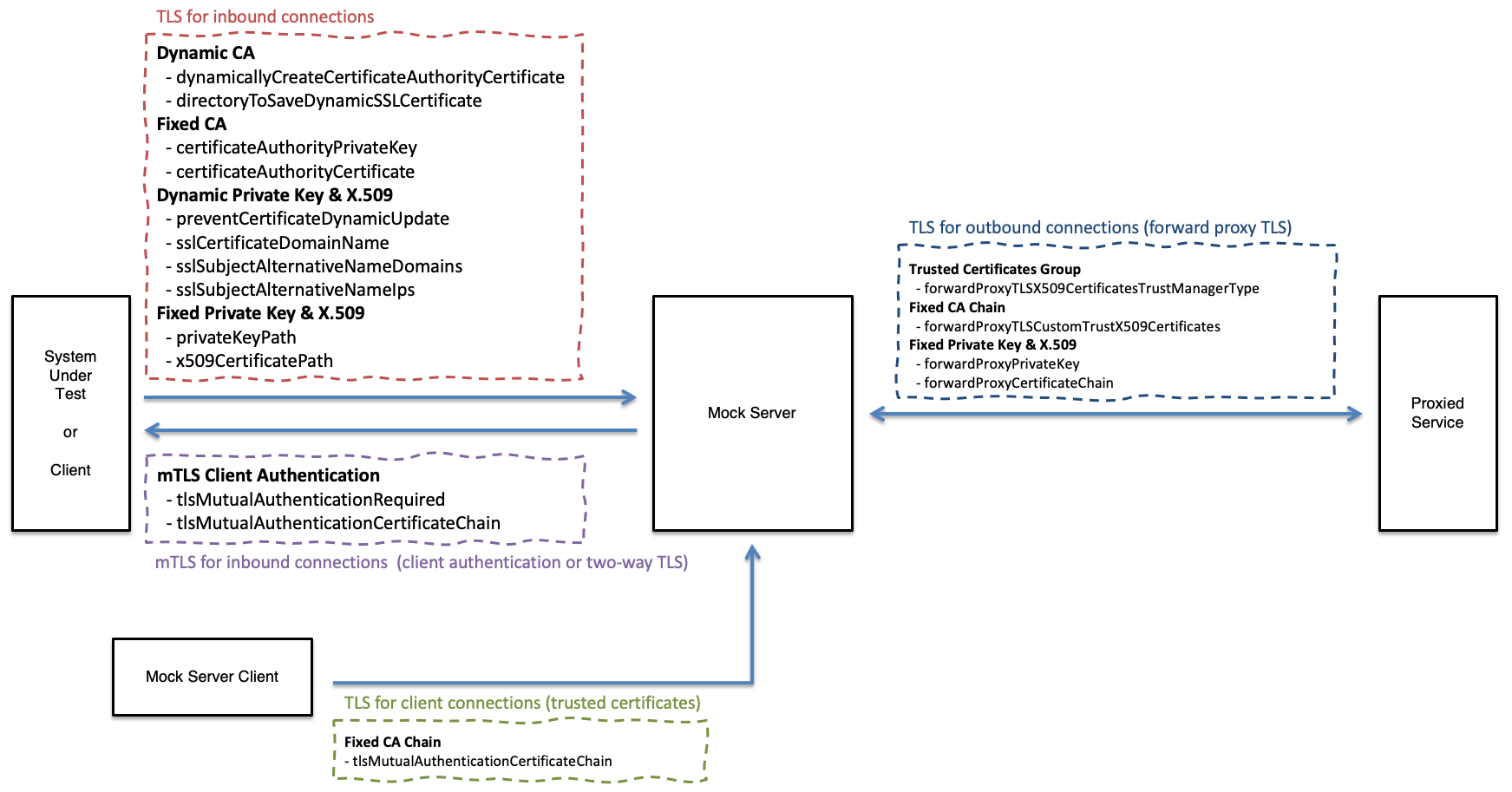
TLS Configuration:
The following diagram shows where TLS/mTLS configuration settings are used:
Inbound TLS (for Received Requests)
Dynamic Inbound Certificate Authority X.509 & Private Key
Enable dynamic creation of Certificate Authority X.509 Certificate and Private Key
Enable this property to increase the security of trusting the MockServer Certificate Authority X.509 by ensuring a local dynamic value is used instead of the public value in the MockServer git repo.
These PEM files will be created and saved in the directory specified with configuration property directoryToSaveDynamicSSLCertificate.
A Certificate Authority X.509 Certificate and Private Key will only be created if the files used to save them are not already present. Therefore, if MockServer is re-started multiple times with the same value for directoryToSaveDynamicSSLCertificate. the Certificate Authority X.509 Certificate and Private Key will only be created once.
Type: boolean Default: false
Java Code:
ConfigurationProperties.dynamicallyCreateCertificateAuthorityCertificate(boolean enable)System Property:
-Dmockserver.dynamicallyCreateCertificateAuthorityCertificate=...Environment Variable:
MOCKSERVER_DYNAMICALLY_CREATE_CERTIFICATE_AUTHORITY_CERTIFICATE=...Property File:
mockserver.dynamicallyCreateCertificateAuthorityCertificate=...Example:
-Dmockserver.dynamicallyCreateCertificateAuthorityCertificate="true"Directory used to save the dynamically generated Certificate Authority X.509 Certificate and Private Key.
This directory will only be used if MockServer is configured to create a dynamic Certificate Authority X.509 certificate and private key using dynamicallyCreateCertificateAuthorityCertificate.
By default the certificate and private key are written to the current working directory (.) of the MockServer process.
Type: string Default: . (current working directory)
Java Code:
ConfigurationProperties.directoryToSaveDynamicSSLCertificate(String directoryToSaveDynamicSSLCertificate)System Property:
-Dmockserver.directoryToSaveDynamicSSLCertificate=...Environment Variable:
MOCKSERVER_CERTIFICATE_DIRECTORY_TO_SAVE_DYNAMIC_SSL_CERTIFICATE=...Property File:
mockserver.directoryToSaveDynamicSSLCertificate=...Example:
-Dmockserver.directoryToSaveDynamicSSLCertificate="/some/existing/path"Proactively initialise TLS during start to ensure that if dynamicallyCreateCertificateAuthorityCertificate is enabled the Certificate Authority X.509 Certificate and Private Key will be created during start up and not when the first TLS connection is received.
This setting will also ensure any configured private key and X.509 will be loaded during start up and not when the first TLS connection is received to give immediate feedback on any related TLS configuration errors.
Type: boolean Default: false
Java Code:
ConfigurationProperties.proactivelyInitialiseTLS(boolean enable)System Property:
-Dmockserver.proactivelyInitialiseTLS=...Environment Variable:
MOCKSERVER_PROACTIVELY_INITIALISE_TLS=...Property File:
mockserver.proactivelyInitialiseTLS=...Example:
-Dmockserver.proactivelyInitialiseTLS="true"TLS Protocol Versions
Comma separated list of TLS protocol versions to enable for both inbound and outbound TLS connections.
The default value is TLSv1.2,TLSv1.3. TLSv1 and TLSv1.1 are deprecated by RFC 8996 (they are vulnerable to the BEAST and POODLE attacks) and are no longer enabled by default, and TLSv1.3 is now enabled by default.
Breaking change: a client that can only negotiate TLSv1 or TLSv1.1 will no longer be able to complete a handshake with MockServer. If you genuinely need the legacy protocols for an old client, set tlsProtocols back to TLSv1,TLSv1.1,TLSv1.2 and set tlsAllowInsecureProtocols to true — both are required, because the insecure-protocol filter strips TLSv1/TLSv1.1 unless they are explicitly allowed.
Type: string Default: TLSv1.2,TLSv1.3
Java Code:
ConfigurationProperties.tlsProtocols("TLSv1.2,TLSv1.3")System Property:
-Dmockserver.tlsProtocols=...Environment Variable:
MOCKSERVER_TLS_PROTOCOLS=...Property File:
mockserver.tlsProtocols=...Example (enable TLS 1.2 and 1.3 only):
-Dmockserver.tlsProtocols="TLSv1.2,TLSv1.3"Example (Docker environment variable):
MOCKSERVER_TLS_PROTOCOLS="TLSv1.2,TLSv1.3"Whether to honour deprecated TLSv1 / TLSv1.1 entries that appear in tlsProtocols.
The default is false, so even if TLSv1 or TLSv1.1 are present in tlsProtocols they are stripped before the SSL context is built. Set this to true only if a legacy client genuinely cannot negotiate TLSv1.2/TLSv1.3, together with adding the protocols back to tlsProtocols.
Type: boolean Default: false
Java Code:
ConfigurationProperties.tlsAllowInsecureProtocols(true)System Property:
-Dmockserver.tlsAllowInsecureProtocols=...Environment Variable:
MOCKSERVER_TLS_ALLOW_INSECURE_PROTOCOLS=...Property File:
mockserver.tlsAllowInsecureProtocols=...Example:
-Dmockserver.tlsAllowInsecureProtocols="true"Dynamic Inbound Private Key & X.509
MockServer dynamically updates the Subject Alternative Name (SAN) values for its TLS certificate to add domain names and IP addresses from request Host headers and Host headers in expectations, this configuration setting disables this automatic update and only uses SAN value provided in TLS Subject Alternative Name Domains and TLS Subject Alternative Name IPs configuration properties.
When this property is enabled the generated X.509 Certificate and Private Key pair are saved to the directoryToSaveDynamicSSLCertificate as Certificate.pem and PKCS8PrivateKey.pem
Type: boolean Default: false
Java Code:
ConfigurationProperties.preventCertificateDynamicUpdate(boolean prevent)System Property:
-Dmockserver.preventCertificateDynamicUpdate=...Environment Variable:
MOCKSERVER_PREVENT_CERTIFICATE_DYNAMIC_UPDATE=...Property File:
mockserver.preventCertificateDynamicUpdate=...Example:
-Dmockserver.preventCertificateDynamicUpdate="true"The domain name for auto-generate TLS certificates
Type: string Default: localhost
Java Code:
ConfigurationProperties.sslCertificateDomainName(String domainName)System Property:
-Dmockserver.sslCertificateDomainName=...Environment Variable:
MOCKSERVER_SSL_CERTIFICATE_DOMAIN_NAME=...Property File:
mockserver.sslCertificateDomainName=...Example:
-Dmockserver.sslCertificateDomainName="localhost"The Subject Alternative Name (SAN) domain names for auto-generate TLS certificates as a comma separated list
Type: string Default: localhost
Java Code:
ConfigurationProperties.addSslSubjectAlternativeNameDomains(String... additionalSubjectAlternativeNameDomains)ConfigurationProperties.clearSslSubjectAlternativeNameDomains()System Property:
-Dmockserver.sslSubjectAlternativeNameDomains=...Environment Variable:
MOCKSERVER_SSL_SUBJECT_ALTERNATIVE_NAME_DOMAINS=...Property File:
mockserver.sslSubjectAlternativeNameDomains=...Example:
-Dmockserver.sslSubjectAlternativeNameDomains="localhost,www.foo.bar"The Subject Alternative Name (SAN) IP addresses for auto-generate TLS certificates as a comma separated list
Type: string Default: 127.0.0.1,0.0.0.0
Java Code:
ConfigurationProperties.addSslSubjectAlternativeNameIps(String... additionalSubjectAlternativeNameIps)ConfigurationProperties.clearSslSubjectAlternativeNameIps()System Property:
-Dmockserver.sslSubjectAlternativeNameIps=...Environment Variable:
MOCKSERVER_SSL_SUBJECT_ALTERNATIVE_NAME_IPS=...Property File:
mockserver.sslSubjectAlternativeNameIps=...Example:
-Dmockserver.sslSubjectAlternativeNameIps="127.0.0.1,0.0.0.0"The maximum number of dynamically-discovered Subject Alternative Names (SANs) the auto-generated server certificate will accumulate. MockServer adds a SAN for each new hostname it observes via SNI or the Host header and regenerates the leaf certificate each time. Without a cap, a client sending many distinct hostnames could grow the SAN list without bound, causing unbounded memory and CPU use and eventually producing a certificate too large to complete a TLS handshake.
When the cap is reached, the oldest dynamically-discovered entry is evicted and a warning is logged. Explicitly configured names — including the default localhost and any names set via sslSubjectAlternativeNameDomains or sslSubjectAlternativeNameIps — are never evicted.
Raise this value if you are proxying more than 100 distinct hostnames in a single MockServer instance and are seeing eviction warnings or intermittent certificate name-mismatch errors for hosts used earlier in a long-running session.
Type: integer Default: 100
Java Code:
ConfigurationProperties.maxSubjectAlternativeNames(int maxSubjectAlternativeNames)System Property:
-Dmockserver.maxSubjectAlternativeNames=...Environment Variable:
MOCKSERVER_MAX_SUBJECT_ALTERNATIVE_NAMES=...Property File:
mockserver.maxSubjectAlternativeNames=...Example:
-Dmockserver.maxSubjectAlternativeNames=200Number of days the auto-generated server (leaf) TLS certificate is valid for. The default of 397 keeps the certificate inside Apple's 825-day maximum for TLS server certificates (iOS 13 / macOS 10.15); the previous 10-year certificate exceeded this limit and can cause TLS handshakes to fail on Apple platforms. MockServer automatically regenerates the certificate well before it expires, so a long-running server never serves an expired certificate.
Raise this (for example to 3650) only if you depend on the previous long-lived certificate. A non-positive value falls back to the default. The dynamically generated Certificate Authority is unaffected and keeps its long (10 year) life.
Type: integer Default: 397
Java Code:
ConfigurationProperties.sslCertificateLeafValidityInDays(int sslCertificateLeafValidityInDays)System Property:
-Dmockserver.sslCertificateLeafValidityInDays=...Environment Variable:
MOCKSERVER_SSL_CERTIFICATE_LEAF_VALIDITY_IN_DAYS=...Property File:
mockserver.sslCertificateLeafValidityInDays=...Example:
-Dmockserver.sslCertificateLeafValidityInDays=3650Fixed (i.e. Custom) Inbound Certificate Authority X.509 & Private Key
Location of custom file for Certificate Authority for TLS, the private key must be a PKCS#8 or PKCS#1 PEM file and must match the TLS Certificate Authority X.509 Certificate.
To convert a PKCS#1 PEM file (i.e. default for Bouncy Castle) to a PKCS#8 PEM file the following command can be used: openssl pkcs8 -topk8 -inform PEM -in private_key_PKCS_1.pem -out private_key_PKCS_8.pem -nocrypt
Type: string Default: the built-in MockServer CA private key (org/mockserver/socket/PKCS8CertificateAuthorityPrivateKey.pem on the classpath)
Java Code:
ConfigurationProperties.certificateAuthorityPrivateKey(String certificateAuthorityPrivateKey)System Property:
-Dmockserver.certificateAuthorityPrivateKey=...Environment Variable:
MOCKSERVER_CERTIFICATE_AUTHORITY_PRIVATE_KEY=...Property File:
mockserver.certificateAuthorityPrivateKey=...Example:
-Dmockserver.certificateAuthorityPrivateKey="/some/existing/path"Location of custom file for Certificate Authority for TLS, the certificate must be a X.509 PEM file and must match the TLS Certificate Authority Private Key.
Type: string Default: the built-in MockServer CA certificate (org/mockserver/socket/CertificateAuthorityCertificate.pem on the classpath)
Java Code:
ConfigurationProperties.certificateAuthorityCertificate(String certificateAuthorityCertificate)System Property:
-Dmockserver.certificateAuthorityCertificate=...Environment Variable:
MOCKSERVER_CERTIFICATE_AUTHORITY_X509_CERTIFICATE=...Property File:
mockserver.certificateAuthorityCertificate=...Example:
-Dmockserver.certificateAuthorityCertificate="/some/existing/path"Fixed (i.e. Custom) Inbound Private Key & X.509
File system path or classpath location of a fixed custom private key for TLS connections into MockServer.
The private key must be a PKCS#8 or PKCS#1 PEM file and must be the private key corresponding to the x509CertificatePath X.509 (public key) configuration.
The certificateAuthorityCertificate configuration must be the Certificate Authority for the corresponding X.509 certificate (i.e. able to valid its signature), see: x509CertificatePath.
To convert a PKCS#1 (i.e. default for Bouncy Castle) to a PKCS#8 the following command can be used: openssl pkcs8 -topk8 -inform PEM -in private_key_PKCS_1.pem -out private_key_PKCS_8.pem -nocrypt
This configuration will be ignored unless x509CertificatePath is also set.
Type: string Default: null
Java Code:
ConfigurationProperties.privateKeyPath(String privateKeyPath)System Property:
-Dmockserver.privateKeyPath=...Environment Variable:
MOCKSERVER_TLS_PRIVATE_KEY_PATH=...Property File:
mockserver.privateKeyPath=...Example:
-Dmockserver.privateKeyPath="/some/existing/path"File system path or classpath location of a fixed custom X.509 Certificate for TLS connections into MockServer
The certificate must be a X.509 PEM file and must be the public key corresponding to the privateKeyPath private key configuration.
The certificateAuthorityCertificate configuration must be the Certificate Authority for this certificate (i.e. able to valid its signature).
This configuration will be ignored unless privateKeyPath is also set.
Type: string Default: null
Java Code:
ConfigurationProperties.x509CertificatePath(String x509CertificatePath)System Property:
-Dmockserver.x509CertificatePath=...Environment Variable:
MOCKSERVER_TLS_X509_CERTIFICATE_PATH=...Property File:
mockserver.x509CertificatePath=...Example:
-Dmockserver.x509CertificatePath="/some/existing/path"Inbound mTLS Client Authentication (for Received Requests)
Require mTLS (also called client authentication and two-way TLS) for all TLS connections / HTTPS requests to MockServer
Type: boolean Default: false
Java Code:
ConfigurationProperties.tlsMutualAuthenticationRequired(boolean enable)System Property:
-Dmockserver.tlsMutualAuthenticationRequired=...Environment Variable:
MOCKSERVER_TLS_MUTUAL_AUTHENTICATION_REQUIRED=...Property File:
mockserver.tlsMutualAuthenticationRequired=...Example:
-Dmockserver.tlsMutualAuthenticationRequired="true"File system path or classpath location of custom mTLS (TLS client authentication) X.509 Certificate Chain for Trusting (i.e. signature verification of) Client X.509 Certificates, the certificate chain must be a X.509 PEM file.
This certificate chain will be used if MockServer performs mTLS (client authentication) for inbound TLS connections because tlsMutualAuthenticationRequired is enabled
This configuration property is also used for MockServerClient to trust outbound TLS X.509 certificates i.e. TLS connections to MockServer
Type: string Default: null
Java Code:
ConfigurationProperties.tlsMutualAuthenticationCertificateChain(String certificateChain)System Property:
-Dmockserver.tlsMutualAuthenticationCertificateChain=...Environment Variable:
MOCKSERVER_TLS_MUTUAL_AUTHENTICATION_CERTIFICATE_CHAIN=...Property File:
mockserver.tlsMutualAuthenticationCertificateChain=...Example:
-Dmockserver.tlsMutualAuthenticationCertificateChain="/some/existing/path"Outbound Client TLS/mTLS (for Forwarded or Proxied Requests)
Configure trusted set of certificates for forwarded or proxied requests (i.e. TLS connections out of MockServer).
MockServer will only be able to establish a TLS connection to endpoints that have a trusted X.509 certificate according to the trust manager type, as follows:
- ANY - Insecure, trusts all X.509 certificates and does not perform host name verification (the default).
- JVM - Trusts all X.509 certificates trusted by the JVM, and verifies the upstream host name against the certificate (unless forwardProxyTLSHostnameVerificationEnabled is set to false).
- CUSTOM - Trusts all X.509 certificates specified in forwardProxyTLSCustomTrustX509Certificates configuration value, and verifies the upstream host name against the certificate (unless forwardProxyTLSHostnameVerificationEnabled is set to false).
When the TLS connection to the upstream cannot be established — for example its certificate is not trusted, is for another host name, the upstream does not speak TLS, the upstream closes the connection during the handshake, or the handshake takes longer than socketConnectionTimeout — MockServer answers the request with a 502 Bad Gateway whose body says why, such as TLS with the upstream failed: SSLHandshakeException: PKIX path building failed: ..., and logs the failure as an error with the request. An upstream that closes the connection during the handshake, which is also how some servers refuse a TLS version or cipher they do not support, gives TLS with the upstream failed: SSLHandshakeException: upstream closed the connection during the TLS handshake.
Type: string Default: ANY
Java Code:
ConfigurationProperties.forwardProxyTLSX509CertificatesTrustManagerType(String trustManagerType)System Property:
-Dmockserver.forwardProxyTLSX509CertificatesTrustManagerType=...Environment Variable:
MOCKSERVER_FORWARD_PROXY_TLS_X509_CERTIFICATES_TRUST_MANAGER_TYPE=...Property File:
mockserver.forwardProxyTLSX509CertificatesTrustManagerType=...Example:
-Dmockserver.forwardProxyTLSX509CertificatesTrustManagerType="CUSTOM"Whether to verify the upstream host name against its certificate when MockServer forwards or proxies over TLS with a validating trust manager (forwardProxyTLSX509CertificatesTrustManagerType of JVM or CUSTOM).
The default is true. Without host name verification, any certificate signed by a trusted CA — for any host name — would be accepted, which would leave MockServer open to a man-in-the-middle it believes it is protected from. So when you opt into real upstream validation (JVM or CUSTOM) the upstream host name is verified against the certificate as well.
This has no effect for the ANY trust manager type (the default), which deliberately trusts everything and performs no host name verification. Set this to false when you legitimately need to connect to an upstream whose certificate host name does not match the address you connect to (a common testing scenario) while still validating the certificate chain.
Type: boolean Default: true
Java Code:
ConfigurationProperties.forwardProxyTLSHostnameVerificationEnabled(false)System Property:
-Dmockserver.forwardProxyTLSHostnameVerificationEnabled=...Environment Variable:
MOCKSERVER_FORWARD_PROXY_TLS_HOSTNAME_VERIFICATION_ENABLED=...Property File:
mockserver.forwardProxyTLSHostnameVerificationEnabled=...Example:
-Dmockserver.forwardProxyTLSHostnameVerificationEnabled="false"Fixed (i.e. Custom) Outbound CA X.509, Private Key & X.509
File system path or classpath location of custom file for trusted X.509 Certificate Authority roots for forwarded or proxied requests (i.e. TLS connections out of MockServer), the certificate chain must be a X.509 PEM file.
MockServer will only be able to establish a TLS connection to endpoints that have an X.509 certificate chain that is signed by one of the provided custom certificates, i.e. where a path can be established from the endpoints X.509 certificate to one or more of the custom X.509 certificates provided.
This configuration only take effect if forwardProxyTLSX509CertificatesTrustManagerType is configured as CUSTOM otherwise this value is ignored.
Type: string Default: null
Java Code:
ConfigurationProperties.forwardProxyTLSCustomTrustX509Certificates(String customX509Certificates)System Property:
-Dmockserver.forwardProxyTLSCustomTrustX509Certificates=...Environment Variable:
MOCKSERVER_FORWARD_PROXY_TLS_CUSTOM_TRUST_X509_CERTIFICATES=...Property File:
mockserver.forwardProxyTLSCustomTrustX509Certificates=...Example:
-Dmockserver.forwardProxyTLSCustomTrustX509Certificates="/some/existing/path"File system path or classpath location of custom Private Key for forwarded or proxied requests (i.e. TLS connections out of MockServer), the private key must be a PKCS#8 or PKCS#1 PEM file
To convert a PKCS#1 (i.e. default for Bouncy Castle) to a PKCS#8 the following command can be used: openssl pkcs8 -topk8 -inform PEM -in private_key_PKCS_1.pem -out private_key_PKCS_8.pem -nocrypt
This private key will be used if MockServer needs to perform mTLS (client authentication) for outbound TLS connections.
If this file, or the certificate chain, is not valid PEM, every forward over TLS is answered with a 502 Bad Gateway whose body is connection to the upstream could not be set up: RuntimeException: Exception creating SSL context for client, and the error is logged with its cause. Such a forward is not retried and does not count against the forward circuit breaker, because the upstream was never reached.
Type: string Default: null
Java Code:
ConfigurationProperties.forwardProxyPrivateKey(String privateKey)System Property:
-Dmockserver.forwardProxyPrivateKey=...Environment Variable:
MOCKSERVER_FORWARD_PROXY_TLS_PRIVATE_KEY=...Property File:
mockserver.forwardProxyPrivateKey=...Example:
-Dmockserver.forwardProxyPrivateKey="/some/existing/path"File system path or classpath location of custom X.509 Certificate Chain for forwarded or proxied requests (i.e. TLS connections out of MockServer), the certificates must be a X.509 PEM file
This certificate chain will be used if MockServer needs to perform mTLS (client authentication) for outbound TLS connections.
Type: string Default: null
Java Code:
ConfigurationProperties.forwardProxyCertificateChain(String certificateChain)System Property:
-Dmockserver.forwardProxyCertificateChain=...Environment Variable:
MOCKSERVER_FORWARD_PROXY_TLS_X509_CERTIFICATE_CHAIN=...Property File:
mockserver.forwardProxyCertificateChain=...Example:
-Dmockserver.forwardProxyCertificateChain="/some/existing/path"Present a different client certificate and key for outbound mTLS depending on which upstream host MockServer is connecting to. By default the fixed outbound client key/certificate above are used for every upstream; this property lets you override them per host.
The value is a comma-separated list of host=certificateChainPath;privateKeyPath entries. When MockServer opens a TLS connection to a matching upstream host (matched case-insensitively), it presents that host's certificate/key pair; any host that is not listed falls back to the fixed outbound client key/certificate (or, if those are not set, MockServer's own generated certificate). Each certificate chain is an X.509 PEM file and each private key a PKCS#8 or PKCS#1 PEM file.
Type: string Default: null
Java Code:
ConfigurationProperties.forwardProxyClientCertificatesByHost(String clientCertificatesByHost)System Property:
-Dmockserver.forwardProxyClientCertificatesByHost=...Environment Variable:
MOCKSERVER_FORWARD_PROXY_CLIENT_CERTIFICATES_BY_HOST=...Property File:
mockserver.forwardProxyClientCertificatesByHost=...Example:
-Dmockserver.forwardProxyClientCertificatesByHost="api.internal=/certs/api-chain.pem;/certs/api-key.pem,billing.internal=/certs/billing-chain.pem;/certs/billing-key.pem"MockServer Client
File system path or classpath location of custom mTLS (TLS client authentication) X.509 Certificate Chain for Trusting (i.e. signature verification of) MockServer X.509 Certificates, the certificate chain must be a X.509 PEM file. This certificate chain will only be used if MockServerClient performs TLS to calls to MockServer.
This settings is particularly used when connecting to MockServer via a load-balancer or other TLS terminating network infrastructure with its own X.509 Certificate.
This configuration property is also used for MockServer to trust inbound mTLS client authentication X.509 certificates
Type: string Default: null
Java Code:
ConfigurationProperties.tlsMutualAuthenticationCertificateChain(String certificateChain)System Property:
-Dmockserver.tlsMutualAuthenticationCertificateChain=...Environment Variable:
MOCKSERVER_TLS_MUTUAL_AUTHENTICATION_CERTIFICATE_CHAIN=...Property File:
mockserver.tlsMutualAuthenticationCertificateChain=...Example:
-Dmockserver.tlsMutualAuthenticationCertificateChain="/some/existing/path"See Also
- Control Plane mTLS Authentication — require mutual TLS client certificates on control-plane (expectation and verification) requests
- Control Plane JWT Authentication — protect the control plane with bearer JWTs as an alternative or complement to mTLS
- Mocking OAuth2 Flows — mock OAuth2/OpenID Connect token endpoints and JWKS discovery over TLS for integration testing
- CORS Support — configure cross-origin request handling for browser-based clients
- TLS Configuration Properties — all TLS, mTLS, and certificate configuration properties