Centralised Deployment
Many teams share a single MockServer deployment across multiple CI pipelines, test suites, or squads rather than running one instance per test. This page describes the deployment models available and helps you choose the right one for your needs.
- Option 1: Single shared instance (no clustering)
- Option 2: Clustered HA fleet (Infinispan)
- Option 3: Persistence-only durability (no clustering)
- Cloud blob storage (durable shared storage for any model)
- Decision table
Option 1: Single Shared Instance
When to use
This is the right choice when you have a small number of teams sharing a stable set of expectations in a shared test environment, and you can tolerate the server being unavailable during a restart. It has no extra dependencies and zero operational overhead.
Architecture
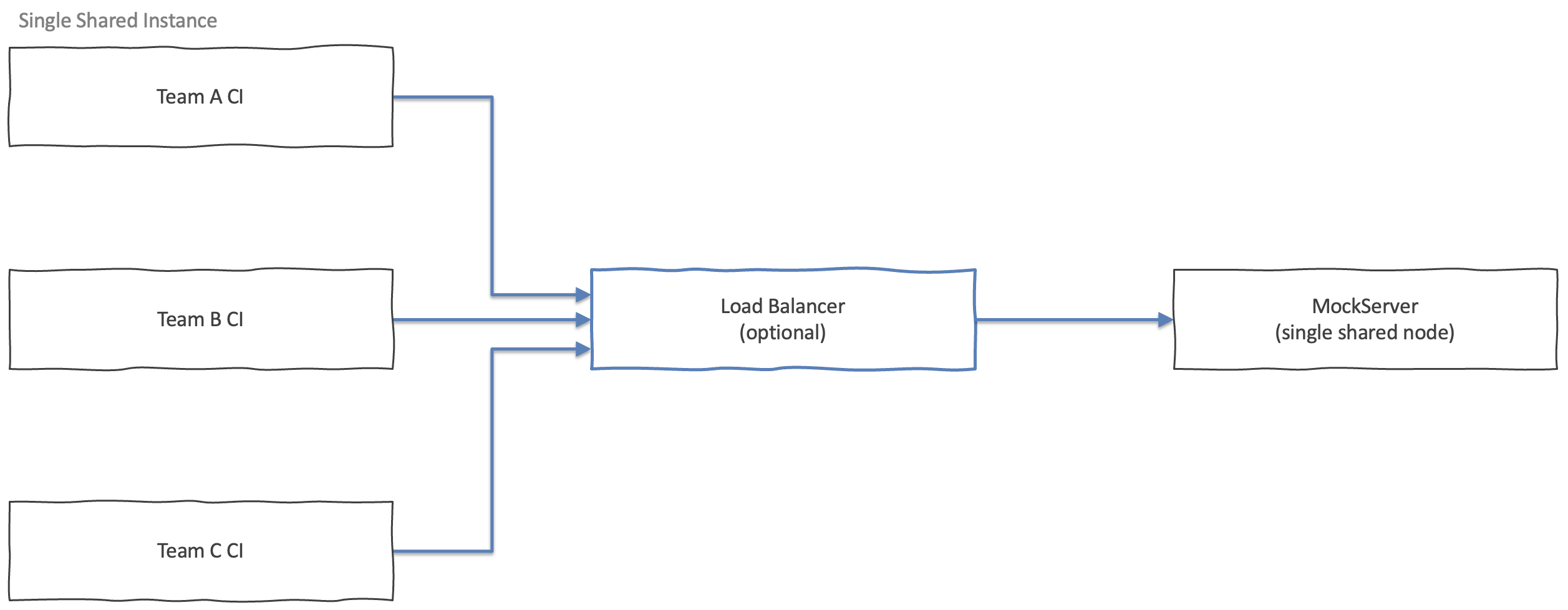
One MockServer process (or Kubernetes Deployment with replicas: 1) receives all traffic.
Expectations, scenario state, and CRUD entities live in-memory on that single node.
No state-backend module is needed.
Setup
Run the Docker image directly:
docker run --rm -p 1080:1080 mockserver/mockserver:9.0.0Or on Kubernetes with the Helm chart:
replicaCount: 1

app:
  serverPort: "1080"
  logLevel: INFO
helm upgrade --install --namespace mockserver --create-namespace \
--version 9.0.0 \
mockserver oci://ghcr.io/mock-server/charts/mockserverAll configuration properties for log level, TLS, and performance tuning apply exactly as documented in Configuration Properties.
Parallel test isolation
When multiple teams or pipelines share a single instance simultaneously, use a unique session identifier (such as a UUID) in every expectation's request matcher — for example as a header or cookie value — so expectations from one test run do not match requests from another. See Running Tests In Parallel.
Trade-offs
| Concern | Detail |
|---|---|
| Availability | Single point of failure. A restart or crash makes the server unavailable to all teams until it comes back up. |
| Scale | MockServer handles very high throughput from a single node (see Scalability & Latency), but there is no horizontal scale path without clustering. |
| State durability | All expectations are lost on restart unless you add filesystem persistence (see Option 3). |
| Simplicity | Lowest operational overhead: one process, default configuration, no extra dependencies. |
Option 2: Clustered HA Fleet
When to use
Use this when you need high availability (no single point of failure), horizontal scale beyond a single node,
or zero-downtime rolling updates.
Clustering requires the mockserver-state-infinispan module on the classpath
and a JGroups-capable network between nodes.
The -clustered image variant
The default mockserver/mockserver Docker image does not include
the Infinispan and JGroups libraries to keep its size lean for single-node use.
For clustering, use the -clustered image variant which bundles the
mockserver-state-infinispan module and all of its transitive dependencies:
docker pull mockserver/mockserver:clustered-9.0.0
This image is published to Docker Hub, GHCR (ghcr.io/mock-server/mockserver:clustered-9.0.0) and ECR Public alongside every release, built for both
linux/amd64 and linux/arm64.
It also includes netty-tcnative-boringssl-static for native TLS performance,
the same as the base image.
Important: setting MOCKSERVER_STATE_BACKEND=infinispan with the default
(non-clustered) image will fail at startup with a ClassNotFoundException.
Always use the clustered- image tag when enabling clustering.
What is clustered
The following state is replicated synchronously across all cluster nodes via JGroups REPL_SYNC:
- Expectations (add, update, delete)
- Scenario state (atomic compare-and-set transitions across nodes)
- CRUD entity stores
- Chaos profiles (HTTP service, TCP, gRPC)
The following state is node-local and is NOT clustered:
-
The event log and request verification ring buffer.
By default a
verify()call (orMockServerClient.verify()) checks only the node that received that call. In a load-balanced cluster, requests may be spread across nodes, so verification must be sent to the specific node that received the request being verified — or verification must be performed per-node and the results combined in your test logic. This is the most significant operational constraint of the clustered model. You can instead enable cluster verify fan-in (clusterVerifyFanIn=trueplusclusterVerifyFanInPeerslisting the other nodes' base URLs): the node that receives the call then queries its peers for their local records, merges them, and evaluates the verification against the cluster-wide total. This covers count-based request verifications (exactly/atLeast/atMost/between) and retrieval of recorded requests; orderedverifysequences, response-aware verification, and the dashboard log view remain node-local. If a peer cannot be reached the call fails rather than returning a partial result. If your control plane is authenticated (bearer token, JWT, or OIDC), also setclusterFanInPeerAuthTokento the credential each node should present to its peers (the same value on every node, for exampleBearer <jwt>) — otherwise the cross-node queries are rejected and the verify/retrieve fails.
Architecture
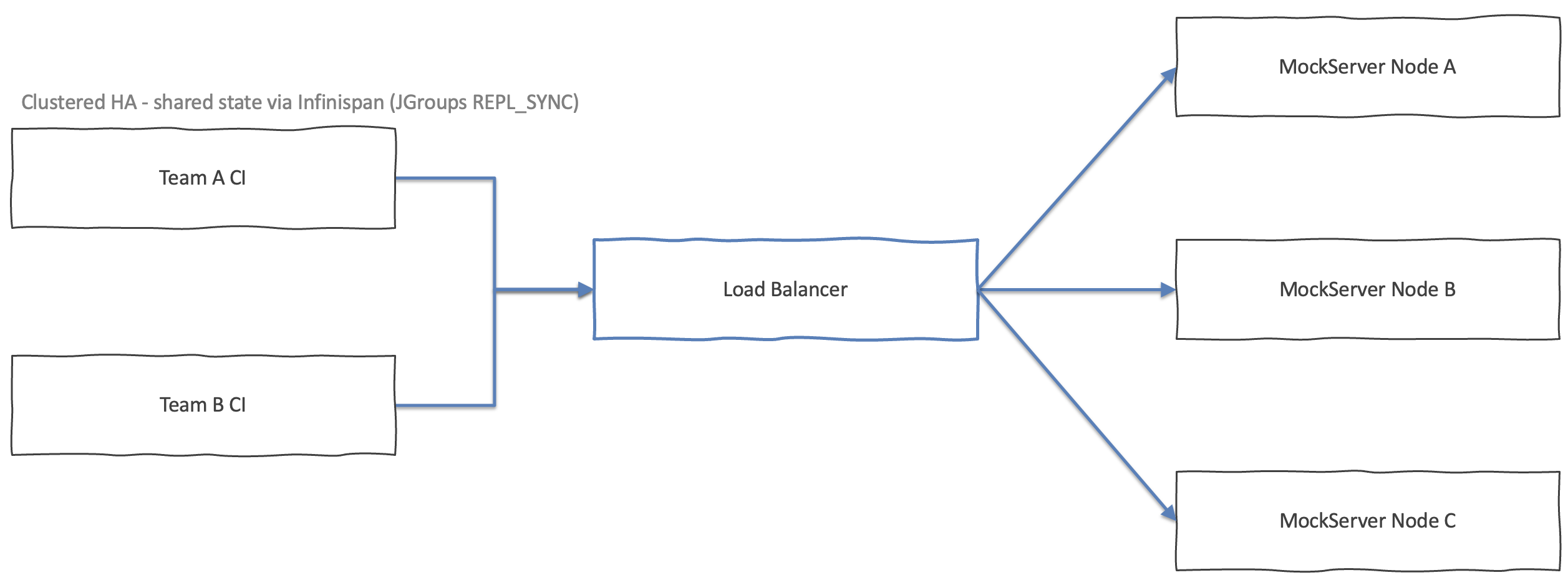
Infinispan runs embedded inside each MockServer node — there is no separate data grid to operate. When one node receives an expectation write, Infinispan replicates it synchronously to all other cluster members before the write call returns. Each node then updates its local matcher cache so it can match incoming requests immediately.
Configuration properties
| Property | Env var | Default | Description |
|---|---|---|---|
mockserver.stateBackend |
MOCKSERVER_STATE_BACKEND |
memory |
Set to infinispan to enable the Infinispan backend. Requires the mockserver-state-infinispan module on the classpath. Fails at startup if the module is missing. |
mockserver.clusterEnabled |
MOCKSERVER_CLUSTER_ENABLED |
false |
Set to true to activate JGroups transport and REPL_SYNC caches. When false, Infinispan runs in LOCAL mode (no replication) — useful for testing the code path without a multi-node cluster. |
mockserver.clusterName |
MOCKSERVER_CLUSTER_NAME |
mockserver-cluster |
JGroups cluster identifier. All nodes that should share state must use the same value. |
mockserver.clusterTransportConfig |
MOCKSERVER_CLUSTER_TRANSPORT_CONFIG |
Built-in loopback stack | Path to a JGroups XML transport configuration file. The built-in default is a loopback stack suitable only for in-JVM tests. For any real multi-node deployment you must supply a UDP or TCP stack here. |
See Configuration Properties for the full property reference.
Setup: Docker Compose (two-node example)
Create a JGroups TCP stack file (jgroups-tcp.xml) — JGroups ships several ready-to-use
stacks; the snippet below is representative only. See the
JGroups documentation
for production-grade stacks with discovery appropriate for your network.
<config xmlns="urn:org:jgroups">
    <TCP bind_port="7600" />
    <TCPPING initial_hosts="mockserver-a[7600],mockserver-b[7600]" />
    <MERGE3/>
    <FD_SOCK/>
    <FD_ALL/>
    <VERIFY_SUSPECT/>
    <pbcast.NAKACK2/>
    <UNICAST3/>
    <pbcast.STABLE/>
    <pbcast.GMS/>
    <pbcast.STATE_TRANSFER/>
</config>
services:
mockserver-a:
image: mockserver/mockserver:clustered-9.0.0
environment:
MOCKSERVER_STATE_BACKEND: infinispan
MOCKSERVER_CLUSTER_ENABLED: "true"
MOCKSERVER_CLUSTER_NAME: shared-cluster
MOCKSERVER_CLUSTER_TRANSPORT_CONFIG: /config/jgroups-tcp.xml
volumes:
- ./jgroups-tcp.xml:/config/jgroups-tcp.xml:ro
ports:
- "1080:1080"
mockserver-b:
image: mockserver/mockserver:clustered-9.0.0
environment:
MOCKSERVER_STATE_BACKEND: infinispan
MOCKSERVER_CLUSTER_ENABLED: "true"
MOCKSERVER_CLUSTER_NAME: shared-cluster
MOCKSERVER_CLUSTER_TRANSPORT_CONFIG: /config/jgroups-tcp.xml
volumes:
- ./jgroups-tcp.xml:/config/jgroups-tcp.xml:ro
ports:
- "1081:1080"Setup: Kubernetes (Helm chart)
The MockServer Helm chart has built-in support for clustering via the clustering.enabled value.
When enabled, the chart automatically:
- Sets the
MOCKSERVER_STATE_BACKEND,MOCKSERVER_CLUSTER_ENABLED,MOCKSERVER_CLUSTER_NAME, andMOCKSERVER_CLUSTER_TRANSPORT_CONFIGenvironment variables - Creates a headless Service for JGroups
DNS_PINGpod discovery - Sets the
JGROUPS_DNS_QUERYenvironment variable so JGroups discovers all pod IPs automatically - Exposes the JGroups TCP port (default 7800) as a container port
You only need to set clustering.enabled=true, point the image to the
-clustered variant, and increase replicaCount.
A minimal values file:
replicaCount: 3

image:
  repositoryNameAndTag: "mockserver/mockserver:clustered-9.0.0"

clustering:
  enabled: true
  # clusterName: "mockserver-cluster"   # default
  # transportConfig: "jgroups-kubernetes.xml"  # default — uses DNS_PING
  # jgroupsPort: 7800                   # default
helm upgrade --install --namespace mockserver --create-namespace \
--version 9.0.0 \
-f cluster-values.yaml \
mockserver oci://ghcr.io/mock-server/charts/mockserver
How DNS_PING discovery works:
the chart creates a headless Service (ClusterIP: None) with publishNotReadyAddresses: true.
JGroups DNS_PING queries the headless Service DNS name
(<release>-headless.<namespace>.svc.cluster.local)
and receives A records for all pod IPs, including pods still starting up.
This allows the cluster to form without additional RBAC or Kubernetes API access.
Shared TLS Certificate Authority — do this for any multi-replica deployment.
By default every pod generates its own Certificate Authority, so a client that imported one pod's
mockserver-ca.pem gets a TLS trust error — showing up intermittently as
the load balancer rotates pods — the moment it is routed to a different pod.
Give every pod one shared CA from a Kubernetes Secret (a Secret, never a ConfigMap — it holds a
private key) using the chart's app.tls values, which also turn off dynamic CA generation:
helm upgrade --install --namespace mockserver --create-namespace \
  --version 9.0.0 \
  -f cluster-values.yaml \
  --set app.tls.enabled=true \
  --set-file app.tls.certificateAuthorityCertificate=ca.pem \
  --set-file app.tls.certificateAuthorityPrivateKey=ca-key.pem \
  mockserver oci://ghcr.io/mock-server/charts/mockserver
Keep the CA private key out of source control — pass it with --set-file, or manage the
Secret yourself and reference it with app.tls.create=false and
app.tls.existingSecretName.
Advanced: custom JGroups transport
The built-in jgroups-kubernetes.xml transport uses TCP + DNS_PING and works
out of the box with the headless Service. For non-Kubernetes environments or advanced tuning, you can
supply a custom JGroups XML via the chart's app.config.extraFiles value:
replicaCount: 3

image:
  repositoryNameAndTag: "mockserver/mockserver:clustered-9.0.0"

clustering:
  enabled: true
  transportConfig: /config/jgroups-custom.xml

app:
  config:
    enabled: true
    extraFiles:
      jgroups-custom.xml: |
        <config xmlns="urn:org:jgroups">
            <TCP bind_port="7800" />
            <dns.DNS_PING dns_query="my-headless-svc.my-ns.svc.cluster.local" />
            <MERGE3/>
            <FD_SOCK/>
            <FD_ALL/>
            <VERIFY_SUSPECT/>
            <pbcast.NAKACK2/>
            <UNICAST3/>
            <pbcast.STABLE/>
            <pbcast.GMS/>
            <pbcast.STATE_TRANSFER/>
        </config>
See the JGroups documentation
for the full protocol reference. Alternative discovery protocols include
KUBE_PING
(uses the Kubernetes API; requires a ServiceAccount with pod list/get RBAC) and
TCPPING (static member list).
Trade-offs and limitations
| Concern | Detail |
|---|---|
| Availability | No single point of failure. Losing one node does not affect the rest of the cluster. Nodes can be rolled without downtime when behind a load balancer. |
| Horizontal scale | Requests can be distributed across nodes. Expectations, scenarios, CRUD entities, and chaos profiles are immediately visible on all nodes after any write, and per-expectation Times match limits are enforced cluster-wide (a Times(3) limit serves exactly 3 total matches across the whole fleet, not 3 per node). |
| Verification | The event log is node-local by default. verify() checks only the node it is sent to. When a load balancer distributes requests, a request handled by Node A is not visible in Node B's log. Either enable cluster verify fan-in (clusterVerifyFanIn=true with clusterVerifyFanInPeers) to aggregate count-based verify/retrieve across the fleet, pin verification calls to specific nodes, run verification against all nodes, or use a single-node deployment when cross-node assertion is required. |
| TLS Certificate Authority | Do not use dynamic CA generation in a cluster. By default each node generates its own Certificate Authority, which is not shared between nodes. A client that trusts one node's mockserver-ca.pem gets a TLS trust error — appearing intermittently as the load balancer rotates pods — when routed to another node. Supply one shared CA to every node (certificateAuthorityCertificate + certificateAuthorityPrivateKey) and set dynamicallyCreateCertificateAuthorityCertificate=false. On Kubernetes, mount the CA from a Secret via the chart's app.tls values (see the Helm setup below). MockServer logs a warning at start up if it detects clustering with dynamic CA generation. |
| Eviction | Infinispan uses approximate LRU eviction. The node-local matcher cache may briefly contain one extra entry between an eviction event and the next reconcile cycle. |
| JGroups transport | The built-in loopback transport is for in-JVM tests only. A production cluster requires a proper UDP or TCP JGroups stack configured via clusterTransportConfig. |
| Operational complexity | Adds the Infinispan module, JGroups network configuration, and (on Kubernetes) RBAC for pod discovery. More moving parts than Option 1. |
| CrossProtocol event bus | Scenario event bus registrations (which scenarios fire on which triggers) are node-local. The downstream scenario state changes are clustered, but the trigger registrations themselves are not replicated. |
| Chaos TTL clock skew | TTL-based chaos profile expiry uses the node-local clock. If you advance the clock via PUT /mockserver/clock on individual nodes, TTL expiry may differ between nodes. For deterministic cross-node cleanup, use the REST DELETE endpoint instead. |
Monitoring cluster membership
Every MockServer node exposes a read-only GET /mockserver/cluster control-plane
endpoint that reports the node's view of the cluster — how many members it can see, which member is the
coordinator, and which member is itself. Use it from a health check, dashboard, or operations script to confirm
that all nodes have formed the cluster and agree on membership.
curl -s http://localhost:1080/mockserver/clusterOn a clustered node, the response lists every member and flags the coordinator and the local node:
{
  "clustered" : true,
  "nodeId" : "node-a-7f3c",
  "coordinator" : "node-a-7f3c",
  "clusterName" : "shared-cluster",
  "memberCount" : 2,
  "members" : [
    { "id" : "node-a-7f3c", "coordinator" : true,  "local" : true  },
    { "id" : "node-b-91ad", "coordinator" : false, "local" : false }
  ]
}
On a single-node deployment (the default in-memory backend, or Infinispan in LOCAL mode), the same endpoint returns
a sensible degenerate response: "clustered": false with exactly one member —
this node, which is its own coordinator. This means health checks and tooling can call the endpoint unconditionally,
regardless of whether clustering is enabled.
If MockServer metrics are enabled (metricsEnabled=true), the live member count is
also exported as the Prometheus gauge mock_server_cluster_members (read at scrape time),
so you can chart and alert on cluster size from your existing Prometheus stack. The gauge reads 1
for a single-node deployment. See Observability for the full metrics setup.
Option 3: Persistence-Only Durability
A middle ground between Options 1 and 2: a single non-clustered node that persists expectations to the filesystem so they survive a restart. No extra modules are needed, and there is no clustering overhead. This is the right choice when you want restart durability but do not need HA or horizontal scale.
Enable filesystem persistence:
docker run --rm \
  -p 1080:1080 \
  -v /var/mockserver:/persistence \
  -e MOCKSERVER_PERSIST_EXPECTATIONS=true \
  -e MOCKSERVER_PERSISTED_EXPECTATIONS_PATH=/persistence/persistedExpectations.json \
  -e MOCKSERVER_INITIALIZATION_JSON_PATH=/persistence/persistedExpectations.json \
  mockserver/mockserver:9.0.0
On Kubernetes use the Helm chart's built-in persistence support:
helm upgrade --install --namespace mockserver --create-namespace \
  --version 9.0.0 \
  --set app.persistence.enabled=true \
  mockserver oci://ghcr.io/mock-server/charts/mockserver
See Persisting Expectations for full details.
Limitations: State is still in-memory at runtime — all active requests hit one node. The same single-point-of-failure and no-horizontal-scale constraints as Option 1 apply. If the process crashes mid-write, persisted expectations may be incomplete until the next successful write cycle.
Cloud Blob Storage
When to use
By default MockServer reads and writes persisted expectations, recorded proxy traffic, and fixture files
on the local filesystem (blobStoreType=filesystem). When several nodes —
or several short-lived CI runners — need to share that durable data without a shared
POSIX volume (NFS / EFS / Azure Files), MockServer can store it in a cloud object store instead.
This is useful for centralised fixture libraries, record-and-replay cassettes captured by one job and
replayed by another, and snapshots that must outlive any individual pod.
Cloud blob storage is an opt-in module: mockserver-core ships with
no cloud SDK on its classpath. You add the module for the backend you want, and the backend registers itself
automatically when blobStoreType is set to its name. It is orthogonal to the
clustering option above — you can use it with a single node, a persisted single node, or an Infinispan
cluster.
Choosing a backend module
blobStoreType | Backend | Maven module |
|---|---|---|
s3 |
Amazon S3 (and S3-compatible stores such as MinIO / LocalStack) | org.mock-server:mockserver-blob-s3 |
gcs |
Google Cloud Storage | org.mock-server:mockserver-blob-gcs |
azure |
Azure Blob Storage | org.mock-server:mockserver-blob-azure |
Add the relevant dependency (matching your MockServer version) so the cloud SDK is on the classpath:
<dependency>
    <groupId>org.mock-server</groupId>
    <artifactId>mockserver-blob-s3</artifactId>
    <version>9.0.0</version>
</dependency>
Configuration properties
| Property | Env var | Applies to | Description |
|---|---|---|---|
mockserver.blobStoreType |
MOCKSERVER_BLOB_STORE_TYPE |
all | Backend selector. Defaults to filesystem. Set to s3, gcs, or azure (the matching module must be on the classpath, otherwise startup fails). |
mockserver.blobStoreBucket |
MOCKSERVER_BLOB_STORE_BUCKET |
s3, gcs | Bucket name. Required for s3 and gcs. |
mockserver.blobStoreRegion |
MOCKSERVER_BLOB_STORE_REGION |
s3 | Region for the S3 bucket (e.g. eu-west-1). |
mockserver.blobStoreEndpoint |
MOCKSERVER_BLOB_STORE_ENDPOINT |
s3, gcs | Endpoint override URL for S3-compatible stores (MinIO, LocalStack) or GCS emulators. Optional. |
mockserver.blobStoreKeyPrefix |
MOCKSERVER_BLOB_STORE_KEY_PREFIX |
all cloud | Optional key prefix so multiple deployments can share one bucket/container without colliding. |
mockserver.blobStoreAccessKeyId |
MOCKSERVER_BLOB_STORE_ACCESS_KEY_ID |
s3 | Explicit AWS access key ID. Optional — when empty the default AWS credential chain (environment, profile, instance/IRSA role) is used. |
mockserver.blobStoreSecretAccessKey |
MOCKSERVER_BLOB_STORE_SECRET_ACCESS_KEY |
s3 | Explicit AWS secret access key. Optional — paired with the access key ID above. |
mockserver.blobStoreProjectId |
MOCKSERVER_BLOB_STORE_PROJECT_ID |
gcs | Google Cloud project ID. Optional — when empty it is inferred from Application Default Credentials. |
mockserver.blobStoreContainer |
MOCKSERVER_BLOB_STORE_CONTAINER |
azure | Azure Blob Storage container name. Required for azure. |
mockserver.blobStoreConnectionString |
MOCKSERVER_BLOB_STORE_CONNECTION_STRING |
azure | Azure connection string (account name, key, and endpoint). Required for azure. |
All blob-store properties default to an empty string. See Configuration Properties for the full reference, and Persisting Expectations → Cloud Blob Storage for how persisted and recorded expectations map onto the blob store.
Example: S3 backend
docker run --rm -p 1080:1080 \
  -e MOCKSERVER_BLOB_STORE_TYPE=s3 \
  -e MOCKSERVER_BLOB_STORE_BUCKET=my-mockserver-fixtures \
  -e MOCKSERVER_BLOB_STORE_REGION=eu-west-1 \
  -e MOCKSERVER_BLOB_STORE_KEY_PREFIX=ci-shared/ \
  mockserver/mockserver:9.0.0
Note: the default mockserver/mockserver image does not bundle the cloud SDK
modules. To use a cloud blob store from a container, build an image that adds the relevant
mockserver-blob-* jar to the classpath, or run via the
-no-dependencies jar with the module (and its transitive cloud SDK) on the classpath.
Choosing an Option
| Need | Option 1 Single node |
Option 2 Clustered HA |
Option 3 Persisted single node |
|---|---|---|---|
| No extra dependencies | Yes | No (Infinispan + JGroups) | Yes |
| Survives a single node failure | No | Yes | No |
| Survives a restart without losing expectations | No | Yes (state replicated) | Yes (filesystem persistence) |
| Horizontal scale (multiple nodes behind LB) | No | Yes | No |
| verify() works across all nodes | Yes (one node) | Optional (node-local by default; enable clusterVerifyFanIn) | Yes (one node) |
| Times match limits are global | Yes | Yes — cluster-wide CAS | Yes |
| Lowest operational complexity | Yes | No | Yes |
Related Pages
- Configuration Properties — full reference for
stateBackend,clusterEnabled,clusterName,clusterTransportConfig,blobStoreType, and all other properties - Persisting Expectations — filesystem and cloud blob persistence in detail, including record-and-replay
- Running Tests In Parallel — session-ID isolation when multiple teams share one instance
- Scalability & Latency — single-node throughput benchmarks and tuning guidance
- Helm & Kubernetes — Helm chart reference and Kubernetes deployment patterns