AI Protocol Mocking (MCP & A2A)
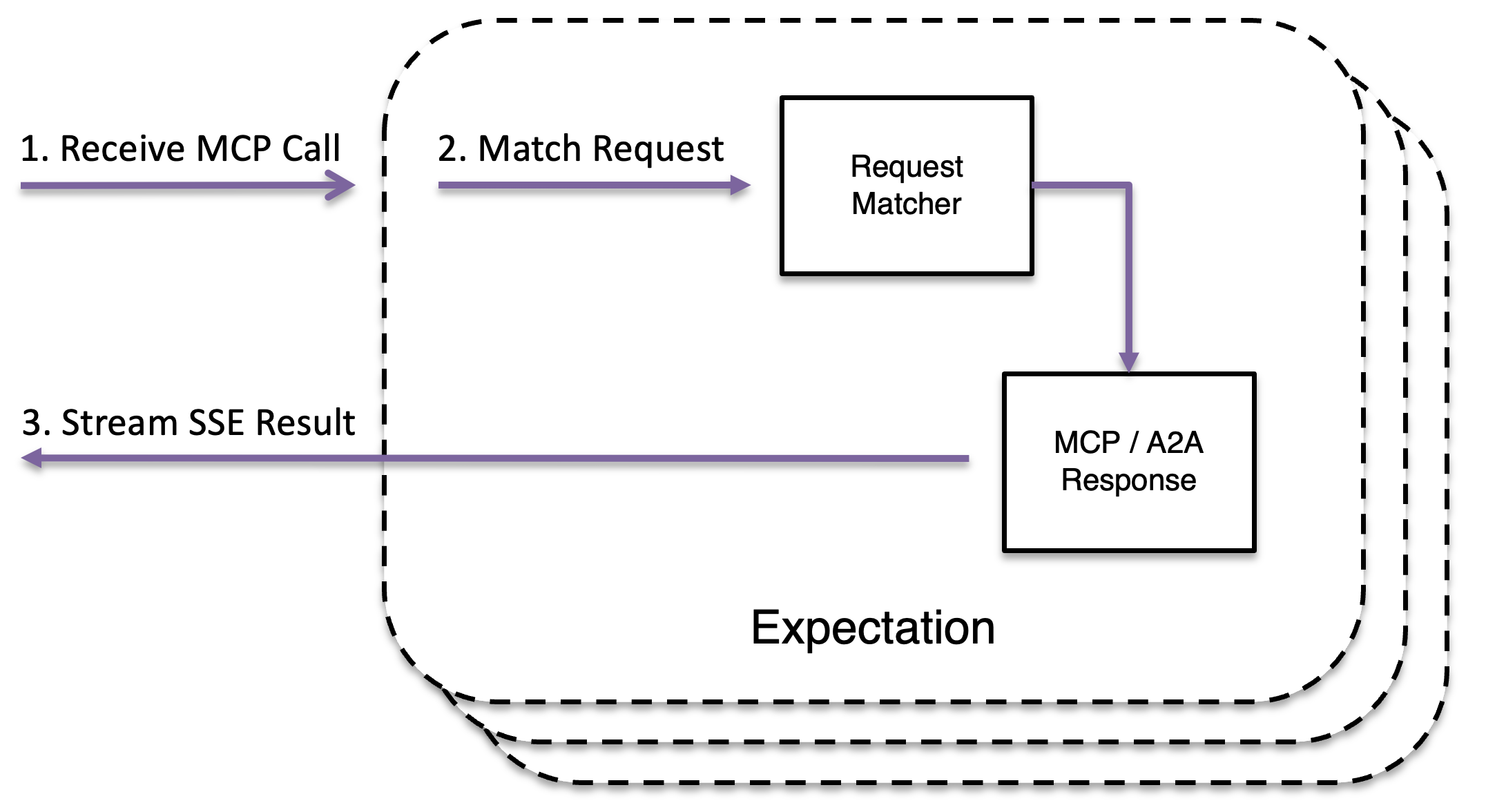
MockServer can mock AI protocol servers — including MCP (Model Context Protocol) servers and A2A (Agent-to-Agent Protocol) agents — enabling you to test AI clients against predictable mock services without running real AI infrastructure.
This is distinct from MockServer's built-in MCP control plane (which lets AI assistants control MockServer). These features let you mock other people's MCP and A2A servers. For mocking LLM API responses (OpenAI, Anthropic, Gemini, etc.) with provider-correct formatting and streaming, see LLM Response Mocking.
SSE Streaming Responses
Server-Sent Events (SSE) responses stream events to clients over a long-lived HTTP connection. This is the transport used by MCP's Streamable HTTP protocol and many other AI APIs.
By default each event's data is a fixed string. To generate event content dynamically — for example to echo a value from the request into every event — set an optional templateType (VELOCITY, MUSTACHE or JAVASCRIPT) on the httpSseResponse. Each event's data is then rendered as a response template against the triggering request, with the same context available in response templates (request fields, jsonPath, built-in helpers, faker and scenario state). When templateType is not set, events are sent exactly as written.
new MockServerClient("localhost", 1080)
    .when(
        request()
            .withMethod("GET")
            .withPath("/events")
    )
    .respondWithSse(
        sseResponse()
            .withStatusCode(200)
            .withEvents(
                sseEvent()
                    .withEvent("message")
                    .withData("hello world")
                    .withId("1"),
                sseEvent()
                    .withEvent("update")
                    .withData("second event")
                    .withId("2")
            )
            .withCloseConnection(true)
);var mockServerClient = require('mockserver-client').mockServerClient;
mockServerClient("localhost", 1080).respondWithSse({
"method": "GET",
"path": "/events"
}, {
"statusCode": 200,
"events": [
{
"event": "message",
"data": "hello world",
"id": "1"
},
{
"event": "update",
"data": "second event",
"id": "2"
}
],
"closeConnection": true
}).then(
function () {
console.log("expectation created");
},
function (error) {
console.log(error);
}
);See REST API for full JSON specification
from mockserver.client import MockServerClient
from mockserver.models import HttpRequest, HttpSseResponse, SseEvent

client = MockServerClient("localhost", 1080)
client.when(
    HttpRequest(method="GET", path="/events")
).respond_with_sse(
    HttpSseResponse(
        status_code=200,
        events=[
            SseEvent(event="message", data="hello world", id="1"),
            SseEvent(event="update", data="second event", id="2"),
        ],
        close_connection=True,
    )
)require 'mockserver-client'
client = MockServer::Client.new('localhost', 1080)
client.when(
MockServer::HttpRequest.new(method: 'GET', path: '/events')
).respond_with_sse(
MockServer::HttpSseResponse.new(
status_code: 200,
events: [
MockServer::SseEvent.new(event: 'message', data: 'hello world', id: '1'),
MockServer::SseEvent.new(event: 'update', data: 'second event', id: '2')
],
close_connection: true
)
)import mockserver "github.com/mock-server/mockserver-monorepo/mockserver-client-go/v7"
client := mockserver.New("localhost", 1080)
client.When(
mockserver.Request().Method("GET").Path("/events"),
).RespondSse(
mockserver.SseResponse().
StatusCode(200).
AddEvent(mockserver.SseEvent{Event: "message", Data: "hello world", ID: "1"}).
AddEvent(mockserver.SseEvent{Event: "update", Data: "second event", ID: "2"}).
CloseConnection(true),
)using MockServer.Client;
using MockServer.Client.Models;
using var client = new MockServerClient("localhost", 1080);
client.When(
HttpRequest.Request().WithMethod("GET").WithPath("/events")
).RespondWithSse(
HttpSseResponse.Response()
.WithStatusCode(200)
.WithEvent(data: "hello world", eventName: "message", id: "1")
.WithEvent(data: "second event", eventName: "update", id: "2")
.WithCloseConnection()
);use mockserver_client::{ClientBuilder, HttpRequest, HttpSseResponse, SseEvent};
let client = ClientBuilder::new("localhost", 1080).build().unwrap();
client.when(HttpRequest::new().method("GET").path("/events"))
.respond_sse(
HttpSseResponse::new()
.status_code(200)
.event(SseEvent::new().event("message").data("hello world").id("1"))
.event(SseEvent::new().event("update").data("second event").id("2"))
.close_connection(true)
)
.unwrap();use MockServer\MockServerClient;
use MockServer\HttpRequest;
use MockServer\HttpSseResponse;
use MockServer\SseEvent;
$client = new MockServerClient('localhost', 1080);
$client->when(
HttpRequest::request()
->method('GET')
->path('/events')
)->respondWithSse(
HttpSseResponse::response()
->statusCode(200)
->event(SseEvent::event()->withEvent('message')->withData('hello world')->withId('1'))
->event(SseEvent::event()->withEvent('update')->withData('second event')->withId('2'))
->closeConnection(true)
);curl -v -X PUT "http://localhost:1080/mockserver/expectation" -d '{
"httpRequest": {
"method": "GET",
"path": "/events"
},
"httpSseResponse": {
"statusCode": 200,
"events": [
{
"event": "message",
"data": "hello world",
"id": "1"
},
{
"event": "update",
"data": "second event",
"id": "2"
}
],
"closeConnection": true
}
}'new MockServerClient("localhost", 1080)
.when(
request()
.withMethod("GET")
.withPath("/events")
)
.respondWithSse(
sseResponse()
.withStatusCode(200)
.withEvents(
sseEvent()
.withEvent("message")
.withData("first event")
.withId("1"),
sseEvent()
.withEvent("message")
.withData("delayed event")
.withId("2")
.withDelay(TimeUnit.MILLISECONDS, 500)
)
.withCloseConnection(true)
);var mockServerClient = require('mockserver-client').mockServerClient;
mockServerClient("localhost", 1080).respondWithSse({
"method": "GET",
"path": "/events"
}, {
"statusCode": 200,
"events": [
{
"event": "message",
"data": "first event",
"id": "1"
},
{
"event": "message",
"data": "delayed event",
"id": "2",
"delay": {
"timeUnit": "MILLISECONDS",
"value": 500
}
}
],
"closeConnection": true
}).then(
function () {
console.log("expectation created");
},
function (error) {
console.log(error);
}
);See REST API for full JSON specification
from mockserver.client import MockServerClient
from mockserver.models import HttpRequest, HttpSseResponse, SseEvent, Delay

client = MockServerClient("localhost", 1080)
client.when(
    HttpRequest(method="GET", path="/events")
).respond_with_sse(
    HttpSseResponse(
        status_code=200,
        events=[
            SseEvent(event="message", data="first event", id="1"),
            SseEvent(
                event="message",
                data="delayed event",
                id="2",
                delay=Delay(time_unit="MILLISECONDS", value=500),
            ),
        ],
        close_connection=True,
    )
)require 'mockserver-client'
client = MockServer::Client.new('localhost', 1080)
client.when(
MockServer::HttpRequest.new(method: 'GET', path: '/events')
).respond_with_sse(
MockServer::HttpSseResponse.new(
status_code: 200,
events: [
MockServer::SseEvent.new(event: 'message', data: 'first event', id: '1'),
MockServer::SseEvent.new(
event: 'message',
data: 'delayed event',
id: '2',
delay: MockServer::Delay.new(time_unit: 'MILLISECONDS', value: 500)
)
],
close_connection: true
)
)import mockserver "github.com/mock-server/mockserver-monorepo/mockserver-client-go/v7"
client := mockserver.New("localhost", 1080)
client.When(
mockserver.Request().Method("GET").Path("/events"),
).RespondSse(
mockserver.SseResponse().
StatusCode(200).
AddEvent(mockserver.SseEvent{Event: "message", Data: "first event", ID: "1"}).
AddEvent(mockserver.SseEvent{
Event: "message",
Data: "delayed event",
ID: "2",
Delay: &mockserver.Delay{TimeUnit: "MILLISECONDS", Value: 500},
}).
CloseConnection(true),
)using MockServer.Client;
using MockServer.Client.Models;
using var client = new MockServerClient("localhost", 1080);
client.When(
HttpRequest.Request().WithMethod("GET").WithPath("/events")
).RespondWithSse(
HttpSseResponse.Response()
.WithStatusCode(200)
.WithEvent(data: "first event", eventName: "message", id: "1")
.WithEvent(new SseEvent {
Event = "message",
Data = "delayed event",
Id = "2",
Delay = new Delay { TimeUnit = TimeUnit.MILLISECONDS, Value = 500 }
})
.WithCloseConnection()
);use mockserver_client::{ClientBuilder, HttpRequest, HttpSseResponse, SseEvent, Delay};
let client = ClientBuilder::new("localhost", 1080).build().unwrap();
client.when(HttpRequest::new().method("GET").path("/events"))
.respond_sse(
HttpSseResponse::new()
.status_code(200)
.event(SseEvent::new().event("message").data("first event").id("1"))
.event(
SseEvent::new()
.event("message")
.data("delayed event")
.id("2")
.delay(Delay::milliseconds(500))
)
.close_connection(true)
)
.unwrap();use MockServer\MockServerClient;
use MockServer\HttpRequest;
use MockServer\HttpSseResponse;
use MockServer\SseEvent;
use MockServer\Delay;
$client = new MockServerClient('localhost', 1080);
$client->when(
HttpRequest::request()
->method('GET')
->path('/events')
)->respondWithSse(
HttpSseResponse::response()
->statusCode(200)
->event(SseEvent::event()->withEvent('message')->withData('first event')->withId('1'))
->event(
SseEvent::event()
->withEvent('message')
->withData('delayed event')
->withId('2')
->withDelay(new Delay('MILLISECONDS', 500))
)
->closeConnection(true)
);curl -v -X PUT "http://localhost:1080/mockserver/expectation" -d '{
"httpRequest": {
"method": "GET",
"path": "/events"
},
"httpSseResponse": {
"statusCode": 200,
"events": [
{
"event": "message",
"data": "first event",
"id": "1"
},
{
"event": "message",
"data": "delayed event",
"id": "2",
"delay": {
"timeUnit": "MILLISECONDS",
"value": 500
}
}
],
"closeConnection": true
}
}'Each event is sent after the specified delay, enabling realistic simulation of streaming APIs.
new MockServerClient("localhost", 1080)
    .when(
        request()
            .withMethod("GET")
            .withPath("/events")
    )
    .respondWithSse(
        sseResponse()
            .withStatusCode(200)
            .withEvent(
                sseEvent()
                    .withEvent("message")
                    .withData("line 1\nline 2\nline 3")
                    .withId("1")
            )
            .withCloseConnection(true)
);var mockServerClient = require('mockserver-client').mockServerClient;
mockServerClient("localhost", 1080).respondWithSse({
"method": "GET",
"path": "/events"
}, {
"statusCode": 200,
"events": [
{
"event": "message",
"data": "line 1\nline 2\nline 3",
"id": "1"
}
],
"closeConnection": true
}).then(
function () {
console.log("expectation created");
},
function (error) {
console.log(error);
}
);See REST API for full JSON specification
from mockserver.client import MockServerClient
from mockserver.models import HttpRequest, HttpSseResponse, SseEvent

client = MockServerClient("localhost", 1080)
client.when(
    HttpRequest(method="GET", path="/events")
).respond_with_sse(
    HttpSseResponse(
        status_code=200,
        events=[
            SseEvent(event="message", data="line 1\nline 2\nline 3", id="1"),
        ],
        close_connection=True,
    )
)require 'mockserver-client'
client = MockServer::Client.new('localhost', 1080)
client.when(
MockServer::HttpRequest.new(method: 'GET', path: '/events')
).respond_with_sse(
MockServer::HttpSseResponse.new(
status_code: 200,
events: [
MockServer::SseEvent.new(event: 'message', data: "line 1\nline 2\nline 3", id: '1')
],
close_connection: true
)
)import mockserver "github.com/mock-server/mockserver-monorepo/mockserver-client-go/v7"
client := mockserver.New("localhost", 1080)
client.When(
mockserver.Request().Method("GET").Path("/events"),
).RespondSse(
mockserver.SseResponse().
StatusCode(200).
AddEvent(mockserver.SseEvent{Event: "message", Data: "line 1\nline 2\nline 3", ID: "1"}).
CloseConnection(true),
)using MockServer.Client;
using MockServer.Client.Models;
using var client = new MockServerClient("localhost", 1080);
client.When(
HttpRequest.Request().WithMethod("GET").WithPath("/events")
).RespondWithSse(
HttpSseResponse.Response()
.WithStatusCode(200)
.WithEvent(data: "line 1\nline 2\nline 3", eventName: "message", id: "1")
.WithCloseConnection()
);use mockserver_client::{ClientBuilder, HttpRequest, HttpSseResponse, SseEvent};
let client = ClientBuilder::new("localhost", 1080).build().unwrap();
client.when(HttpRequest::new().method("GET").path("/events"))
.respond_sse(
HttpSseResponse::new()
.status_code(200)
.event(SseEvent::new().event("message").data("line 1\nline 2\nline 3").id("1"))
.close_connection(true)
)
.unwrap();use MockServer\MockServerClient;
use MockServer\HttpRequest;
use MockServer\HttpSseResponse;
use MockServer\SseEvent;
$client = new MockServerClient('localhost', 1080);
$client->when(
HttpRequest::request()
->method('GET')
->path('/events')
)->respondWithSse(
HttpSseResponse::response()
->statusCode(200)
->event(SseEvent::event()->withEvent('message')->withData("line 1\nline 2\nline 3")->withId('1'))
->closeConnection(true)
);curl -v -X PUT "http://localhost:1080/mockserver/expectation" -d '{
"httpRequest": {
"method": "GET",
"path": "/events"
},
"httpSseResponse": {
"statusCode": 200,
"events": [
{
"event": "message",
"data": "line 1\nline 2\nline 3",
"id": "1"
}
],
"closeConnection": true
}
}'Multi-line data is automatically split into multiple data: lines per the SSE specification.
WebSocket Mocking
Mock WebSocket endpoints that perform the upgrade handshake and send a sequence of text or binary messages. Useful for testing clients that connect to WebSocket APIs (GraphQL subscriptions, real-time feeds, etc.).
As with SSE, text messages can be generated dynamically by setting an optional templateType (VELOCITY, MUSTACHE or JAVASCRIPT) on the httpWebSocketResponse: each text message is then rendered as a response template against the triggering request. Binary messages are always sent verbatim, and with no templateType every message is sent exactly as written.
new MockServerClient("localhost", 1080)
    .when(
        request()
            .withMethod("GET")
            .withPath("/ws")
    )
    .respondWithWebSocket(
        webSocketResponse()
            .withMessage(webSocketMessage("hello"))
            .withMessage(webSocketMessage("world"))
            .withCloseConnection(true)
);var mockServerClient = require('mockserver-client').mockServerClient;
mockServerClient("localhost", 1080).respondWithWebSocket({
"method": "GET",
"path": "/ws"
}, {
"messages": [
{"text": "hello"},
{"text": "world"}
],
"closeConnection": true
}).then(
function () {
console.log("expectation created");
},
function (error) {
console.log(error);
}
);from mockserver.client import MockServerClient
from mockserver.models import HttpRequest, HttpWebSocketResponse, WebSocketMessage
client = MockServerClient("localhost", 1080)
client.when(
HttpRequest.request("/ws").with_method("GET")
).respond_with_websocket(
HttpWebSocketResponse(
messages=[
WebSocketMessage(text="hello"),
WebSocketMessage(text="world"),
],
close_connection=True,
)
)require 'mockserver-client'
client = MockServer::Client.new('localhost', 1080)
client.when(
MockServer::HttpRequest.new(method: 'GET', path: '/ws')
).respond_with_websocket(
MockServer::HttpWebSocketResponse.new(
messages: [
MockServer::WebSocketMessage.new(text: 'hello'),
MockServer::WebSocketMessage.new(text: 'world')
],
close_connection: true
)
)import mockserver "github.com/mock-server/mockserver-monorepo/mockserver-client-go/v7"
client := mockserver.New("localhost", 1080)
client.When(
mockserver.Request().Method("GET").Path("/ws"),
).RespondWebSocket(
mockserver.WebSocketResponse().
TextMessage("hello").
TextMessage("world").
CloseConnection(true),
)using MockServer.Client;
using MockServer.Client.Models;
using var client = new MockServerClient("localhost", 1080);
client.When(
HttpRequest.Request().WithMethod("GET").WithPath("/ws")
).RespondWithWebSocket(
HttpWebSocketResponse.Response()
.WithTextMessage("hello")
.WithTextMessage("world")
.WithCloseConnection(true)
);use mockserver_client::{ClientBuilder, HttpRequest, HttpWebSocketResponse, WebSocketMessage};
let client = ClientBuilder::new("localhost", 1080).build().unwrap();
client.when(HttpRequest::new().method("GET").path("/ws"))
.respond_web_socket(
HttpWebSocketResponse::new()
.message(WebSocketMessage::text("hello"))
.message(WebSocketMessage::text("world"))
.close_connection(true)
)
.unwrap();use MockServer\MockServerClient;
use MockServer\HttpRequest;
use MockServer\HttpWebSocketResponse;
use MockServer\WebSocketMessage;
$client = new MockServerClient('localhost', 1080);
$client->when(
HttpRequest::request()
->method('GET')
->path('/ws')
)->respondWithWebSocket(
HttpWebSocketResponse::response()
->message(WebSocketMessage::text('hello'))
->message(WebSocketMessage::text('world'))
->closeConnection(true)
);curl -v -X PUT "http://localhost:1080/mockserver/expectation" -d '{
"httpRequest": {
"method": "GET",
"path": "/ws"
},
"httpWebSocketResponse": {
"messages": [
{"text": "hello"},
{"text": "world"}
],
"closeConnection": true
}
}'new MockServerClient("localhost", 1080)
.when(
request()
.withMethod("GET")
.withPath("/ws")
)
.respondWithWebSocket(
webSocketResponse()
.withMessage(webSocketMessage("immediate"))
.withMessage(webSocketMessage("delayed").withDelay(TimeUnit.MILLISECONDS, 500))
.withCloseConnection(true)
);var mockServerClient = require('mockserver-client').mockServerClient;
mockServerClient("localhost", 1080).respondWithWebSocket({
"method": "GET",
"path": "/ws"
}, {
"messages": [
{"text": "immediate"},
{"text": "delayed", "delay": {"timeUnit": "MILLISECONDS", "value": 500}}
],
"closeConnection": true
}).then(
function () {
console.log("expectation created");
},
function (error) {
console.log(error);
}
);from mockserver.client import MockServerClient
from mockserver.models import HttpRequest, HttpWebSocketResponse, WebSocketMessage, Delay
client = MockServerClient("localhost", 1080)
client.when(
HttpRequest.request("/ws").with_method("GET")
).respond_with_websocket(
HttpWebSocketResponse(
messages=[
WebSocketMessage(text="immediate"),
WebSocketMessage(text="delayed", delay=Delay(time_unit="MILLISECONDS", value=500)),
],
close_connection=True,
)
)require 'mockserver-client'
client = MockServer::Client.new('localhost', 1080)
client.when(
MockServer::HttpRequest.new(method: 'GET', path: '/ws')
).respond_with_websocket(
MockServer::HttpWebSocketResponse.new(
messages: [
MockServer::WebSocketMessage.new(text: 'immediate'),
MockServer::WebSocketMessage.new(
text: 'delayed',
delay: MockServer::Delay.new(time_unit: 'MILLISECONDS', value: 500)
)
],
close_connection: true
)
)import mockserver "github.com/mock-server/mockserver-monorepo/mockserver-client-go/v7"
client := mockserver.New("localhost", 1080)
client.When(
mockserver.Request().Method("GET").Path("/ws"),
).RespondWebSocket(
mockserver.WebSocketResponse().
TextMessage("immediate").
AddMessage(mockserver.WebSocketMessage{
Text: "delayed",
Delay: &mockserver.Delay{TimeUnit: "MILLISECONDS", Value: 500},
}).
CloseConnection(true),
)using MockServer.Client;
using MockServer.Client.Models;
using var client = new MockServerClient("localhost", 1080);
client.When(
HttpRequest.Request().WithMethod("GET").WithPath("/ws")
).RespondWithWebSocket(
HttpWebSocketResponse.Response()
.WithTextMessage("immediate")
.WithMessage(new WebSocketMessage
{
Text = "delayed",
Delay = new Delay { TimeUnit = TimeUnit.MILLISECONDS, Value = 500 }
})
.WithCloseConnection(true)
);use mockserver_client::{ClientBuilder, HttpRequest, HttpWebSocketResponse, WebSocketMessage, Delay};
let client = ClientBuilder::new("localhost", 1080).build().unwrap();
client.when(HttpRequest::new().method("GET").path("/ws"))
.respond_web_socket(
HttpWebSocketResponse::new()
.message(WebSocketMessage::text("immediate"))
.message(WebSocketMessage::text("delayed").delay(Delay::milliseconds(500)))
.close_connection(true)
)
.unwrap();use MockServer\MockServerClient;
use MockServer\HttpRequest;
use MockServer\HttpWebSocketResponse;
use MockServer\WebSocketMessage;
use MockServer\Delay;
$client = new MockServerClient('localhost', 1080);
$client->when(
HttpRequest::request()
->method('GET')
->path('/ws')
)->respondWithWebSocket(
HttpWebSocketResponse::response()
->message(WebSocketMessage::text('immediate'))
->message(WebSocketMessage::text('delayed')->withDelay(Delay::milliseconds(500)))
->closeConnection(true)
);curl -v -X PUT "http://localhost:1080/mockserver/expectation" -d '{
"httpRequest": {
"method": "GET",
"path": "/ws"
},
"httpWebSocketResponse": {
"messages": [
{"text": "immediate"},
{"text": "delayed", "delay": {"timeUnit": "MILLISECONDS", "value": 500}}
],
"closeConnection": true
}
}'new MockServerClient("localhost", 1080)
.when(
request()
.withMethod("GET")
.withPath("/graphql")
)
.respondWithWebSocket(
webSocketResponse()
.withSubprotocol("graphql-ws")
.withMessage(webSocketMessage("{\"type\": \"connection_ack\"}"))
.withMessage(webSocketMessage("{\"type\": \"next\", \"payload\": {\"data\": {\"newMessage\": \"hello\"}}}"))
.withCloseConnection(true)
);var mockServerClient = require('mockserver-client').mockServerClient;
mockServerClient("localhost", 1080).respondWithWebSocket({
"method": "GET",
"path": "/graphql"
}, {
"subprotocol": "graphql-ws",
"messages": [
{"text": "{\"type\": \"connection_ack\"}"},
{"text": "{\"type\": \"next\", \"payload\": {\"data\": {\"newMessage\": \"hello\"}}}"}
],
"closeConnection": true
}).then(
function () {
console.log("expectation created");
},
function (error) {
console.log(error);
}
);from mockserver.client import MockServerClient
from mockserver.models import HttpRequest, HttpWebSocketResponse, WebSocketMessage
client = MockServerClient("localhost", 1080)
client.when(
HttpRequest.request("/graphql").with_method("GET")
).respond_with_websocket(
HttpWebSocketResponse(
subprotocol="graphql-ws",
messages=[
WebSocketMessage(text='{"type": "connection_ack"}'),
WebSocketMessage(text='{"type": "next", "payload": {"data": {"newMessage": "hello"}}}'),
],
close_connection=True,
)
)require 'mockserver-client'
client = MockServer::Client.new('localhost', 1080)
client.when(
MockServer::HttpRequest.new(method: 'GET', path: '/graphql')
).respond_with_websocket(
MockServer::HttpWebSocketResponse.new(
subprotocol: 'graphql-ws',
messages: [
MockServer::WebSocketMessage.new(text: '{"type": "connection_ack"}'),
MockServer::WebSocketMessage.new(text: '{"type": "next", "payload": {"data": {"newMessage": "hello"}}}')
],
close_connection: true
)
)import mockserver "github.com/mock-server/mockserver-monorepo/mockserver-client-go/v7"
client := mockserver.New("localhost", 1080)
client.When(
mockserver.Request().Method("GET").Path("/graphql"),
).RespondWebSocket(
mockserver.WebSocketResponse().
Subprotocol("graphql-ws").
TextMessage(`{"type": "connection_ack"}`).
TextMessage(`{"type": "next", "payload": {"data": {"newMessage": "hello"}}}`).
CloseConnection(true),
)using MockServer.Client;
using MockServer.Client.Models;
using var client = new MockServerClient("localhost", 1080);
client.When(
HttpRequest.Request().WithMethod("GET").WithPath("/graphql")
).RespondWithWebSocket(
HttpWebSocketResponse.Response()
.WithSubprotocol("graphql-ws")
.WithTextMessage(@"{""type"": ""connection_ack""}")
.WithTextMessage(@"{""type"": ""next"", ""payload"": {""data"": {""newMessage"": ""hello""}}}")
.WithCloseConnection(true)
);use mockserver_client::{ClientBuilder, HttpRequest, HttpWebSocketResponse, WebSocketMessage};
let client = ClientBuilder::new("localhost", 1080).build().unwrap();
client.when(HttpRequest::new().method("GET").path("/graphql"))
.respond_web_socket(
HttpWebSocketResponse::new()
.subprotocol("graphql-ws")
.message(WebSocketMessage::text(r#"{"type": "connection_ack"}"#))
.message(WebSocketMessage::text(r#"{"type": "next", "payload": {"data": {"newMessage": "hello"}}}"#))
.close_connection(true)
)
.unwrap();use MockServer\MockServerClient;
use MockServer\HttpRequest;
use MockServer\HttpWebSocketResponse;
use MockServer\WebSocketMessage;
$client = new MockServerClient('localhost', 1080);
$client->when(
HttpRequest::request()
->method('GET')
->path('/graphql')
)->respondWithWebSocket(
HttpWebSocketResponse::response()
->subprotocol('graphql-ws')
->message(WebSocketMessage::text('{"type": "connection_ack"}'))
->message(WebSocketMessage::text('{"type": "next", "payload": {"data": {"newMessage": "hello"}}}'))
->closeConnection(true)
);curl -v -X PUT "http://localhost:1080/mockserver/expectation" -d '{
"httpRequest": {
"method": "GET",
"path": "/graphql"
},
"httpWebSocketResponse": {
"subprotocol": "graphql-ws",
"messages": [
{"text": "{\"type\": \"connection_ack\"}"},
{"text": "{\"type\": \"next\", \"payload\": {\"data\": {\"newMessage\": \"hello\"}}}"}
],
"closeConnection": true
}
}'The subprotocol field is included in the WebSocket handshake response, allowing clients that require specific subprotocols (like graphql-ws or graphql-transport-ws) to connect successfully.
JSON-RPC Body Matching
Match HTTP requests containing JSON-RPC 2.0 bodies by method name. This is the foundation for mocking any JSON-RPC based protocol (MCP, A2A, language servers, etc.).
new MockServerClient("localhost", 1080)
    .when(
        request()
            .withMethod("POST")
            .withPath("/rpc")
            .withBody(jsonRpc("tools/list"))
    )
    .respond(
        response()
            .withStatusCode(200)
            .withBody("{\"jsonrpc\": \"2.0\", \"result\": {\"tools\": []}, \"id\": 1}")
);var mockServerClient = require('mockserver-client').mockServerClient;
mockServerClient("localhost", 1080).mockAnyResponse({
"httpRequest": {
"method": "POST",
"path": "/rpc",
"body": {
"type": "JSON_RPC",
"method": "tools/list"
}
},
"httpResponse": {
"statusCode": 200,
"body": "{\"jsonrpc\": \"2.0\", \"result\": {\"tools\": []}, \"id\": 1}"
}
}).then(
function () {
console.log("expectation created");
},
function (error) {
console.log(error);
}
);from mockserver import MockServerClient, HttpRequest, HttpResponse, JsonRpcBody
client = MockServerClient("localhost", 1080)
client.when(
HttpRequest(method="POST", path="/rpc", body=JsonRpcBody(method="tools/list"))
).respond(
HttpResponse.response(
'{"jsonrpc": "2.0", "result": {"tools": []}, "id": 1}',
status_code=200,
)
)require 'mockserver-client'
client = MockServer::Client.new('localhost', 1080)
client.when(
MockServer::HttpRequest.new(
method: 'POST',
path: '/rpc',
body: MockServer::Body.json_rpc('tools/list')
)
).respond(
MockServer::HttpResponse.response(
body: '{"jsonrpc": "2.0", "result": {"tools": []}, "id": 1}',
status_code: 200
)
)package main
import (
"bytes"
"net/http"
)
func main() {
body := []byte(`{
"httpRequest": {
"method": "POST",
"path": "/rpc",
"body": {
"type": "JSON_RPC",
"method": "tools/list"
}
},
"httpResponse": {
"statusCode": 200,
"body": "{\"jsonrpc\": \"2.0\", \"result\": {\"tools\": []}, \"id\": 1}"
}
}`)
req, _ := http.NewRequest("PUT",
"http://localhost:1080/mockserver/expectation",
bytes.NewReader(body))
req.Header.Set("Content-Type", "application/json")
http.DefaultClient.Do(req)
}using System.Net.Http;
using System.Text;
using var httpClient = new HttpClient();
var json = @"{
""httpRequest"": {
""method"": ""POST"",
""path"": ""/rpc"",
""body"": {
""type"": ""JSON_RPC"",
""method"": ""tools/list""
}
},
""httpResponse"": {
""statusCode"": 200,
""body"": ""{\""jsonrpc\"": \""2.0\"", \""result\"": {\""tools\"": []}, \""id\"": 1}""
}
}";
await httpClient.PutAsync(
"http://localhost:1080/mockserver/expectation",
new StringContent(json, Encoding.UTF8, "application/json")
);use reqwest::blocking::Client;
let client = Client::new();
let body = r#"{
"httpRequest": {
"method": "POST",
"path": "/rpc",
"body": {
"type": "JSON_RPC",
"method": "tools/list"
}
},
"httpResponse": {
"statusCode": 200,
"body": "{\"jsonrpc\": \"2.0\", \"result\": {\"tools\": []}, \"id\": 1}"
}
}"#;
client.put("http://localhost:1080/mockserver/expectation")
.header("Content-Type", "application/json")
.body(body.to_string())
.send()
.unwrap();$json = <<<'JSON'
{
"httpRequest": {
"method": "POST",
"path": "/rpc",
"body": {
"type": "JSON_RPC",
"method": "tools/list"
}
},
"httpResponse": {
"statusCode": 200,
"body": "{\"jsonrpc\": \"2.0\", \"result\": {\"tools\": []}, \"id\": 1}"
}
}
JSON;
$ch = curl_init('http://localhost:1080/mockserver/expectation');
curl_setopt_array($ch, [
CURLOPT_CUSTOMREQUEST => 'PUT',
CURLOPT_POSTFIELDS => $json,
CURLOPT_HTTPHEADER => ['Content-Type: application/json; charset=utf-8'],
CURLOPT_RETURNTRANSFER => true,
]);
curl_exec($ch);
curl_close($ch);curl -v -X PUT "http://localhost:1080/mockserver/expectation" -d '{
"httpRequest": {
"method": "POST",
"path": "/rpc",
"body": {
"type": "JSON_RPC",
"method": "tools/list"
}
},
"httpResponse": {
"statusCode": 200,
"body": "{\"jsonrpc\": \"2.0\", \"result\": {\"tools\": []}, \"id\": 1}"
}
}'new MockServerClient("localhost", 1080)
.when(
request()
.withMethod("POST")
.withPath("/rpc")
.withBody(jsonRpc(
"tools/call",
"{\"type\": \"object\", \"properties\": {\"name\": {\"type\": \"string\"}}, \"required\": [\"name\"]}"
))
)
.respond(
response()
.withStatusCode(200)
.withBody("{\"jsonrpc\": \"2.0\", \"result\": {\"content\": [{\"type\": \"text\", \"text\": \"result\"}]}, \"id\": 1}")
);var mockServerClient = require('mockserver-client').mockServerClient;
mockServerClient("localhost", 1080).mockAnyResponse({
"httpRequest": {
"method": "POST",
"path": "/rpc",
"body": {
"type": "JSON_RPC",
"method": "tools/call",
"paramsSchema": "{\"type\": \"object\", \"properties\": {\"name\": {\"type\": \"string\"}}, \"required\": [\"name\"]}"
}
},
"httpResponse": {
"statusCode": 200,
"body": "{\"jsonrpc\": \"2.0\", \"result\": {\"content\": [{\"type\": \"text\", \"text\": \"result\"}]}, \"id\": 1}"
}
}).then(
function () {
console.log("expectation created");
},
function (error) {
console.log(error);
}
);from mockserver import MockServerClient, HttpRequest, HttpResponse, JsonRpcBody
client = MockServerClient("localhost", 1080)
client.when(
HttpRequest(
method="POST",
path="/rpc",
body=JsonRpcBody(
method="tools/call",
params_schema='{"type": "object", "properties": {"name": {"type": "string"}}, "required": ["name"]}',
),
)
).respond(
HttpResponse.response(
'{"jsonrpc": "2.0", "result": {"content": [{"type": "text", "text": "result"}]}, "id": 1}',
status_code=200,
)
)require 'mockserver-client'
client = MockServer::Client.new('localhost', 1080)
client.when(
MockServer::HttpRequest.new(
method: 'POST',
path: '/rpc',
body: MockServer::Body.json_rpc(
'tools/call',
params_schema: '{"type": "object", "properties": {"name": {"type": "string"}}, "required": ["name"]}'
)
)
).respond(
MockServer::HttpResponse.response(
body: '{"jsonrpc": "2.0", "result": {"content": [{"type": "text", "text": "result"}]}, "id": 1}',
status_code: 200
)
)package main
import (
"bytes"
"net/http"
)
func main() {
body := []byte(`{
"httpRequest": {
"method": "POST",
"path": "/rpc",
"body": {
"type": "JSON_RPC",
"method": "tools/call",
"paramsSchema": "{\"type\": \"object\", \"properties\": {\"name\": {\"type\": \"string\"}}, \"required\": [\"name\"]}"
}
},
"httpResponse": {
"statusCode": 200,
"body": "{\"jsonrpc\": \"2.0\", \"result\": {\"content\": [{\"type\": \"text\", \"text\": \"result\"}]}, \"id\": 1}"
}
}`)
req, _ := http.NewRequest("PUT",
"http://localhost:1080/mockserver/expectation",
bytes.NewReader(body))
req.Header.Set("Content-Type", "application/json")
http.DefaultClient.Do(req)
}using System.Net.Http;
using System.Text;
using var httpClient = new HttpClient();
var json = @"{
""httpRequest"": {
""method"": ""POST"",
""path"": ""/rpc"",
""body"": {
""type"": ""JSON_RPC"",
""method"": ""tools/call"",
""paramsSchema"": ""{\""type\"": \""object\"", \""properties\"": {\""name\"": {\""type\"": \""string\""}}, \""required\"": [\""name\""]}""
}
},
""httpResponse"": {
""statusCode"": 200,
""body"": ""{\""jsonrpc\"": \""2.0\"", \""result\"": {\""content\"": [{\""type\"": \""text\"", \""text\"": \""result\""}]}, \""id\"": 1}""
}
}";
await httpClient.PutAsync(
"http://localhost:1080/mockserver/expectation",
new StringContent(json, Encoding.UTF8, "application/json")
);use reqwest::blocking::Client;
let client = Client::new();
let body = r#"{
"httpRequest": {
"method": "POST",
"path": "/rpc",
"body": {
"type": "JSON_RPC",
"method": "tools/call",
"paramsSchema": "{\"type\": \"object\", \"properties\": {\"name\": {\"type\": \"string\"}}, \"required\": [\"name\"]}"
}
},
"httpResponse": {
"statusCode": 200,
"body": "{\"jsonrpc\": \"2.0\", \"result\": {\"content\": [{\"type\": \"text\", \"text\": \"result\"}]}, \"id\": 1}"
}
}"#;
client.put("http://localhost:1080/mockserver/expectation")
.header("Content-Type", "application/json")
.body(body.to_string())
.send()
.unwrap();$json = <<<'JSON'
{
"httpRequest": {
"method": "POST",
"path": "/rpc",
"body": {
"type": "JSON_RPC",
"method": "tools/call",
"paramsSchema": "{\"type\": \"object\", \"properties\": {\"name\": {\"type\": \"string\"}}, \"required\": [\"name\"]}"
}
},
"httpResponse": {
"statusCode": 200,
"body": "{\"jsonrpc\": \"2.0\", \"result\": {\"content\": [{\"type\": \"text\", \"text\": \"result\"}]}, \"id\": 1}"
}
}
JSON;
$ch = curl_init('http://localhost:1080/mockserver/expectation');
curl_setopt_array($ch, [
CURLOPT_CUSTOMREQUEST => 'PUT',
CURLOPT_POSTFIELDS => $json,
CURLOPT_HTTPHEADER => ['Content-Type: application/json; charset=utf-8'],
CURLOPT_RETURNTRANSFER => true,
]);
curl_exec($ch);
curl_close($ch);curl -v -X PUT "http://localhost:1080/mockserver/expectation" -d '{
"httpRequest": {
"method": "POST",
"path": "/rpc",
"body": {
"type": "JSON_RPC",
"method": "tools/call",
"paramsSchema": "{\"type\": \"object\", \"properties\": {\"name\": {\"type\": \"string\"}}, \"required\": [\"name\"]}"
}
},
"httpResponse": {
"statusCode": 200,
"body": "{\"jsonrpc\": \"2.0\", \"result\": {\"content\": [{\"type\": \"text\", \"text\": \"result\"}]}, \"id\": 1}"
}
}'The paramsSchema field is a JSON Schema that validates the params field of the JSON-RPC request. The request only matches if the params are valid according to the schema.
MCP Server Mocking
The McpMockBuilder generates a complete set of expectations to make MockServer behave as a mock MCP (Model Context Protocol) server. This enables testing MCP clients without running a real MCP server.
The builder handles all protocol details: initialize, ping, tools/list, tools/call, resources/list, resources/read, prompts/list, prompts/get, and notifications/initialized. JSON-RPC response IDs are automatically echoed from the request.
import static org.mockserver.client.McpMockBuilder.mcpMock;

MockServerClient mockServerClient = new MockServerClient("localhost", 1080);

mcpMock("/mcp")
    .withServerName("TestMCP")
    .withServerVersion("1.0.0")
    .withTool("get_weather")
        .withDescription("Get weather for a city")
        .withInputSchema("{\"type\": \"object\", \"properties\": {\"city\": {\"type\": \"string\"}}, \"required\": [\"city\"]}")
        .respondingWith("72F and sunny")
        .and()
    .withTool("search")
        .withDescription("Search the knowledge base")
        .respondingWith("No results found")
        .and()
.applyTo(mockServerClient);var mockServerClient = require('mockserver-client').mockServerClient;
var client = mockServerClient("localhost", 1080);
client.mcpMock("/mcp")
.withServerName("TestMCP")
.withServerVersion("1.0.0")
.withTool("get_weather")
.withDescription("Get weather for a city")
.withInputSchema('{"type": "object", "properties": {"city": {"type": "string"}}, "required": ["city"]}')
.respondingWith("72F and sunny")
.and()
.withTool("search")
.withDescription("Search the knowledge base")
.respondingWith("No results found")
.and()
.applyTo();from mockserver import MockServerClient
from mockserver.mcp import mcp_mock
client = MockServerClient("localhost", 1080)
mcp_mock("/mcp") \
.with_server_name("TestMCP") \
.with_server_version("1.0.0") \
.with_tool("get_weather") \
.with_description("Get weather for a city") \
.with_input_schema('{"type": "object", "properties": {"city": {"type": "string"}}, "required": ["city"]}') \
.responding_with("72F and sunny") \
.and_() \
.with_tool("search") \
.with_description("Search the knowledge base") \
.responding_with("No results found") \
.and_() \
.apply_to(client)require 'mockserver-client'
client = MockServer::Client.new('localhost', 1080)
MockServer::MCP.mcp_mock('/mcp')
.with_server_name('TestMCP')
.with_server_version('1.0.0')
.with_tool('get_weather')
.with_description('Get weather for a city')
.with_input_schema('{"type": "object", "properties": {"city": {"type": "string"}}, "required": ["city"]}')
.responding_with('72F and sunny')
.and_then
.with_tool('search')
.with_description('Search the knowledge base')
.responding_with('No results found')
.and_then
.apply_to(client)import mockserver "github.com/mock-server/mockserver-monorepo/mockserver-client-go/v7"
client := mockserver.New("localhost", 1080)
mockserver.McpMock("/mcp").
WithServerName("TestMCP").
WithServerVersion("1.0.0").
WithTool("get_weather", func(t *mockserver.McpToolBuilder) {
t.WithDescription("Get weather for a city").
WithInputSchema(`{"type": "object", "properties": {"city": {"type": "string"}}, "required": ["city"]}`).
RespondingWith("72F and sunny", false)
}).
WithTool("search", func(t *mockserver.McpToolBuilder) {
t.WithDescription("Search the knowledge base").
RespondingWith("No results found", false)
}).
ApplyTo(client)using MockServer.Client;
using MockServer.Client.Mcp;
var client = new MockServerClient("localhost", 1080);
McpMockBuilder.McpMock("/mcp")
.WithServerName("TestMCP")
.WithServerVersion("1.0.0")
.WithTool("get_weather")
.WithDescription("Get weather for a city")
.WithInputSchema("{\"type\": \"object\", \"properties\": {\"city\": {\"type\": \"string\"}}, \"required\": [\"city\"]}")
.RespondingWith("72F and sunny")
.And()
.WithTool("search")
.WithDescription("Search the knowledge base")
.RespondingWith("No results found")
.And()
.ApplyTo(client);use mockserver_client::MockServerClient;
use mockserver_client::mcp::mcp_mock;
let client = MockServerClient::new("localhost", 1080);
mcp_mock("/mcp")
.with_server_name("TestMCP")
.with_server_version("1.0.0")
.with_tool("get_weather")
.with_description("Get weather for a city")
.with_input_schema(r#"{"type": "object", "properties": {"city": {"type": "string"}}, "required": ["city"]}"#)
.responding_with("72F and sunny", false)
.and()
.with_tool("search")
.with_description("Search the knowledge base")
.responding_with("No results found", false)
.and()
.apply_to(&client)?;use MockServer\MockServerClient;
use MockServer\Mcp\McpMockBuilder;
$client = new MockServerClient('localhost', 1080);
McpMockBuilder::mcpMock('/mcp')
->withServerName('TestMCP')
->withServerVersion('1.0.0')
->withTool('get_weather')
->withDescription('Get weather for a city')
->withInputSchema('{"type": "object", "properties": {"city": {"type": "string"}}, "required": ["city"]}')
->respondingWith('72F and sunny')
->and()
->withTool('search')
->withDescription('Search the knowledge base')
->respondingWith('No results found')
->and()
->applyTo($client);MockServerClient mockServerClient = new MockServerClient("localhost", 1080);
mcpMock("/mcp")
.withServerName("ConfigServer")
.withResource("config://app")
.withName("App Configuration")
.withDescription("Application configuration")
.withMimeType("application/json")
.withContent("{\"debug\": true, \"logLevel\": \"info\"}")
.and()
.withResource("docs://readme")
.withName("README")
.withMimeType("text/plain")
.withContent("Welcome to the application")
.and()
.applyTo(mockServerClient);var mockServerClient = require('mockserver-client').mockServerClient;
var client = mockServerClient("localhost", 1080);
client.mcpMock("/mcp")
.withServerName("ConfigServer")
.withResource("config://app")
.withName("App Configuration")
.withDescription("Application configuration")
.withMimeType("application/json")
.withContent('{"debug": true, "logLevel": "info"}')
.and()
.withResource("docs://readme")
.withName("README")
.withMimeType("text/plain")
.withContent("Welcome to the application")
.and()
.applyTo();from mockserver import MockServerClient
from mockserver.mcp import mcp_mock
client = MockServerClient("localhost", 1080)
mcp_mock("/mcp") \
.with_server_name("ConfigServer") \
.with_resource("config://app") \
.with_name("App Configuration") \
.with_description("Application configuration") \
.with_mime_type("application/json") \
.with_content('{"debug": true, "logLevel": "info"}') \
.and_() \
.with_resource("docs://readme") \
.with_name("README") \
.with_mime_type("text/plain") \
.with_content("Welcome to the application") \
.and_() \
.apply_to(client)require 'mockserver-client'
client = MockServer::Client.new('localhost', 1080)
MockServer::MCP.mcp_mock('/mcp')
.with_server_name('ConfigServer')
.with_resource('config://app')
.with_name('App Configuration')
.with_description('Application configuration')
.with_mime_type('application/json')
.with_content('{"debug": true, "logLevel": "info"}')
.and_then
.with_resource('docs://readme')
.with_name('README')
.with_mime_type('text/plain')
.with_content('Welcome to the application')
.and_then
.apply_to(client)import mockserver "github.com/mock-server/mockserver-monorepo/mockserver-client-go/v7"
client := mockserver.New("localhost", 1080)
mockserver.McpMock("/mcp").
WithServerName("ConfigServer").
WithResource("config://app", func(r *mockserver.McpResourceBuilder) {
r.WithName("App Configuration").
WithDescription("Application configuration").
WithMimeType("application/json").
WithContent(`{"debug": true, "logLevel": "info"}`)
}).
WithResource("docs://readme", func(r *mockserver.McpResourceBuilder) {
r.WithName("README").
WithMimeType("text/plain").
WithContent("Welcome to the application")
}).
ApplyTo(client)using MockServer.Client;
using MockServer.Client.Mcp;
var client = new MockServerClient("localhost", 1080);
McpMockBuilder.McpMock("/mcp")
.WithServerName("ConfigServer")
.WithResource("config://app")
.WithName("App Configuration")
.WithDescription("Application configuration")
.WithMimeType("application/json")
.WithContent("{\"debug\": true, \"logLevel\": \"info\"}")
.And()
.WithResource("docs://readme")
.WithName("README")
.WithMimeType("text/plain")
.WithContent("Welcome to the application")
.And()
.ApplyTo(client);use mockserver_client::MockServerClient;
use mockserver_client::mcp::mcp_mock;
let client = MockServerClient::new("localhost", 1080);
mcp_mock("/mcp")
.with_server_name("ConfigServer")
.with_resource("config://app")
.with_name("App Configuration")
.with_description("Application configuration")
.with_mime_type("application/json")
.with_content(r#"{"debug": true, "logLevel": "info"}"#)
.and()
.with_resource("docs://readme")
.with_name("README")
.with_mime_type("text/plain")
.with_content("Welcome to the application")
.and()
.apply_to(&client)?;use MockServer\MockServerClient;
use MockServer\Mcp\McpMockBuilder;
$client = new MockServerClient('localhost', 1080);
McpMockBuilder::mcpMock('/mcp')
->withServerName('ConfigServer')
->withResource('config://app')
->withName('App Configuration')
->withDescription('Application configuration')
->withMimeType('application/json')
->withContent('{"debug": true, "logLevel": "info"}')
->and()
->withResource('docs://readme')
->withName('README')
->withMimeType('text/plain')
->withContent('Welcome to the application')
->and()
->applyTo($client);MockServerClient mockServerClient = new MockServerClient("localhost", 1080);
mcpMock("/mcp")
.withServerName("PromptServer")
.withPrompt("code_review")
.withDescription("Review code changes for issues")
.withArgument("language", "Programming language", true)
.withArgument("style", "Review style (brief/detailed)", false)
.respondingWith("user", "Please review the following code for bugs and style issues")
.and()
.applyTo(mockServerClient);var mockServerClient = require('mockserver-client').mockServerClient;
var client = mockServerClient("localhost", 1080);
client.mcpMock("/mcp")
.withServerName("PromptServer")
.withPrompt("code_review")
.withDescription("Review code changes for issues")
.withArgument("language", "Programming language", true)
.withArgument("style", "Review style (brief/detailed)", false)
.respondingWith("user", "Please review the following code for bugs and style issues")
.and()
.applyTo();from mockserver import MockServerClient
from mockserver.mcp import mcp_mock
client = MockServerClient("localhost", 1080)
mcp_mock("/mcp") \
.with_server_name("PromptServer") \
.with_prompt("code_review") \
.with_description("Review code changes for issues") \
.with_argument("language", "Programming language", True) \
.with_argument("style", "Review style (brief/detailed)", False) \
.responding_with("user", "Please review the following code for bugs and style issues") \
.and_() \
.apply_to(client)require 'mockserver-client'
client = MockServer::Client.new('localhost', 1080)
MockServer::MCP.mcp_mock('/mcp')
.with_server_name('PromptServer')
.with_prompt('code_review')
.with_description('Review code changes for issues')
.with_argument('language', 'Programming language', true)
.with_argument('style', 'Review style (brief/detailed)', false)
.responding_with('user', 'Please review the following code for bugs and style issues')
.and_then
.apply_to(client)import mockserver "github.com/mock-server/mockserver-monorepo/mockserver-client-go/v7"
client := mockserver.New("localhost", 1080)
mockserver.McpMock("/mcp").
WithServerName("PromptServer").
WithPrompt("code_review", func(p *mockserver.McpPromptBuilder) {
p.WithDescription("Review code changes for issues").
WithArgument("language", "Programming language", true).
WithArgument("style", "Review style (brief/detailed)", false).
RespondingWith("user", "Please review the following code for bugs and style issues")
}).
ApplyTo(client)using MockServer.Client;
using MockServer.Client.Mcp;
var client = new MockServerClient("localhost", 1080);
McpMockBuilder.McpMock("/mcp")
.WithServerName("PromptServer")
.WithPrompt("code_review")
.WithDescription("Review code changes for issues")
.WithArgument("language", "Programming language", true)
.WithArgument("style", "Review style (brief/detailed)", false)
.RespondingWith("user", "Please review the following code for bugs and style issues")
.And()
.ApplyTo(client);use mockserver_client::MockServerClient;
use mockserver_client::mcp::mcp_mock;
let client = MockServerClient::new("localhost", 1080);
mcp_mock("/mcp")
.with_server_name("PromptServer")
.with_prompt("code_review")
.with_description("Review code changes for issues")
.with_argument("language", Some("Programming language".to_string()), true)
.with_argument("style", Some("Review style (brief/detailed)".to_string()), false)
.responding_with("user", "Please review the following code for bugs and style issues")
.and()
.apply_to(&client)?;use MockServer\MockServerClient;
use MockServer\Mcp\McpMockBuilder;
$client = new MockServerClient('localhost', 1080);
McpMockBuilder::mcpMock('/mcp')
->withServerName('PromptServer')
->withPrompt('code_review')
->withDescription('Review code changes for issues')
->withArgument('language', 'Programming language', true)
->withArgument('style', 'Review style (brief/detailed)', false)
->respondingWith('user', 'Please review the following code for bugs and style issues')
->and()
->applyTo($client);MockServerClient mockServerClient = new MockServerClient("localhost", 1080);
mcpMock("/mcp")
.withServerName("FullMCPServer")
.withServerVersion("2.0.0")
.withProtocolVersion("2025-06-18")
.withTool("calculator")
.withDescription("Basic arithmetic calculator")
.withInputSchema("{\"type\": \"object\", \"properties\": {\"expression\": {\"type\": \"string\"}}, \"required\": [\"expression\"]}")
.respondingWith("42")
.and()
.withTool("failing_tool")
.withDescription("A tool that always fails")
.respondingWith("Something went wrong", true)
.and()
.withResource("config://app")
.withName("App Config")
.withContent("{\"version\": \"1.0\"}")
.and()
.withPrompt("summarize")
.withDescription("Summarize text")
.respondingWith("user", "Please summarize the following text concisely")
.and()
.applyTo(mockServerClient);This creates expectations for all MCP methods: initialize, ping, notifications/initialized, tools/list, tools/call (per tool), resources/list, resources/read (per resource), prompts/list, and prompts/get (per prompt).
var mockServerClient = require('mockserver-client').mockServerClient;
var client = mockServerClient("localhost", 1080);

client.mcpMock("/mcp")
    .withServerName("FullMCPServer")
    .withServerVersion("2.0.0")
    .withProtocolVersion("2025-06-18")
    .withTool("calculator")
        .withDescription("Basic arithmetic calculator")
        .withInputSchema('{"type": "object", "properties": {"expression": {"type": "string"}}, "required": ["expression"]}')
        .respondingWith("42")
        .and()
    .withTool("failing_tool")
        .withDescription("A tool that always fails")
        .respondingWith("Something went wrong", true)
        .and()
    .withResource("config://app")
        .withName("App Config")
        .withContent('{"version": "1.0"}')
        .and()
    .withPrompt("summarize")
        .withDescription("Summarize text")
        .respondingWith("user", "Please summarize the following text concisely")
        .and()
.applyTo();from mockserver import MockServerClient
from mockserver.mcp import mcp_mock
client = MockServerClient("localhost", 1080)
mcp_mock("/mcp") \
.with_server_name("FullMCPServer") \
.with_server_version("2.0.0") \
.with_protocol_version("2025-06-18") \
.with_tool("calculator") \
.with_description("Basic arithmetic calculator") \
.with_input_schema('{"type": "object", "properties": {"expression": {"type": "string"}}, "required": ["expression"]}') \
.responding_with("42") \
.and_() \
.with_tool("failing_tool") \
.with_description("A tool that always fails") \
.responding_with("Something went wrong", True) \
.and_() \
.with_resource("config://app") \
.with_name("App Config") \
.with_content('{"version": "1.0"}') \
.and_() \
.with_prompt("summarize") \
.with_description("Summarize text") \
.responding_with("user", "Please summarize the following text concisely") \
.and_() \
.apply_to(client)require 'mockserver-client'
client = MockServer::Client.new('localhost', 1080)
MockServer::MCP.mcp_mock('/mcp')
.with_server_name('FullMCPServer')
.with_server_version('2.0.0')
.with_protocol_version('2025-06-18')
.with_tool('calculator')
.with_description('Basic arithmetic calculator')
.with_input_schema('{"type": "object", "properties": {"expression": {"type": "string"}}, "required": ["expression"]}')
.responding_with('42')
.and_then
.with_tool('failing_tool')
.with_description('A tool that always fails')
.responding_with('Something went wrong', true)
.and_then
.with_resource('config://app')
.with_name('App Config')
.with_content('{"version": "1.0"}')
.and_then
.with_prompt('summarize')
.with_description('Summarize text')
.responding_with('user', 'Please summarize the following text concisely')
.and_then
.apply_to(client)import mockserver "github.com/mock-server/mockserver-monorepo/mockserver-client-go/v7"
client := mockserver.New("localhost", 1080)
mockserver.McpMock("/mcp").
WithServerName("FullMCPServer").
WithServerVersion("2.0.0").
WithProtocolVersion("2025-06-18").
WithTool("calculator", func(t *mockserver.McpToolBuilder) {
t.WithDescription("Basic arithmetic calculator").
WithInputSchema(`{"type": "object", "properties": {"expression": {"type": "string"}}, "required": ["expression"]}`).
RespondingWith("42", false)
}).
WithTool("failing_tool", func(t *mockserver.McpToolBuilder) {
t.WithDescription("A tool that always fails").
RespondingWith("Something went wrong", true)
}).
WithResource("config://app", func(r *mockserver.McpResourceBuilder) {
r.WithName("App Config").
WithContent(`{"version": "1.0"}`)
}).
WithPrompt("summarize", func(p *mockserver.McpPromptBuilder) {
p.WithDescription("Summarize text").
RespondingWith("user", "Please summarize the following text concisely")
}).
ApplyTo(client)using MockServer.Client;
using MockServer.Client.Mcp;
var client = new MockServerClient("localhost", 1080);
McpMockBuilder.McpMock("/mcp")
.WithServerName("FullMCPServer")
.WithServerVersion("2.0.0")
.WithProtocolVersion("2025-06-18")
.WithTool("calculator")
.WithDescription("Basic arithmetic calculator")
.WithInputSchema("{\"type\": \"object\", \"properties\": {\"expression\": {\"type\": \"string\"}}, \"required\": [\"expression\"]}")
.RespondingWith("42")
.And()
.WithTool("failing_tool")
.WithDescription("A tool that always fails")
.RespondingWith("Something went wrong", isError: true)
.And()
.WithResource("config://app")
.WithName("App Config")
.WithContent("{\"version\": \"1.0\"}")
.And()
.WithPrompt("summarize")
.WithDescription("Summarize text")
.RespondingWith("user", "Please summarize the following text concisely")
.And()
.ApplyTo(client);use mockserver_client::MockServerClient;
use mockserver_client::mcp::mcp_mock;
let client = MockServerClient::new("localhost", 1080);
mcp_mock("/mcp")
.with_server_name("FullMCPServer")
.with_server_version("2.0.0")
.with_protocol_version("2025-06-18")
.with_tool("calculator")
.with_description("Basic arithmetic calculator")
.with_input_schema(r#"{"type": "object", "properties": {"expression": {"type": "string"}}, "required": ["expression"]}"#)
.responding_with("42", false)
.and()
.with_tool("failing_tool")
.with_description("A tool that always fails")
.responding_with("Something went wrong", true)
.and()
.with_resource("config://app")
.with_name("App Config")
.with_content(r#"{"version": "1.0"}"#)
.and()
.with_prompt("summarize")
.with_description("Summarize text")
.responding_with("user", "Please summarize the following text concisely")
.and()
.apply_to(&client)?;use MockServer\MockServerClient;
use MockServer\Mcp\McpMockBuilder;
$client = new MockServerClient('localhost', 1080);
McpMockBuilder::mcpMock('/mcp')
->withServerName('FullMCPServer')
->withServerVersion('2.0.0')
->withProtocolVersion('2025-06-18')
->withTool('calculator')
->withDescription('Basic arithmetic calculator')
->withInputSchema('{"type": "object", "properties": {"expression": {"type": "string"}}, "required": ["expression"]}')
->respondingWith('42')
->and()
->withTool('failing_tool')
->withDescription('A tool that always fails')
->respondingWith('Something went wrong', true)
->and()
->withResource('config://app')
->withName('App Config')
->withContent('{"version": "1.0"}')
->and()
->withPrompt('summarize')
->withDescription('Summarize text')
->respondingWith('user', 'Please summarize the following text concisely')
->and()
->applyTo($client);A2A Agent Mocking
The A2aMockBuilder generates expectations to make MockServer behave as a mock A2A (Agent-to-Agent Protocol) agent. This enables testing A2A clients that discover and communicate with agents.
The builder handles: Agent Card discovery (GET /.well-known/agent.json), tasks/send, tasks/get, and tasks/cancel.
import static org.mockserver.client.A2aMockBuilder.a2aMock;

MockServerClient mockServerClient = new MockServerClient("localhost", 1080);

a2aMock("/agent")
    .withAgentName("TranslationAgent")
    .withAgentDescription("Translates text between languages")
    .withAgentVersion("1.0.0")
    .withSkill("translate")
        .withName("Translation")
        .withDescription("Translates text between any two languages")
        .withTag("translation")
        .withTag("language")
        .withExample("Translate 'hello' to Spanish")
        .and()
    .withDefaultTaskResponse("Translation complete: Hola")
.applyTo(mockServerClient);var a2aMock = require('mockserver-client').a2aMock;
var mockServerClient = require('mockserver-client').mockServerClient;
var client = mockServerClient("localhost", 1080);
a2aMock("/agent")
.withAgentName("TranslationAgent")
.withAgentDescription("Translates text between languages")
.withAgentVersion("1.0.0")
.withSkill("translate")
.withName("Translation")
.withDescription("Translates text between any two languages")
.withTag("translation")
.withTag("language")
.withExample("Translate 'hello' to Spanish")
.and()
.withDefaultTaskResponse("Translation complete: Hola")
.applyTo(client);from mockserver import MockServerClient, a2a_mock
client = MockServerClient("localhost", 1080)
a2a_mock("/agent") \
.with_agent_name("TranslationAgent") \
.with_agent_description("Translates text between languages") \
.with_agent_version("1.0.0") \
.with_skill("translate") \
.with_name("Translation") \
.with_description("Translates text between any two languages") \
.with_tag("translation") \
.with_tag("language") \
.with_example("Translate 'hello' to Spanish") \
.and_() \
.with_default_task_response("Translation complete: Hola") \
.apply_to(client)require 'mockserver-client'
client = MockServer::Client.new('localhost', 1080)
MockServer::A2A.a2a_mock('/agent')
.with_agent_name('TranslationAgent')
.with_agent_description('Translates text between languages')
.with_agent_version('1.0.0')
.with_skill('translate')
.with_name('Translation')
.with_description('Translates text between any two languages')
.with_tag('translation')
.with_tag('language')
.with_example("Translate 'hello' to Spanish")
.and_then
.with_default_task_response('Translation complete: Hola')
.apply_to(client)import mockserver "github.com/mock-server/mockserver-monorepo/mockserver-client-go/v7"
client := mockserver.New("localhost", 1080)
mockserver.A2aMock("/agent").
WithAgentName("TranslationAgent").
WithAgentDescription("Translates text between languages").
WithAgentVersion("1.0.0").
WithSkill("translate", func(s *mockserver.A2aSkillBuilder) {
s.WithName("Translation").
WithDescription("Translates text between any two languages").
WithTag("translation").
WithTag("language").
WithExample("Translate 'hello' to Spanish")
}).
WithDefaultTaskResponse("Translation complete: Hola").
ApplyTo(client)using MockServer.Client;
using MockServer.Client.A2a;
var client = new MockServerClient("localhost", 1080);
A2aMockBuilder.A2aMock("/agent")
.WithAgentName("TranslationAgent")
.WithAgentDescription("Translates text between languages")
.WithAgentVersion("1.0.0")
.WithSkill("translate")
.WithName("Translation")
.WithDescription("Translates text between any two languages")
.WithTag("translation")
.WithTag("language")
.WithExample("Translate 'hello' to Spanish")
.And()
.WithDefaultTaskResponse("Translation complete: Hola")
.ApplyTo(client);use mockserver_client::MockServerClient;
use mockserver_client::a2a::a2a_mock;
let client = MockServerClient::new("localhost", 1080);
a2a_mock("/agent")
.with_agent_name("TranslationAgent")
.with_agent_description("Translates text between languages")
.with_agent_version("1.0.0")
.with_skill("translate")
.with_name("Translation")
.with_description("Translates text between any two languages")
.with_tag("translation")
.with_tag("language")
.with_example("Translate 'hello' to Spanish")
.and()
.with_default_task_response("Translation complete: Hola")
.apply_to(&client)?;<?php
use MockServer\MockServerClient;
use MockServer\A2a\A2aMockBuilder;
$client = new MockServerClient('localhost', 1080);
A2aMockBuilder::a2aMock('/agent')
->withAgentName('TranslationAgent')
->withAgentDescription('Translates text between languages')
->withAgentVersion('1.0.0')
->withSkill('translate')
->withName('Translation')
->withDescription('Translates text between any two languages')
->withTag('translation')
->withTag('language')
->withExample("Translate 'hello' to Spanish")
->and()
->withDefaultTaskResponse('Translation complete: Hola')
->applyTo($client);MockServerClient mockServerClient = new MockServerClient("localhost", 1080);
a2aMock("/agent")
.withAgentName("SmartAgent")
.withSkill("translate")
.withName("Translation")
.and()
.withSkill("summarize")
.withName("Summarization")
.and()
.onTaskSend()
.matchingMessage("translate.*")
.respondingWith("Translated: Bonjour le monde")
.and()
.onTaskSend()
.matchingMessage("summarize.*")
.respondingWith("Summary: Brief overview of the content")
.and()
.onTaskSend()
.matchingMessage("fail.*")
.respondingWith("Unable to process request", true)
.and()
.applyTo(mockServerClient);var a2aMock = require('mockserver-client').a2aMock;
var mockServerClient = require('mockserver-client').mockServerClient;
var client = mockServerClient("localhost", 1080);
a2aMock("/agent")
.withAgentName("SmartAgent")
.withSkill("translate")
.withName("Translation")
.and()
.withSkill("summarize")
.withName("Summarization")
.and()
.onTaskSend()
.matchingMessage("translate.*")
.respondingWith("Translated: Bonjour le monde")
.and()
.onTaskSend()
.matchingMessage("summarize.*")
.respondingWith("Summary: Brief overview of the content")
.and()
.onTaskSend()
.matchingMessage("fail.*")
.respondingWith("Unable to process request", true)
.and()
.applyTo(client);from mockserver import MockServerClient, a2a_mock
client = MockServerClient("localhost", 1080)
a2a_mock("/agent") \
.with_agent_name("SmartAgent") \
.with_skill("translate") \
.with_name("Translation") \
.and_() \
.with_skill("summarize") \
.with_name("Summarization") \
.and_() \
.on_task_send() \
.matching_message("translate.*") \
.responding_with("Translated: Bonjour le monde") \
.and_() \
.on_task_send() \
.matching_message("summarize.*") \
.responding_with("Summary: Brief overview of the content") \
.and_() \
.on_task_send() \
.matching_message("fail.*") \
.responding_with("Unable to process request", True) \
.and_() \
.apply_to(client)require 'mockserver-client'
client = MockServer::Client.new('localhost', 1080)
MockServer::A2A.a2a_mock('/agent')
.with_agent_name('SmartAgent')
.with_skill('translate')
.with_name('Translation')
.and_then
.with_skill('summarize')
.with_name('Summarization')
.and_then
.on_task_send
.matching_message('translate.*')
.responding_with('Translated: Bonjour le monde')
.and_then
.on_task_send
.matching_message('summarize.*')
.responding_with('Summary: Brief overview of the content')
.and_then
.on_task_send
.matching_message('fail.*')
.responding_with('Unable to process request', true)
.and_then
.apply_to(client)import mockserver "github.com/mock-server/mockserver-monorepo/mockserver-client-go/v7"
client := mockserver.New("localhost", 1080)
mockserver.A2aMock("/agent").
WithAgentName("SmartAgent").
WithSkill("translate", func(s *mockserver.A2aSkillBuilder) {
s.WithName("Translation")
}).
WithSkill("summarize", func(s *mockserver.A2aSkillBuilder) {
s.WithName("Summarization")
}).
OnTaskSend("translate.*", "Translated: Bonjour le monde", false).
OnTaskSend("summarize.*", "Summary: Brief overview of the content", false).
OnTaskSend("fail.*", "Unable to process request", true).
ApplyTo(client)using MockServer.Client;
using MockServer.Client.A2a;
var client = new MockServerClient("localhost", 1080);
A2aMockBuilder.A2aMock("/agent")
.WithAgentName("SmartAgent")
.WithSkill("translate")
.WithName("Translation")
.And()
.WithSkill("summarize")
.WithName("Summarization")
.And()
.OnTaskSend()
.MatchingMessage("translate.*")
.RespondingWith("Translated: Bonjour le monde")
.And()
.OnTaskSend()
.MatchingMessage("summarize.*")
.RespondingWith("Summary: Brief overview of the content")
.And()
.OnTaskSend()
.MatchingMessage("fail.*")
.RespondingWith("Unable to process request", true)
.And()
.ApplyTo(client);use mockserver_client::MockServerClient;
use mockserver_client::a2a::a2a_mock;
let client = MockServerClient::new("localhost", 1080);
a2a_mock("/agent")
.with_agent_name("SmartAgent")
.with_skill("translate")
.with_name("Translation")
.and()
.with_skill("summarize")
.with_name("Summarization")
.and()
.on_task_send()
.matching_message("translate.*")
.responding_with("Translated: Bonjour le monde", false)
.and()
.on_task_send()
.matching_message("summarize.*")
.responding_with("Summary: Brief overview of the content", false)
.and()
.on_task_send()
.matching_message("fail.*")
.responding_with("Unable to process request", true)
.and()
.apply_to(&client)?;<?php
use MockServer\MockServerClient;
use MockServer\A2a\A2aMockBuilder;
$client = new MockServerClient('localhost', 1080);
A2aMockBuilder::a2aMock('/agent')
->withAgentName('SmartAgent')
->withSkill('translate')
->withName('Translation')
->and()
->withSkill('summarize')
->withName('Summarization')
->and()
->onTaskSend()
->matchingMessage('translate.*')
->respondingWith('Translated: Bonjour le monde')
->and()
->onTaskSend()
->matchingMessage('summarize.*')
->respondingWith('Summary: Brief overview of the content')
->and()
->onTaskSend()
->matchingMessage('fail.*')
->respondingWith('Unable to process request', true)
->and()
->applyTo($client);Custom task handlers use regex pattern matching on the message text. Handlers with more specific patterns should be added first. The default tasks/send handler matches any message that doesn't match a custom handler.
MockServerClient mockServerClient = new MockServerClient("localhost", 1080);

a2aMock("/agent")
    .withAgentName("StreamingAgent")
    .withAgentVersion("1.0.0")
    .withStreaming()                  // advertise capabilities.streaming: true
    // optional: override the streaming method name (default "message/stream")
    // .withStreamingMethod("tasks/sendSubscribe")
    .withDefaultTaskResponse("Streaming complete")
.applyTo(mockServerClient);var a2aMock = require('mockserver-client').a2aMock;
var mockServerClient = require('mockserver-client').mockServerClient;
var client = mockServerClient("localhost", 1080);
a2aMock("/agent")
.withAgentName("StreamingAgent")
.withAgentVersion("1.0.0")
.withStreaming() // advertise capabilities.streaming: true
// optional: override the streaming method name (default "message/stream")
// .withStreamingMethod("tasks/sendSubscribe")
.withDefaultTaskResponse("Streaming complete")
.applyTo(client);from mockserver import MockServerClient, a2a_mock
client = MockServerClient("localhost", 1080)
# with_streaming() advertises capabilities.streaming: true
# optional: override the streaming method name (default "message/stream")
# by inserting .with_streaming_method("tasks/sendSubscribe") into the chain
a2a_mock("/agent") \
.with_agent_name("StreamingAgent") \
.with_agent_version("1.0.0") \
.with_streaming() \
.with_default_task_response("Streaming complete") \
.apply_to(client)require 'mockserver-client'
client = MockServer::Client.new('localhost', 1080)
MockServer::A2A.a2a_mock('/agent')
.with_agent_name('StreamingAgent')
.with_agent_version('1.0.0')
.with_streaming # advertise capabilities.streaming: true
# optional: override the streaming method name (default 'message/stream')
# .with_streaming_method('tasks/sendSubscribe')
.with_default_task_response('Streaming complete')
.apply_to(client)import mockserver "github.com/mock-server/mockserver-monorepo/mockserver-client-go/v7"
client := mockserver.New("localhost", 1080)
mockserver.A2aMock("/agent").
WithAgentName("StreamingAgent").
WithAgentVersion("1.0.0").
WithStreaming(). // advertise capabilities.streaming: true
// optional: override the streaming method name (default "message/stream")
// WithStreamingMethod("tasks/sendSubscribe").
WithDefaultTaskResponse("Streaming complete").
ApplyTo(client)using MockServer.Client;
using MockServer.Client.A2a;
var client = new MockServerClient("localhost", 1080);
A2aMockBuilder.A2aMock("/agent")
.WithAgentName("StreamingAgent")
.WithAgentVersion("1.0.0")
.WithStreaming() // advertise capabilities.streaming: true
// optional: override the streaming method name (default "message/stream")
// .WithStreamingMethod("tasks/sendSubscribe")
.WithDefaultTaskResponse("Streaming complete")
.ApplyTo(client);use mockserver_client::MockServerClient;
use mockserver_client::a2a::a2a_mock;
let client = MockServerClient::new("localhost", 1080);
a2a_mock("/agent")
.with_agent_name("StreamingAgent")
.with_agent_version("1.0.0")
.with_streaming() // advertise capabilities.streaming: true
// optional: override the streaming method name (default "message/stream")
// .with_streaming_method("tasks/sendSubscribe")
.with_default_task_response("Streaming complete")
.apply_to(&client)?;<?php
use MockServer\MockServerClient;
use MockServer\A2a\A2aMockBuilder;
$client = new MockServerClient('localhost', 1080);
A2aMockBuilder::a2aMock('/agent')
->withAgentName('StreamingAgent')
->withAgentVersion('1.0.0')
->withStreaming() // advertise capabilities.streaming: true
// optional: override the streaming method name (default 'message/stream')
// ->withStreamingMethod('tasks/sendSubscribe')
->withDefaultTaskResponse('Streaming complete')
->applyTo($client);When withStreaming() is set the agent card reports capabilities.streaming: true. The builder generates an SSE expectation for the streaming JSON-RPC method (default message/stream; legacy tasks/sendSubscribe when overridden). The SSE stream emits three events:
- A
TaskStatusUpdateEventwithstatus.state: "working"and"final": false - A
TaskArtifactUpdateEventcarrying the configured response text as a text part - A
TaskStatusUpdateEventwithstatus.state: "completed"and"final": true
Each SSE event's data is a JSON-RPC 2.0 response envelope. Use withStreamingMethod(String) to override the JSON-RPC method name — calling this implies withStreaming().
MockServerClient mockServerClient = new MockServerClient("localhost", 1080);

a2aMock("/agent")
    .withAgentName("PushAgent")
    .withAgentVersion("1.0.0")
    .withPushNotifications("http://localhost:9999/a2a/callback")
    .withDefaultTaskResponse("Task done")
.applyTo(mockServerClient);var a2aMock = require('mockserver-client').a2aMock;
var mockServerClient = require('mockserver-client').mockServerClient;
var client = mockServerClient("localhost", 1080);
a2aMock("/agent")
.withAgentName("PushAgent")
.withAgentVersion("1.0.0")
.withPushNotifications("http://localhost:9999/a2a/callback")
.withDefaultTaskResponse("Task done")
.applyTo(client);from mockserver import MockServerClient, a2a_mock
client = MockServerClient("localhost", 1080)
a2a_mock("/agent") \
.with_agent_name("PushAgent") \
.with_agent_version("1.0.0") \
.with_push_notifications("http://localhost:9999/a2a/callback") \
.with_default_task_response("Task done") \
.apply_to(client)require 'mockserver-client'
client = MockServer::Client.new('localhost', 1080)
MockServer::A2A.a2a_mock('/agent')
.with_agent_name('PushAgent')
.with_agent_version('1.0.0')
.with_push_notifications('http://localhost:9999/a2a/callback')
.with_default_task_response('Task done')
.apply_to(client)import mockserver "github.com/mock-server/mockserver-monorepo/mockserver-client-go/v7"
client := mockserver.New("localhost", 1080)
mockserver.A2aMock("/agent").
WithAgentName("PushAgent").
WithAgentVersion("1.0.0").
WithPushNotifications("http://localhost:9999/a2a/callback").
WithDefaultTaskResponse("Task done").
ApplyTo(client)using MockServer.Client;
using MockServer.Client.A2a;
var client = new MockServerClient("localhost", 1080);
A2aMockBuilder.A2aMock("/agent")
.WithAgentName("PushAgent")
.WithAgentVersion("1.0.0")
.WithPushNotifications("http://localhost:9999/a2a/callback")
.WithDefaultTaskResponse("Task done")
.ApplyTo(client);use mockserver_client::MockServerClient;
use mockserver_client::a2a::a2a_mock;
let client = MockServerClient::new("localhost", 1080);
a2a_mock("/agent")
.with_agent_name("PushAgent")
.with_agent_version("1.0.0")
.with_push_notifications("http://localhost:9999/a2a/callback")
.with_default_task_response("Task done")
.apply_to(&client)?;<?php
use MockServer\MockServerClient;
use MockServer\A2a\A2aMockBuilder;
$client = new MockServerClient('localhost', 1080);
A2aMockBuilder::a2aMock('/agent')
->withAgentName('PushAgent')
->withAgentVersion('1.0.0')
->withPushNotifications('http://localhost:9999/a2a/callback')
->withDefaultTaskResponse('Task done')
->applyTo($client);withPushNotifications(webhookUrl) does two things:
- The agent card reports
capabilities.pushNotifications: true. - A
tasks/pushNotificationConfig/setexpectation is created that echoes the registered push-notification config back as the JSON-RPC result. - The
tasks/sendexpectation is replaced by an override-forwarded-request that both POSTs the completed task (as a JSON-RPC push payload) to the webhook URL and returns the standard JSON-RPC task response to the original caller.
The webhook URL must be an absolute HTTP or HTTPS URL (e.g. http://localhost:9999/a2a/callback).
MockServerClient mockServerClient = new MockServerClient("localhost", 1080);

// Create the mock A2A agent
a2aMock("/agent")
    .withAgentName("TestAgent")
    .withAgentVersion("1.0.0")
    .withAgentUrl("http://localhost:1080/agent")
    .withAgentCardPath("/.well-known/agent.json")
    .withSkill("process")
        .withName("Data Processing")
        .withDescription("Process data")
        .and()
    .withDefaultTaskResponse("Processing complete")
    .applyTo(mockServerClient);

// Client workflow:
// 1. GET /.well-known/agent.json   → discovers agent card with skills
// 2. POST /agent (tasks/send)      → sends message, gets completed task
// 3. POST /agent (tasks/get)       → retrieves task status
// 4. POST /agent (tasks/cancel) → cancels a running taskvar a2aMock = require('mockserver-client').a2aMock;
var mockServerClient = require('mockserver-client').mockServerClient;
var client = mockServerClient("localhost", 1080);
// Create the mock A2A agent
a2aMock("/agent")
.withAgentName("TestAgent")
.withAgentVersion("1.0.0")
.withAgentUrl("http://localhost:1080/agent")
.withAgentCardPath("/.well-known/agent.json")
.withSkill("process")
.withName("Data Processing")
.withDescription("Process data")
.and()
.withDefaultTaskResponse("Processing complete")
.applyTo(client);
// Client workflow:
// 1. GET /.well-known/agent.json → discovers agent card with skills
// 2. POST /agent (tasks/send) → sends message, gets completed task
// 3. POST /agent (tasks/get) → retrieves task status
// 4. POST /agent (tasks/cancel) → cancels a running taskfrom mockserver import MockServerClient, a2a_mock
client = MockServerClient("localhost", 1080)
# Create the mock A2A agent
a2a_mock("/agent") \
.with_agent_name("TestAgent") \
.with_agent_version("1.0.0") \
.with_agent_url("http://localhost:1080/agent") \
.with_agent_card_path("/.well-known/agent.json") \
.with_skill("process") \
.with_name("Data Processing") \
.with_description("Process data") \
.and_() \
.with_default_task_response("Processing complete") \
.apply_to(client)
# Client workflow:
# 1. GET /.well-known/agent.json → discovers agent card with skills
# 2. POST /agent (tasks/send) → sends message, gets completed task
# 3. POST /agent (tasks/get) → retrieves task status
# 4. POST /agent (tasks/cancel) → cancels a running taskrequire 'mockserver-client'
client = MockServer::Client.new('localhost', 1080)
# Create the mock A2A agent
MockServer::A2A.a2a_mock('/agent')
.with_agent_name('TestAgent')
.with_agent_version('1.0.0')
.with_agent_url('http://localhost:1080/agent')
.with_agent_card_path('/.well-known/agent.json')
.with_skill('process')
.with_name('Data Processing')
.with_description('Process data')
.and_then
.with_default_task_response('Processing complete')
.apply_to(client)
# Client workflow:
# 1. GET /.well-known/agent.json → discovers agent card with skills
# 2. POST /agent (tasks/send) → sends message, gets completed task
# 3. POST /agent (tasks/get) → retrieves task status
# 4. POST /agent (tasks/cancel) → cancels a running taskimport mockserver "github.com/mock-server/mockserver-monorepo/mockserver-client-go/v7"
client := mockserver.New("localhost", 1080)
// Create the mock A2A agent
mockserver.A2aMock("/agent").
WithAgentName("TestAgent").
WithAgentVersion("1.0.0").
WithAgentURL("http://localhost:1080/agent").
WithAgentCardPath("/.well-known/agent.json").
WithSkill("process", func(s *mockserver.A2aSkillBuilder) {
s.WithName("Data Processing").
WithDescription("Process data")
}).
WithDefaultTaskResponse("Processing complete").
ApplyTo(client)
// Client workflow:
// 1. GET /.well-known/agent.json → discovers agent card with skills
// 2. POST /agent (tasks/send) → sends message, gets completed task
// 3. POST /agent (tasks/get) → retrieves task status
// 4. POST /agent (tasks/cancel) → cancels a running taskusing MockServer.Client;
using MockServer.Client.A2a;
var client = new MockServerClient("localhost", 1080);
// Create the mock A2A agent
A2aMockBuilder.A2aMock("/agent")
.WithAgentName("TestAgent")
.WithAgentVersion("1.0.0")
.WithAgentUrl("http://localhost:1080/agent")
.WithAgentCardPath("/.well-known/agent.json")
.WithSkill("process")
.WithName("Data Processing")
.WithDescription("Process data")
.And()
.WithDefaultTaskResponse("Processing complete")
.ApplyTo(client);
// Client workflow:
// 1. GET /.well-known/agent.json → discovers agent card with skills
// 2. POST /agent (tasks/send) → sends message, gets completed task
// 3. POST /agent (tasks/get) → retrieves task status
// 4. POST /agent (tasks/cancel) → cancels a running taskuse mockserver_client::MockServerClient;
use mockserver_client::a2a::a2a_mock;
let client = MockServerClient::new("localhost", 1080);
// Create the mock A2A agent
a2a_mock("/agent")
.with_agent_name("TestAgent")
.with_agent_version("1.0.0")
.with_agent_url("http://localhost:1080/agent")
.with_agent_card_path("/.well-known/agent.json")
.with_skill("process")
.with_name("Data Processing")
.with_description("Process data")
.and()
.with_default_task_response("Processing complete")
.apply_to(&client)?;
// Client workflow:
// 1. GET /.well-known/agent.json → discovers agent card with skills
// 2. POST /agent (tasks/send) → sends message, gets completed task
// 3. POST /agent (tasks/get) → retrieves task status
// 4. POST /agent (tasks/cancel) → cancels a running task<?php
use MockServer\MockServerClient;
use MockServer\A2a\A2aMockBuilder;
$client = new MockServerClient('localhost', 1080);
// Create the mock A2A agent
A2aMockBuilder::a2aMock('/agent')
->withAgentName('TestAgent')
->withAgentVersion('1.0.0')
->withAgentUrl('http://localhost:1080/agent')
->withAgentCardPath('/.well-known/agent.json')
->withSkill('process')
->withName('Data Processing')
->withDescription('Process data')
->and()
->withDefaultTaskResponse('Processing complete')
->applyTo($client);
// Client workflow:
// 1. GET /.well-known/agent.json → discovers agent card with skills
// 2. POST /agent (tasks/send) → sends message, gets completed task
// 3. POST /agent (tasks/get) → retrieves task status
// 4. POST /agent (tasks/cancel) → cancels a running taskRelated Pages
- MCP Tools Reference — the built-in MCP control plane that lets AI assistants drive MockServer (distinct from mocking other MCP servers)
- gRPC Mocking — mock gRPC services, another common AI/microservice transport
- AsyncAPI Messaging — mock event-driven and message-broker APIs from an AsyncAPI specification
- MCP Setup — connect an AI assistant to MockServer's MCP endpoint
Related Pages
- AI & MCP Overview — start here to understand all three MockServer AI modes
- LLM Response Mocking — mock OpenAI, Anthropic, Gemini, and other LLM provider APIs with provider-correct formatting and streaming
- MCP Setup — connect an AI assistant to MockServer's own MCP control plane (the reverse of this page)
AI Integration — See Also
- MCP Setup — connect Claude Code, Cursor, Windsurf, Cline, or OpenCode to MockServer's built-in MCP endpoint
- MCP Tools Reference — full documentation of all MCP tools, parameters, and resources
- Debugging with AI — workflows for using AI assistants to debug HTTP traffic via MCP
- AI Traffic Inspection — inspect and record LLM/MCP traffic for debugging and deterministic replay
- OpenAPI Contract Verification — verify recorded traffic and run contract/resiliency tests against an OpenAPI spec
- OpenAPI for AI — use MockServer's OpenAPI spec as a fallback for AI tools without MCP support
- AI Protocol Mocking (MCP & A2A) — mock MCP servers and A2A agents your AI application depends on
- LLM Response Mocking — mock LLM API responses from OpenAI, Anthropic, Gemini, Bedrock, Azure OpenAI, and Ollama with provider-correct formatting, streaming, conversations, and chaos
- LLM Cost Optimisation — export a one-click optimisation brief (Markdown) or JSON bundle from captured LLM traffic to find ways to cut inference cost
- llms.txt — machine-readable index of MockServer documentation for AI assistants and LLMs